

Police Scanner Pro - App
- 57.00
- 3.8
- Installs
- 1.00K
- Price
- $5.99
Screenshots
Analysis by Reviewed
I approach a police radio app differently from a regular news feed: I want to know what I can actually listen to, how quickly I can find a useful channel, and what the audio can—and cannot—tell me. Police Scanner Pro is built around listening to public-safety radio rather than reading headlines, so it suits curious listeners and people who want another way to follow local activity. It is less useful if you need confirmed, polished updates or urgent instructions.
What to expect from a radio-first app
The appeal is immediacy, but radio traffic can be fragmented. You may hear brief exchanges, pauses, or references that make sense to responders but not to a new listener. I treat it as a window into activity, not a complete account of an incident. A scanner feed is not a substitute for official emergency guidance, and I would not use it to decide whether a situation is safe or to travel toward one.
That distinction also helps set expectations about the app’s place among news and magazine apps. A news app is generally better for a clear summary, background, and confirmation; a scanner is better for hearing live radio as it happens. If I want the what and why in a concise, checked format, I choose a news source. If I want to listen and understand how dispatch activity sounds, this app offers a different kind of experience.
A calmer first setup
When opening it for the first time, I would start with a feed associated with my area and listen for a short stretch before browsing farther afield. That gives me a feel for the pace and vocabulary without turning the first session into a hunt through channels. If a feed’s label is unclear, I would read its background information before assuming it covers a particular neighborhood or service.
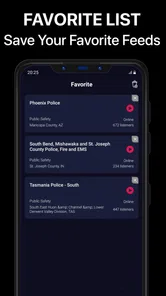
I also recommend trying the app when you have a few minutes to focus, rather than leaving it on while expecting every exchange to explain itself. Keeping a note of a channel that is genuinely relevant can make a later visit quicker; saving favorites is useful for that, but I would keep the list selective so I can find the right feed without sorting through a collection of near-duplicates.
Finding a first useful listen
A practical first success is simply locating one relevant channel and understanding its general rhythm. For example, if I’m at home on a stormy evening and hear activity that sounds connected to local conditions, I can listen for context while checking trusted local updates for confirmed details. The scanner may help me notice that radio traffic is active, but it cannot tell me the full story by itself.
For a newcomer, the best measure of success is not catching a dramatic call. It is finding a feed that is understandable enough to revisit and learning when it is worth switching to a reliable news report. That small workflow makes listening more useful and less likely to turn ambiguous snippets into assumptions.
More From Our News Desk

 Gmail
GmailGmail in a Busy Inbox: Who Benefits Most?
From first account to crowded workday, Gmail earns its place through dependable search and flexible sorting—but its best fit depends on how much inbox maintenance you can tolerate.

 Prime Video
Switching to Prime Video: What Changes in Your Viewing Routine
Prime Video can make a compelling second home for streaming, but switching means learning a different catalog, rental layer, and route from browsing to playback.

 Universal TV Remote Control
Universal TV Remote Control Works Best as a Reliable Backup
A phone remote earns its place through quick setup and reliable habits. Here is how to get more from Universal TV Remote Control—and where its limits show.

 Weather - By Xiaomi
Weather by Xiaomi Review: Clear at a Glance, Less Clear Up Close
Xiaomi’s weather app makes everyday forecasts quick to scan, but its calm surface can leave useful details and recovery paths harder to find than they should be.

 X
XX Under Pressure: Can It Recover When Posting Goes Wrong?
A resilience-focused review of X, examining setup, mistaken posts, interruptions, weak connections, and the gaps that matter when recovery needs to be dependable.

 Clash of Clans
Clash of Clans Is Won Between the Battles
Its raids are quick; its community is a long-term project of coordination, teaching, rivalry, and shared responsibility—with all the friction that entails.
Latest News



Getting Started with Police Scanner Pro
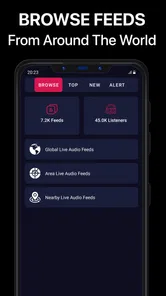
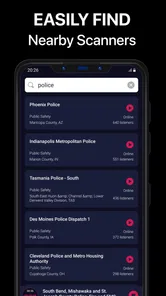
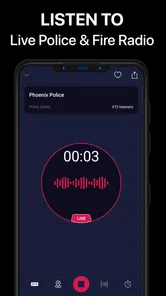
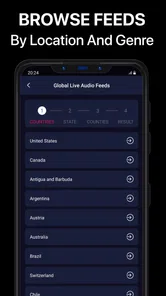
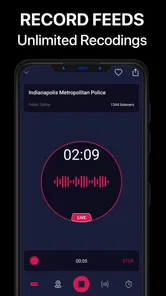
The first thing I noticed about the Police Scanner Pro app was how easy it was to navigate. Once you download and open it, you're greeted with a clean interface that's pretty straightforward. No need to be a tech whiz here, folks. You can dive right into listening to live police, fire, and emergency medical services feeds from your area. The app lets you browse through various channels based on your location or even search for feeds from different parts of the world.
Features That Stand Out
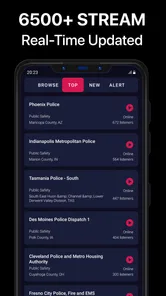
One of the coolest things about this app is the sheer variety of channels you can tune into. Whether you're in a major city or a small town, Police Scanner Pro seems to have it all covered. And, if you have a particular interest or area you want to focus on, you can save your favorite channels for easy access later.
Another highlight is the app's alert feature. You can set it up to notify you when a significant event, like a major fire or a high-speed chase, is happening in your area. It's like having your very own news alert system, but with a more personal touch. Plus, for those of us who get a little thrill from hearing the real-time action, the app's audio quality is surprisingly clear. You can almost picture the scenes as they unfold.
User Experience and Interface
Using the app is a breeze, thanks to its user-friendly design. All the main features are accessible from the home screen, and switching between different feeds is seamless. I love how the app also provides some background info on the feeds, giving you context about what you're listening to.
For the tech-savvy folks, there's an option to customize the app settings, though even the default settings work perfectly fine for most users. The developers clearly put a lot of thought into making this app both functional and accessible for everyone.
Making sense of scanner traffic
A common point of confusion is whether every channel will be relevant just because it appears nearby or sounds busy. I would check the feed’s description and listen long enough to recognize its general focus before relying on it as a regular pick. Channel availability and usefulness can vary by place, so someone in a smaller community may have a different experience from a listener in a large city.
Alerts can help draw attention to activity, but I would treat them as a prompt to check—not as a verified news bulletin. If an alert arrives while I am driving, I would leave the phone alone and check it only after stopping safely. The same caution applies to audio: a clear signal can still contain shorthand or missing context, so clarity is not the same as certainty.
Who will get the most from it
This is a better fit for someone who enjoys listening closely, has a specific local area or public-safety interest in mind, and is comfortable pairing radio traffic with dependable reporting. A local-history enthusiast, for instance, might use a saved feed to learn how routine dispatch sounds, rather than waiting for a major incident. The app is also suited to a short, occasional check-in when a developing local story has made radio listening relevant.
I would skip it if I mainly want a calm, complete account of breaking news, or if ambiguous audio is likely to make me anxious. In those cases, a standard news app or official local information source is a better first stop. It is also not a tool for contacting emergency services or for getting personalized safety advice.
Cost, compatibility, and the next step
Before installing, I would weigh the one-time decision to spend $5.99 against how often I expect to listen. The app is rated 3.8 on average from around 170 ratings, with 57 written reviews and over 1K installs. Those figures suggest a modest audience rather than a universally adopted news tool, so I would judge it by whether the feeds I care about are useful to me, not by expecting a polished newsroom experience.
It is a paid News & Magazines app from Fucidin, released on September 30, 2021, and its current version is 1.8. It is rated Teen and requires Android 8.0 or later. If those basics fit your device and budget, my next step would be simple: open a nearby feed, read its context, listen briefly, then save only the channel I would realistically return to. That gives a first-time user a low-effort way to decide whether radio listening adds anything to their usual news routine.
Using it without letting it take over
I would make scanner listening a deliberate check-in rather than background noise that runs all day. A short session gives me room to notice which channel I chose and whether the traffic is useful; a feed left on while I work can turn into fragments I half-hear and misinterpret. If I want to follow one developing story, I can listen briefly, note the general area or service involved, and then look for a confirmed report instead of trying to build a full narrative from scattered radio calls.
There is also a practical difference between listening at home and listening while out. At home, I can pause and compare what I heard with a reliable local source. When walking or doing errands, I would avoid treating the audio as something that needs immediate attention. The value is in adding context when I have time to think, not in making every dispatch exchange a personal alert.
Choosing channels with a purpose
Before browsing widely, I find it helpful to decide what I want from the session: a general sense of routine local activity, a particular public-safety service, or context for a story already being reported. That intention makes the channel list less overwhelming. If I start with a broad search and save every interesting-sounding result, I make the next visit slower; a small set of feeds tied to a real interest is easier to revisit and evaluate.
Names and descriptions are useful starting points, but I would not assume that a channel’s label guarantees complete coverage of a town or a single incident. The most useful test is whether I can identify its general purpose from its background information and repeated listening. If the feed is hard to interpret or seems unrelated to what I hoped to follow, I would move on rather than keep it simply because it sounded active once.
When a different source is the better tool
For a quick answer about road closures, evacuation directions, or whether a reported event is confirmed, I would use official local communications or established reporting first. Those sources are designed to present actionable information in plain language. Police Scanner Pro is more appropriate when I want to hear the character of radio traffic and can accept that I may not understand every exchange or learn the full outcome.
This difference matters especially for families and anyone listening because they are worried about a nearby event. Radio snippets can raise more questions than they answer. I would not use a feed to reassure myself that everything is fine, or to conclude that a situation is dangerous; I would check direct guidance from local authorities. For casual curiosity, the scanner format can be engaging. For decisions affecting safety, a confirmed source is the better choice.
What the paid choice means in practice
The $5.99 price makes this less of a casual install than a free headline app, so I would decide based on repeat use rather than the novelty of hearing a live feed once. If I already know I enjoy scanner audio and have identified a local channel I expect to return to, the cost may feel reasonable. If I only want occasional breaking-news summaries, the usual free news sources are likely to serve me better.
I would also keep the rating in perspective: a 3.8 average reflects a mixed experience among listeners, not a guarantee that the feeds most relevant to me will be strong or weak. My own decision would hinge on whether the nearby channels are understandable and worth revisiting. The app’s Teen age rating is another practical point for households; I would consider whether live, unpredictable public-safety audio is suitable for a younger listener and supervise accordingly.
A useful routine for first-time listeners
My suggested first session is uncomplicated: choose one nearby feed, read its description, and listen long enough to recognize its ordinary rhythm. Then close it and ask whether I learned anything useful or simply heard isolated phrases. On a later visit, I can compare that impression with a trusted report or try a different relevant feed. This avoids mistaking a single unusual exchange for the normal character of a channel.
If I find a feed worth keeping, I would save just that one and return to it when I have a clear reason. If not, there is no need to force a habit. That small test answers the questions that matter most to a new user: whether a relevant channel is available, whether its traffic is understandable enough to follow, and whether listening adds something beyond a standard news update.
Why You Should Try It
Now, you might be wondering, "Is this app for me?" Well, if you're someone who's curious about what's happening in your neighborhood or just enjoys the thrill of listening to live police feeds, then absolutely. It's a great way to stay informed and maybe even a little entertained in the process.
Overall, the Police Scanner Pro app offers a unique experience that you won't get from your average news source. It's like having a direct line to the pulse of your community, and who wouldn't want that? So go ahead, give it a whirl, and see what all the buzz is about.
Police Scanner Pro - App Frequently Asked Questions
What does the Teen content rating mean for Police Scanner Pro?
Police Scanner Pro has a Teen content rating, which is worth considering when deciding whether it is appropriate for a younger user. The app is described as a way to listen to live police and fire radio, so broadcasts may concern emergencies or unfolding incidents. Parents and guardians may want to consider that subject matter alongside the age rating before allowing a download.
How much does Police Scanner Pro cost, and what should I know before downloading it?
Police Scanner Pro costs $5.99. It is a News & Magazines app from Fucidin, and its store description is simply “Police Scanner.” Before downloading, consider whether listening to police and fire radio is something you will use regularly and whether the app suits your needs. Its current version is 1.8, and it requires Android 8.0 or later.
What is Police Scanner Pro and how does it work?
Police Scanner Pro is a mobile application designed to provide users with real-time access to police, fire, and emergency radio broadcasts. By streaming live audio feeds from various public safety agencies, the app allows users to stay informed about incidents happening in their area or across the globe. The app uses a network of volunteer-run scanners to capture and transmit these live broadcasts directly to your device.
Is Police Scanner Pro legal to use?
Yes, Police Scanner Pro is legal to use in most regions. The app simply streams publicly available radio broadcasts from police and emergency services. However, users should be aware of local laws and regulations regarding scanning police frequencies, as some jurisdictions may have restrictions or require permits. Always ensure compliance with local laws when using the app.
Can I customize the feeds I listen to on Police Scanner Pro?
Police Scanner Pro allows users to customize their listening experience by selecting specific feeds based on location or type of service, such as police, fire, or EMS. Users can favorite channels for quick access and may also receive notifications for major incidents. This customization helps users stay updated on the information most relevant to them.
Pros
- Real-time police radio feeds
- Covers multiple regions and departments
- User-friendly interface
- Customizable alert settings
- Ad-free experience
Cons
- Limited free version features
- Requires internet connection
- Occasional feed interruptions
- High battery consumption
- No offline access











