

Police Scanner 5.0
- 1.33K
- 4.3
- Installs
- 1.00M
- Price
- Free

Screenshots
Analysis by Reviewed
I like Police Scanner 5.0 most as a window into how a community responds to unfolding events, not as a dependable emergency alert service. It turns listening into an easy, curiosity-led activity, but the value depends on finding a useful local feed and keeping what you hear in perspective. If you want an informal way to follow public-safety radio, it can be engaging; if you need verified instructions or guaranteed coverage, I’d choose official alerts instead.
What listening is good for
The app makes the most sense when you have a specific reason to tune in. A local resident might listen during a major storm or a large public event to understand which kinds of services are active nearby. Someone learning about emergency response can use a feed to get a feel for radio traffic and how quickly situations change. I’d treat either use as background context, not as a complete picture: radio chatter can be brief, technical, or missing the details that make an event understandable.
One practical habit is to save a small set of channels you genuinely care about instead of browsing broadly every time. That makes it easier to return to familiar areas and notice when a feed is active, while reducing the temptation to mistake random transmissions from elsewhere for news that matters to you. If you’re only curious about a different region, browsing around can still be interesting, but it’s less useful for local awareness.
A different kind of local coverage
Compared with local news apps, this is a less edited and less explanatory way to follow events. You may hear activity sooner than a polished report appears, but you also have to do more work to interpret it—and may never learn the outcome from the audio alone. Compared with official emergency notifications, it is not a substitute for clear instructions about what to do. I’d keep those sources available for practical safety information and use scanner audio only as a supplementary listen.
There’s also a useful listening trade-off: staying with one local channel gives you continuity, while hopping among feeds offers variety but makes it harder to understand what is happening in any one place. When I’m trying to follow a situation, I’d stick with a relevant feed and avoid drawing conclusions from a single fragment. If the audio is unclear or the terminology is unfamiliar, waiting for an authoritative update is the sensible move.
Make a listening session useful
A scanner feed works best when I decide in advance what I’m trying to learn. If I’m following a community event, I’ll choose the relevant local feed and give it enough time to provide context rather than switching channels after every short transmission. If I’m simply exploring, I can browse more freely, but I keep in mind that activity elsewhere is interesting audio, not a report about my own neighborhood.
For a practical routine, I’d treat scanner listening as one step in a wider information check: listen for general activity, then look to local reporting or official notices for confirmed details and instructions. That approach helps answer the question many first-time listeners have—whether the app can tell them exactly what is happening. It can offer fragments of live radio traffic, but understanding those fragments may require patience and outside context.
More From Our News Desk

 Gmail
Gmail in a Busy Inbox: Who Benefits Most?
From first account to crowded workday, Gmail earns its place through dependable search and flexible sorting—but its best fit depends on how much inbox maintenance you can tolerate.

 Prime Video
Switching to Prime Video: What Changes in Your Viewing Routine
Prime Video can make a compelling second home for streaming, but switching means learning a different catalog, rental layer, and route from browsing to playback.

 Universal TV Remote Control
 Works Best as a Reliable Backup
A phone remote earns its place through quick setup and reliable habits. Here is how to get more from Universal TV Remote Control—and where its limits show.

 Weather - By Xiaomi
Weather by Xiaomi Review: Clear at a Glance, Less Clear Up Close
Xiaomi’s weather app makes everyday forecasts quick to scan, but its calm surface can leave useful details and recovery paths harder to find than they should be.

 X
X Under Pressure: Can It Recover When Posting Goes Wrong?
A resilience-focused review of X, examining setup, mistaken posts, interruptions, weak connections, and the gaps that matter when recovery needs to be dependable.

 Clash of Clans
 Is Won Between the Battles
Its raids are quick; its community is a long-term project of coordination, teaching, rivalry, and shared responsibility—with all the friction that entails.
Latest News



Ever found yourself in a situation where you're just craving a bit of real-life action drama without actually being in the middle of it? Well, say hello to Police Scanner 5.0. I downloaded this app out of sheer curiosity, and let's just say, it didn't disappoint.
Tuning into Real-Time Action
With Police Scanner 5.0, you're literally tuning into real-time police, fire, and emergency services frequencies. It's like having a backstage pass to the city's hustle and bustle. I was surprised at how easy it was to navigate through the app. The interface is pretty straightforward, so even if you're not tech-savvy, you'll get the hang of it in no time.
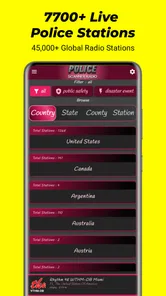
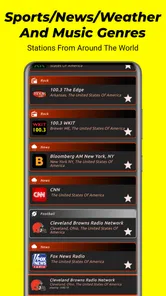
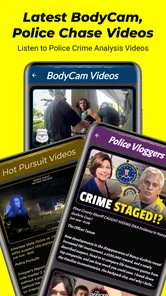
The app offers a wide range of channels to choose from, and I found myself hopping between different states just to see what's happening elsewhere. The streaming quality impressed me. It was smooth, with minimal buffering, which is a big plus when you're trying to catch every detail of the action.
Features That Stand Out
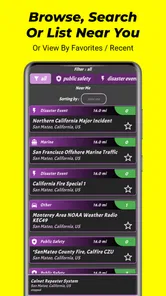
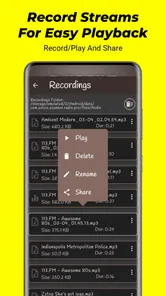
One of the features I genuinely appreciated is the ability to save your favorite channels. It saves a lot of time, especially if you're like me and have a few states you like to keep tabs on. Another neat feature is the alert system. I set it up to notify me if there's a significant event happening in my area. It's like having my own personal news alert system.
For the data nerds out there, the app also provides plenty of information about each channel, like location and listener numbers. It's fascinating to see how many others are tuned in during major events.
Using channels and alerts thoughtfully
Saved channels are especially handy if you return to the same places or follow a particular area over time. Rather than starting each session with a broad search, I’d keep a short personal list and check the location information before listening. That small step can prevent a common mistake: choosing a feed that sounds relevant because its name is familiar, even though it covers somewhere else.
Alerts can make listening more convenient, but I wouldn’t treat them as a complete monitoring system. A notification is a reason to check the feed and then seek reliable context, not evidence by itself that a particular event is confirmed or fully described. If I’m busy, I’d rather review a notification when I can focus than let it pull my attention away from driving, work, or another task that needs concentration.
Who should tune in—and who shouldn’t
I’d recommend it to curious listeners, people who follow public-safety activity as a hobby, and anyone who wants another perspective during a community event. The developer is Police Scanner Radio, and the app sits in the entertainment category; that framing fits my experience better than treating it as a formal news service. It’s free to start, with in-app purchases ranging from $3.99 to $10.00 per item, so I’d explore the basic listening experience before deciding whether an upgrade is worthwhile.
A realistic example: if a neighborhood event is causing unusual traffic, I might open a saved local channel, listen for a while, and then check a trusted local source for confirmed details. I wouldn’t use a scanner feed to decide whether to evacuate, approach an incident, or share an unverified claim. Audio can be incomplete, and a busy channel can be difficult to follow if you’re doing something else at the same time.
The alert feature is best treated as a prompt to pay attention, not proof that something important has happened or a promise that every relevant incident will reach you. I’d also check that a saved channel is actually the area I intend to follow before relying on it. Channel names and location context matter; a feed from another place may sound compelling but won’t answer a local question.
When another source is the better choice
Someone who mainly wants a short, readable account of a developing story will probably be happier starting with a local news service. News reports add explanation and follow-up that raw radio traffic may not provide. Someone who needs to know what action to take should go directly to official emergency notifications. The scanner’s appeal is different: it offers an unfiltered listen, which can be absorbing, but also places more responsibility on the listener to judge what a fragment means.
I’d also think about the setting before turning it on. Listening while cooking or relaxing at home may suit someone who enjoys following radio activity, while trying to monitor several feeds during a commute is a poor trade-off if it competes with attention. The app is entertainment for me, not a task that deserves priority over immediate safety or a reliable source of instructions.
Practical limits before you install
There are a few reasons this won’t suit everyone. Radio communication can be clipped, full of shorthand, or hard to understand without local context. Even a smooth stream cannot make a confusing transmission clearer, and switching between many channels can leave you with scattered snippets instead of a coherent account. For people who want concise summaries, maps, or clear guidance, a local news app or official alert service is the better first stop.
It also helps to think about when listening is appropriate. I wouldn’t keep it on while driving if it distracts me, and I’d avoid turning sensitive incidents into entertainment for other people. The app is rated for teens, but that doesn’t make every transmission suitable for every listener or every moment. A little restraint keeps curiosity from becoming intrusive or needlessly alarming.
There’s a further trade-off in the way live audio asks for attention. A written update can be skimmed and revisited; a transmission may be short and easy to miss if I’m distracted. I’d use the app when I can listen deliberately, rather than expecting it to work like a searchable archive or a neatly organized timeline. That makes the experience more rewarding for hobby listening, but less convenient for anyone who needs a quick answer.
Worth trying, with the right expectations
The app has a 4.3 average from around 12,000 ratings, and it has been installed over a million times. It launched on January 14, 2020, and version 5.0.0 supports Android 5.0 and later. Those details suggest a well-established option, but they don’t change the main question: do you enjoy listening to live public-safety audio, and can you treat it as partial information rather than a complete report?
So, why should you give it a shot? Well, if you're someone who's always on the lookout for what's happening in your area, this app is a treasure trove of information. It's like having a finger on the pulse of your city without stepping out of your home. Plus, it's a great way to stay informed during emergencies or large public events.
However, a little disclaimer here: while it's fun and informative, it's also crucial to remember to use the app responsibly. Respect privacy and remember that not everything you hear might be the whole story. It's a tool for awareness, not for snooping.
My verdict for curious listeners
For me, the strongest reason to try this app is the unusual perspective it gives on local public-safety radio. Saving channels, checking their location details, and listening with a specific question in mind can make a session more coherent than aimless channel-hopping. Those habits do not turn it into a verified news source, but they help me get more out of the audio while keeping its limits clear.
I’d skip it if I wanted dependable incident summaries, direct instructions, or a quiet app that works entirely in the background without asking me to interpret anything. I’d also be cautious about paying for an upgrade before deciding whether the basic listening experience fits my routine. Since the app is free to start, it makes sense to see whether local feeds are useful to you first; purchases are optional rather than a reason to install it.
All in all, Police Scanner 5.0 is a fascinating app that offers a unique peek into the world of emergency services. Whether you're a budding journalist, a curious citizen, or just someone who loves a good adrenaline rush without getting too close to the action, this app has something for you. So go ahead, give it a whirl, and join the thousands of listeners already tuned in.
Police Scanner 5.0 Frequently Asked Questions
Is Police Scanner 5.0 free to download, and are there optional purchases?
Police Scanner 5.0 is free to download, so you can try the app without paying upfront. It also offers in-app purchases priced from $3.99 to $10.00 per item. Check the purchase details shown in your app store before confirming anything, and consider whether optional spending suits your needs. The app is rated Teen, which may also be useful to consider when deciding whether it is appropriate for you or your family.
What should I know about the app’s age rating before installing it?
Police Scanner 5.0 has a Teen content rating. Since it lets users listen to live police, fire, and emergency medical broadcasts, the material may involve serious or unsettling situations. Parents and guardians may want to consider that context when deciding whether younger users should access it, and discuss responsible listening with teens. The app is in the Entertainment category and is intended for people interested in scanner audio.
What is Police Scanner 5.0 and how does it work?
Police Scanner 5.0 is an app designed to transform your mobile device into a live police scanner, allowing users to listen to real-time police, fire, and emergency medical services (EMS) broadcasts. By tapping into the feeds provided by various radio networks, the app streams audio from police scanners directly to your phone. It’s a great tool for those interested in understanding local law enforcement activities or staying informed about emergencies in real-time. The app is developed by Police Scanner Radio, whose website is policescannerradio.com.
Is it legal to use Police Scanner 5.0?
Yes, using Police Scanner 5.0 is generally legal in many locations as long as you are using it for personal purposes and not for committing a crime or evading law enforcement. However, laws regarding scanner usage can vary by country, state, or municipality, so it's crucial to check local regulations before using the app to ensure compliance. Always use the app responsibly.
Can I access police scanner feeds from any location?
Police Scanner 5.0 provides access to thousands of scanner feeds from around the world, but availability can vary depending on the location. Some areas might have comprehensive coverage while others may offer limited or no feeds due to legal restrictions or lack of infrastructure. Users should understand that the app's ability to provide feeds is contingent on local broadcasting capabilities and regulations.
Pros
- Real-time police updates
- Covers multiple locations
- User-friendly interface
- Customizable alerts
- Free to use
Cons
- Requires constant internet
- Ads can be intrusive
- Limited to major cities
- No offline mode
- Battery drain











