Plynk: Grow as an Investor
- 590.00
- 4.1
- Installs
- 500.00K
- Price
- Free

Screenshots


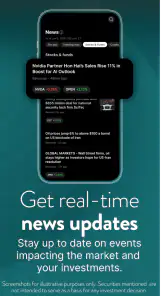

Analysis by Reviewed
I approached Plynk: Grow as an Investor as a beginner-friendly finance app rather than as a replacement for a full trading workstation. That distinction matters. Its strongest idea is not to overwhelm new investors with dense market screens, but to make the first steps feel more understandable through approachable tools and learning material. In my experience, that makes it easier to build a habit around investing, especially if the usual brokerage interface leaves you unsure where to begin.
The app is free, aimed at everyone, and available for devices running iOS or Android version 12 or later. It comes from Digital Brokerage Services LLC and sits in the finance category. The store listing shows a 4.1 average from around 4,100 ratings, with more than 500,000 installs, so it has attracted a meaningful audience without presenting itself as an intimidating professional platform.
What makes Plynk useful for learning the basics
The central strength is clarity. Many investing apps assume you already understand the difference between a market order and a limit order, know why diversification matters, and can interpret a chart without help. Plynk takes a gentler route. Its education-focused approach gives a new user somewhere to start before making decisions, which is more valuable than simply placing a collection of financial buttons on a screen.
I found that the app makes the most sense when used slowly. Instead of opening it only when a market headline catches your attention, I would use it as a short learning routine: review one concept, look at the investment choices with that concept in mind, and then decide whether an action is actually necessary. That workflow helps separate learning from impulse, a useful habit for anyone who tends to react to dramatic financial news.
One practical advantage is that the educational material can act as a decision filter. Before considering an investment, I would ask myself what I understand about it, how it fits the rest of my plan, and whether I am acting because of a reason or because of excitement. The app cannot make those judgments for me, but its accessible presentation encourages a more deliberate process than jumping straight into a complicated trading screen.
That makes it particularly suitable for someone opening an investment account for the first time, a young adult trying to understand long-term investing, or an existing saver who wants a less intimidating introduction to the market. It can also be useful for a person who has tried a conventional brokerage app and abandoned it because the interface felt too technical.
A calmer workflow for everyday decisions
Imagine checking your finances after receiving your monthly income. You have already handled regular expenses and want to put a modest amount toward investing, but you do not want to spend the evening studying a professional charting platform. With Plynk, I would first use the learning tools to refresh the basic idea behind the investment, then review the available information, and finally pause before committing anything. That sequence is simple, but it turns a vague intention into a repeatable routine.
The important insight is that the app is more useful as a guardrail for behavior than as a source of excitement. A new investor often needs help answering “What should I understand first?” rather than “How quickly can I trade?” Plynk’s accessible design supports the first question. If you use it that way, the app can help create patience and consistency instead of encouraging constant checking.
Another useful workflow is to keep a short personal note outside the app about why you are investing and what level of risk feels acceptable to you. Read that note before making a decision. Plynk can make the information easier to approach, but a written personal rule helps prevent the interface from becoming an invitation to act whenever the market moves.
I also think the app can work well for guided conversations. A beginner could explore a topic, then discuss it with a financially knowledgeable friend or family member. That is preferable to treating any app as a substitute for personal judgment. The educational material gives the conversation a starting point, while the final decision remains yours.
Where it compares well with traditional brokerage apps
Compared with a conventional brokerage platform, Plynk feels better suited to orientation and confidence-building. Traditional alternatives often provide more information at once, which can be valuable for experienced investors but distracting for a newcomer. A screen filled with technical indicators, account panels, and market terminology may offer depth while still failing to answer the beginner’s first question: what does this actually mean?
Plynk’s trade-off is clear. It favors approachability over the feeling of a professional terminal. If your goal is to study complex price movements, manage a highly detailed portfolio, or make decisions using advanced analysis, a more established full-service brokerage may be a better fit. I would not choose this app simply because its interface is less intimidating and then expect it to replace every specialized tool.
Compared with a savings app, however, Plynk serves a different purpose. A savings product is usually easier to understand because the focus is on setting money aside, while investing involves uncertainty and requires more active learning. Plynk is appropriate when you are ready to learn about market participation, not when you only want a predictable place for emergency funds or short-term spending money.
It also differs from a financial news app. News can tell you what happened, but it rarely teaches you how to interpret that information calmly. Plynk’s educational angle is more helpful for building foundational knowledge, although I would still avoid using any single app as my entire source of financial understanding.
The limitations I noticed before recommending it
The main limitation is the same quality that makes Plynk approachable: simplicity can become restrictive. Beginners may appreciate fewer distractions, but eventually some users will want deeper research, more detailed portfolio analysis, or a broader set of controls. When that point arrives, the app may feel like a starting place rather than a permanent home.
There is also a risk that a friendly interface creates more confidence than knowledge. Clear explanations are helpful, but they do not remove market risk. I would be cautious about treating an easy-to-follow lesson as proof that an investment is suitable for me. The app can support education; it cannot know my full financial situation, time horizon, debts, emergency savings, or tolerance for losses.
That is why I would not recommend using it with money needed for rent, bills, or near-term emergencies. Someone who wants certainty, guaranteed returns, or a simple cash-management tool should look elsewhere. Likewise, an experienced investor who already has a carefully developed strategy may find the app too introductory and prefer a platform built around research depth and precise control.
Device compatibility is another practical point to check before getting started. The current version is 4.4.2, and the app requires iOS or Android version 12 or later. That is not a problem for a recent phone, but anyone using an older device should confirm compatibility before planning around it. The app is free to install, which lowers the barrier to trying it, but free access should not be confused with an absence of financial risk once investment decisions enter the picture.
I would also encourage new users to distinguish between the app experience and the underlying investment choice. A polished learning path can make the process feel manageable, but the outcome still depends on what you choose, how long you stay invested, and how the market behaves. That is an important mental boundary to establish from the beginning.
Who should start with it, and who should skip it
I would recommend Plynk to a first-time investor who wants plain-language guidance, a less crowded starting point, and a way to learn while becoming familiar with investing. It is especially appealing if you have postponed investing because other apps looked designed for experts. The combination of a free entry point and an education-led experience makes experimentation with the learning process less intimidating.
It may also suit someone who knows the basics but struggles with consistency. In that case, the value is not necessarily discovering an advanced feature; it is using a simple routine to revisit your goals and avoid making every decision in response to a headline. The app can be a useful bridge between “I should learn about investing” and actually spending regular time doing so.
I would skip it if you need a highly specialized platform from day one. Active traders, advanced analysts, and people who want extensive customization should compare it with a full brokerage service before committing. I would also steer away from it if your immediate priority is debt repayment, emergency savings, or short-term cash access. Investing education is worthwhile, but it should not distract from more urgent financial foundations.
Parents or mentors considering it for a younger learner should focus on the educational opportunity rather than presenting investing as easy money. The everyone age rating makes the app broadly accessible, but responsible supervision and honest conversations about losses remain more important than the rating itself. A beginner should understand that learning the vocabulary is only the first step.
Small habits that make the experience better
My first tip is to complete the learning process before making the app part of your regular financial routine. Do not treat every new concept as a signal to buy something. Instead, write down what you learned in your own words. If you cannot explain the idea without repeating the app’s phrasing, you probably need more time before acting.
My second tip is to set a review schedule rather than checking constantly. A fixed weekly or monthly moment is less likely to turn ordinary market movement into an emotional event. This is especially useful for beginners who confuse activity with progress. An app designed to make investing approachable should support calm behavior, and your schedule plays a large role in achieving that.
My third tip is to compare the app’s beginner-friendly approach with your actual needs after the first stage. If you start wanting more detailed information, do not force Plynk to become something it is not. Use the early experience to learn what questions you need answered, then decide whether a different brokerage or research tool is more appropriate. Moving to a more advanced service later is not a failure; it can be a sign that your understanding has grown.
A final practical habit is to keep investing separate from entertainment. Avoid opening the app simply because you are bored or because a social media post has made a particular asset sound irresistible. Open it with a question, a learning goal, or a planned review. That small change can make the difference between using Plynk as an educational aid and using it as another source of financial noise.
My final view after testing its place in a finance routine
My overall impression is that Plynk: Grow as an Investor succeeds when it stays in its lane: helping ordinary people become more comfortable with investing through clear tools and education. It is not the app I would choose for advanced analysis, and I would not use its friendly presentation as a reason to ignore risk. Still, those are reasonable boundaries rather than deal-breakers.
For a beginner, the strongest benefit is psychological as much as practical. The app lowers the intimidation factor, encourages questions, and gives you a more approachable way to begin forming better financial habits. Its free price makes it easy to explore, while the broad audience reflected in its rating and install history suggests that the concept has resonated with many users.
My recommendation is specific: choose it if you want an accessible first step and are willing to learn before acting. Skip it if you already require professional-level research, highly detailed controls, or a guaranteed cash solution. Used patiently, Plynk can help turn investing from an unfamiliar task into a more understandable part of your financial routine. Its real strength is not making investing effortless; it is making the learning curve feel manageable.
Pros
- Simple interface makes investing approachable for beginners.
- Offers educational content to help users understand investing basics.
- Supports recurring investments for building consistent saving habits.
- Provides access to a range of stocks and investment options.
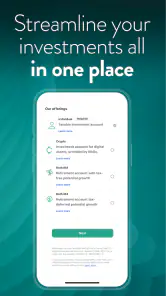
- Portfolio tracking makes it easy to monitor performance in one place.
Cons
- Investment availability and features may vary by country.
- Fees and spreads can reduce returns on smaller investments.
- Limited advanced tools may frustrate experienced investors.
- Investments can lose value
- and returns are not guaranteed.
- Identity checks and account setup may take time to complete.

- Category
- Finance
- Version
- 4.4.2











