

PlotifyTv
- 34.00
- 2.2
- Installs
- 50.00K
- Price
- Free

Screenshots


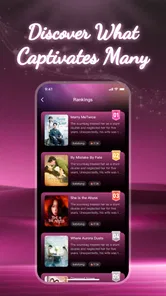
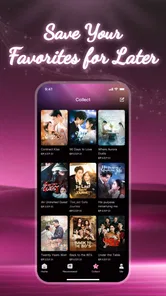

Analysis by Reviewed
I approached PlotifyTv as a lightweight entertainment app for short-form drama, the kind of service you might open when you have a few spare minutes rather than an entire evening. Its basic idea is easy to understand: browse compact dramatic stories, start watching quickly, and let recommendations help you choose what comes next. In practice, the experience depends heavily on how smoothly the app gets from installation to playback, and that is where I found the most useful things to consider before making it part of your daily viewing routine.
PlotifyTv is free to install, but it includes optional purchases ranging from $0.49 to $369.99 per item. That wide range makes it especially important to pay attention to any purchase screen instead of assuming every episode or viewing action is covered in the same way. The app is aimed at everyone, and the developer is Yunzhiniang. It runs on Android 7.0 and later, which makes it accessible to many older devices, although compatibility alone does not guarantee an equally smooth experience on every phone.
Getting past the first points of friction
I want to focus here on making the first session useful rather than judging PlotifyTv by a single loading hiccup. Giving the app a moment to settle, then testing one story before exploring further, helps separate ordinary setup friction from a problem that affects viewing. Once that baseline is clear, the next section looks at how to get more value from the app without letting recommendations or purchase prompts make the decisions for you.
Why the first launch deserves patience
The first few minutes with a short-drama app can feel more complicated than the store summary suggests. A viewer usually expects to install the app, choose a story, and watch. If the opening screen takes time to load, recommendations appear slowly, or playback does not begin immediately, it is easy to conclude that the app is broken. I would not make that judgment after one delayed screen. A new installation may need a moment to finish its initial setup, load artwork, and prepare the browsing experience.
My practical advice is to open PlotifyTv on a stable connection and allow the first screen to settle before repeatedly tapping buttons. Rapidly switching between pages can make a slow response look like several failed commands. If the app appears frozen, I would wait briefly, then close and reopen it once rather than repeatedly pressing the same control. This simple habit avoids creating a confusing chain of duplicate actions, especially around sign-in, episode selection, or purchase prompts.
Another common sticking point is confusing a blank content area with an empty catalog. Short-drama services often rely on remote content, so a weak connection can leave posters, episode lists, or recommendations partially loaded. If text appears but images do not, or if one page loads while another does not, I would first treat that as a connection or loading problem rather than an indication that the app has no shows available.
Checks worth making before blaming playback
Before watching, I would check three things in order: the phone’s connection, available storage, and the app version. PlotifyTv is listed as version 1.0.10, so keeping that installed version current is sensible when an update is offered through the normal app store. Updates can resolve compatibility problems, but I would avoid installing unofficial packages or modified copies just to force a feature to work. That can introduce risks unrelated to the app itself.
More From Our News Desk

 Gmail
GmailGmail in a Busy Inbox: Who Benefits Most?
From first account to crowded workday, Gmail earns its place through dependable search and flexible sorting—but its best fit depends on how much inbox maintenance you can tolerate.

 Prime Video
Switching to Prime Video: What Changes in Your Viewing Routine
Prime Video can make a compelling second home for streaming, but switching means learning a different catalog, rental layer, and route from browsing to playback.

 Universal TV Remote Control
Universal TV Remote Control Works Best as a Reliable Backup
A phone remote earns its place through quick setup and reliable habits. Here is how to get more from Universal TV Remote Control—and where its limits show.

 Weather - By Xiaomi
Weather by Xiaomi Review: Clear at a Glance, Less Clear Up Close
Xiaomi’s weather app makes everyday forecasts quick to scan, but its calm surface can leave useful details and recovery paths harder to find than they should be.

 X
XX Under Pressure: Can It Recover When Posting Goes Wrong?
A resilience-focused review of X, examining setup, mistaken posts, interruptions, weak connections, and the gaps that matter when recovery needs to be dependable.

 Clash of Clans
Clash of Clans Is Won Between the Battles
Its raids are quick; its community is a long-term project of coordination, teaching, rivalry, and shared responsibility—with all the friction that entails.
Latest News



Storage is easy to overlook. Even when an app streams rather than permanently downloading episodes, a nearly full phone can affect temporary files and general app behavior. Removing a few unused files or apps may help if playback stops unexpectedly, pages reload repeatedly, or the application closes during browsing. I would also restart the phone if the problem continues across several attempts, because a restart can clear a temporary system process without changing the app’s settings.
On an older Android device, I would close demanding apps running in the background before opening a drama. Android 7.0 support is useful for compatibility, but older hardware may still struggle when memory is tight or several apps are competing for resources. This is an important distinction: an app can support an operating-system version while the actual phone still delivers a less comfortable viewing experience than a newer device.
Understanding the free label
The free price makes PlotifyTv easy to try, but I would not interpret “free” as a promise that every viewing path is unlimited. Optional in-app purchases are part of the experience, and individual items can cost as little as $0.49 or as much as $369.99. The difference between those amounts is substantial, so I would read each confirmation screen carefully and check whether the purchase applies to one item, a group of episodes, or another form of access.
This is also where a family device needs extra care. The everyone rating describes the app’s age category, but it does not remove the need for an adult to supervise purchases. If children use the phone, I would secure the device’s purchase authentication and avoid handing over the phone while a payment screen is open. That is not a criticism unique to this app; it is simply a sensible response to the presence of optional purchases and a broad audience rating.
A more reliable setup routine
For a smoother start, I would use this order:
Install PlotifyTv from the official app marketplace and let the installation finish completely.
Open it on a reliable Wi-Fi or mobile connection, then wait for the home screen and artwork to load.
Browse one story before making any purchase decision, so you understand how the app presents episodes and viewing choices.
Check the exact wording and amount on any payment screen, especially if several access options appear close together.
Close other demanding apps if playback is choppy, then try again before changing more settings.
This routine sounds basic, but it prevents two common mistakes: paying before understanding the viewing flow and treating a temporary loading delay as a permanent failure. I would also avoid changing several things at once. If you switch networks, clear app data, restart the phone, and reinstall immediately, you lose the ability to know which step actually helped.
Recovering when a story will not continue
When an episode refuses to continue, I would first return to the story page and select the episode again rather than repeatedly tapping the play button on a stalled screen. If the same behavior appears across multiple stories, I would close the app and reopen it. If only one story is affected, the problem may be limited to that particular content request or temporary loading state, so testing a different title is a useful comparison.
I would also separate playback problems from account or purchase problems. A video that fails to start is one issue; an episode that starts but remains unavailable after a payment is another. For the latter, I would avoid paying again immediately. First, check whether the app has returned to the same account or viewing area, and allow time for the transaction state to refresh. Repeating a purchase while the first request is still being processed can create unnecessary confusion.
If the app closes during playback, I would reopen it and test a different episode before reinstalling. Reinstallation can remove local app information and may not solve a network-side or device-wide problem. It is better used as a later step, after checking the connection, storage, operating-system behavior, and whether other apps play video normally.
Small workflow changes that make short dramas easier to use
One useful habit is to choose a viewing session before opening the app. If I have only a few minutes, I browse first and avoid starting a story that requires immediate commitment to a long sequence. If I have more time, I can use the recommendation area as a discovery tool instead of repeatedly jumping between unrelated titles. This reduces the sense that I am searching without direction, which is one of the weaknesses of recommendation-led entertainment apps.
I would also treat recommendations as suggestions rather than a complete catalog. Smart recommendations can be convenient when I already know the kind of mood I want, but they may keep presenting similar dramatic themes. To avoid getting trapped in a narrow loop, I would occasionally choose a title outside the first row or browse by manually scanning the available options. That gives the app less control over the entire viewing decision and makes the experience feel more deliberate.
A second practical tip is to test playback before settling into a noisy or low-signal location. Starting a story at home and then moving into an area with weak reception can make the app appear unreliable even though the real change is the network. For commuting or waiting-room use, I would test the app in the location where I expect to watch. That gives a more honest result than judging it only from a strong home connection.
Finally, I would keep purchase decisions separate from recommendation browsing. A dramatic cliffhanger can make an immediate payment feel tempting, but the better workflow is to pause, inspect the amount, and decide whether the access offered matches how I actually watch. This is particularly important because the available purchase range is broad. The app is easier to enjoy when I remain in control of that boundary.
When the application is not the real problem
Not every failed viewing session points to PlotifyTv. If other video apps also buffer, the phone’s connection is the stronger suspect. If only this app struggles while other services work normally, then the app, its current content request, or its compatibility with the device becomes more likely. Testing one comparable service is not about replacing PlotifyTv immediately; it is a quick way to isolate the source of the trouble.
Device performance matters too. A phone running many background processes may show stuttering, delayed touch response, or sudden app closures. In that situation, blaming the streaming app alone would be unfair. I would restart the device, close unused apps, and make sure the system is not warning about low storage. If the same phone has trouble with several demanding tasks, a lighter device workload may help more than reinstalling PlotifyTv.
Network switching can also produce misleading results. Moving from Wi-Fi to mobile data, or from one Wi-Fi network to another, can interrupt an active stream. I would stop playback before changing connections and then reopen the episode. If the app works on one network but not another, the difference is useful evidence. It suggests that the next step should involve the network rather than repeated changes inside the app.
There is a similar distinction with payments. If a purchase screen appears but the transaction does not complete, the problem may involve the device’s payment setup or the app marketplace rather than video playback. I would not keep pressing the purchase button. Instead, I would check the transaction status through the normal marketplace tools and retain any confirmation details. That is a safer workflow than assuming the first attempt failed and starting over.
Who will enjoy it most
I think PlotifyTv suits viewers who like compact dramatic stories and want a quick way to fill short breaks. It is a reasonable choice for someone who does not want to search through a large traditional streaming library every time they open an app. The recommendation approach can reduce decision fatigue, especially when I am in the mood for something immediate and plot-focused.
It may also work well for casual viewers using an older Android phone, since the minimum operating-system requirement reaches back to Android 7.0. That does not guarantee perfect performance, but it means the app is not limited to only recent devices. A stable connection and reasonable free storage remain more important than the age of the phone alone.
I would be more cautious about recommending it to someone who wants a predictable subscription model, extensive control over viewing costs, or a polished experience that never asks them to think about individual purchases. The free entry point is attractive, but the optional purchase range means cost awareness is part of using the app responsibly. Viewers who prefer full-length films, established television libraries, or offline viewing as a central feature may be better served by a conventional streaming platform designed around those priorities.
How it compares with familiar entertainment alternatives
Compared with a general video platform, PlotifyTv is more focused on short dramatic viewing rather than an enormous mix of creators, genres, and formats. That focus can be a strength when I want a story quickly, but it can also feel limiting if I want documentaries, long episodes, live content, or unrelated entertainment in the same place.
Compared with a paid streaming service, the free installation is less of a commitment, but the purchase model deserves closer attention. A subscription service usually makes its basic access pattern clear at the account level, while an app with optional item purchases can require more care at the moment of selection. Neither approach is automatically better; the right choice depends on whether I value low entry friction or predictable ongoing access.
Compared with manually searching for short dramas on a general platform, PlotifyTv’s recommendations may save time. The trade-off is that recommendation systems can steer me toward familiar choices and may not reflect the full range of what I would enjoy. I see it as a focused discovery tool, not a universal replacement for every way of watching video.
My practical verdict after weighing the trade-offs
PlotifyTv is worth trying if your main goal is quick access to short dramas and you are comfortable checking how viewing and purchases are presented. Its free installation, broad age rating, and support for Android 7.0 make the first step approachable. The app’s strongest practical quality is its narrow purpose: it gives a viewer a direct route into compact dramatic entertainment instead of asking them to navigate a general-purpose media library.
My reservations come from the same areas that can affect many newer entertainment apps: setup and playback may be sensitive to connection quality, older hardware, storage pressure, or a busy phone, and the optional purchase range means I would never tap through a payment screen casually. I would also keep expectations realistic around recommendations. They can help me choose, but I would still browse beyond the first suggestions when I want variety.
The current average rating is 2.2 from around 68 ratings, with around 34 written reviews, while the app has passed 50 thousand installs. Those figures suggest that interest exists, but the modest rating is a reason to approach it as a personal trial rather than an automatic recommendation for everyone. I would install it, test several browsing and playback situations, and decide based on how reliably it behaves on my own phone and network.
In short, I would recommend PlotifyTv to a patient short-drama viewer who wants a free starting point and is willing to manage the practical details. I would skip it in favor of a more established alternative if predictable pricing, broad content variety, or consistently polished playback matters more than quick access to this specific style of entertainment. The best way to use it is to test first, watch deliberately, and treat every purchase screen as a decision rather than a shortcut.
PlotifyTv Frequently Asked Questions
What devices and operating systems can run PlotifyTV?
PlotifyTV is an entertainment app, and its current version requires Android 7.0 or later. Check your device’s operating-system version before downloading so you can confirm that it meets this requirement. Compatibility can also depend on the device and regional store availability, so use the official app-store listing for your device when deciding whether to install it.
Who develops PlotifyTV, and how do users rate it?
PlotifyTV is developed by Yunzhiniang. Its average rating is 2.2, based on 68 ratings, with 34 reviews, so it is worth reading recent user feedback before deciding whether the app suits you. Ratings and experiences can vary, but comments may help you understand what other users have encountered with playback, recommendations, or the overall experience.
What is PlotifyTV, and what type of content does it offer?
PlotifyTV is an entertainment app designed for users who enjoy discovering and watching story-focused video content, including plot summaries, movie and television explanations, recommendations, and related clips. Before downloading, users should review the current catalog and supported regions, because available titles, categories, and features may change over time. The app’s exact content selection can also depend on licensing and platform availability.
Is PlotifyTV free to download and use?
PlotifyTV is free to download, but some features or content could require in-app purchases, a subscription, advertising support, or another form of payment. In-app purchases range from $0.49 to $369.99 per item, so users should carefully check the app’s store listing and payment screen before starting a trial or making a purchase. It is also important to review renewal terms, cancellation instructions, and whether removing the app automatically ends an active subscription.
Does PlotifyTV require an internet connection?
PlotifyTV generally requires an internet connection to load its catalog, display recommendations, stream videos, or retrieve updated information. Performance can vary depending on Wi-Fi or mobile-data quality, and watching content over cellular data may consume a significant amount of your data allowance. Users should look for download or offline-viewing options inside the app, but should not assume that every title or feature is available without an active connection.
Pros
- Simple interface makes browsing available titles quick and straightforward.
- Useful search tools help locate movies and shows with less scrolling.
- Supports convenient on-demand viewing across compatible mobile devices.
- Regular content updates can give users new titles to explore.
- Playback controls are easy to understand for first-time users.
Cons
- Content availability may vary depending on your country or region.
- Some videos may be unavailable or removed without much notice.
- Streaming quality depends heavily on your internet connection.
- The app may show frequent ads during browsing or playback.
- Compatibility and performance can differ between Android and iOS devices.











