

PlayPlus: Earn & Rewards
- 432.00
- 4.8
- Installs
- 500.00K
- Price
- Free

Screenshots


Analysis by Reviewed
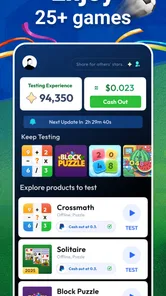
I tested PlayPlus: Earn & Rewards as an entertainment app built around trying games and receiving rewards, and I found that its real appeal depends less on the games themselves than on how neatly it fits into a person’s spare time. The basic idea is easy to understand: open the app, browse available game activities, play, and work toward rewards. That makes it especially interesting on a shared household device, where one person may want a quick diversion while another is waiting for the phone or tablet.
My first impression was positive because the concept is more focused than a typical entertainment hub. Instead of opening a streaming service and deciding what to watch, I could move directly toward an activity. The free price also lowers the barrier to trying it. Still, I would not treat it as a guaranteed earning tool. I see it as a reward-oriented way to spend gaming time, with the important caveat that the value comes from consistency and patience rather than from expecting immediate results.
How PlayPlus fits into a shared household device
A realistic use case is a family tablet or a phone that moves between people during the day. One household member might use it for a short gaming session after work, while someone else uses the same device later for entertainment. PlayPlus can fit that pattern because the activity is self-contained: the person using it can choose when to begin and stop without needing another player in the room.
That flexibility is useful, but it also creates a practical question: whose progress is being recorded? On a shared device, I would decide this before anyone starts. If several people play under one account, their activity can become mixed together, making it harder to understand who earned what or why progress looks different from one session to the next. If separate accounts are used, each person needs to be deliberate about switching to the correct account before playing.
This is one of the less obvious parts of using a rewards app in a household. With an ordinary game, a shared device may only create confusion over saved progress. With PlayPlus, the account boundary can also affect the meaning of the reward activity. I would therefore treat the app as belonging to one clearly identified user unless everyone in the home agrees on a simple routine for changing accounts.
For a solo user, this is barely an issue. For couples, roommates, or families sharing one tablet, it matters from the first session. My practical advice is to avoid casual “I’ll just use your account for a minute” habits. Even when the game itself is harmless, mixing activity can make the reward journey less transparent.
What the first setup should establish
Before playing, I would check which account is active, confirm that the user understands the reward concept, and agree on whether the device is personal or communal. That sounds basic, but it prevents the most avoidable household friction. A child borrowing an adult’s device, for example, should not automatically be assumed to be using the adult’s PlayPlus activity.
More From Our News Desk

 Gmail
GmailGmail in a Busy Inbox: Who Benefits Most?
From first account to crowded workday, Gmail earns its place through dependable search and flexible sorting—but its best fit depends on how much inbox maintenance you can tolerate.

 Prime Video
Switching to Prime Video: What Changes in Your Viewing Routine
Prime Video can make a compelling second home for streaming, but switching means learning a different catalog, rental layer, and route from browsing to playback.

 Universal TV Remote Control
Universal TV Remote Control Works Best as a Reliable Backup
A phone remote earns its place through quick setup and reliable habits. Here is how to get more from Universal TV Remote Control—and where its limits show.

 Weather - By Xiaomi
Weather by Xiaomi Review: Clear at a Glance, Less Clear Up Close
Xiaomi’s weather app makes everyday forecasts quick to scan, but its calm surface can leave useful details and recovery paths harder to find than they should be.

 X
XX Under Pressure: Can It Recover When Posting Goes Wrong?
A resilience-focused review of X, examining setup, mistaken posts, interruptions, weak connections, and the gaps that matter when recovery needs to be dependable.

 Clash of Clans
Clash of Clans Is Won Between the Battles
Its raids are quick; its community is a long-term project of coordination, teaching, rivalry, and shared responsibility—with all the friction that entails.
Latest News



The app is free to install, which makes experimentation simple, but “free” does not mean every user will find the time commitment worthwhile. I would begin with a short trial period and observe whether the available activities feel enjoyable enough to justify repeated sessions. If the person is only playing because of the reward promise, the experience may become tedious quickly.
One useful workflow is to separate entertainment time from reward checking. I would play normally first, then review the progress or reward area afterward rather than constantly interrupting a game to monitor results. This keeps the app feeling like entertainment instead of turning every minute into a calculation.
Another good boundary is device access. If several people use the same phone, the person who owns the account should remain responsible for signing in and out. I would not rely on memory alone when the device is passed around. A quick visual check of the account before a session is more reliable than trying to reconstruct activity later.
Coordinating play without turning it into a chore
PlayPlus works best when household coordination stays light. I would not create a complicated schedule for it. A simple agreement is enough: each person uses their own account, nobody changes another person’s profile, and the account holder checks reward progress themselves. That gives everyone room to play without making the app feel like another household responsibility.
There is also a useful distinction between shared access and shared ownership. A family may share the tablet, but that does not mean the reward account should be communal. Keeping those ideas separate protects expectations. The device can be available to everyone while the activity remains tied to one person.
If two people want to try the same game, I would compare experiences rather than combine them. One user may enjoy longer sessions, while another prefers quick tests. Their results may therefore feel different even on the same device. Treating each account as an individual experiment makes those differences easier to understand.
I also recommend agreeing on when to stop. Reward-based apps can encourage “one more session” thinking, especially when progress feels close to a target. In my view, the app should remain a pleasant extra, not something that dictates a household’s evening. Set a personal time limit, finish when the entertainment value drops, and do not let the reward become the only reason to continue.
Age, trust, and who should use it
PlayPlus carries a Mature 17+ content rating, so I would not present it as a general children’s app. That rating should shape the decision before installation, particularly on a family device. Parents and guardians should make the choice themselves rather than assuming that an entertainment app is automatically suitable for younger users.
The age context also changes how I view shared use. If an adult installs the app on a tablet that children sometimes borrow, the adult should remember that the app remains available when the device changes hands. The safest household approach is to keep the app associated with an adult’s account and avoid treating the shared tablet as a child-focused environment.
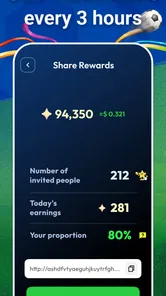
I would also explain the reward model in plain language to any older teenager or adult who uses it: rewards are an incentive connected to playing, not a substitute for employment or a predictable source of income. That expectation-setting is important because the word “earn” can sound more substantial than the actual experience of collecting rewards through leisure activity.
Trust matters in another way too. A user should be comfortable with the app’s normal account and reward process before spending significant time on it. I would read the in-app instructions carefully, understand what counts as a completed activity, and avoid assuming that every game session will produce the same outcome. If the process feels unclear, I would pause rather than keep playing blindly.
This is where PlayPlus differs from a standard game library. With a conventional entertainment app, the main question is whether the content is fun. Here, I would ask two questions: is the activity enjoyable, and does the reward process feel understandable enough to justify continuing? If the first answer is no, the second one cannot rescue the experience for long.
What it does better than ordinary entertainment alternatives
Compared with simply downloading random free games, PlayPlus gives me a reason to organize my game time around one place. That can be convenient for someone who likes sampling games instead of committing to a single title. It also offers a more active alternative to passive entertainment such as watching short videos or browsing a streaming catalog.
The strongest use case is a person who already enjoys testing new games and would appreciate a reward layer on top. For that user, the incentive feels like a bonus rather than a demand. The app can turn otherwise scattered trial sessions into a more deliberate routine.
It is less compelling for someone who wants a deep, uninterrupted gaming experience. A dedicated game will usually offer richer progression, stronger immersion, or more consistent design than a rewards-focused collection of activities. Likewise, someone looking for a conventional loyalty program may prefer an app with clearer purchase-based benefits rather than game-based participation.
I would also choose a normal game store or a single favorite title when the goal is discovery without any reward expectations. Those alternatives keep the decision simple. PlayPlus adds a second layer to the experience, and that layer is valuable only if the user actually cares about it.
Three practical lessons from using a reward-focused game app
First, I would judge each activity by enjoyment before judging it by reward progress. This prevents a common mistake: continuing with something boring simply because time has already been invested. If the game is not enjoyable on its own, the reward may not compensate for the frustration.
Second, I would keep the account holder consistent. On a shared device, this is more important than it appears. A single person should ideally manage the account, check progress, and handle any reward-related decisions. That creates a clean record and avoids arguments over who completed an activity.
Third, I would use PlayPlus in short, intentional sessions rather than leaving it open indefinitely. This makes it easier to compare the actual entertainment value with the effort involved. It also protects the app from taking over time that could be spent on a game the user genuinely prefers.
A fourth lesson is to avoid treating the headline concept as a promise of guaranteed value. The phrase “play games, test games, get rewards” explains the direction, but a real user still needs to evaluate whether the available activities are appealing and whether the reward journey feels worth the attention. My experience suggests that expectations should stay modest and practical.
Performance expectations and device fit
The app supports Android 7.0 and newer, which makes it accessible to people using older compatible Android devices as well as newer phones and tablets. That does not automatically mean every device will feel equally comfortable. A small screen may be fine for brief sessions, while a shared tablet can be more pleasant when several people are browsing or taking turns.
Because the app revolves around games, I would pay attention to the condition of the device rather than assuming that the app alone determines the experience. Available storage, battery health, and general responsiveness can affect how pleasant repeated sessions feel. On an older phone, I would keep sessions short at first and see whether switching between PlayPlus and its activities feels smooth enough.
The current version is 1.0.39, and I would keep the app updated through the normal store process. Updates are particularly relevant for an app that coordinates game activities and rewards, because a stale version can create avoidable confusion when the app or its connected experiences change.
Creation Tech Pte. Ltd. is the developer behind the app. For a household, the important practical point is not the developer name alone but knowing which app is installed and who is responsible for using its account. I would keep that information clear when multiple people share one device.
Popularity is encouraging, but not a personal guarantee
PlayPlus has an average rating of 4.8 from around twenty-three thousand ratings, with more than four hundred written reviews. That level of response suggests that many users have found the concept appealing, and it gives the app a stronger starting point than an unknown entertainment download.
It has also passed half a million installs, which indicates that the idea has reached a substantial audience. I see those figures as useful signs of interest, not proof that the app will suit every household. A high rating cannot decide whether the age context is appropriate, whether the games match someone’s taste, or whether the reward process is worth their time.
The app was released on July 22, 2025, so I would still approach it as a relatively young product and pay attention to how it develops. Newer apps can feel fresh and focused, but their long-term usefulness depends on continued refinement and a steady supply of activities that users want to try.
Who should install it, and who should skip it
I would recommend PlayPlus to adults who already like sampling mobile games, want a free entertainment option, and are willing to treat rewards as an extra rather than a dependable income stream. It is also a reasonable fit for someone who wants a structured way to use small pockets of free time without committing to one large game.
I would be more cautious for a shared family tablet, especially when younger users regularly access it. The Mature 17+ rating makes the age decision important, and the account question makes casual sharing less attractive. An adult-only personal device is a cleaner fit.
I would skip it if the main goal is a premium gaming experience, a guaranteed payout, or a completely passive form of entertainment. It is not the best choice for someone who dislikes trying unfamiliar games or who becomes frustrated when rewards require repeated participation.
For roommates or couples, I would install it only after agreeing on account ownership. If that conversation feels unnecessarily complicated, a normal game or streaming app may be a better shared-device choice. PlayPlus is more suitable when one person owns the activity and others simply use the device for their own separate purposes.
My household verdict
After looking at PlayPlus through the lens of shared use, I think its best role is as an adult-oriented personal entertainment app that happens to add rewards to game testing. The free entry point and focused idea make it easy to try, while the strong user response suggests genuine appeal. I especially like it for people who already enjoy discovering mobile games and want a reason to keep those experiments in one place.
My reservations are about expectations and boundaries, not the basic concept. The app should not be treated as a family game by default because of its Mature 17+ rating, and a shared device can blur account activity unless users coordinate carefully. I would also avoid measuring success only by rewards; the games need to be enjoyable enough to make the time worthwhile.
My bottom line: use PlayPlus as a controlled, adult-focused way to turn casual game testing into reward-oriented entertainment, not as a replacement for a favorite game or a guaranteed earning platform. If that matches your expectations, it is worth trying. If you need child-friendly shared use, deep gaming, or predictable financial value, I would choose a different kind of app.
PlayPlus: Earn & Rewards Frequently Asked Questions
Does PlayPlus: Earn & Rewards have many users and positive ratings?
PlayPlus has a 4.8 average from around 23,000 ratings, with over 500,000 installs. Those figures suggest that many users have tried it, but they do not guarantee that every person will enjoy the app or have the same experience. Before downloading, consider whether its mix of mobile games, promotional activities, and rewards suits what you are looking for.
When was PlayPlus: Earn & Rewards released, and what version is current?
PlayPlus: Earn & Rewards was released on July 22, 2025, and its current version is 1.0.39. Checking that your app store offers a compatible version before installing can help avoid setup surprises. As with any app, keeping it updated can give you access to the version currently available for your device.
Who develops PlayPlus: Earn & Rewards, and what kind of app is it?
PlayPlus: Earn & Rewards is an entertainment app developed by Creation Tech Pte. Ltd. Its focus is combining mobile games and promotional activities with reward opportunities, so it may appeal to people who like trying new games in their spare time. The app is free to download, and its content rating is Mature 17+, which users should consider before installing.
What is PlayPlus: Earn & Rewards, and how does it work?
PlayPlus: Earn & Rewards is a rewards app that lets users earn points or other benefits by completing activities such as trying selected games, reaching in-app milestones, answering offers, or interacting with sponsored content. After installing it, you normally choose an available task, follow its instructions carefully, and wait for the activity to be tracked before requesting an eligible reward.
Is PlayPlus: Earn & Rewards free to download and use?
The app is generally available to download without an upfront purchase, but that does not mean every feature is completely free of conditions. Some earning opportunities may involve advertisements, optional purchases inside promoted games, registration with third-party services, or specific eligibility rules. Read each offer carefully and never spend money simply to chase a reward unless the terms clearly justify it.
Pros
- Simple tasks make it easy to start earning points.
- Offers are organized clearly for quick browsing.
- Rewards can provide useful discounts or gift cards.
- Suitable for short sessions during spare time.
- Regular users may find new earning opportunities often.
Cons
- Some offers may be unavailable depending on your location.
- Rewards can require considerable time to accumulate.
- Certain tasks redirect to external websites or apps.
- Earnings may vary significantly from one offer to another.
- Privacy-conscious users may dislike the data requested for some tasks.











