Phone Dialer - Contacts
- 180.00
- 4.2
- Installs
- 1.00M
- Price
- Free
Screenshots
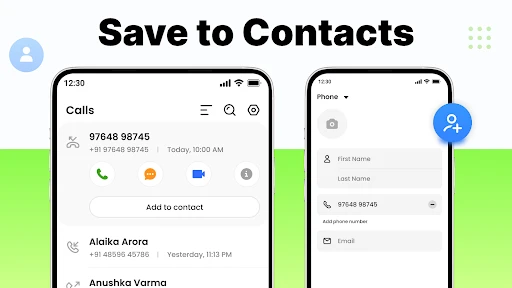
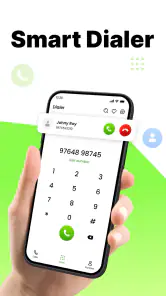
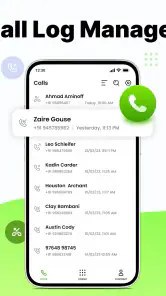
Analysis by Reviewed
Before replacing the dialer I already knew, I’d ask a practical question: does another calling app make it easier to find a person and place a call, without adding new steps? That is the lens I’d use for Phone Dialer - Contacts. It is a free communication app from Contacts - Smart Dialer and Phone, and its current version is 4.0. The release date is Sep 27, 2024, so I see it as a relatively recent option rather than a long-established phone utility.
Where it fits in a daily routine
A dialer is most useful when it shortens the small steps between deciding to call and reaching the right person. I’d consider this app if I wanted my contacts and calling controls together, especially when I make repeat calls to family, coworkers, or local services. For example, if I’m carrying groceries and need to call someone I contact regularly, a clearly arranged dialer and quick access to familiar names matter more than a long list of extra tools.
That focused purpose is also the main comparison point with a phone’s built-in dialer. The built-in option is usually the simplest choice if it already handles search and contacts the way you like. A separate dialer makes more sense when you prefer its layout or want a different way to find people. I would decide by trying the actual everyday workflow—searching a name, opening a contact, and placing a call—rather than assuming a third-party app is automatically an upgrade.
There is another useful comparison: some people manage contacts in a separate address-book app and use the phone’s standard dialer only when they are ready to call. This app’s appeal is the prospect of bringing those everyday calling and contact steps closer together. That can be convenient if you often move between a contact list and the keypad, but it is not automatically better for someone who prefers keeping those jobs separate. I’d try the same task both ways before deciding which arrangement feels less fussy.
Who may find it useful, and who may not
The app is aimed at a broad audience: it is rated for Everyone, supports Android 8.0 and later, and has passed the million-install mark. Its average rating is 4.2 from around 35,000 ratings, with 180 written reviews. Those figures suggest that many people have tried it, but they don’t tell me whether its layout will suit your habits; I’d treat them as context, not a guarantee.
I’d give it a look if you want a dedicated calling interface and are comfortable making a different dialer part of your routine. I’d stick with the phone’s default app if it already does everything you need, or if you depend on a very specific contact-management setup. Before switching, check that your important contacts appear as expected and make a test call. That small check is more useful than moving your whole routine over at once.
It may also suit someone who often uses the keypad instead of tapping a saved name: a dialer that brings contact lookup into the same workflow can reduce the back-and-forth. On the other hand, if your calling habits rely on a specialized workplace directory or a carefully organized contact system, I would not assume that a general-purpose dialer will reproduce that setup. Keep the tool that handles those needs well, and only change the call screen if it solves a real annoyance.
More From Our News Desk

Weather by Xiaomi Review: Clear at a Glance, Less Clear Up Close

X Under Pressure: Can It Recover When Posting Goes Wrong?

Clash of Clans Is Won Between the Battles

Android Auto Makes the Case for Quieter Car Software

MobiOffice: Transforming Mobile Productivity with Seamless Integration

EA SPORTS FC™ Mobile Soccer: Redefining Mobile Sports Gaming
For a shared family phone, or for anyone who helps a less confident relative place calls, the best choice is the interface that person can recognize and use without coaching. I would test it with the actual user rather than judge it on my own preferences. A familiar default dialer may be better if changing screens would make someone hesitate, while a clearer-feeling alternative may help if finding names has become a recurring struggle.
First Impressions
The first thing I look for in Phone Dialer - Contacts is whether it makes the basic call flow feel straightforward. A dialer is not a place where I want to spend time learning a new system; the useful test is whether I can move from the keypad to a known contact and back without losing my place. For a reader considering a switch, that small everyday test is more revealing than a feature list.
Easy Navigation and Features
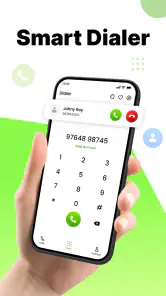
Upon launching the app, I was immediately greeted by a clean and intuitive user interface. It’s like the app developers knew exactly what I wanted—a no-nonsense approach to calling and managing contacts. Everything just feels right where it should be. The app doesn’t bombard you with unnecessary features, which is a breath of fresh air in today’s app market.
Navigating through the app is as smooth as butter. The speed dial feature lets you access your frequently called contacts with just a tap. And let’s not forget the smart contact search that’s almost telepathic in predicting who you want to call next. It’s like having a personal assistant who’s always on point.
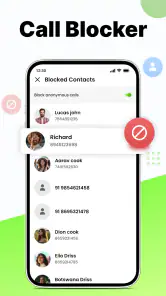
One of my favorite features has to be the call blocking option. We all have those pesky telemarketers, and with this app, you can easily block unwanted calls without a second thought. It’s a game-changer for anyone tired of incessant spam calls.
Smart search is most valuable when your contact list is large or names are easy to confuse. My practical tip is to use the exact name or number you normally recognize, then pause to confirm the person before tapping call. That extra moment matters if colleagues or relatives share similar names. Speed dial is best treated as a small shortlist, not a second address book: reserve it for the people you genuinely call often, so the shortcut remains quick instead of becoming another crowded list.
Call blocking has a different trade-off. It can make unwanted repeat calls easier to avoid, but blocking is a decision with consequences if a number is later used for something legitimate. I would check a number carefully before adding it, and revisit the blocked list if I start wondering why a caller cannot get through. If your main concern is screening unknown callers rather than blocking specific ones, compare the app’s approach with the tools already available on your phone before relying on it.
Customization Galore
If you’re anything like me, you love a bit of personalization. The app doesn’t disappoint in this department. You can customize the dialer interface to fit your vibe, whether you’re feeling minimalist or a bit more vibrant. The theme options are diverse and cater to all sorts of tastes.
Another neat feature is the ability to sync your contacts across devices. No more manually adding contacts whenever you switch phones. It’s seamless and saves a ton of time.
For me, customization is most useful when it improves legibility, not just appearance. I’d choose a theme that makes names and numbers easy to scan in bright daylight or when I’m using the phone one-handed. Speed dial can also be more helpful when reserved for a few genuinely frequent contacts; filling every shortcut makes the feature less quick to use. And before relying on contact syncing during a phone change, I’d check that the same contacts are present on both devices so I know my address book is in order.
Contact syncing is especially worth treating as a transition task, not something to trust without checking. Before moving to a new phone, I’d compare a few important entries—one with a long name, one with more than one number, and one I rarely call—to see whether the information I rely on is still easy to find. This is a simple way to catch an address-book mismatch early. If your contacts are already managed through another service or app, decide which place you consider authoritative before syncing, so you do not end up unsure which copy to edit.
Theme choice can also be a practical accessibility decision. I’d prioritize readable labels and clear contrast over a look that seems attractive in a quick glance. If the interface feels harder to scan in sunlight or with one hand, switch back to a simpler presentation rather than forcing yourself to adapt. A dialer is used in brief, sometimes distracted moments, so small improvements in clarity count more than decorative variety.
Performance and Reliability
Performance-wise, the app doesn’t lag, even on older devices. Calls connect quickly, and the call quality is top-notch. It’s reliable and has yet to crash on me, which is more than I can say for some other dialer apps I’ve tried.
Battery consumption is also minimal, so you don’t have to worry about your phone’s battery draining rapidly while using this app. It’s optimized for efficiency, and I appreciate that.
My practical advice is to treat call blocking as a setting to review occasionally rather than something to configure and forget. If you block a number, make sure it is one you truly do not want to hear from; a legitimate caller could be inconvenient to miss. Likewise, after making a dialer your usual choice, place a test call and check that incoming calls and contact lookup still fit your needs. A calling app is only helpful if it works smoothly in both directions.
A low-risk way to judge reliability is to try a few different kinds of calls before making the app central to your routine: a saved contact, a manually entered number, and a frequently used number from speed dial. Then check that you can return to the contact list and find the same person without confusion. This does not prove how the app will behave in every situation, but it tells you whether its basic workflow works for the calls you actually make.
One trade-off with any replacement dialer is that a familiar appearance can matter less than how it behaves alongside the rest of your phone. If your normal routine depends on a built-in calling feature or another contact app, compare those steps before settling in. I’d keep the default option available until I’m confident the new arrangement feels natural, especially if I use the phone for important work or family calls.
That caution is particularly relevant if you answer calls while busy or use your phone for time-sensitive arrangements. I would not make a new dialer the only route to important contacts on the first day. Keep a way to reach the usual interface while you learn the new layout, and do not delete or reorganize contacts just to make the switch feel complete. A reversible trial tells you more than an all-at-once change.
What the current version means
Version 4.0 is the current release, and the app’s release date places it on the market from Sep 27, 2024. That gives me a concrete point in its product timeline, but not a reason to assume every feature is new or that a particular change has been made. For an existing user, the sensible approach is to judge the version by the calling and contact tasks that matter day to day, rather than expecting a major redesign simply because the version number has advanced.
Looking ahead, I would watch for whether future versions keep the dialer dependable while preserving the simple workflow. I’d also pay attention to how contact search, blocking, and syncing behave in ordinary use, since those are the areas that can either save time or create friction. If your current setup already feels reliable, there is no urgency to switch; if finding people to call is a recurring annoyance, trying this app for routine calls is a reasonable way to see whether its approach suits you.
For existing users, the practical question is whether the current release continues to handle familiar tasks comfortably. I would check the details that affect my own routine after installing a version change: can I still reach regular contacts quickly, are the shortcuts I use still convenient, and does the contact list remain in the order or format I expect? Those checks are more useful than treating a version number as a promise of new capabilities. The release date and current version describe where the app stands, while future improvements remain something to judge when they actually arrive.
If you are deciding whether to install it now, start with the task that prompted the search. Is the built-in dialer awkward to navigate, do you want a different way to look up a person, or are unwanted calls your main irritation? Try the app against that one need first. If it improves the specific step without making other parts of calling less comfortable, there is a stronger reason to keep it; if not, returning to the familiar option is a perfectly sensible result.
What I would watch in future releases is consistency more than novelty: whether contact search remains predictable, whether blocking is easy to review, and whether contact syncing continues to fit a user’s existing address-book habits. Those details shape trust in a calling tool because people rely on it for ordinary but important moments. Until changes are actually visible, I would keep expectations measured and choose based on the current experience rather than assuming a roadmap.
My recommendation
In conclusion, Phone Dialer - Contacts is a solid choice for anyone looking to streamline their calling experience. Its user-friendly design, combined with practical features, makes it a must-have app. Whether you’re a tech enthusiast or just someone who wants a reliable dialer app, this one’s worth checking out. So, if you’re on the lookout for a dialer app that ticks all the right boxes, give this one a try—you won’t be disappointed!
My more measured recommendation is to treat it as an option to test, not an automatic replacement for the phone’s built-in calling tools. It is most appealing if you value a dedicated dialer, use speed dial and smart contact search, and like being able to adjust the interface. It is less compelling if your current setup already feels effortless or depends on a specialized contact workflow. Start with a few routine calls, verify the contacts you rely on, and keep the default available until the new arrangement proves itself. If it genuinely saves you steps, it earns a place in your routine; if it merely looks different, there is no need to switch.
Phone Dialer - Contacts Frequently Asked Questions
What does Phone Dialer - Contacts do, and who might find it useful?
Phone Dialer - Contacts is a communication app built around calling and contact management. Its straightforward purpose may appeal to people who want a dedicated phone dialer and an easy way to work with their contacts. The app is described as making contacts smart and simple, so it is worth considering if those everyday tasks are what you want to manage from one place.
Can I use Phone Dialer - Contacts on my device?
Phone Dialer - Contacts is an Android app that requires Android 8.0 or later. Check your device’s Android version before installing to make sure it meets that requirement. If you use an iPhone or iPad, this Android compatibility information does not establish support for iOS, so look for an iOS version in the appropriate app store before downloading.
Is Phone Dialer - Contacts free, and what should I know before installing it?
Phone Dialer - Contacts is a free communication app for managing everyday calling and contacts. It has an Everyone content rating and is currently at version 4.0. Before downloading, check that your device meets the app’s operating-system requirement and consider whether you want a dedicated dialer for handling calls and contact details. The app is presented as an easy-to-use way to make contacts smart and simple.
What features does Phone Dialer - Contacts offer for managing my calls and contacts?
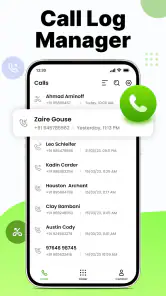
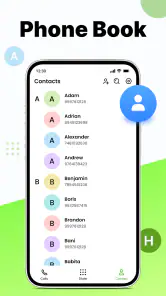
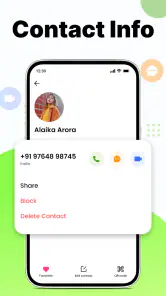
Phone Dialer - Contacts offers a variety of features designed to enhance your communication experience. It provides a user-friendly interface for making and receiving calls, managing contacts efficiently, and organizing your call logs. You can easily add, edit, and delete contacts, as well as use advanced search and filter options to quickly find the information you need. Additionally, the app supports speed dialing and allows customization of ringtones for individual contacts, making it a comprehensive tool for managing your calls.
Is Phone Dialer - Contacts compatible with all Android and iOS devices?
Phone Dialer - Contacts is designed to be compatible with a wide range of devices, but it is an Android app with a minimum operating-system requirement of version 8.0. Check your device’s Android version before installing. If you use an iPhone or iPad, this Android compatibility information does not establish support for iOS, so look for an iOS version in the appropriate app store before downloading.
Pros
- User-friendly interface
- Quick access to contacts
- Efficient call management
- Customizable themes
- Integration with other apps
Cons
- Lacks advanced features
- Occasional lag
- Ads in free version
- Limited customer support
- No cloud backup option
- Category
- Communication
- Version
- 4.0