

PerkSpot
- 94.00
- 3.4
- Installs
- 100.00K
- Price
- Free

Screenshots


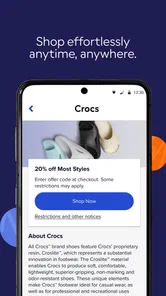
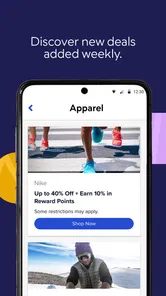

Analysis by Reviewed
I approached PerkSpot as a practical shopping companion rather than a full marketplace. Its purpose is to bring an employer- or organization-provided discount program onto a phone, so the useful question is not whether it replaces every shopping app, but whether it makes those existing savings easier to find and use while I am away from a computer.
That distinction matters. PerkSpot is a free shopping app from PerkSpot, rated for Everyone, and it has passed the early adoption stage with over one hundred thousand installs. Its average rating is 3.4 from more than two hundred ratings, which suggests a mixed but meaningful user experience: plenty of people find value in it, while others likely run into account, offer, or navigation frustrations. I found it most interesting as a bridge between a workplace benefit and an everyday purchase.
How clearly the app supports different users
I’d use this section to consider how the app’s focused purpose fits different shopping habits, comfort levels, and access needs. A useful test is to choose one ordinary purchase and follow the offer from discovery through its instructions before relying on it in a time-sensitive situation. That makes it easier to judge whether the app’s role as a discount-program companion suits the way you actually shop.
Readability and navigation in a discount-focused app
The app’s central idea is easy to understand: sign in, look through available discounts, and take the savings with you. That is a much narrower task than browsing a general shopping platform, and the focused purpose can be helpful for people who do not want to compare endless products, advertisements, and unrelated recommendations.
In practice, the quality of the experience depends heavily on how clearly the available offers are organized for the individual account. A discount program can contain many different kinds of deals, from shopping and travel to services or entertainment, so category labels and search behavior matter more here than they would in a simple single-store app. I would begin by looking for the categories I use most often instead of scrolling through everything. That reduces visual fatigue and makes the app feel more like a benefits directory than a promotional feed.
For readers who prefer larger text, stronger contrast, or a less crowded screen, the best approach is to use the phone’s own display and text settings before judging the app. System-level enlargement can make offer details easier to read, although it may also cause longer titles or buttons to wrap differently. I would check one complete offer from the list through the redemption step, because a screen that looks readable at the top may become less comfortable when instructions, conditions, and action controls appear together.
There is also a useful habit that is easy to overlook: save time by deciding what kind of discount you need before opening the app. If I am buying a gift, planning a trip, or replacing household equipment, I can use that goal to filter my attention. This is more accessible than treating the app as a place to browse casually, especially for users who become tired or distracted by dense lists.
More From Our News Desk

 Instagram
Instagram’s Power Comes From Its Place in Your Phone
A close look at how Instagram turns Meta’s reach, recommendation systems and everyday camera habits into durable platform power—and what that costs users.

 Gmail
GmailGmail in a Busy Inbox: Who Benefits Most?
From first account to crowded workday, Gmail earns its place through dependable search and flexible sorting—but its best fit depends on how much inbox maintenance you can tolerate.

 Prime Video
Switching to Prime Video: What Changes in Your Viewing Routine
Prime Video can make a compelling second home for streaming, but switching means learning a different catalog, rental layer, and route from browsing to playback.

 Universal TV Remote Control
Universal TV Remote Control Works Best as a Reliable Backup
A phone remote earns its place through quick setup and reliable habits. Here is how to get more from Universal TV Remote Control—and where its limits show.

 Weather - By Xiaomi
Weather by Xiaomi Review: Clear at a Glance, Less Clear Up Close
Xiaomi’s weather app makes everyday forecasts quick to scan, but its calm surface can leave useful details and recovery paths harder to find than they should be.

 X
XX Under Pressure: Can It Recover When Posting Goes Wrong?
A resilience-focused review of X, examining setup, mistaken posts, interruptions, weak connections, and the gaps that matter when recovery needs to be dependable.
Latest News



The current version is 1.8.14, and the app supports Android 7.0 and later. That broad operating-system range is helpful for people using older phones, including anyone who keeps a reliable device rather than upgrading frequently. At the same time, an older phone may display modern interfaces less comfortably, so performance and text scaling can vary with the device. I would keep the app updated when possible, particularly if a sign-in or offer page behaves unexpectedly.
Motor and sensory considerations before using an offer
Discount apps often look simple because their main action is tapping an offer, but the real interaction can involve several steps: opening the deal, reading restrictions, moving to a retailer or service, and completing the purchase in another environment. For someone with limited dexterity, the number of transitions matters. I would avoid opening an offer while standing in a checkout line unless I had already checked the instructions and knew exactly what action was required.
A calmer workflow is to review the offer at home, note any code or redemption direction that is important, and only then use it during the purchase. This reduces the need for quick taps, repeated back navigation, or trying to read small text under pressure. It also helps users with attention-related difficulties because the decision is made before the surrounding situation becomes noisy or time-sensitive.
Sensory comfort is another practical issue. Shopping-related screens can contain promotional imagery and changing content, which may be tiring for people sensitive to visual clutter. I would use the app in short sessions and rely on category-based browsing rather than repeatedly returning to a broad home screen. If a particular offer sends me to another website or service, I would judge that destination separately; the accessibility of the PerkSpot interface does not automatically make every linked shopping experience equally comfortable.
Voice control, screen readers, display zoom, and other phone features may help with basic interaction, but I would not assume that every offer page has identical support. The app gathers access to a discount program, while the actual redemption experience can vary by merchant or offer type. That is an important trade-off: PerkSpot can make the starting point easier to find, but it cannot guarantee a uniform interaction after I leave its own interface.
One non-obvious advantage is that the app can reduce memory demands. Instead of remembering a benefits website address or searching through old workplace messages, I can keep the program in one familiar place on my phone. For users who manage several accounts or find written instructions hard to track, that consolidation may be more valuable than the discount itself.
Using PerkSpot in real situations
Imagine I am commuting home and remember that I need a new appliance. A general shopping app would immediately show products, prices, reviews, and sponsored results. PerkSpot serves a different role: I can first check whether my discount program contains a relevant offer, read the conditions when I have time, and then decide whether to continue to the retailer. That extra step can prevent me from paying full price simply because I forgot the benefit existed.
For a family member who helps someone else manage purchases, the app may also work as a preparation tool. I could review available discounts before a shared shopping trip, identify an appropriate offer, and explain the redemption process in advance. This is more manageable than trying to solve account access and purchase details at the store counter. However, I would confirm whose account is permitted to use the benefit before relying on it for another person.
Travel planning is another situation where a benefits app can be useful. I would search early, compare the offer’s conditions with my actual plans, and save the relevant information in a way I can access later. The important point is timing: a discount that requires preparation is less useful when discovered minutes before departure. PerkSpot is better for planning than for last-second improvisation.
It can also fit occasional shoppers who do not want another daily shopping feed. I would open it only when I have a purchase in mind, rather than expecting it to replace a retailer’s app. That limited-use pattern is a strength for people who prefer fewer notifications and less commercial content on their phone.
Situational access becomes weaker when connectivity, account credentials, or time are limited. If I am already at checkout and cannot remember how to sign in, the app may not rescue the purchase quickly. My practical tip is to test the sign-in process before I need the discount and to review important offers while I have a stable connection. This is not glamorous, but it is the difference between a benefit I can actually use and one that remains theoretical.
Where the experience still creates barriers
The largest barrier is that PerkSpot depends on access to a participating discount program. It is not a universal coupon finder that anyone can open and immediately use for every retailer. That makes it highly relevant for eligible users and largely irrelevant for people without a connected program. Before spending time organizing the app, I would confirm that my employer or organization provides access and that I can complete the account setup.
Another limitation is the separation between discovering a benefit and understanding its real value. A discount may have conditions, exclusions, expiration details, or a redemption method that changes how convenient it is. I would never judge an offer by its headline alone. The better workflow is to read the complete details first, then compare the final effort with a normal purchase through the retailer’s own app or website.
This is where the usual alternatives can be better. A retailer’s app is generally the stronger choice when I already know exactly what I want from that store, need order tracking, or want the most direct checkout. A general coupon service may be more useful when I am searching across many unrelated merchants without an employer benefit. PerkSpot wins when the discount program is the starting point and I want one place to explore those specific savings.
There is also a cognitive cost to comparing too many offers. Having access to a discount can encourage unnecessary spending, especially when an attractive deal makes a purchase feel urgent. I would set a simple rule: use the app only for something I already planned to buy or for a clearly defined trip or event. That keeps the benefit focused on saving money rather than creating another stream of shopping prompts.
People who need highly predictable, step-by-step interactions should be prepared for variation between offers. The app can organize access, but different merchants may present different instructions and destinations. If a user relies on a particular assistive setup, I would test the complete path with a low-stakes purchase or a non-urgent offer first. That gives a more honest picture than evaluating the opening screen alone.
Privacy and account comfort may also influence the decision. Anyone uneasy about adding a workplace-related benefit service to a personal phone should read the app’s current permission and account prompts carefully during installation and sign-in. I would not enter sensitive information into a rushed session or use a shared device without checking who might remain signed in. These are sensible precautions for any shopping-related account, but they matter more when access is tied to an organization.
Who will benefit most from this app?
I would recommend PerkSpot to someone who already has access to a PerkSpot discount program and often forgets to use it. The app’s strongest value is convenience: the benefit travels with the user instead of remaining buried in an internal website, printed material, or an old email. It is especially suitable for planned purchases, travel research, and occasional checking before spending.
It may also suit users who appreciate a single starting point but do not need a complete shopping ecosystem. The app is free, carries an Everyone content rating, and its support for Android 7.0 and later makes it approachable for people with older compatible phones. I would still treat the experience as a benefit-access tool, not as a replacement for retailer apps, price comparison tools, or a dedicated accessibility service.
I would skip it if I do not have a connected discount program, if I mainly shop through one retailer and want fast checkout, or if I dislike moving between offer pages and external shopping destinations. I would also hesitate to rely on it for urgent purchases until I had already tested my account and understood how redemption works. In those cases, the retailer’s own app or a familiar coupon method may involve fewer steps.
My inclusive verdict after using it
PerkSpot has a clear and worthwhile purpose: it puts an existing discount benefit closer to the moment when I make a purchase. I like that it can reduce the effort of remembering where workplace savings are stored, and I find the planning workflow more useful than casual browsing. The free price and broad Android compatibility remove two obvious entry barriers.
Its accessibility story is practical rather than universal. Phone-level text, zoom, voice, and display tools may improve the basic experience, but the full journey depends on the offer and the merchant behind it. Users with motor, sensory, visual, or cognitive needs should test the complete redemption path, not just the offer list. Preparing at home, choosing one purchase goal, and reading conditions before arriving at checkout are the three habits I would most strongly recommend.
The 3.4 average rating reflects why I would approach it with realistic expectations. This is not a polished all-purpose shopping destination for everyone. It is a useful companion when the right discount program is already available and the user values convenience over a single, tightly controlled checkout. For that audience, I would try it, keep the workflow deliberate, and compare each offer with the simpler alternative before buying.
In my view, the app succeeds when it makes an overlooked benefit visible and usable. It falls short when account access, offer conditions, or a merchant’s separate experience introduce friction. If that trade-off matches your situation, PerkSpot is worth keeping on your phone as a focused savings tool rather than treating it as another general shopping app.
PerkSpot Frequently Asked Questions
Can I browse PerkSpot before creating an account?
PerkSpot is an employee-discount platform, so access to its offers is tied to an eligible employer or affiliated organization. You may need to verify your work email, create an account, or complete an organization-specific sign-in process before browsing the discounts available to you. If you are considering downloading it, check that your organization participates and that you can use its sign-in method.
Which devices can run the PerkSpot app?
PerkSpot is a shopping app for mobile devices, and the minimum operating system requirement is version 7.0. Before downloading, check the operating system version on your device and make sure it meets that requirement. The current version is 1.8.14, and keeping an app up to date can help you use its latest available features and improvements.
Is PerkSpot free, and how is the app rated by users?
PerkSpot is free to download. Its average rating is 3.4, based on 265 ratings, with 94 written reviews, so user feedback reflects a range of experiences. The app has more than 100,000 installs. These figures can offer a broad impression of its reception, but your experience will also depend on your organization’s access and the offers available to your account.
What is PerkSpot and how does it work?
PerkSpot is an employee-discount platform that gives eligible users access to special offers from participating retailers, travel providers, restaurants, entertainment services, and other brands. After signing in through a participating employer or organization, you can browse categories, search for deals, and open an offer to view its conditions. Some discounts are redeemed online, while others may require a code, voucher, or in-store instructions.
Who can use PerkSpot, and is it free to download?
PerkSpot is generally intended for employees, members, or other individuals whose organization provides access to the service. Downloading the app is free, but eligibility depends on your employer or affiliated organization rather than simply installing it. You may need to verify your work email, create an account, or use an organization-specific sign-in process before the available discounts can be viewed.
Pros
- Easy access to employee discounts in one mobile app.
- Offers savings across shopping
- dining
- travel
- and entertainment categories.
- Personalized deals can make browsing more relevant.
- Digital coupons are convenient to save and use on the go.
- Useful search and category filters help find offers quickly.
Cons
- Access usually requires eligibility through a participating employer.
- Available discounts vary by company
- location
- and membership status.
- Some offers may redirect to external websites or apps.
- Deal terms
- expiration dates
- and exclusions require careful checking.
- The app is less useful if nearby merchants have limited participation.











