Perks at Work
- 798.00
- 4.8
- Installs
- 100.00K
- Price
- Free

Screenshots
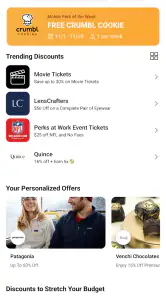
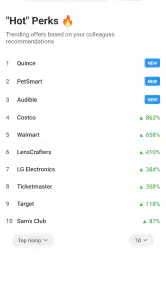

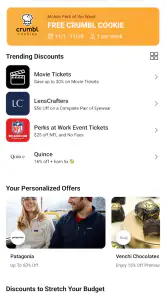
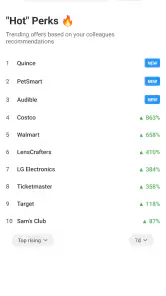

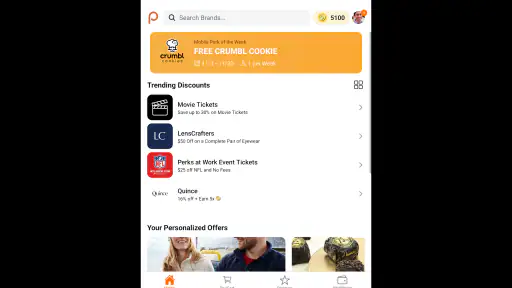
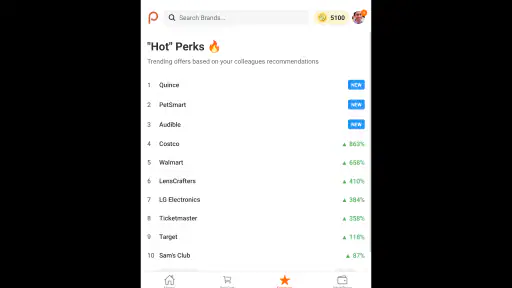
Analysis by Reviewed
When I look at an employee-discount app, I care less about flashy presentation and more about whether it helps me find a worthwhile offer before I lose patience. Perks at Work is built around that simple purpose: it brings workplace benefits and discounts into one shopping-focused app. I found it most useful as a place to check before buying something I already planned to purchase, rather than as an app I would browse casually every day.
The app comes from Next Jump Inc. and is free to use, with an Everyone content rating. It is available for devices running Android 7.0 or later, which makes it accessible on many older phones as well as newer models. Its current version is 2.4.69, and the release shown for the app is March 31, 2025. Those details matter because this is the kind of utility people may install on a work phone, an older personal handset, or a device with limited storage and battery.
How Perks at Work feels in everyday use
Speed expectations before shopping
My first impression is that Perks at Work makes more sense when I approach it with a specific intention. If I am looking for a discount on an item, service, or purchase I was already considering, the app has a clear role. It can save me from checking several unrelated websites or remembering which employee-benefit page contains a particular offer.
I would not treat it like a conventional shopping marketplace where the main goal is endless discovery. The experience is more practical than entertaining. That is a strength if I want to get in, compare an offer with the normal alternative, and decide. It is less compelling if I expect a highly personalized shopping feed or a full retail experience with every stage of purchasing handled inside one place.
Perceived speed depends heavily on what I am trying to do. Opening a benefits app is only half the task; the real test is how quickly I can move from an offer to understanding its conditions. A discount that looks attractive but requires several extra steps, a separate merchant visit, or careful eligibility checking can feel slow even when the app itself responds promptly.
My practical advice is to use it before you are standing at a checkout. I would browse while planning a purchase, read the offer details, and save the relevant information before leaving home. That small change makes the app feel more efficient because I am not trying to research a benefit while also making a time-sensitive purchase.
What happens during heavier use
The app is likely to be most demanding when I am comparing several benefits in one session. For example, imagine I am preparing for a family trip and want to check discounts related to travel, shopping, and entertainment. Moving repeatedly between categories, offer pages, and merchant information creates more opportunities for waiting, refreshing, or losing my place than a single quick lookup.
More From Our News Desk

Clash of Clans Is Won Between the Battles

Android Auto Makes the Case for Quieter Car Software

MobiOffice: Transforming Mobile Productivity with Seamless Integration

EA SPORTS FC™ Mobile Soccer: Redefining Mobile Sports Gaming

How Microsoft OneDrive Became a Mobile Productivity Giant

How Google Translate Breaks Language Barriers Effortlessly
This is where I would judge the app by its recovery as much as by its initial speed. If I switch briefly to another app to check a price and then return, I want to continue from the offer I was reviewing. If I have to reconstruct the entire search, the convenience advantage becomes smaller. I would therefore avoid opening a large number of offers in separate screens unless I already know which ones are relevant.
A useful workflow is to narrow the search first, then inspect only the strongest candidates. I would compare the final discount with the ordinary price, delivery charge, membership requirement, or redemption process rather than assuming the largest-looking percentage is automatically the best deal. This is one of the more important trade-offs: a benefit can be valuable, but the time spent understanding it also has a cost.
For occasional use, I would expect resource demands to be modest because the app’s purpose is focused on shopping and employee benefits rather than constant media playback or intensive graphics. Still, any shopping app can become inconvenient if it is left open while I move between many pages or other applications. Closing it after finishing a search is a sensible habit on an older device.
Reliability matters more than visual polish
Perks at Work has an average rating of 4.8 from around 2.6 thousand ratings, and it has passed 100 thousand installs. Those figures suggest that many users find the service worthwhile, although they do not guarantee that every offer or device experience will be equally smooth. For me, the more meaningful question is whether the app remains useful when I need a benefit at a particular moment.
Reliability here includes more than avoiding crashes. I also want offer information to be understandable, account access to remain consistent, and the app to recover sensibly after a temporary connection problem. If an offer page fails to load, I would retry rather than immediately assuming the benefit is unavailable. If the same problem continues, checking the merchant’s own terms is safer than relying on a partially loaded page.
Because the app is connected to employee benefits, access may also depend on the workplace arrangement behind the account. That makes it different from an ordinary coupon app that anyone can browse without an employment connection. Before spending time comparing deals, I would make sure I can sign in or otherwise access the benefits intended for me. This is an important practical limitation for people who want a universal shopping-discount service.
I also recommend reading the complete conditions before treating an offer as ready to use. The headline benefit is only one part of the decision. Restrictions, eligible products, redemption instructions, or merchant-specific steps can determine whether the saving works for my exact purchase. The app is most reliable as a guide to a benefit that I then verify before committing money.
Older phones and device constraints
The minimum Android requirement of 7.0 is relatively approachable for people who keep an older phone. That is good news for an employee-benefit tool because I would not necessarily want to replace a perfectly usable handset just to check discounts. The Everyone rating also means the app is positioned for a broad audience rather than a narrowly restricted age group.
On a modest device, I would keep expectations realistic. A phone with limited free storage, an older processor, or a crowded background workload may take longer to open shopping pages than a recent handset. That does not automatically make the app unsuitable, but it does make preparation worthwhile: update the operating system if possible, close unused apps, and avoid relying on the app for a last-second purchase decision.
Screen size can affect comfort too. Offer details often need careful reading, and a smaller display may make it harder to compare conditions without scrolling. I would use a larger phone or tablet when planning a complicated purchase, while keeping the app on my everyday phone for quick checks. The app’s value is not limited to powerful hardware, but the quality of the reading experience still affects how confidently I can use a discount.
Battery impact is unlikely to be my main concern during a short search, but I would not leave the app running unnecessarily throughout the day. Since this is a utility rather than an entertainment app, I expect to open it for a task and leave it afterward. That usage pattern should suit people who want occasional access without adding another permanent distraction to their phone.
Where it beats ordinary alternatives
The usual alternative is searching the web for coupons, visiting a retailer’s own app, or relying on a workplace intranet page. Each option has a weakness. General web searches can produce outdated or irrelevant results. Retailer apps are useful when I already know the merchant, but they do not necessarily show the wider employee-benefit picture. An intranet may explain the program, yet be less convenient when I am shopping away from my desk.
Perks at Work’s advantage is concentration. I can begin with the employee-benefit context instead of searching the entire internet and hoping an appropriate offer appears. That is especially useful for someone who makes several planned purchases over a month and wants one familiar starting point.
It is not automatically better than a retailer’s own app for completing an order. If I already know exactly what I want from one store, the merchant’s app may provide a faster product search, clearer stock information, and a more direct checkout. I would use Perks at Work to investigate the benefit first, then move to the retailer when that produces a simpler purchase path.
It also differs from a general coupon service because the relevant value is tied to employee perks rather than just public promotions. Someone who wants broad, unrestricted coupon hunting may prefer a conventional deal-search tool. Someone who wants to make better use of workplace discounts has a stronger reason to keep this app available.
Three practical habits that improve the experience
First, I would check the app before deciding where to shop, not after placing the order. This sounds obvious, but it changes the result. A discount is most useful when it influences the purchase route from the beginning. Checking afterward may leave me with no practical way to apply it.
Second, I would take a moment to separate genuine savings from attractive wording. I compare the final cost with the price I would normally pay, including any required extras. This prevents me from choosing a more complicated offer that saves less in real terms than a straightforward public promotion.
Third, I would keep a simple personal routine for recurring purchases. If I regularly buy gifts, household items, or entertainment, I would check the relevant benefit category before each planned purchase rather than browsing the entire app. This reduces screen time, lowers the chance of missing important conditions, and makes the app feel like a useful checkpoint instead of another shopping feed.
A fourth habit is to prepare for weak connectivity. If I know I will be shopping somewhere with unreliable service, I would review the offer instructions earlier and keep the essential details available in a form I can consult. I would not assume that a benefit page will load perfectly at the exact moment I reach the register.
Who should use it, and who should skip it
I think Perks at Work is a good fit for employees who have access to its benefits and want a central place to investigate discounts before spending. It is particularly suitable for planners: people who compare prices, make recurring purchases, or prefer checking workplace perks before opening several retailer apps.
It can also help someone who rarely remembers which benefits are available. Keeping a free app on the phone creates a simple reminder to check before a larger purchase. The benefit is not only the discount itself; it is the habit of looking in the right place before paying full price.
I would be more cautious about recommending it to someone who expects instant universal coupons with no account or eligibility considerations. It may also be the wrong choice for a person who shops almost exclusively through one retailer and already receives better value from that retailer’s loyalty program. In that situation, adding another step may not justify the possible saving.
People who dislike reading redemption conditions may also find the experience frustrating. Employee benefits are not always as simple as tapping a coupon and checking out. If I am unwilling to verify the details, I could easily misunderstand how an offer works and blame the app for a problem caused by skipping the instructions.
My performance verdict
Perks at Work succeeds when I treat it as a focused employee-benefit utility rather than a complete replacement for every shopping app. Its strongest quality is the way it gives workplace discounts a practical starting point. The free price removes a major barrier, and the broad Android compatibility makes it reasonable to try even on an older phone.
My main reservation is that the app’s usefulness depends on what benefits I can access and how smoothly each offer connects with the final merchant purchase. It cannot remove every step from discount shopping, and it should not be the only place I verify the final terms. The experience is best when I use it early, compare the real total, and allow enough time to understand the redemption process.
From a performance perspective, I would expect the lightest experience during short, purposeful sessions. Longer comparison sessions may feel less efficient on older hardware or when I move repeatedly between apps. I would not install it for entertainment or constant browsing; I would install it because a planned purchase gives me a reason to check employee benefits first.
Overall, I would recommend it to eligible employees who want a convenient reminder and a central shopping-benefit route. The app is not a magic replacement for retailer apps, public coupon searches, or careful price comparison. Used with those boundaries in mind, Perks at Work is a sensible free tool that can earn its place on my phone by helping me pause before paying the ordinary price.
Next Jump Inc. has positioned the app around a clear everyday need, and the strong average rating of 4.8 reflects its appeal to many users. I would judge it less by how long I spend inside it and more by whether it helps me make a better purchase decision. For that purpose, the most valuable feature is the habit of checking employee benefits before checkout, not endless browsing.
Perks at Work Frequently Asked Questions
Does Perks at Work require an employer invitation or company registration?
Perks at Work is designed around employee benefits, so access is generally connected to a participating employer or organization. Your company may provide a registration link, invitation, or instructions for joining. If you are considering the app, check whether your employer offers the program and which work email or registration details you should use before you begin setting up an account.
Which devices can run the Perks at Work app?
Perks at Work is a shopping app for employees, and the current version is 2.4.69. It requires Android 7.0 or later, making the operating system version an important check before downloading. The app is free, and its age rating is Everyone. Checking your device’s software version and available storage before installation can help avoid setup problems.
What is Perks at Work, and who can use it?
Perks at Work is an employee benefits and discounts platform that gives eligible workers access to savings on shopping, travel, entertainment, restaurants, wellness services, and other everyday purchases. Access is usually provided through an employer or participating organization, so availability depends on whether your company offers the service. You may need to verify your work email or employee status before using all features.
Is Perks at Work free to download and use?
The Perks at Work app is generally free to download, and eligible employees typically do not pay a separate membership fee to browse available offers. However, the app does not make every product or service free. You still pay the merchant for purchases, and prices, taxes, delivery charges, booking fees, and offer conditions can vary. Always review the final terms before completing a transaction.
What types of discounts and benefits are available in the app?
The available selection can include discounts on retail products, electronics, clothing, travel bookings, hotels, car rentals, movie tickets, attractions, restaurants, fitness programs, and gift cards. Some offers are instant discounts, while others may use cashback, reward points, vouchers, or special employee pricing. The catalog can change frequently, and the exact benefits depend on your employer, location, and participating merchants.
Pros
- Wide range of employee discounts across shopping
- travel
- and entertainment.
- Offers digital coupons and cashback opportunities from recognizable brands.
- Includes wellness perks such as fitness
- health
- and lifestyle benefits.
- Search and category filters make relevant offers easy to find.
- Free for eligible employees through participating employers.
Cons
- Access depends on employer participation and an eligible work email.
- Some deals may have regional restrictions or limited availability.
- Offer terms
- expiration dates
- and redemption rules vary by merchant.
- Savings can require external accounts
- promo codes
- or additional steps.
- The app may feel less useful when nearby offers are limited.
- Category
- Shopping
- Version
- 2.4.69











