

PBS: TV Shows & Documentaries
- 4.84K
- 4.7
- Installs
- 5.00M
- Price
- Free

Screenshots





Analysis by Reviewed
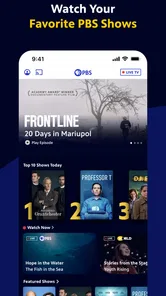
Sharing a screen at home can make choosing something to watch a small group project. I find the PBS app most appealing when someone wants a documentary or a familiar series without turning the evening into a long search through general-purpose streaming catalogs. Its mix of live viewing and on-demand programs gives a household a useful place to start, though it works best when everyone is comfortable taking turns with the same viewing setup.
A shared screen, with room for different tastes
For a realistic weeknight, imagine one person wanting the evening’s live broadcast while another would rather find a documentary to watch later. PBS can suit both moods: it offers live TV alongside programs available to stream. That combination is more useful than a catalog made only for browsing, especially if you already know you want public-media programming. I would still agree on what to watch before settling in; a shared screen and account can make personal preferences less private and the next choice less obvious.
The app is free, and PBS Passport is the route to full seasons for eligible viewers. I would check what is available to me before planning a whole series night around it, since access can depend on the program and the Passport arrangement. If a household mainly wants the newest episode of a show from a commercial service, a subscription app focused on that network may be a better fit. PBS makes more sense when its particular mix of news, documentaries, drama, and educational programs is the draw.
Deciding who signs in and what to expect
Before using it on a shared phone or tablet, I would settle whose PBS account is being used and who is comfortable with that choice. This is ordinary household coordination, not a reason to assume the app has special family controls. If several people use one device, check that the account belongs to the person who intends to access Passport content, and avoid treating one person’s sign-in as a separate profile for everyone else.
That small bit of planning can prevent confusion later: a viewer may think a full season should play, only to discover that the desired access is tied to Passport. I would also decide whether live viewing or a particular program is the priority before handing over the device. These habits matter more on a shared screen than they do when one person watches alone, because the next user may not know which account is active or what access it provides.
Discovering the World of PBS
First off, let me just say how pleasantly surprised I was by the sheer range of content available on the PBS: Watch Live TV Shows app. Whether you're a fan of riveting documentaries, captivating dramas, or educational children's programming, this app has something for everyone. It's like having a front-row seat to a world of storytelling that’s both entertaining and enlightening.
Easy Navigation and User-Friendly Interface
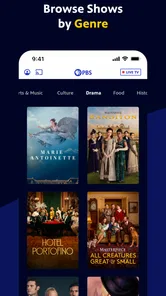
One of the first things I noticed was how intuitive the interface is. It’s designed with the user in mind, making it super easy to find what you’re looking for. The categories are neatly organized, and the search function works like a charm. Honestly, it feels like the app developers really understood the importance of a smooth and hassle-free user experience.
More From Our News Desk

 Gmail
GmailGmail in a Busy Inbox: Who Benefits Most?
From first account to crowded workday, Gmail earns its place through dependable search and flexible sorting—but its best fit depends on how much inbox maintenance you can tolerate.

 Prime Video
Switching to Prime Video: What Changes in Your Viewing Routine
Prime Video can make a compelling second home for streaming, but switching means learning a different catalog, rental layer, and route from browsing to playback.

 Universal TV Remote Control
Universal TV Remote Control Works Best as a Reliable Backup
A phone remote earns its place through quick setup and reliable habits. Here is how to get more from Universal TV Remote Control—and where its limits show.

 Weather - By Xiaomi
Weather by Xiaomi Review: Clear at a Glance, Less Clear Up Close
Xiaomi’s weather app makes everyday forecasts quick to scan, but its calm surface can leave useful details and recovery paths harder to find than they should be.

 X
XX Under Pressure: Can It Recover When Posting Goes Wrong?
A resilience-focused review of X, examining setup, mistaken posts, interruptions, weak connections, and the gaps that matter when recovery needs to be dependable.

 Clash of Clans
Clash of Clans Is Won Between the Battles
Its raids are quick; its community is a long-term project of coordination, teaching, rivalry, and shared responsibility—with all the friction that entails.
Latest News



My practical tip is to search by program when you already have a title in mind, rather than browse every category hoping to stumble across it. On a shared device, that can also help keep the viewing decision quick and avoid scrolling through choices that do not interest the rest of the room. I would use browsing when I have time to explore, but search when the household has already agreed on what to watch.
Streaming Quality and Performance
Let's talk about streaming quality. I streamed a couple of episodes of "Nature" and "Masterpiece," and the quality was top-notch. No annoying buffering or lag, just seamless streaming. It’s clear that the app is optimized for performance, ensuring that you get the best viewing experience possible.
In day-to-day use, I would treat live viewing and on-demand viewing as different plans. Live TV is convenient when I want to join what is currently airing; an on-demand program is easier to fit around dinner, homework, or a late start. If a household has a particular time to watch together, live programming can provide a natural appointment. If people keep different schedules, on-demand viewing is usually the less stressful choice.
Personalization and Features
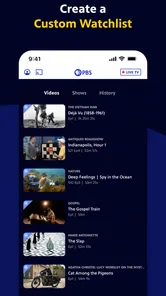
Another cool feature is the personalization aspect. The app allows you to set up a custom watchlist, so you never miss an episode of your must-watch shows. Plus, it sends you reminders for upcoming episodes, which is a nice touch. It’s like having a personal assistant who knows your TV preferences!
For a shared household, I would keep the watchlist focused on programs everyone is actually considering, rather than treating it as a perfect record of each person’s interests. A reminder is helpful if a show has a regular broadcast time, but it does not replace checking whether the episode or season you want is available to your account. That distinction is useful when planning a family viewing night around a specific series.
Accessibility, age context, and availability
What’s also great about this app is its accessibility. It’s available on both Android and iOS, so no matter what device you’re using, you can dive into the world of PBS. Plus, the app is free to download, which is always a bonus. You do need to sign in with your PBS account to access the full range of content, but the sign-up process is quick and painless.
PBS is an entertainment app from PBS, with a Teen content rating. I would use that rating as a prompt for parents and caregivers to choose programs with the young viewer in mind, rather than assume every title suits every age. The presence of children’s programming is helpful for family browsing, but the household should still decide what is appropriate for its own viewers. There is no substitute for an adult checking the specific program before making it the shared choice.
The app has a 4.8 average from around 22,000 ratings, and more than a million installs. It is free, and its current version is 5.21.1, with Android 6.0 as the minimum system requirement. Those details make it a reasonable option to consider on a compatible device, but I would judge it by whether PBS’s programming and the way my household watches actually fit together. Someone looking for a huge all-studio catalog or a dedicated children’s video service may be happier with another option.
Making a viewing plan that works for everyone
One useful way to share the app is to separate choosing from watching. I would ask everyone to suggest a title before opening the catalog, then use search to see whether it is available. That simple routine keeps one person from doing all the browsing while the others wait, and it makes the app’s strength—quick access to a known PBS program—more apparent. When nobody has a specific choice, browsing together can turn discovery into part of the evening rather than a chore.
There is a trade-off with a common device: one person’s watchlist and reminders may shape what the next user sees or expects. I would not assume the app keeps separate household tastes neatly apart. If people want different viewing histories or private recommendations, using their own devices and accounts where appropriate is a more sensible arrangement than sharing one sign-in and expecting it to behave like individual profiles.
For a busy household, live television can be a good fit when everyone is free at the same time, while on-demand viewing is easier when schedules do not line up. I would also avoid promising a specific episode as the evening’s entertainment until I have checked its availability. That is especially useful if the plan depends on Passport access: confirm the program first, then decide whether the group wants to watch now or save the choice for another time.
How it compares with other ways to watch
Compared with broad commercial streaming services, PBS is a more focused choice. I would open it for public-media news, documentaries, dramas, and educational programming rather than expect it to replace every other service in the living room. The narrower identity is a benefit when that is exactly what the household wants; it is a limitation when viewers expect one subscription-style library to cover every genre, studio, and current release.
It also serves a different purpose from a traditional live-TV package. If the main goal is a wide set of channels and a familiar channel-surfing routine, a dedicated television service may suit better. PBS is appealing when its own live offering or a particular program is the point, and when on-demand viewing provides enough flexibility for the household. I would think of it as a useful specialist option, not as a universal replacement for cable or every streaming app.
For children’s viewing, the fact that the app includes educational programming is a reason to explore it together, not a guarantee that every item is right for every child. I would choose a specific program with the child’s age and interests in mind and stay involved in the selection. If a caregiver needs strong, clearly separated child profiles or tightly managed viewing, a service built around those controls may be a better match.
Who will get the most from it
I think PBS is especially worthwhile for viewers who already seek out documentaries, public affairs, educational shows, or PBS drama and want live and on-demand options in one place. It can also be a useful addition for people who do not want every evening’s choice to come from the same large commercial catalog. Because the app is free, it is easy to consider as a complement to other services when its programs are part of the household’s routine.
I would be less enthusiastic if someone wants a huge library of unrelated entertainment, expects every show to be available as a complete season, or needs individual household profiles to keep preferences separate. The Passport distinction is important here: free access does not mean every program or full season is available on the same terms. A quick check of the desired title before planning around it can save a disappointing change of plan.
Before installing it on an older Android device, I would check that the operating system meets the minimum requirement. The app first appeared on June 9, 2015, and its current version is 5.21.1. Those details are most useful as practical compatibility context; the more important question is whether the device is comfortable to watch on and whether the household wants PBS’s particular programming. On a small phone, a short news segment is an easy fit, while a shared tablet or television setup makes a longer documentary more comfortable.
As with any streaming app, I would make the first use a low-pressure test: open a program the household already wants, check how it plays, and confirm what access is needed before planning a longer session. That answers the everyday questions that matter most: whether the app suits the device, whether the chosen title is available, and whether the account arrangement works for the people sharing it. It is a more reliable test than judging the whole service from a quick browse.
So, there you have it, folks. If you’re a fan of quality programming and looking for a reliable way to watch your favorite PBS shows on the go, the PBS: Watch Live TV Shows app is definitely worth checking out. It’s a blend of convenience, quality, and content that I think many people will appreciate. Happy watching!
PBS: TV Shows & Documentaries Frequently Asked Questions
Does PBS: Watch Live TV Shows offer live television as well as on-demand programs?
Yes. PBS: Watch Live TV Shows brings live television together with on-demand programming, including news, documentaries, educational shows, and episodes from PBS series. That mix can suit viewers who want to follow live broadcasts as well as choose a program when it fits their schedule. The exact programs available to watch can vary, so browsing the app is a practical way to see what interests you.
What kind of programming can I find in the PBS app?
The app focuses on PBS content, including news, documentaries, educational programming, and entertainment. You can explore live TV and episodes, while PBS Passport adds access to full seasons of select shows and additional content. This range makes the app useful for viewers looking for informative programs as well as series to watch for enjoyment, though the selection depends on what is available through the service.
Is PBS: Watch Live TV Shows suitable for families and younger viewers?
PBS: Watch Live TV Shows is an entertainment app centered on PBS programming, including educational shows, news, and documentaries. Its content rating is Teen, so parents may want to consider that rating when deciding whether it is appropriate for younger viewers. Families can browse the available programs together and choose titles that suit their interests and comfort levels.
What does PBS Passport add to the viewing experience?
PBS Passport is an optional benefit that provides access to full seasons of select shows and additional content. It is useful if you want more than the programming available to watch for free, though it is not required to use the app. The free app includes live TV and episodes, while Passport access depends on a subscription.
What is PBS: Watch Live TV Shows?
PBS: Watch Live TV Shows is a streaming application that allows users to watch a wide range of educational and entertaining content from PBS. It features live TV, past episodes, and special series, making it a comprehensive source for quality programming. Available on both Android and iOS, it offers a user-friendly interface and a seamless viewing experience.
Pros
- High-quality streaming experience
- Wide variety of educational content
- User-friendly interface
- Compatible with multiple devices
- Free access to live TV shows
Cons
- Limited international content
- Requires stable internet connection
- Ads in the free version
- Limited offline viewing options
- Some content requires subscription











