Papa Murphy’s Pizza
- 8.12K
- 4.0
- Installs
- 1.00M
- Price
- Free
Screenshots
Analysis by Reviewed
When I’m deciding whether to use a restaurant app, convenience matters, but so does knowing what I’m choosing to share and where an order will lead me. Papa Murphy's Pizza is a free Food & Drink app from Papa Murphy's, built around ordering its take-and-bake pizzas and keeping track of rewards. Its approach suits people who already plan to pick up Papa Murphy’s food and finish cooking it at home; it is less compelling if I want a broad restaurant directory or delivery options from many places.
Trust starts with a clear use
I find the app easiest to assess when I treat it as a direct route to one pizza chain, rather than as a general food-ordering service. That focus can make repeat orders more practical, but it also means its usefulness depends on having a participating Papa Murphy’s location that works for your plans. Before building an order, I’d check the pickup location and timing that suit me, especially if I’m coordinating dinner for other people.
The app is rated for Everyone, and it has an average rating of 3.6 from around 17,000 ratings. Those figures give a rough sense of how people have responded, not a guarantee that every ordering experience will be smooth. I’d judge it by whether it handles my particular routine: finding a nearby shop, choosing a pizza, and making pickup fit the evening.
Keep the checkout deliberate
Ordering food involves decisions about the meal and the pickup, so I’d review the basket carefully before completing it. For a group order, that means checking each customization and confirming that the selected location is the one everyone can reach. This small pause is more useful than assuming an earlier order or saved preference still matches tonight’s plan.
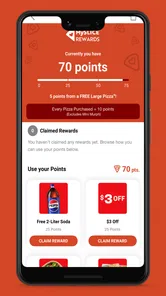
The app’s rewards angle may be worthwhile if I return to Papa Murphy’s often enough to care about tracking them. If I only order occasionally, I’d weigh that convenience against the extra step of using a dedicated restaurant app instead of choosing a nearby alternative in a general ordering service. I wouldn’t install it just for rewards unless the chain is already part of my routine.
Where I’d be cautious
Restaurant apps can involve account and notification choices, so I’d take a moment to review the options shown on my own device and decide what I want enabled. I wouldn’t assume that a notification is necessary to place an order, or that keeping an account is essential for every visit. Those choices can change how much ongoing contact I get from the app without changing what kind of dinner I’m planning.
It has more than a million installs, and its current version is 25.11.2025102202, with Android 10 as the minimum operating-system requirement. The app was released on September 4, 2018, and has around 7,500 written reviews. I see those details as context, not a substitute for checking how it behaves on my phone. If it feels slow or awkward during checkout, the restaurant’s other ordering route or an in-person visit may be a better fit.
More From Our News Desk

Weather by Xiaomi Review: Clear at a Glance, Less Clear Up Close

X Under Pressure: Can It Recover When Posting Goes Wrong?

Clash of Clans Is Won Between the Battles

Android Auto Makes the Case for Quieter Car Software

MobiOffice: Transforming Mobile Productivity with Seamless Integration

EA SPORTS FC™ Mobile Soccer: Redefining Mobile Sports Gaming
For a typical weeknight, I’d use it when I know the group wants Papa Murphy’s, have a location in mind, and can collect the uncooked pizza before heading home. That workflow is different from ordering a ready-to-eat meal: I need time and an oven at home, so it won’t solve dinner if I’m unable to bake it. The trade-off is worthwhile when I want the take-and-bake format, but a delivery service or another restaurant is more practical when cooking and pickup are inconvenient.
Overall, I’d recommend trying it if Papa Murphy’s is already a regular choice and you want a direct way to arrange pickup and follow rewards. I’d skip it if you rarely visit the chain, prefer a single app for many restaurants, or need dinner delivered ready to eat. The most sensible approach is to make one straightforward order, check the location and customizations before paying, and decide afterward whether the app genuinely saves effort for your household.
Ordering Made Easy
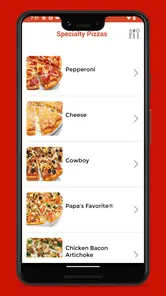
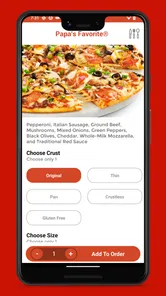
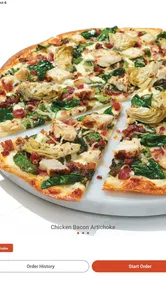
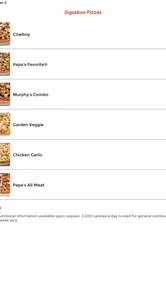
First off, let's talk about how simple Papa Murphy's Pizza makes ordering your favorite pie. The app is designed with user-friendliness in mind, making it super easy to browse through the menu. You can customize your pizza just the way you like it, and there are plenty of options to suit every taste. Whether you're a meat lover or a veggie fanatic, they've got you covered.
Features at Your Fingertips
What I really love about this app is how it keeps everything at your fingertips. You can save your favorite orders for next time, so it's even quicker to satisfy that pizza craving. Plus, the app sends you notifications about exclusive deals and offers, which is perfect for a pizza lover on a budget.
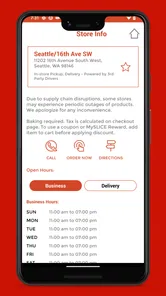
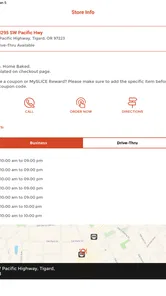
The app also has a store locator feature, which is a lifesaver when you're on the go and need to find the nearest Papa Murphy's to pick up your order. It’s all about convenience, and this app nails it.
A Personal Touch
One of the standout aspects of the app is how it adds a personal touch to your ordering experience. You can read reviews from other users, which helps in deciding what to try next if you're in the mood for something new. Plus, the app's interface is clean and straightforward, making it easy to navigate even for those who aren't tech-savvy.
And for those who love a good surprise, the app sometimes features "mystery deals" that you can unlock. It's like a little pizza adventure every time you order!
Choosing the right ordering routine
The practical question is not just whether ordering through the app is easy, but whether it fits the way I want dinner to happen. Papa Murphy’s pizzas are meant to be baked at home, so the app is best for someone who can pick up the food and has the time and equipment to finish the meal. If I’m coming home late, traveling, or trying to feed people without cooking, a ready-to-eat pizza or a delivery option is the more sensible choice.
For a family movie night, I’d decide on the pickup shop before browsing, then make the order while I still have time to check the details. That order of operations matters: choosing a location first helps avoid building a basket around a shop that is inconvenient for the route home. Before checkout, I’d also ask the group about toppings and sizes rather than trying to settle disagreements at the counter. The app can organize the choices, but it cannot make a take-and-bake meal fit a schedule that leaves no time to bake it.
There is a useful trade-off between saving a familiar order and starting fresh. A saved favorite can cut down on repeat decisions, but I would still inspect it each time because tonight’s group, pickup location, or preferences may be different. Treating saved details as a shortcut rather than a final confirmation is a simple way to keep convenience without accidentally carrying over an old plan.
How it compares with broader food apps
Compared with a general restaurant-ordering app, this one is deliberately narrow. I would choose a broader service when I’m undecided, want to compare several cuisines, or need a ready-to-eat delivery option. I’d choose Papa Murphy’s app when I already want this chain and the take-and-bake format, because a direct app keeps the task focused on its menu, location, and rewards rather than making me sort through unrelated restaurants.
That focus is also the main limitation. It is not a substitute for a restaurant marketplace, and the rewards component only has practical value if I return often enough to use it. Someone who visits Papa Murphy’s once in a while may find that installing and maintaining another restaurant app adds more friction than it removes. For regular customers, by contrast, a dedicated route can be convenient when a familiar order and pickup routine are already part of the week.
Small checks that protect the plan
I’d make the final review of an order at a calm moment rather than while walking out the door. Confirm the chosen shop, pickup details, and each requested customization, then check that the order still matches the people who will be eating. This is especially helpful for group meals: a small change in toppings can matter more than shaving a few seconds off checkout.
Rewards and offers are another reason to pause and read what is actually displayed. The app’s notifications may help surface deals, but I would treat them as optional prompts rather than a reason to order. If I prefer fewer alerts, I’d review the device and app choices available to me and keep only what I find useful. A discount is only a benefit when it applies to something I wanted anyway and the pickup plan still works.
For a first-time user, I’d keep the initial order uncomplicated. That makes it easier to learn how the menu, customization choices, and pickup flow feel on the phone without having to troubleshoot a complicated group order at the same time. Once that basic route feels comfortable, saved favorites and rewards tracking may make repeat visits more convenient. If anything about the checkout is unclear, I’d stop and confirm the order before submitting it rather than assuming the app has interpreted an earlier choice correctly.
A Personal Touch
One of the standout aspects of the app is how it adds a personal touch to your ordering experience. You can read reviews from other users, which helps in deciding what to try next if you're in the mood for something new. Plus, the app's interface is clean and straightforward, making it easy to navigate even for those who aren't tech-savvy.
And for those who love a good surprise, the app sometimes features "mystery deals" that you can unlock. It's like a little pizza adventure every time you order!
Ending on a Delicious Note
In conclusion, the Papa Murphy's Pizza app is a game-changer for anyone who loves the idea of freshly baked pizza from the comfort of their own home. It's user-friendly, packed with convenient features, and adds a sprinkle of fun to the pizza ordering process. Whether you’re planning a movie night or just craving a cheesy delight, this app has got your back. So, next time you're in the mood for some deliciousness, give it a try. You might just find your new favorite way to enjoy pizza!
Papa Murphy’s Pizza Frequently Asked Questions
Can I use the Papa Murphy’s Pizza app to find a nearby restaurant?
The app is centered on Papa Murphy’s pizza ordering and rewards, making it a handy place to start when planning a pickup. You can explore the ordering options and choose a location as part of placing an order. If you already have a preferred restaurant, the app can help keep your ordering routine together with your rewards activity.
Does the Papa Murphy’s Pizza app support pickup orders?
The app is designed to make ordering Papa Murphy’s pizza fast, and pickup is part of the ordering experience described for the app. You can browse the menu, customize an order, and select a preferred pickup time. This can be useful when you want to arrange your meal ahead rather than make your selections at the restaurant.
Can I browse the menu before deciding what to order?
Yes. The app lets you browse Papa Murphy’s menu before placing an order, which is helpful if you want to compare options or plan a meal in advance. You can also customize an order through the app, so browsing and choosing ingredients can happen in one place. The experience is aimed at making the ordering process more convenient.
Is the Papa Murphy’s Pizza app free, and which devices can run it?
The Papa Murphy’s Pizza app is free to download and is designed for ordering and rewards on mobile devices. It is listed for Android and iOS, so you can look for it in the relevant app store for your device. Check that your operating system meets the app’s minimum requirement before downloading; the app is rated Everyone, making it suitable for a broad audience.
What is Papa Murphy's Pizza app and how can it benefit me?
Papa Murphy's Pizza app is a convenient mobile application designed to make ordering your favorite pizzas quick and easy. With this app, you can browse the full menu, customize your order, and choose your preferred pick-up time at your nearest location. The app also offers exclusive deals and promotions, making it a must-have for pizza lovers looking to save time and money. Its focus is on getting made-from-scratch Papa Murphy's pizza fast and tracking rewards, which can make repeat visits easier to manage.
Pros
- User-friendly interface makes ordering easy
- Customizable pizza options for all tastes
- Frequent promotions and discounts available
- Order tracking for real-time delivery updates
- Loyalty program offers rewards for frequent customers
Cons
- Limited delivery areas restrict access
- App occasionally crashes during peak times
- No dine-in option available
- Requires account creation to place orders
- Limited payment options for some users











