Panda Express
- 26.31K
- 4.6
- Installs
- 5.00M
- Price
- Free
Screenshots




Analysis by Reviewed
I find the Panda Express app most useful when I already know I want Panda Express and want to handle the order before I get to the restaurant. It is a free Food & Drink app from Panda Restaurant Group, Inc., and its main appeal is practical: menu browsing, meal choices, ordering, and rewards are brought together in one place. If you usually decide what to eat while standing in line, that convenience may matter more than any single feature.
What the Free App Is Worth
There is no purchase price to weigh against the app’s features, so trying it does not require a paid commitment. That is useful if you are curious about ordering ahead or want to see whether the rewards fit your habits. The cost of the meal itself is separate, though, and I would not confuse free access with free food or assume rewards will change the price of every order.
For me, the app’s value comes from reducing small bits of friction: deciding what to get before reaching the counter, keeping a familiar order handy, and checking rewards in the same place as the menu. Those conveniences matter most when Panda Express is already on your shortlist. If you are choosing between several restaurants, a multi-restaurant ordering service or a quick search may be more useful because it lets you compare options across brands.
Easy Navigation and User-Friendly Design
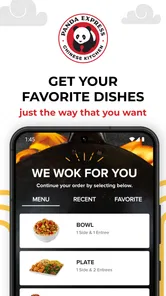
The first thing you'll notice about the Panda Express app is its sleek and intuitive design. Navigating through the app feels like a breeze. With just a few taps, you can explore the extensive menu, customize your order, and even find nutritional information if you're counting calories. It's all about making the user experience as smooth as possible, and I must say, they've nailed it.
The app is rated 4.7 on average, with around 60,000 ratings, and has been installed over 5 million times. Those figures suggest it has found a substantial audience, but I would still judge it by whether it fits your routine: a dedicated restaurant app is most helpful when you order from that chain often enough to appreciate a familiar menu and saved choices.
Customization Galore
One of the coolest features of this app is the level of customization it offers. Whether you're in the mood for a bowl, plate, or a family feast, you can personalize your meal to your heart's content. Want extra orange chicken? No problem. Prefer fried rice over chow mein? You got it! This kind of flexibility is what makes ordering food fun and tailored to individual tastes.
A useful way to approach customization is to make the main choice first, then check the sides before moving on. That helps when you are ordering for people with different preferences, because you can compare combinations without trying to negotiate over a counter. If nutrition affects your decision, the menu information can also help you think through options before you commit, though it is still worth checking the details for the exact items you plan to order.
More From Our News Desk

Weather by Xiaomi Review: Clear at a Glance, Less Clear Up Close

X Under Pressure: Can It Recover When Posting Goes Wrong?

Clash of Clans Is Won Between the Battles

Android Auto Makes the Case for Quieter Car Software

MobiOffice: Transforming Mobile Productivity with Seamless Integration

EA SPORTS FC™ Mobile Soccer: Redefining Mobile Sports Gaming
Effortless Ordering and Fast Checkout
Ordering through the app is not only easy but also incredibly fast. You can save your favorite orders for quick reordering, which is perfect for those days when you need your food fix in a hurry. The checkout process is seamless, offering multiple payment options, including Apple Pay and Google Wallet. Who doesn’t love a quick and easy checkout?
For example, if I have a short lunch break, I can decide on my usual meal in advance, review the order, and avoid making every choice while other people wait behind me. Saved orders are especially useful for repeat visits, but I would still review the basket each time: a familiar order is convenient, yet it is easy to overlook a side or carry forward a choice that no longer suits the group. This app is less compelling if you are comparing many nearby restaurants, since a general food-ordering service is better suited to browsing across brands.
A Practical Order-Ahead Routine
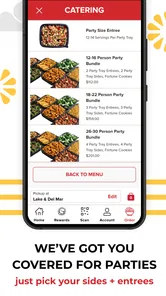
One small workflow I find helpful is to settle the meal before the busiest part of the day, then give the basket a fresh read when I am ready to place the order. It separates the slower decision—what everyone wants—from the quick final check. When ordering for coworkers, I would ask each person for their entrée and side choices first, rather than passing one phone around while people make decisions in a queue.
That routine also makes it easier to catch mismatches between what someone requested and what ended up in the order. For a group, I would read each selection aloud or send a clear summary before checkout. The app can make the ordering steps more organized, but it cannot resolve unclear preferences for you; a minute of coordination beforehand can prevent the familiar office-lunch problem of discovering that a side was chosen for the wrong person.
Exclusive Rewards and Offers
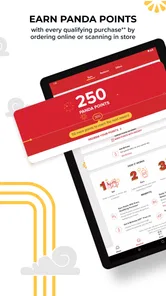
Here’s a little secret: the app is not just about ordering food. It's also a gateway to exclusive rewards and offers. By using the app, you can rack up points with every purchase which can be redeemed for free entrees and other surprises. It's a great way to get a little extra out of your dining experience.
Rewards add value mainly for people who already visit Panda Express; I would not treat them as a reason to order food I did not want in the first place. If you are new to the app, check the rewards area before placing an order so you understand what is available and can see whether it changes your choice. A casual customer may get more use from the ordering convenience than from collecting points, while a regular can make both parts of the app worthwhile.
Getting More from the Rewards Side
A practical habit is to check the rewards section before choosing a meal, not after you have already settled on one. That way, any available offer can inform the decision without steering you into buying something just to chase points. I would also treat rewards as a bonus attached to an order I already planned to make, rather than trying to calculate a complicated long-term payoff from occasional visits.
This distinction matters if you are comparing the app with a general delivery or restaurant service. A broad service may be better for discovering unfamiliar places, while Panda Express’s own app is more focused on the chain’s menu and its rewards. The dedicated approach is a real advantage when you are a repeat customer; it is less useful if you rarely eat there or prefer to keep all restaurant choices in one place.
What to Expect Before You Rely on It
The app is free to download, so there is no purchase price to weigh against its features. That makes trying it low-risk, but it does not mean every meal or order is free; the cost of food remains separate. The app is rated for Everyone, and its current version is 7.3.4, with Android support beginning at version 7.0. It was released on August 20, 2014, and has accumulated around 23,000 written reviews.
As with any restaurant-specific app, its usefulness depends on whether Panda Express is a practical choice where you live and eat. A menu and ordering tool cannot make a location convenient if you are nowhere near one, and it is not a substitute for a broad restaurant search when your group has not settled on a place. I would also avoid assuming a saved order or reward will suit every visit; taking a moment to inspect the final selections is a sensible habit.
When Another Option Makes More Sense
If you are unfamiliar with the menu, ordering in person may be more comfortable for a first visit, especially if you want to ask a staff member about a choice before deciding. The app is strongest when you already know the kind of meal you want and can make those choices without help. For someone who wants to browse multiple cuisines, compare restaurants, or coordinate a meal around places beyond Panda Express, a general-purpose food app is the more practical starting point.
I would also be cautious about relying on an order-ahead routine when the plan is still changing. If your group has not agreed on a restaurant or people are likely to change their minds, placing the order early can create more back-and-forth rather than less. In that situation, use the app to look over the menu, but wait until the group is settled before committing to a basket.
Who Will Get the Most from It?
I would recommend it to regular customers, people who like choosing their meal before arriving, and families or coworkers who need to settle on different combinations without slowing down the order. If you are only looking for a one-off meal, downloading a dedicated app may not add much over ordering in person. And if your priority is choosing among many cuisines, a general restaurant app is the more natural place to start. For Panda Express fans, though, the no-cost app is an easy way to make repeat orders more organized and see whether its rewards suit their habits.
A realistic example is a workday lunch with a short break and a few people ordering together. I would use the menu to collect everyone’s choices in advance, check that each meal has the intended sides, and then place the order once the group agrees. That is where the app can earn its place: not by making lunch decisions for you, but by moving the menu review and coordination out of the line and into a calmer moment.
The app is also a better fit for people who have a dependable nearby Panda Express than for someone who travels around and picks food based on whatever is closest. A chain-specific tool naturally narrows the choice to one restaurant brand. That focus keeps repeat ordering straightforward, but it means the app is not a substitute for comparing locations, cuisines, or restaurant options when flexibility is your main priority.
My Verdict on Downloading It
Overall, I see this as a useful, no-cost companion for customers who already like Panda Express and want a more organized way to browse, customize, and repeat an order. The rewards can add appeal for regular visits, while saved choices can make familiar meals quicker to assemble. Neither benefit makes the app essential for every diner, and neither removes the need to check the basket before ordering.
For a first-time or occasional customer, I would download it only if the menu and ordering convenience solve a real problem for that visit. For a regular, the low barrier to trying it makes sense, provided the restaurant is convenient and the focused selection suits your routine. If you want broad restaurant discovery, prefer deciding face-to-face, or do not visit Panda Express often, skipping the app is a reasonable choice. If you do return regularly, it is worth seeing whether its ordering flow and rewards genuinely save you effort.
Panda Express Frequently Asked Questions
Can I browse the Panda Express menu in the app before deciding what to order?
Yes. The app lets you browse the menu and review meal choices before placing an order. This can help you compare options and decide what you want at your own pace. If you already have a particular meal in mind, you can select items and customize them before adding them to your cart.
Does the Panda Express app help me find a nearby restaurant?
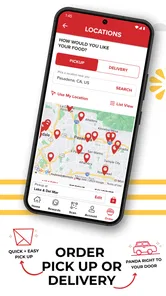
The app includes a feature for finding nearby Panda Express locations, which can be useful when you want to plan an order around where you are. You can use it alongside the ordering features to explore your options and choose a location. It brings restaurant discovery and ordering together in one place.
Is the Panda Express app free to download, and what devices can use it?
The Panda Express app is free to download and is designed for Android devices running version 7.0 or later. It is a Food & Drink app from Panda Restaurant Group, Inc., with an Everyone content rating. If you are considering downloading it, checking that your device meets the operating-system requirement is a sensible first step.
What is Panda Express and what services does it offer?
Panda Express is a popular fast-food chain specializing in American Chinese cuisine. The app offers a seamless experience for ordering your favorite dishes, tracking your order status, and finding nearby locations. It also provides nutritional information, exclusive deals, and rewards for frequent customers, enhancing your dining experience.
How can I place an order through the Panda Express app?
Placing an order through the Panda Express app is simple and convenient. After downloading the app, create an account or log in. Browse the menu, select your items, and customize them according to your preferences. Add them to your cart, proceed to checkout, and choose your payment method. Confirm your order to enjoy your meal.
Pros
- User-friendly interface for easy navigation.
- Wide variety of Asian-inspired dishes.
- Offers customization for dietary preferences.
- Quick and responsive customer support.
- Regular updates and improvements.
Cons
- Limited delivery areas available.
- Some dishes can be high in calories.
- App requires constant internet connection.
- Occasional glitches in payment processing.
- Limited options for vegan users.











