Outback Steakhouse
- 4.98K
- 4.7
- Installs
- 1.00M
- Price
- Free

Screenshots

Analysis by Reviewed
I find the Outback Steakhouse app most useful when I already know I want food from this particular restaurant and want a more direct route from craving to order. Rather than treating it as a general dining guide, I see it as a way to handle the practical steps around choosing and arranging an Outback meal. That focus is what makes it worth considering: it is designed for people who visit the chain, not for comparing every restaurant nearby.
Where a restaurant-specific app earns its place
When I’m deciding what to eat, a general food app is useful for discovering nearby choices, comparing cuisines, or checking several businesses at once. Outback’s app has a different job: it keeps the restaurant’s menu and visit-related tasks together. That distinction matters most after I’ve already settled on Outback. Instead of switching between a search app, a menu page, and a phone call, I can start with the restaurant’s own tools.
That focus also means I wouldn’t use it as my only food app. It is not the right starting point when I’m unsure what I want or when I need to compare local restaurants. For those decisions, a broader dining or delivery service is more practical. But once Outback is the plan, a dedicated app can reduce the small bits of coordination that otherwise make ordering or meeting up feel more complicated than it needs to be.
Ordering Made Easy
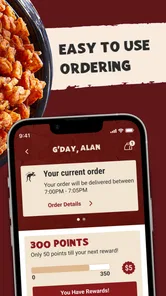
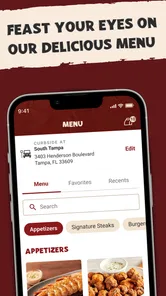
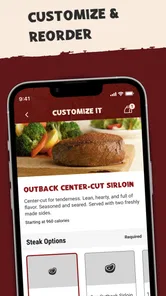
Let’s be honest, one of the best things about the Outback Steakhouse app is how it simplifies the process of ordering your favorite Aussie-inspired dishes. You know those times when you’re really craving a Bloomin’ Onion but don’t want to deal with the hassle of calling in or waiting in line? This app is your best mate! With a few taps, you can explore the entire menu, customize your order just the way you like it, and even save your favorite meals for next time.
Putting an order together
The useful part of a saved favorite is not merely avoiding a few taps. It can help when I’m ordering for a group and need to repeat a familiar combination without rebuilding it from memory. I’d still review the details before placing an order: a saved choice is a shortcut, not a reason to assume every meal or preference is automatically carried over exactly as expected. For a new dish, browsing first also gives me a chance to compare options before committing.
For a practical weeknight routine, I could check the menu while deciding what everyone wants, settle the order before the drive, then use the app to place it rather than trying to explain several items over a phone call. That is especially handy when one person wants a familiar favorite and another is choosing something different. I would keep the app open long enough to verify the order details and any available collection or dining choices, rather than rushing through the last step.
Making a group order less fiddly
A useful way to get more from the menu is to decide who is choosing what before starting the final order. I’d ask everyone for a preferred dish and any adjustments, then check each item as I add it. That simple division of labor can prevent the common problem of placing an order quickly and only afterward discovering that someone expected a different side or customization. For a group, the app is best treated as a shared checklist rather than a substitute for confirming preferences.
More From Our News Desk

Weather by Xiaomi Review: Clear at a Glance, Less Clear Up Close

X Under Pressure: Can It Recover When Posting Goes Wrong?

Clash of Clans Is Won Between the Battles

Android Auto Makes the Case for Quieter Car Software

MobiOffice: Transforming Mobile Productivity with Seamless Integration

EA SPORTS FC™ Mobile Soccer: Redefining Mobile Sports Gaming
There is a small but meaningful trade-off here: placing an order through a screen gives me more time to inspect choices, but it also makes me responsible for catching mistakes before submission. I’d take a moment to scan the whole order, especially when several people have contributed. If a choice is unclear or an item needs a conversation, contacting the restaurant through its usual channel may be better than guessing. The app is most helpful for straightforward selections that I can confidently review myself.
Perks and Rewards
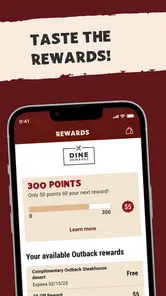
Who doesn’t love a good reward program? The app offers a loyalty program that’s as rewarding as finding a kangaroo in your backyard. Every time you dine, you earn points that can be redeemed for discounts on future meals. It’s like getting a little bonus every time you eat, which let’s be real, is one of the best incentives to keep coming back for more.
And if that wasn’t enough, the app sometimes surprises users with exclusive offers and promotions that aren’t available anywhere else. It’s like having a little secret stash of savings right in your pocket.
I’d treat those perks as a welcome extra, not the main reason to choose dinner. If I’m already planning an Outback visit, it makes sense to check the app before paying and keep track of the rewards it shows. But someone who rarely eats at the chain may find that a general restaurant-discovery or delivery service is more useful day to day; a restaurant-specific loyalty program has the most value when it matches habits you already have.
Getting sensible value from rewards
For rewards to be genuinely useful, I’d build the habit of checking the app at the point when I’m already planning a visit, rather than making an extra trip just to chase a deal. That keeps the restaurant choice tied to what I actually want to eat. I’d also review the offer details before relying on them, since promotions can have their own conditions and a reward is only helpful if it applies to the meal I’m planning.
This is a better fit for someone who returns to Outback than for someone who samples a different restaurant every time. If my visits are occasional, the loyalty element may not change my decision much. If I already go with family or friends, checking the available rewards can be a quick part of planning. Either way, I see the program as a modest benefit layered onto the convenience of the app, not a reason to spend more than I intended.
Planning a visit without guesswork
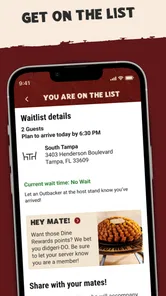
If you’re the kind of person who likes to plan ahead, you’ll appreciate the reservation feature. You can easily book a table right from the app, ensuring you get the perfect spot without any last-minute scrambling. Plus, the app has a handy waitlist feature, so if you do decide to pop in on a whim, you can check the wait times and snag yourself a spot in the queue. No more standing awkwardly at the entrance, wondering how long until you can dive into that juicy steak!
That makes the app more relevant to a spontaneous dinner than a simple menu browser. If plans are still uncertain, I’d check the waitlist close to the time I expect to arrive and make sure the chosen location and party details are right before relying on it. For a special occasion with a fixed schedule, I’d plan ahead rather than assume a waitlist estimate guarantees a table at a particular minute. The feature can make coordination easier, but it cannot remove the uncertainty that comes with a busy restaurant.
When plans are moving targets
For a casual evening when my group is still deciding whether to eat out, I’d use the reservation or waitlist tools as part of the decision, not as a promise that the timing is settled. I’d first confirm that everyone is comfortable with the location and approximate arrival time, then check the app once the plan is real. If the group is delayed or its size changes, I would revisit the details rather than assume the original arrangement still fits.
This is where the app’s convenience has a natural limit. It can help me organize the restaurant side of an evening, but it cannot coordinate every person or predict how a busy dining room will run. For a dinner with a tight schedule, I’d leave room for uncertainty and contact the restaurant directly if the arrangement needs special clarification. For a flexible meal, the in-app planning tools are more useful because a small wait is less likely to disrupt the whole night.
Who gets the most from it
This is an app I’d recommend to regular Outback guests, people who often order the same meal, and families trying to coordinate a restaurant visit without a string of calls. It is less compelling if you want a broad directory of nearby places, independent restaurant reviews, or one place to manage meals from lots of different businesses. In those situations, a general food app is a better fit because its purpose is comparison across restaurants rather than convenience with one chain.
Outback Steakhouse of Florida, LLC develops this free Food & Drink app. It is rated for Everyone, has an average rating of 4.8 from around 23 thousand ratings, and has passed one million installs. Those figures suggest it has an established audience, though they don’t tell me whether its particular ordering and visit-planning features fit an individual routine. I’d judge it by whether I expect to use Outback often enough to benefit from having its menu and visit tools close at hand.
Who may be better served elsewhere
I’d skip it if I rarely eat at Outback, mainly want independent restaurant recommendations, or prefer to make every food decision in a single service that covers many businesses. A chain-specific app adds the most value when its tools match a repeat habit; otherwise, it can become another icon I open only once in a while. Someone who needs help comparing menus across different restaurants will get more from a general dining app, while someone who already knows the destination may prefer this direct route.
It may also be less useful if I would rather speak to a person about a complicated order or a special arrangement. Digital ordering is convenient when the choices are clear, but it is not automatically better for every situation. I’d use the app for familiar meals, routine planning, and checking what is available, then switch to direct contact if a detail needs personal clarification. That is a practical boundary, not a failure of the app: its strengths are in handling ordinary repeat tasks.
A straightforward interface, with a narrow purpose
Now, let’s talk about the design. The developers have done a stellar job in creating an interface that’s intuitive and easy to navigate, even for those who might not be the most tech-savvy. The layout is clean, the icons are clear, and everything flows smoothly, making the app a breeze to use. Whether you’re placing an order, checking your rewards, or making a reservation, the process is straightforward and hassle-free.
The app’s narrow focus is both its strength and its limitation. I wouldn’t install it expecting a complete food-planning toolkit; I’d use it when the decision is already Outback and I want to move between menu browsing, ordering, rewards, and arranging a visit. If I only eat there occasionally, using the restaurant’s usual options may be enough. If I visit regularly, keeping the app updated can make the repeat tasks simpler; its current version is 5.9.0 and it requires Android 9 or later.
A practical routine for deciding whether to install
Before downloading, I’d ask myself one simple question: do I expect the restaurant’s own menu, ordering, reward, or visit-planning tools to save me effort more than once? If yes, the app has a clear role. If I’m only curious about one meal, browsing through the usual restaurant information may be sufficient, and a dedicated app may not add much to that single visit. This quick test keeps the decision grounded in my habits rather than in the promise of having every restaurant app available.
For someone who does install it, I’d start with the task they actually need: browse before choosing, save a familiar meal only after checking its details, or look at the visit options once the time and party are settled. There is no need to treat every feature as part of every meal. Used selectively, the app is easier to judge: does it remove a step I normally dislike, such as repeating an order or coordinating a visit? If it does, it is earning its place.
In summary, the Outback Steakhouse app is a must-have for anyone who loves good food and great deals. It brings the convenience of modern technology to the classic dining experience, making it easier than ever to enjoy your favorite meals. So, if you haven’t already, give it a download and see how it can enhance your next Outback adventure. Trust me, your taste buds will thank you!
Outback Steakhouse Frequently Asked Questions
How much storage space should I allow for the Outback Steakhouse app?
The app is free to download, but the space it needs on your phone can vary with the device and the version available in its app store. Check the download page before installing and make sure you have enough room for the app and any updates. This is especially useful if your device is already low on storage.
Who develops the Outback Steakhouse app?
The app is developed by Outback Steakhouse of Florida, LLC. Checking the developer name in the app store can help you distinguish the official Outback Steakhouse app from unrelated results with similar names. It is a Food & Drink app for people who want a digital way to engage with the restaurant.
Is the Outback Steakhouse app free, and what devices can install it?
The Outback Steakhouse app is free to download and is available for Android and iOS devices. Its age rating is Everyone, so it is suitable for a general audience. Before installing, check that your device meets the app’s minimum operating-system requirement. The app is listed in the Food & Drink category and is developed by Outback Steakhouse of Florida, LLC.
What is the Outback Steakhouse app used for?
The Outback Steakhouse app is designed to enhance your dining experience by allowing you to easily browse the menu, place orders, and make reservations at any Outback Steakhouse location. Users can also participate in the Dine Rewards loyalty program directly through the app, earning points for every dollar spent. Additionally, the app provides access to special promotions, discounts, and other exclusive offers that are not available elsewhere.
How can I earn and redeem rewards on the Outback Steakhouse app?
By signing up for the Dine Rewards loyalty program through the Outback Steakhouse app, users can earn points for every dollar spent on dining. Once you accumulate enough points, you can redeem them for discounts or free menu items. The app conveniently tracks your rewards balance and notifies you when you have enough points to redeem. Additionally, the app might offer exclusive challenges or promotions to earn extra points.
Pros
- User-friendly interface for easy navigation.
- Offers exclusive deals and discounts.
- Provides a detailed menu with images.
- Allows online reservations and order tracking.
- Includes location-based restaurant finder.
Cons
- Limited customization options for orders.
- Occasional app crashes reported by users.
- Requires account creation for full access.
- Some features need a stable internet connection.
- Push notifications can be overwhelming.











