

onX Fish: Midwest Fishing App
- 71.00
- 4.3
- Installs
- 50.00K
- Price
- Free

Screenshots
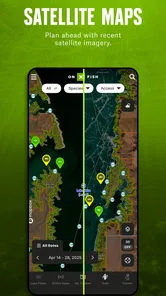
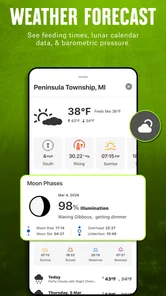
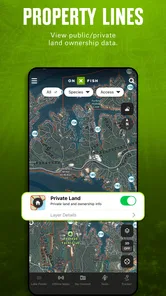
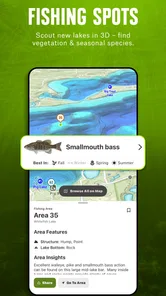
Analysis by Reviewed
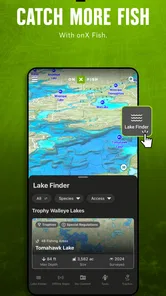
I approached onX Fish: Midwest Fishing App as a practical fishing companion rather than a replacement for local knowledge. Its purpose is straightforward: help me look for fishing spots, narrow lakes using species information, and check weather before deciding where and when to go. That combination makes sense for anglers who would rather spend less time jumping between map searches, species notes, and forecast apps.
The app comes from onXmaps and sits in the sports category. It is free to install, suitable for Everyone, and currently listed as version 26.32.1 for devices running Android 8.0 or later. The free entry point is useful for trying the workflow before committing to anything, although in-app purchases are listed at $34.99 per item, so I would examine what is included before treating the app as a complete long-term solution.
My overall impression is that this is most valuable when used before leaving home. It encourages a repeatable process: identify the kind of fishing I want to do, compare suitable lakes, inspect the forecast, and then make a realistic plan. It is less compelling for someone who only wants a simple weather forecast or already has a trusted local map and a well-established list of waters.
How I would build a reliable fishing routine with it
I’d make the routine dependable by keeping the decision process small: start with the species I want to target, compare only a handful of lakes, and choose a backup before checking the forecast for the planned outing. That gives me a clear way to revisit the same choices each week without letting endless browsing take over. I’d also note which choices worked for my schedule, so future searches begin with better questions rather than assumptions.
Start with the target species, not a random map search
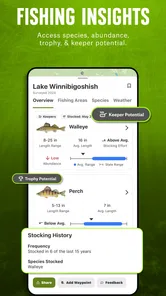
The most useful starting point is the species filter. Instead of opening a broad map and scanning every visible body of water, I can begin with the fish I actually want to pursue. That small change matters because it turns the app from a general map into a planning tool. If I am preparing for a bass trip, for example, I can focus my attention on lakes associated with that species rather than wasting time comparing waters that do not fit the plan.
I would still treat species information as a starting point, not a promise of a successful catch. A lake appearing in a species-based search does not remove the need to consider season, access, water conditions, fishing pressure, and personal experience. The app helps reduce the size of the search; it does not replace judgment at the shoreline.
For a first session, I would choose a small group of candidate lakes rather than trying to inspect every result. I find that this creates a better decision process. One lake may look ideal for the target species, another may offer a more comfortable forecast window, and a third may be a sensible backup if conditions change. Keeping those choices visible makes the final decision less emotional and more practical.
More From Our News Desk

 Weather - By Xiaomi
Weather by Xiaomi Review: Clear at a Glance, Less Clear Up Close
Xiaomi’s weather app makes everyday forecasts quick to scan, but its calm surface can leave useful details and recovery paths harder to find than they should be.

 X
XX Under Pressure: Can It Recover When Posting Goes Wrong?
A resilience-focused review of X, examining setup, mistaken posts, interruptions, weak connections, and the gaps that matter when recovery needs to be dependable.

 Clash of Clans
Clash of Clans Is Won Between the Battles
Its raids are quick; its community is a long-term project of coordination, teaching, rivalry, and shared responsibility—with all the friction that entails.

 Android Auto
Android Auto Makes the Case for Quieter Car Software
The car interface is no longer judged by how much it can do, but by how quietly it helps. Android Auto shows what drivers now expect—and what still gets in the way.

 MobiOffice: Word, Sheets, PDF
MobiOffice: Transforming Mobile Productivity with Seamless Integration
MobiOffice: Word, Sheets, PDF is redefining mobile productivity with a surprising blend of functionality and innovation.

 EA SPORTS FC Soccer Mobile 26
EA SPORTS FC™ Mobile Soccer: Redefining Mobile Sports Gaming
Dive into EA SPORTS FC™ Mobile Soccer, where immersive gameplay and strategic depth transform mobile sports gaming.
Latest News



Use weather as a planning filter
The weather forecast is most useful when I connect it to a specific fishing plan. I would check it after narrowing the lake list, not before. A forecast without a location can be too general to guide a decision, while a forecast attached to a particular water gives me a reason to adjust the trip.
For example, if I am planning a short morning outing before work, I would look for a lake that matches the species goal and then compare the expected conditions during that narrow window. If the forecast makes that choice unattractive, I can move to the next candidate instead of discovering the problem after driving there. This is a simple habit, but it is one of the clearest ways the app can save time.
I would also avoid treating the forecast as fixed. Weather changes, and fishing plans often last longer than the most reliable part of a forecast. My approach would be to check once while preparing, again before leaving, and then use common sense at the water. The app supports that routine, but it cannot make changing conditions predictable.
Keep the first trip deliberately simple
New users may be tempted to explore every available option immediately. I think that is the wrong way to learn this app. I would begin with one target species, a few nearby lakes, and a clear time window. That gives me a chance to understand how the map, species filtering, and weather information fit together without turning preparation into another hobby.
A useful first test is to plan a trip I already know. I can search for a familiar lake, compare its species information with my own knowledge, and see whether the weather view supports the decisions I normally make. This is more revealing than testing the app with an unfamiliar destination because I can quickly recognize whether the information is useful, incomplete, or simply presented differently from my usual method.
Settings that deserve attention before a serious outing
The most important “settings” are really the choices I make about how narrowly I search. I would decide in advance whether I am looking for a species-specific trip, a nearby option, or a weather-friendly backup. Mixing all three goals at once can create a long list that feels informative but is hard to act on.
I would also check that the selected area and search context match the trip I have in mind. A Midwest fishing app is most helpful when I use it for the waters and species relevant to my actual outing, rather than assuming that a broad result automatically applies to every local situation. The more focused the search, the easier it is to compare results honestly.
Another useful habit is to make the weather check part of the setup rather than an afterthought. Before leaving, I would review the forecast for the chosen lake and decide what would make me change the plan. That could mean choosing a shorter session, selecting a backup water, or postponing the outing. Defining that decision rule ahead of time prevents me from forcing a bad plan simply because I have already packed the gear.
I would be especially careful with the paid side of the experience. The app is free, but individual in-app purchases are listed at $34.99 each. That makes it sensible to explore the free experience first and identify whether its workflow fits me. I would not buy an item merely because I wanted more information in the moment; I would first ask whether it changes how I choose lakes, prepare for weather, or organize repeat trips.
Build a repeatable shortlist instead of starting over
One of the better ways to use the app is to create a personal rhythm around it. At the beginning of a fishing week, I might search by species, review several lakes, and select one primary destination plus one fallback. Before the trip, I would revisit the forecast and confirm that the original choice still makes sense.
This approach is more efficient than opening the app only when I am already standing in the driveway. Last-minute searching tends to produce rushed choices. A shortlist gives me a practical alternative when the first lake no longer fits the weather or the timing. It also helps me notice patterns in my own decisions: perhaps I consistently choose waters with a certain species profile or repeatedly reject trips when the forecast creates too much uncertainty.
The important point is that the app becomes more useful through disciplined repetition. I would not expect it to tell me exactly where to cast. I would use it to improve the quality of the choices that happen before casting begins.
Faster patterns for experienced users
Once the basic workflow feels comfortable, I would stop browsing aimlessly and use a fixed order: species first, lake comparison second, weather third, final decision last. This sequence prevents the forecast from distracting me with attractive but unsuitable destinations. It also keeps the species goal at the center of the trip.
A second shortcut is to separate “interesting” lakes from “usable” lakes. An interesting result may look promising because it matches the species search, but a usable choice also fits my available time and the expected conditions. Making that distinction helps avoid a common planning mistake: choosing the most exciting option instead of the option most likely to produce a manageable day.
I would also prepare a backup before leaving home. This is a small but non-obvious improvement. If I wait until the primary plan fails, I may be too tired, too late, or too unfamiliar with the area to make a good second choice. Selecting the backup while I am calm turns the app into a contingency planner rather than a single-destination search tool.
For short outings, I would use the app to reduce travel uncertainty rather than to maximize the number of lakes considered. A nearby lake with a reasonable species match and a workable forecast may be better than a theoretically stronger destination that requires a long drive. That trade-off is easy to overlook when map results make distant options feel equally accessible.
Where the app helps less than local knowledge
The app’s strongest contribution is organization. It brings together fishing-spot discovery, species-based filtering, and weather planning in one place. However, those tools cannot fully express the details an experienced local angler may know: the best access point, how crowded a water becomes, which areas are difficult to reach, or how a specific lake behaves after changing weather.
That is why I would compare the app with the usual alternatives rather than assume it replaces them. A general map app may be better for driving directions and nearby services. A dedicated weather app may offer a more familiar forecast workflow. Local fishing groups, tackle shops, and personal records may provide details that a broad fishing application cannot. onX Fish is strongest in the space between those options, where I need help narrowing fishing destinations before using more specialized local information.
Someone who already maintains a detailed spreadsheet of lakes, species observations, and weather notes may not gain much from the app. The benefit is larger for anglers whose information is scattered across memory, map searches, and separate forecast checks. In that situation, bringing the early planning steps together can be more valuable than any single feature.
Important limits before relying on it
I would not use this app as the only source for a high-stakes or unfamiliar trip. Fishing conditions can change faster than a planning screen suggests, and species information should be interpreted as guidance rather than a guarantee. If the outing involves a long drive, limited daylight, or difficult conditions, I would verify practical details through local sources and keep the plan flexible.
The purchase structure is another consideration. A free download is easy to try, but the listed price for individual in-app purchases means the total value depends on what I personally need from the paid content. For a casual angler who fishes familiar waters, the free experience may be enough to decide whether the concept is useful. For someone expecting a complete, all-purpose fishing atlas, it is worth examining the purchase options carefully before spending.
The app is also not the right choice if my main need is technique instruction. It can help me decide where to fish and when to go, but it is not a substitute for learning lure selection, reading water, handling conditions, or understanding local regulations. Those needs require other resources and hands-on experience.
Who I think will get the most from it
I would recommend it to anglers who regularly debate between several lakes and want a faster way to make that choice. It is particularly suitable for someone who fishes in different parts of the Midwest, targets specific species, or often has to fit a trip into a narrow weather window. The app gives those users a sensible starting structure without demanding a complicated planning system.
It could also suit a newer angler who feels overwhelmed by the number of possible waters. Starting with a species filter is less intimidating than searching a large region without a clear goal. The weather view then adds a practical reality check, helping turn a vague idea into a trip that fits the day.
I would be more cautious recommending it to someone who only wants directions, a basic forecast, or a static list of favorite spots. Those users may find a standard map or weather tool quicker. Likewise, anglers who already have strong local knowledge and a carefully maintained personal system may prefer their existing workflow.
My final assessment after using the workflow
onX Fish: Midwest Fishing App works best when I treat it as a decision-making aid. Its value is not in promising a catch; it is in helping me move from “Where could I fish?” to “Which lake fits my target species, my available time, and the forecast?” That is a useful distinction, especially when several choices look similar at first.
The app has a 4.3 average from around 280 ratings and more than 50 thousand installs, which suggests a meaningful audience without making the product feel universally proven. I see that as a reason to try the free version with a familiar fishing trip rather than relying on popularity alone. The Everyone age rating also makes it approachable for households where fishing plans are shared across generations.
My preferred method would be simple: filter by species, compare a short list, check the weather for the actual time I can fish, choose a backup, and verify local practical details before leaving. That routine captures the app’s real strength while respecting its limits.
My recommendation is positive for anglers who need help narrowing choices, not for people looking for a complete replacement for maps, forecasts, or local experience. If I were introducing a friend to it, I would tell them to begin with one familiar lake, avoid buying anything until the workflow proves useful, and judge the app by whether it helps them make better fishing plans with less wasted searching.
onX Fish: Midwest Fishing App Frequently Asked Questions
Is onX Fish: Midwest Fishing App free to download, and what might cost extra?
The app is free to download, so you can try its basic fishing-planning experience without paying upfront. Some features may require an in-app purchase, and premium tools can be offered through a membership. Check the purchase details shown in the app before subscribing or buying, so you understand what is included and whether a recurring plan or one-time purchase applies.
What devices can run onX Fish: Midwest Fishing App?
onX Fish: Midwest Fishing App is available for Android devices running version 8.0 or later. Before downloading, check your phone’s operating system and available storage to make sure installation is possible. The app is intended for mobile trip planning, so a compatible device lets you review fishing maps and location details while preparing at home or heading toward the water.
What is the onX Fish: Midwest Fishing App used for?
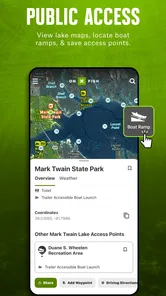
onX Fish: Midwest Fishing App is designed to help anglers discover and plan fishing trips across the Midwest. It provides access to fishing maps, waterway information, property boundaries, access points, and other location details that can make exploring unfamiliar lakes and rivers easier. The app is especially useful for planning before leaving home, although conditions and regulations should always be verified locally.
Which Midwest locations and waters are covered by the app?
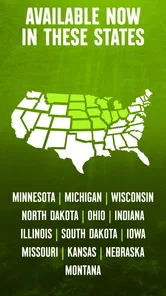
The app focuses on Midwest fishing destinations, but the exact coverage can vary depending on the state, map layer, and subscription plan selected. Users can typically explore lakes, rivers, public access areas, and information related to nearby land ownership. Before downloading, anglers should check whether their preferred state and fishing spots are included and whether all desired features are available in their region.
Does onX Fish require a subscription or offer offline maps?
onX Fish generally includes both free and premium features, with advanced map layers and planning tools commonly available through a paid membership. One of the most useful premium functions is downloading maps for offline use, which can help when fishing in areas with weak or unavailable cellular service. Subscription prices and trial terms may change, so review the current offer in the App Store or Google Play.
Pros
- Detailed lake maps help identify productive fishing spots.
- Offline map access is useful when cellular coverage is limited.
- Weather and water data support better trip planning.
- Fishing forecasts can help choose suitable times to go.
- Trip tools make it easy to save locations and notes.
Cons
- Coverage and feature quality may vary between Midwest waterways.
- Many advanced tools require a paid subscription.
- Detailed maps can use considerable storage space offline.
- Frequent GPS use may drain your phone battery quickly.
- The app may feel overwhelming for occasional anglers.





