Nutrislice
- 620.00
- 4.1
- Installs
- 100.00K
- Price
- Free

Screenshots
Analysis by Reviewed
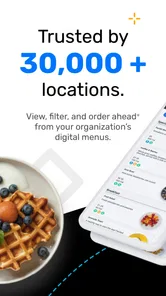
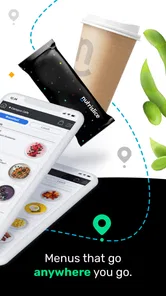
When I need to check what food is available before heading somewhere, I prefer a menu that is easy to scan rather than a general search result full of outdated pages. Nutrislice is built for that specific moment: it brings digital menus and ordering options from participating locations into one mobile experience. I found it most useful when I already knew the school, workplace, campus, or other venue I wanted to check and needed a quicker answer than calling or searching through several pages.
This is a free Food & Drink app from Nutrislice, Inc., with an Everyone age rating. It has been around since February 7, 2013, and its current version is 5.32. The app supports Android devices running version 5.0 or later, so it remains accessible on many older phones. Its audience is broad, but its usefulness depends heavily on whether the places you visit actually publish their menus through the service.
How Nutrislice fits into a normal food decision
My basic workflow is simple. I open the app, look for the relevant location, and check the menu before deciding where or what to eat. That sounds modest, but it solves a real problem for people who deal with changing cafeteria choices, rotating campus meals, workplace dining, or venue-specific ordering. Instead of treating the app like a restaurant discovery tool, I use it as a practical menu reference.
The distinction matters. Nutrislice is not most useful when I am wandering around an unfamiliar city looking for every nearby restaurant. A map app or restaurant directory is generally better for that. Nutrislice makes more sense when a particular organization has adopted it and its menu information is likely to be more relevant than a third-party listing.
In an everyday scenario, I might be leaving for work and want to know whether the cafeteria has something suitable for lunch. I can check the available menu before commuting, decide whether to eat there, and avoid making the trip only to discover that the choice does not work for me. For a parent checking a school menu, the same habit can make morning planning easier. For a student, it can help compare the options available on a campus without walking between buildings first.
The app’s value also comes from timing. Menus are most helpful before I am hungry and already standing in line. I prefer checking them while planning my day, especially when I need to account for dietary preferences, a limited break, or a group with different tastes. It is a small change in routine, but it turns food selection into a decision I can make earlier.
Nutrislice has a 4.1 average from around 1.5 thousand ratings, and its reach extends to over 100 thousand installs. Those figures suggest that it has found a real audience, but they should not be read as a guarantee that every local venue will offer the same experience. The individual location is the important factor: a well-maintained menu can make the app feel indispensable, while a location with sparse or irregular information will make it feel less useful.
More From Our News Desk

Weather by Xiaomi Review: Clear at a Glance, Less Clear Up Close

X Under Pressure: Can It Recover When Posting Goes Wrong?

Clash of Clans Is Won Between the Battles

Android Auto Makes the Case for Quieter Car Software

MobiOffice: Transforming Mobile Productivity with Seamless Integration

EA SPORTS FC™ Mobile Soccer: Redefining Mobile Sports Gaming
Finding the right location without wasting time
My first practical tip is to search with the exact organization or venue name rather than starting with a broad food category. Nutrislice is organized around participating locations, so a precise search habit reduces the chance of opening an irrelevant result or assuming that a nearby place is covered when it is not.
Once I find the location I care about, I treat it as the starting point for future checks. I do not repeatedly browse from scratch if the app makes that location easy to reach again. A repeatable routine is more valuable here than exploring every available option. The app is at its best when it becomes part of a daily or weekly planning habit.
I also check the date or meal period shown with a menu before relying on it. A menu screen can be accurate for one day and unhelpful for another, so I avoid making assumptions based on an old view. This is especially important when meals rotate or when a venue publishes several service periods. Looking at the relevant day first is a simple step that prevents a surprising amount of confusion.
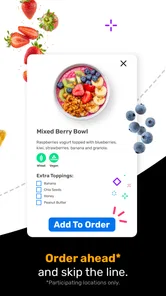
For ordering, I would confirm the details before treating the app as a complete checkout solution. Nutrislice connects menus with digital ordering at participating locations, but the exact experience can vary by venue. Some users will mainly read menus, while others may be able to continue into an ordering flow. I would not assume that every listed location supports identical ordering steps, pickup arrangements, or menu detail.
Settings and habits that make the app easier to live with
There are no complicated controls I need to master before using Nutrislice, which is a strength. I would still spend a minute checking the app’s available settings and notification choices after installation. The useful principle is restraint: enable reminders only if they help me remember a recurring menu check, and avoid turning every possible alert into background noise.
My preferred setup is to keep the app focused on locations I actually use. If the experience presents a way to retain or revisit a chosen organization, I use that rather than collecting every possible venue. A short, relevant list is faster to scan and less likely to lead me into the wrong cafeteria or dining site.
I also check whether the app is showing the correct location before judging the menu quality. Large organizations can have more than one dining area, and a menu that looks incomplete may simply belong to a different service point. This is one of the less obvious sources of frustration: the problem is not always missing food information; sometimes it is a mismatch between the selected venue and the place I had in mind.
On an older Android phone, I would keep expectations realistic and make sure the device meets the minimum operating-system requirement. The app supports Android 5.0 and newer, which is helpful for compatibility, but older hardware may still make browsing feel less smooth than on a recent device. If I am checking a menu in a hurry, I prefer opening it while connected to reliable Wi-Fi or mobile data rather than waiting until I am already at the counter.
Another useful habit is to read the entire item entry instead of relying only on the dish name. Where a location supplies descriptions or dietary details, those can change how useful the menu is. I use the visible information as a planning aid, not as a substitute for asking staff when an allergy or serious dietary restriction is involved. A digital menu can help me narrow choices, but it should not encourage overconfidence about ingredients or preparation.
Faster patterns for regular users
The quickest way to use Nutrislice is to separate discovery from checking. I do the slower work once: identify the correct location and learn where its menu appears. After that, I open the app only to answer a focused question such as what is served today, whether a meal period has changed, or whether ordering is available.
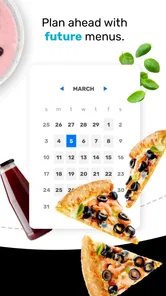
For a regular workplace or school user, I would check the menu at a consistent time each morning. This creates a useful rhythm and avoids repeatedly opening the app without a clear purpose. If I am planning several meals, I look ahead when the interface allows it, but I still verify the current day before leaving because published schedules can change.
For families, the best pattern is to check together rather than assuming the person who opens the app will remember every detail. A parent can use the menu to discuss likely choices before school, while a student can use it to decide whether bringing food from home makes more sense. The app does not need to replace household planning; it works well as the information source that makes that planning less speculative.
When several people are choosing lunch, I use the menu to compare options before anyone starts ordering. This avoids the common problem of one person discovering a restriction or disliked ingredient only after the group has committed to a plan. The trade-off is that everyone may still need to verify availability at the venue, particularly if the menu is updated separately from the physical service line.
Another efficient pattern is to use Nutrislice for confirmation, not endless browsing. Once I know where I want to eat, I check the relevant menu and stop. The app can become less helpful if I treat it like an entertainment feed and keep jumping between locations. Its strongest use is quick, purposeful reference.
I also recommend keeping a backup plan for days when the menu is unclear. That might mean bringing a snack, choosing another nearby option, or checking the venue directly. This is not a criticism unique to the app; digital menus depend on the organization maintaining them. The practical lesson is to avoid making a time-sensitive meal decision with no alternative.
Where the experience reaches its limits
The biggest limitation is coverage. Nutrislice can only be genuinely useful where participating locations provide menus or ordering through the platform. If my favorite restaurant, school, or workplace does not use it, the app cannot replace a direct website, a phone call, or a standard maps service. I would check whether my regular venues appear before making it part of my routine.
Information quality can also vary from one location to another. One menu may be detailed and easy to understand, while another may offer only basic item names. That difference affects people who need ingredient context, portion information, or dependable day-by-day planning. I appreciate the convenience, but I would not treat every entry as equally complete.
Nutrislice is also not the best choice for broad restaurant discovery. If I want reviews, directions, atmosphere, opening hours, or a large range of independent restaurants, I reach for a map or restaurant app instead. Those tools are designed to help me discover places; Nutrislice is more narrowly focused on digital menus and ordering connected to participating locations.
Users who expect one universal ordering system may find the experience uneven. The app can bring ordering and menus together, but the practical process may still depend on the location. I would check the selected venue, review the order details carefully, and allow extra time the first time I use it. Once I understand how a particular location works, repeat orders or menu checks should feel less uncertain.
People with strict allergy requirements should use the app as an early filter rather than final authority. Even a clearly written menu does not remove the need to confirm preparation and cross-contact questions with the venue. In that situation, a direct conversation with staff is better than relying only on a screen.
Likewise, someone who rarely visits covered locations may not gain much from installing it. A general food app will probably offer more value if the main goal is restaurant discovery. Nutrislice earns its place when the same participating locations appear in my life repeatedly.
Who should use it and who should pass
I would recommend Nutrislice to students, parents, employees, and visitors who regularly deal with menus from institutions or organized venues. It is particularly helpful for people who plan meals around a schedule, have short breaks, or want to check choices before arriving. The free price makes trying it low-risk, and the Everyone rating makes it suitable for a wide household audience.
I would also recommend it to anyone who has been frustrated by menu pages that are difficult to find or poorly suited to a phone. A dedicated menu app can be more convenient than navigating a large organization’s website, especially when I only need today’s offerings. The benefit is not that it transforms dining; it removes a small amount of repeated searching.
I would skip it if my usual restaurants are independent places with no Nutrislice presence, or if I mainly want public reviews and location discovery. I would also avoid depending on it as my only source of allergy information or as a guarantee that a listed item will still be available when I arrive. In those cases, direct venue communication or a broader restaurant service is the better choice.
The app has matured over many years, but that does not mean every screen or venue will feel equally polished. My judgment depends less on visual novelty and more on whether the locations I need are maintained well. That is an important trade-off: the service can be extremely practical in a supported environment and almost irrelevant outside one.
My verdict after building a repeatable routine
Nutrislice is a focused Food & Drink app rather than an all-purpose dining companion. I like it because it addresses a specific everyday question: what is available at a participating location, and can I act on that information digitally? When the answer is current and the venue is one I visit often, the app saves time and makes meal planning calmer.
My recommended routine is to identify the exact location, check the relevant day and meal period, review item details carefully, and confirm ordering information before committing. I would keep notifications limited, use the app at a predictable planning time, and maintain a backup option for menu changes or incomplete listings. Those habits make a bigger difference than simply installing the app and browsing randomly.
The limitations are equally clear. Coverage depends on participating organizations, menu detail varies, and the app is not a replacement for restaurant discovery or direct allergy guidance. Users who understand those boundaries are more likely to appreciate it. Users expecting every venue and every ordering process to work identically may be disappointed.
Overall, I see Nutrislice as a worthwhile free download for people whose school, workplace, campus, or regular venue uses the platform. Its 4.1 average and audience of more than 100 thousand installs reflect useful adoption, but the real test is local: find your regular locations and see whether their menus are maintained. If they are, this app can become a quiet but genuinely helpful part of your weekly routine.
Nutrislice Frequently Asked Questions
Which schools, workplaces, or other locations can I find in Nutrislice?
Nutrislice is useful when a school, university, workplace, or other organization uses the platform to share its food-service information. You can look for your institution or location in the app and browse what it makes available. The experience is tied to participating organizations, so the menus and services you see depend on whether your location has set up Nutrislice and what information it publishes.
What is Nutrislice and what can I use it for?
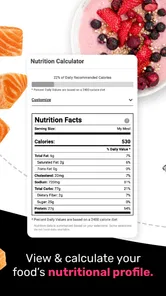
Nutrislice is a digital food-service platform that helps schools, universities, workplaces, and other organizations publish menus online. Depending on the institution using it, you may be able to browse daily meal options, view nutrition and allergen information, check ingredients, see serving locations, and access announcements. The exact features and menu accuracy depend on the organization that manages the account.
Is Nutrislice free to download and use?
Nutrislice is free to download, and it is generally free for diners, students, parents, employees, and other users who need to view an organization’s menus. However, some features may only be available when your school, workplace, or institution subscribes to Nutrislice. The app itself does not necessarily provide food ordering or payment everywhere, so available services can vary significantly by location and participating organization.
Can Nutrislice help me identify allergens and dietary information?
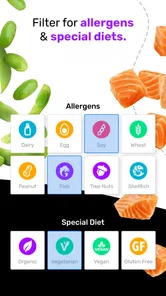
Nutrislice commonly displays nutrition details, ingredients, allergen warnings, dietary labels, and other meal information when the participating organization provides those details. This can be useful for people managing allergies, vegetarian or vegan preferences, religious dietary requirements, or nutritional goals. Nevertheless, users with serious allergies should confirm information directly with the food-service provider because menus and ingredients can change.
Can I order meals or pay for food through Nutrislice?
Ordering and payment options depend on how your school, campus, workplace, or other organization has configured Nutrislice. In some locations, the platform may support online ordering, pickup details, or connections to other food-service services. In others, it may function only as a menu and nutrition-information app. Check the available options for your selected organization before assuming that meals can be purchased in the app.
Pros
- Menus are easy to browse by school
- location
- or dining venue.
- Nutrition and allergen details help users make informed food choices.
- Filters make it simpler to find vegetarian or dietary-friendly options.
- Meal information can be checked before arriving at the cafeteria.
- Useful for families managing children’s school meal selections.
Cons
- Available menus depend on participating schools and dining providers.
- Nutrition data may be incomplete or vary between locations.
- Some menus may not be updated promptly when meals change.
- The app offers limited value in areas without supported institutions.
- Certain features may require location services or account access.











