

Now Thats TV
- 1.14K
- 3.6
- Installs
- 500.00K
- Price
- Free

Screenshots
Analysis by Reviewed
I approached Now Thats TV as an entertainment app for viewers who want something outside the usual mainstream streaming routine. Its identity is tied to independent programming, and that gives it a different appeal from services built around the biggest studio catalogs. I found the experience most interesting when I treated it as a destination for discovering a particular style of content rather than as a complete replacement for every service already on my television.
The app is free to install, which makes trying it fairly easy. That does not mean every part of the experience is cost-free, because in-app purchases range from $1.99 to $99.99 per item. I would therefore approach the first session as an evaluation period: explore the interface, understand how access is organized, and decide whether the available programming fits your viewing habits before spending anything.
What the viewing experience feels like in everyday use
Now Thats TV sits in the entertainment category, and the developer behind it is Now Thats TV LLC. The store presents it as an independent network, so the main reason to install it is not simply having another generic video icon on your phone. The stronger reason is curiosity about programming that may feel more focused, personality-led, or outside the standard mainstream lineup.
In practical terms, I would use it when I wanted a change from endlessly browsing familiar services. A realistic example is a quiet evening after work: instead of opening a large platform and spending half an hour comparing rows of heavily promoted titles, I would open this app with a narrower expectation and see whether its network identity matches my mood. That narrower purpose can be a benefit, especially for viewers who already know they enjoy the kind of independent entertainment associated with the service.
The trade-off is equally important. If you want one application that covers major films, premium television, children’s viewing, documentaries, and every current conversation piece, this is unlikely to be the only app you need. Its appeal depends on whether its own programming direction interests you. People who prefer broad catalogs may find a larger conventional streaming platform more convenient, while people who like exploring a distinct network may appreciate the more specialized choice.
The app carries a Teen content rating, so I would not treat it as a universal family application. That rating is a useful reminder to check the suitability of individual programming before handing a device to a younger viewer. For shared households, I would make the viewing decision myself rather than assuming that a free entertainment app is automatically appropriate for everyone.
Speed expectations before you settle in
My performance expectations here are shaped less by the app’s category label and more by the nature of video viewing. A streaming application can feel quick when its menus respond promptly, yet still depend heavily on network conditions once playback begins. I would judge Now Thats TV in two separate stages: how quickly I can move through its screens, and how consistently a selected program starts and continues.
More From Our News Desk

 Gmail
GmailGmail in a Busy Inbox: Who Benefits Most?
From first account to crowded workday, Gmail earns its place through dependable search and flexible sorting—but its best fit depends on how much inbox maintenance you can tolerate.

 Prime Video
Switching to Prime Video: What Changes in Your Viewing Routine
Prime Video can make a compelling second home for streaming, but switching means learning a different catalog, rental layer, and route from browsing to playback.

 Universal TV Remote Control
Universal TV Remote Control Works Best as a Reliable Backup
A phone remote earns its place through quick setup and reliable habits. Here is how to get more from Universal TV Remote Control—and where its limits show.

 Weather - By Xiaomi
Weather by Xiaomi Review: Clear at a Glance, Less Clear Up Close
Xiaomi’s weather app makes everyday forecasts quick to scan, but its calm surface can leave useful details and recovery paths harder to find than they should be.

 X
XX Under Pressure: Can It Recover When Posting Goes Wrong?
A resilience-focused review of X, examining setup, mistaken posts, interruptions, weak connections, and the gaps that matter when recovery needs to be dependable.

 Clash of Clans
Clash of Clans Is Won Between the Battles
Its raids are quick; its community is a long-term project of coordination, teaching, rivalry, and shared responsibility—with all the friction that entails.
Latest News



On a recent device with a stable connection, I would expect ordinary browsing to feel more comfortable than on an older phone with limited free space or many background tasks. That is not a promise of a particular load time; it is simply the sensible way to evaluate any video app. If the first launch feels slow, I would close unused applications, check the connection, and try again before deciding that the service itself is unreliable.
One useful habit is to avoid judging the entire platform from a single opening attempt. Network congestion, a weak mobile signal, or a busy home connection can make a perfectly usable service appear sluggish. I would test it at the time I normally watch, because an app that behaves well during a quiet afternoon may feel different during a crowded evening in the household.
There is also a practical difference between browsing on a phone and watching for a longer period. A handset is convenient for sampling content, but a larger screen is usually more comfortable for sustained viewing. If I were deciding whether to keep the app installed, I would test the exact device and connection I intend to use regularly rather than relying on someone else’s experience.
What happens during heavier viewing sessions
Heavy use is where a streaming app has to prove more than simple menu responsiveness. I would look for whether the experience remains comfortable after moving between several pieces of content, returning to the main screen, and continuing to browse after a longer session. Those actions matter because real viewers rarely open one item and leave immediately; they compare, pause, change their minds, and come back later.
My advice is to keep the first serious session deliberately simple. Start with a reliable connection, close demanding background apps, and give the service a fair chance to establish playback. If you are using mobile data, remember that extended video viewing can consume your allowance quickly, so Wi-Fi is the more sensible default for a long evening. This is not a special claim about Now Thats TV; it is a practical precaution for using any video-focused application.
The most revealing test is not a short preview but a normal personal routine. I would browse, begin a program, pause it for a few minutes, resume it, and then return to the app later. That sequence tells me more about comfort and recovery than simply opening the home screen. It also exposes whether the app fits how I actually watch, especially if I frequently interrupt viewing to answer messages or move between rooms.
Resource demands matter on older hardware. Video playback itself can place more pressure on a device than reading or listening apps, and a phone with little storage or an aging battery may feel less responsive during any extended session. I would not install it on a nearly full device and then blame the app for every hesitation. Clearing unused files and keeping the operating system in a healthy state is part of a fair test.
Another small but valuable workflow is to decide in advance whether you are browsing casually or watching intentionally. Casual browsing can turn into repeated loading and unnecessary data use, while choosing a program first makes the session more predictable. For me, this distinction is particularly useful with an independent network: I would explore when I have time, then return later when I already know what I want to watch.
Reliability and recovering from interruptions
Reliability is not only about whether an app opens on the first attempt. For a streaming service, I care about how gracefully it handles interruptions: a temporary connection problem, an accidental exit, a phone call, or a switch from Wi-Fi to mobile data. I would consider Now Thats TV dependable for my needs only after seeing how naturally it lets me resume ordinary use after those interruptions.
If playback stops, my first recovery step would be to check the connection rather than repeatedly tapping the screen. I would wait briefly, try again, and, if necessary, close and reopen the app. This simple sequence prevents a temporary network issue from becoming a confusing chain of duplicate actions. It also helps separate a local problem from a broader service problem without making assumptions too quickly.
When an entertainment app does not recover smoothly, the frustration is greater because viewers usually open it for relaxation. A short delay can be acceptable; repeated restarting is not. I would pay attention to whether the app returns me to a sensible place after reopening, whether I can find the same program without excessive searching, and whether the interface remains understandable after an interrupted session.
I also recommend keeping expectations realistic around account and purchase decisions. Since the app includes paid items despite being free to install, I would read each on-screen purchase prompt carefully and avoid tapping through quickly while trying to start a program. That is one of the most important practical precautions for a household with shared devices or younger users.
The app’s audience size gives it a meaningful presence without making it one of the enormous universal platforms. It has passed half a million installs, with an average rating of 3.6 from around 2.6 thousand ratings and roughly 1.1 thousand written reviews. I read those figures as a sign of an established but mixed reception: enough people have tried it to make the app worth considering, while the rating suggests that the experience will not satisfy every viewer equally.
Device constraints and who should install it
Compatibility is relatively approachable because the Android requirement begins at version 7.1. That opens the door to older phones that cannot run some newer entertainment applications, although compatibility alone does not guarantee a smooth session. Hardware age, available storage, battery condition, and connection quality still influence the result.
I would install it on a phone or tablet that has enough free space for normal app operation and that is not already struggling with background tasks. If your device is several years old, test short sessions first. A brief browse can reveal whether menus respond comfortably, while a longer viewing session shows whether the device becomes warm, drains its battery quickly, or starts feeling generally overloaded.
For people watching on a small phone, the app makes most sense as a convenient personal option rather than the centerpiece of a group movie night. A tablet can provide a better middle ground, especially when you want portability without staying close to a small display. If your priority is a polished living-room experience with extensive device support and a very broad catalog, a larger established service may still be the better fit.
I would recommend Now Thats TV to viewers who enjoy independent entertainment, want to sample a network with its own identity, and are comfortable deciding whether optional purchases are worthwhile. It is also a sensible candidate for someone with an older Android device who wants to see whether a modern entertainment app remains usable on it.
I would skip it if you are looking for a completely free, all-purpose replacement for paid streaming services, if your household needs a clearly child-focused catalog, or if you dislike evaluating content access before committing money. The free installation lowers the barrier to testing, but it does not remove the need to understand how the service fits your viewing habits.
How it compares with familiar alternatives
Compared with a major subscription platform, Now Thats TV feels more specialized. The mainstream option usually wins on catalog breadth, polished discovery systems, and the ability to serve several different tastes under one account. This app’s advantage is its independent-network character. If that identity is what you are looking for, a smaller service can feel more purposeful than a giant catalog where the most visible choices are shaped by broad popularity.
Compared with free video platforms supported by a wide mixture of creators, it offers a more defined destination. Those open platforms are excellent for quick clips, informal viewing, and endless variety, but they can require more filtering. I would choose Now Thats TV when I want to explore its particular programming world, and a broad free platform when I want maximum variety without a specific network in mind.
Compared with a conventional television channel or a cable package, the app is more convenient for on-demand personal viewing, assuming the content access and device experience suit you. Traditional television can be easier for a household that wants to turn on one channel and leave it running, while an app is better for someone who wants to choose when and where to watch.
The most useful comparison is therefore not “which service is best?” but “what job do I need this service to do?” For discovery within a distinct independent brand, it has a clear role. For replacing every other entertainment source, it is a weaker proposition. That distinction prevents disappointment and makes the free installation genuinely useful as a low-risk trial.
Small habits that make the trial more informative
I would begin by exploring without making a purchase. Spend the first session learning how the app presents its programming and noting which titles genuinely interest you. This gives you a personal sense of value instead of assuming that the presence of a free download means the whole catalog will match your expectations.
Next, test it under normal conditions rather than ideal ones. Use the connection you usually rely on, the device you actually own, and the time of day when you normally watch. Try both a short browse and a longer session. This two-part test is more useful than a quick installation because it covers speed, stability, resource pressure, and recovery in a way that reflects real life.
Finally, keep purchase awareness part of the routine. The listed in-app purchase range stretches from $1.99 to $99.99 per item, so I would never assume that two prompts offer similar commitments. I would pause, read the wording, and make sure the intended viewer understands what is being selected. That is especially important on shared devices.
One non-obvious benefit of this approach is that it helps you decide whether the app deserves a permanent place on your home screen even if you do not watch every day. A specialized service can be valuable as an occasional alternative: something to open when mainstream recommendations feel repetitive. You do not need to treat it as your primary entertainment platform for it to earn a place in your rotation.
My performance verdict after weighing the trade-offs
My overall view is cautiously positive. Now Thats TV has a clear reason to exist, an accessible Android requirement, and a free entry point that lets viewers investigate its independent-network focus before making a commitment. Its performance should be judged in the context of video streaming: connection quality and device condition will influence the experience as much as the application itself.
I would describe it as a focused entertainment option rather than a universal streaming answer. The strongest case is a viewer who values its programming identity, uses a reasonably stable connection, and is willing to pay attention to how access works. The weakest case is someone expecting a huge, entirely free catalog or a child-safe household solution without checking the Teen rating.
The mixed average rating tells me to keep expectations measured rather than assuming a flawless experience. Still, a rating of 3.6 does not make the app unworthy of a trial; it suggests that personal fit matters. I would install it, test browsing and recovery on my main device, and then decide based on whether its content and viewing rhythm feel worth returning to.
My recommendation: try it as a specialized independent entertainment app, not as a guaranteed replacement for every service you already use. If its network identity matches your taste, the low-friction installation makes exploration sensible. If you want maximum breadth, effortless family viewing, or a predictable one-service setup, a more established general streaming alternative will probably serve you better.
Now Thats TV Frequently Asked Questions
Is Now Thats TV free to download, and can I use it without paying?
Now Thats TV is free to download, so you can install the app and take a look around before deciding whether to spend money. However, downloading it does not mean every program is free to watch. The service offers in-app purchases, and access to some content may require a paid option. Check the purchase details displayed in the app before confirming a transaction.
Is Now That’s TV suitable for teenagers?
Now That’s TV is an entertainment app with a Teen content rating. That rating can help families decide whether the service is appropriate, but it is still sensible for parents or guardians to review the available programs and discuss viewing choices with younger users. The app focuses on entertainment programming, so consider the nature of individual shows rather than relying on the rating alone.
What is Now That’s TV?
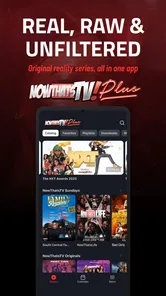
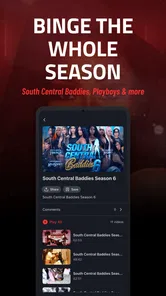
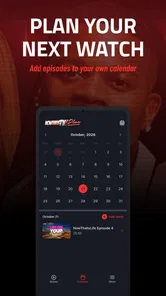
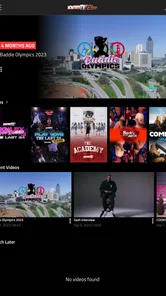
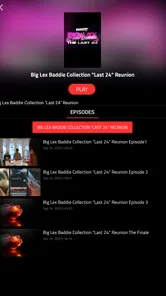
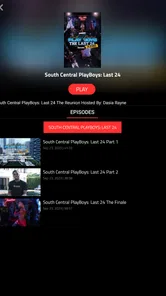
Now That’s TV is an entertainment app from Now Thats TV LLC, described as an independent network. It focuses primarily on reality television, drama, entertainment, and original programming. After installing the app, users can browse available shows, view program details, and stream content on a compatible device. The exact catalog may vary by country, and some titles or episodes may require an active membership or additional access plan.
Do I need a subscription to watch content on Now That’s TV?
Yes, most of the content on Now That’s TV requires a paid subscription or membership. The app may allow you to download it, open it, and explore parts of the catalog without paying, but full episodes and exclusive programs are generally restricted to subscribers. Before signing up, check the current plans, billing frequency, trial terms, and cancellation conditions because pricing and availability can change over time. In-app purchases are offered, so review the purchase terms shown before you commit.
Can I watch Now That’s TV without an internet connection?
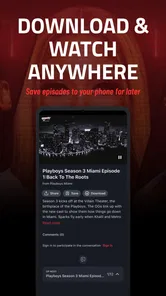
Offline viewing depends on the features currently offered by the service and the specific title. If downloads are supported, you may be able to save selected programs inside the app for later playback, although downloaded content can have expiration limits and may require periodic online verification. If no download option appears, you will need a stable Wi-Fi or mobile-data connection to stream episodes.
Pros
- Wide range of urban entertainment
- including movies
- series
- and reality shows.
- Fresh content is added regularly
- giving subscribers something new to watch.
- Supports on-demand viewing
- so you can watch programs at your preferred time.
- Available across compatible mobile devices for convenient viewing while traveling.
- Focuses on Black British and urban culture that mainstream services may overlook.
Cons
- A paid subscription is required to access most of the library.
- Content availability may vary depending on your country or region.
- Some titles may leave the service without much advance notice.
- Streaming quality depends heavily on your internet connection and device.
- The catalog may feel limited if you mainly prefer mainstream international content.











