

Nextcloud News
- 19.00
- 4.4
- Installs
- 5.00K
- Price
- $2.49

Screenshots
Analysis by Reviewed
Ever found yourself overwhelmed by an avalanche of news articles, blog posts, and updates that you just can't seem to keep up with? That's where Nextcloud News comes in! This app is a lifesaver for anyone who likes to stay informed but doesn't want to spend hours scrolling through countless websites.
Making a Personal Reading Queue Work
I find this app most useful when I already know which publications and blogs I want to follow. Instead of relying on a general news feed to decide what deserves attention, I can bring my own sources together and sort them into folders. A practical routine is to keep work-related reading separate from local news and longer weekend reads, then open the relevant folder when I have a few minutes. That makes the app less like an endless stream and more like a queue I control.
For example, I might check a few headlines over breakfast, save a piece that needs more attention, and return to it later when I have time to read properly. The trade-off is that this approach depends on maintaining useful feeds: if I want broad discovery or recommendations from unfamiliar publishers, a conventional news aggregator may suit me better. Nextcloud News is strongest when I bring the sources and want a focused place to read them.
Getting Started with Nextcloud News
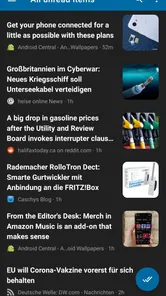
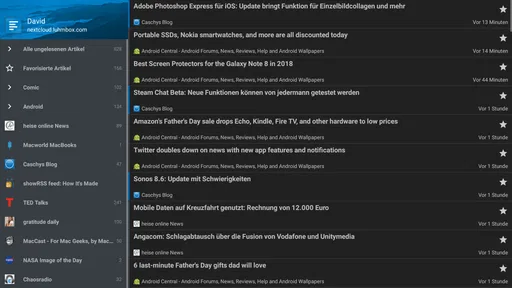
Jumping into Nextcloud News is as easy as pie. Once you have the app installed, it starts working like a charm. The interface is clean, straightforward, and intuitive. You don't have to be a tech wizard to navigate through it. It’s all about simplicity, which is a breath of fresh air in today's app-heavy world.
Features That Make Life Easier
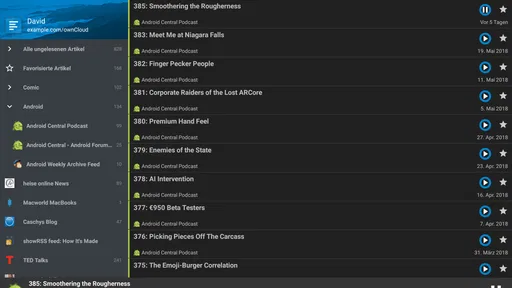
One of the features I absolutely love about this app is the seamless integration with your existing Nextcloud account. It syncs your news feeds and lets you read them offline, which is perfect for when you're on the go and data is a luxury. Plus, the app supports multiple formats, including RSS and Atom feeds, which means you can get all your news in one place. Handy, right?
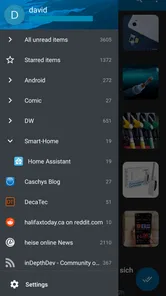
Another cool feature is the ability to organize your feeds into folders. This way, you can categorize and prioritize what you want to read. Whether it's tech news, sports updates, or entertainment gossip, you can have it all sorted just the way you like it.
Readability, Navigation, and Everyday Access
For me, the clearest benefit of organizing feeds is not merely tidiness: it reduces the work of deciding what to open next. A small set of folders with names that make sense at a glance is easier to scan than one large mixed list, especially when I am checking headlines between other tasks. Search is useful for a different reason: it turns the app into a place to revisit something I remember reading, rather than only a stream of new items.
More From Our News Desk

 Gmail
GmailGmail in a Busy Inbox: Who Benefits Most?
From first account to crowded workday, Gmail earns its place through dependable search and flexible sorting—but its best fit depends on how much inbox maintenance you can tolerate.

 Prime Video
Switching to Prime Video: What Changes in Your Viewing Routine
Prime Video can make a compelling second home for streaming, but switching means learning a different catalog, rental layer, and route from browsing to playback.

 Universal TV Remote Control
Universal TV Remote Control Works Best as a Reliable Backup
A phone remote earns its place through quick setup and reliable habits. Here is how to get more from Universal TV Remote Control—and where its limits show.

 Weather - By Xiaomi
Weather by Xiaomi Review: Clear at a Glance, Less Clear Up Close
Xiaomi’s weather app makes everyday forecasts quick to scan, but its calm surface can leave useful details and recovery paths harder to find than they should be.

 X
XX Under Pressure: Can It Recover When Posting Goes Wrong?
A resilience-focused review of X, examining setup, mistaken posts, interruptions, weak connections, and the gaps that matter when recovery needs to be dependable.

 Clash of Clans
Clash of Clans Is Won Between the Battles
Its raids are quick; its community is a long-term project of coordination, teaching, rivalry, and shared responsibility—with all the friction that entails.
Latest News



Offline reading also changes where the app fits into a day. I can load articles while connected and use a commute or a wait in a quiet place to catch up without depending on a steady connection. I would still treat it as a reading aid, not a guarantee that every page will behave identically offline; the experience depends on the content available through each feed. If a story matters, I would open it when I have a connection before relying on it later.
A useful setup is to make the folder names describe when or why I read those sources, not just their subject. “Quick checks” and “save for later,” for example, can help me choose based on available time, while a folder for a specific topic helps when I am following a developing story. This keeps a short break from turning into a tour of every feed. I would start with only the sources I reliably read, then add others when I notice a real gap.
Motor and Sensory Considerations
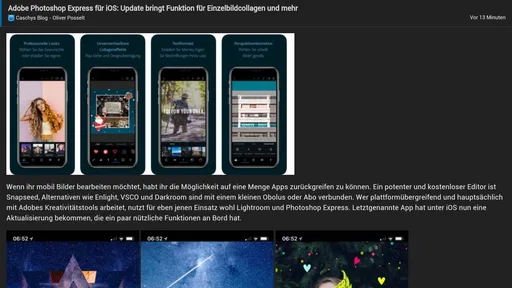
A simple layout can be easier to approach when I want to move through articles without dealing with a busy news portal, but a clean interface does not automatically solve every access need. Reading comfortably still depends on the display, text presentation, and controls working for the person using the phone. The theme options are a welcome way to adjust the look, though I would not assume they replace system-level adjustments or suit every visual preference.
For someone who finds repeated scrolling or precise taps tiring, the most helpful workflow is to keep the feed list manageable and use folders to reduce navigation. That is a practical habit rather than a special accessibility feature. If someone relies on particular assistive technology or needs very specific control behavior, I would test those interactions directly before making this their main reader. A familiar, uncluttered screen can help, but individual needs vary.
There is a sensory trade-off in any feed reader: fewer visual distractions can make the reading task calmer, but a large queue can still feel demanding if every headline competes for attention. I find it helps to decide what counts as “read enough” for a quick session. Scanning titles in one folder and opening only the pieces that matter is less tiring than treating every unread item as an obligation. Favorites are better reserved for articles worth returning to, not used as a second inbox.
Customization and User Experience
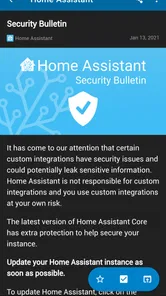
Customization is where Nextcloud News truly shines. You can tweak the theme to match your mood or eyesight preferences, which is super important for those late-night reading sessions. The app also gives you the option to mark articles as favorites and even share them directly from the app. Sharing is caring, after all!
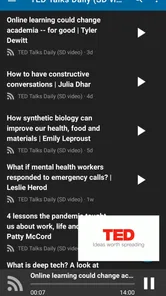
The reading experience is smooth, with no annoying ads popping up every second. It’s just you and your news. The app even supports full-text search, so if you're trying to find that one article you skimmed through a week ago, it's just a few taps away.
Search is most useful when I have a clue to work with: a subject, phrase, or publisher I associate with the article. It is not a substitute for a thoughtful folder system, because a search-first habit can make a collection feel harder to browse. I would use folders to decide where new reading belongs, favorites to keep chosen pieces close, and search as the recovery tool when memory is imperfect. Those jobs are distinct, and keeping them distinct prevents clutter.
Choosing a Reader for Your Routine
Compared with a typical news app that presents selected headlines and encourages browsing inside its own catalog, this one puts more responsibility on me. That is a strength when I trust my chosen sources and want to follow specialist blogs or publications that a broad feed might not surface. It is a weakness if I expect the app to build a balanced daily briefing, suggest new outlets, or sort the world’s news for me. Here, the quality of the reading experience depends partly on the quality and range of the feeds I choose.
That distinction matters for people who follow local reporting, professional sources, and independent writers at the same time. A general aggregator may be quicker to set up for someone who wants headlines immediately, while a browser can be simpler for occasional reading from just one or two sites. I see this app in between: it offers a dedicated place for a deliberately assembled reading list, without turning discovery into its main job. If I enjoy selecting sources, that control feels worthwhile; if I would rather delegate selection, it can feel like extra work.
For a realistic weekday routine, I could check a local-news folder before work, keep a longer analysis piece as a favorite, and read it later when I have a quiet moment. During a commute, offline access is handy if I have already loaded the material while connected. Afterward, search can help me find a detail I want to mention in a conversation. The point is not that the app removes every step; it gives those separate moments a shared place to happen.
What to Consider Before Choosing It
The main question I would ask before installing this reader is whether I already use Nextcloud for news. Its value comes from working with that setup, so it is not the obvious choice for someone who simply wants to open an app and receive a ready-made selection of trending stories. People who prefer editorial recommendations, built-in browsing, or a large amount of publisher discovery may find a mainstream news app more convenient. People who want control over selected RSS and Atom sources are a better match.
There is also a small but important workflow distinction between saving a favorite and keeping a reading habit manageable. I would use favorites for pieces I genuinely want to return to, rather than marking everything interesting and creating another backlog. Folders help with broad organization; search helps when I remember a subject or article later. Used together, those habits make the app more useful than treating it as a chronological feed alone.
Before committing to a large collection, I would test a few feeds that represent different kinds of reading: one that publishes frequent short updates, one with longer articles, and one source I know I return to. That quickly shows whether the list is manageable and whether the content arrives in a form that works for me. It also exposes a practical limit: this reader organizes what those feeds provide, but it cannot make an inconsistent or poorly maintained source useful. Keeping the collection selective is part of getting a good experience.
Someone deciding whether they need a Nextcloud account should treat that as the first compatibility question, not an afterthought. The app is designed around that connection, so a person who does not use Nextcloud or does not want a connected reading setup may be better served by a standalone aggregator. For someone already using Nextcloud, the more relevant question is whether their preferred publications offer feeds and whether they want a hands-on source list. That is the difference between a convenient companion and an unnecessary extra step.
Price, Fit, and Practical Limits
David Luhmer’s app is in the News & Magazines category, costs $2.49, and is rated for Everyone. Its average rating is 4.4 from around 300 ratings, with over 5,000 installs. It was released in 2013, and its focused purpose is still the key point to weigh: this is a companion for reading through Nextcloud, not a general replacement for every kind of news service. I would consider the price worthwhile if I regularly use that workflow; if I only read an occasional headline or want recommendations chosen for me, a free, broader aggregator may be a better fit.
In a typical day, I might check a few feeds before leaving home, let the articles I have already brought in carry me through a patchy commute, and use search later to recover a detail I want to share. That routine suits a reader who values continuity and a personally chosen source list. It is less suitable when the priority is effortless discovery, or when the app’s reading and navigation behavior does not match someone’s access needs. Trying it with a small set of familiar feeds first is a sensible way to judge the fit before building a large library around it.
The price makes most sense to me as a decision about repeated use rather than a one-off experiment. If I check my feeds every day and value having them organized through Nextcloud, paying for a focused tool may be reasonable. If I am still unsure whether RSS fits my habits, I would first think about whether I am willing to choose sources and return to them; the cost cannot compensate for a workflow I do not enjoy. The Everyone age rating tells me the app is intended for a broad audience, but practical suitability still depends on the person’s reading needs and comfort with the setup.
Inclusive Verdict
For readers with different abilities and routines, the app’s clearest inclusive strength is the option to shape a personal reading queue instead of navigating a crowded, recommendation-heavy news service. Folders can cut down on repeated searching through a long list, themes offer some control over appearance, and offline reading can help when a stable connection is not available. Those are useful forms of flexibility, though they are not a promise that the app will suit every device, assistive setup, or sensory preference. I would test the actual reading and navigation flow with the settings and tools I rely on.
I would recommend it to someone who already uses Nextcloud, enjoys following chosen RSS or Atom sources, and wants a quieter way to keep up. I would steer a reader who wants automatic discovery, a fully prepared news briefing, or a low-effort start toward a conventional aggregator instead. And if precise controls, particular text presentation, or assistive technology are essential, I would make those checks before relying on it daily rather than assuming a simple interface is enough.
Final Thoughts
In a world where information overload is a real thing, having a reliable app like Nextcloud News is a game-changer. It brings all your favorite news feeds into one place, lets you read them offline, and offers a user-friendly experience that’s hard to beat. Whether you're a news junkie or just someone who likes to stay updated with the world, this app is definitely worth checking out. Happy reading!
Nextcloud News Frequently Asked Questions
What does Nextcloud News do, and who is it for?
Nextcloud News is an Android app in the News & Magazines category, developed by David Luhmer. It is designed for people who want to read news through Nextcloud News feeds. Its store summary is “Android App for Nextcloud News,” and the short description is simply “Nextcloud News.” If you already use Nextcloud News, the app may be a convenient way to access it on your Android device.
What is Nextcloud News and how does it function?
Nextcloud News is an open-source RSS/Atom feed reader application that allows users to stay updated with their favorite news sources. It functions by aggregating content from various feeds, presenting it in an organized manner for easy reading. The app can be used on both Android and iOS devices, providing a seamless experience across platforms. Users can sync their feeds with their Nextcloud server, ensuring access to the latest updates anytime, anywhere.
Is Nextcloud News free to use, and are there any hidden costs?
Nextcloud News is listed at $2.49. Since it requires a Nextcloud server for syncing feeds, there may also be costs associated with running or maintaining such a server, depending on your hosting provider. Consider both the app’s price and any server expenses when deciding whether it fits your budget.
Can I customize my news feed in Nextcloud News?
Absolutely! Nextcloud News offers a high level of customization, allowing users to tailor their news feed according to their preferences. Users can add or remove feeds, organize them into folders, and set filters to ensure they only receive content that interests them. This personalization ensures that users have a news reading experience that is both relevant and engaging.
How secure is my data with Nextcloud News?
Nextcloud News prioritizes user privacy and data security. Since the app runs on your own Nextcloud server, you maintain control over your data. This means that your reading habits and personal information aren't shared with third parties. The app employs encryption protocols to protect your data during transmission, ensuring a secure news reading experience.
Pros
- Open-source and customizable.
- Integrates with existing Nextcloud setup.
- Supports RSS
- Atom feeds.
- Cross-platform compatibility.
- Offline reading capability.
Cons
- Requires a Nextcloud server.
- Setup can be complex for beginners.
- Limited advanced features.
- Interface feels outdated.
- Occasional sync issues.











