NDI HX Camera: Easy Streaming
- 157.00
- 3.2
- Installs
- 10.00K
- Price
- $19.99
Screenshots
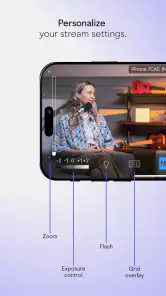
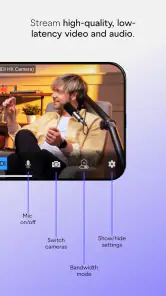
Analysis by Reviewed
Before deciding whether this camera app is worth buying, I’d start with one practical question: do you already have a way to receive an NDI video feed? Its usefulness depends on having a compatible destination in your streaming setup, so the price makes most sense when the app fills a specific role rather than serving as a general-purpose camera.
What the purchase buys you
NDI HX Camera: Easy Streaming is a paid communication app from NewTek Inc., priced at $19.99. That is a straightforward purchase rather than a free entry point, so I’d weigh it against how often you expect to use a phone as a source in an NDI workflow. Its Everyone age rating makes it broadly suitable, but the intended audience is more specific than the rating suggests: people who already work with live video or are building a setup that can use an NDI camera feed.
The app has a 3.2 average from around 870 ratings, with over 150 written reviews, and has passed 10,000 installs. I wouldn’t treat those figures as proof that it will suit every setup; the key test is whether your receiver and network can work with the feed. Version 1.70 is listed for Android 6.0 and newer, while the store release date is November 12, 2020. Check that your device meets the OS requirement before paying.
Where the value shows up in practice
The strongest case for paying is avoiding a more elaborate camera arrangement when a phone is already the quickest camera to put in position. Imagine a small community event where one person is managing a presentation and wants a second angle on the speaker. A phone placed near the stage can provide that view to an NDI-compatible production setup, while the main camera stays on the wide shot. That is a useful, concrete job for the app—not a reason to expect it to replace a full production system.
There is also a workflow advantage when you need to reposition a camera between segments. A phone can be moved to a close-up of a demonstration, then returned to a safe, fixed spot, without rearranging the primary camera. I’d test the whole route before an event: connect the phone, confirm the receiving software sees it, frame the shot, and check the network from the intended location. A successful setup at your desk does not guarantee the same result across a crowded venue or through several walls.
Trade-offs to consider before relying on it
The app’s NDI focus is both its point and its main limitation. A typical camera app is the simpler choice if you only want to record a clip or make an ordinary video call. A standard webcam app may also be more convenient when your computer expects a webcam connection rather than an NDI source. In contrast, this purchase is easier to justify when your existing production tools already understand NDI and you want a mobile camera position without adding a separate camera.
Don’t assume that buying the app alone completes the setup. You still need a receiving application or system that can use the feed, a network path that behaves reliably, and a phone position that gives you the shot you need. For a dependable live stream, I’d keep the phone on stable support, use a power source when practical, and test the picture and connection for longer than a quick preview. Those simple checks can expose framing, battery, or network problems before viewers are waiting.
More From Our News Desk

Weather by Xiaomi Review: Clear at a Glance, Less Clear Up Close

X Under Pressure: Can It Recover When Posting Goes Wrong?

Clash of Clans Is Won Between the Battles

Android Auto Makes the Case for Quieter Car Software

MobiOffice: Transforming Mobile Productivity with Seamless Integration

EA SPORTS FC™ Mobile Soccer: Redefining Mobile Sports Gaming
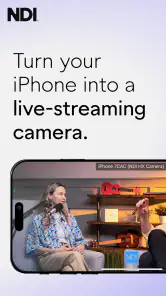
Ever found yourself in a situation where you needed to stream directly from your smartphone but didn’t have the right tools? Enter the NDI HX Camera. This little gem of an app turns your iOS device into a professional-grade camera for live streaming. Let me walk you through my experience with this nifty application.
Transform Your Device Into a Streaming Powerhouse
First things first, the setup process is as smooth as butter. You download the app, follow a couple of prompts, and voilà! Your iOS device is ready to stream. It’s as simple as pie, even for someone like me who is sometimes tech-challenged. The ease of use is one of the standout features of the NDI HX Camera.
Quality That Speaks Volumes
Now, let's talk about the streaming quality. I was genuinely surprised by how crisp and clear the video output was. It almost made me forget that I was streaming from a phone. Whether you’re in a well-lit room or navigating tricky lighting outdoors, the app adapts beautifully, ensuring your stream looks top-notch.
Connectivity and Compatibility
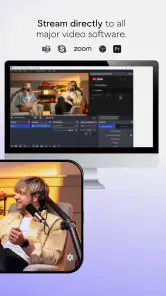
Another awesome feature is the app’s compatibility with various platforms. You can easily connect it to your preferred streaming software, and it works seamlessly. Plus, the app supports multiple resolutions and frame rates, so you can tailor your stream to your audience’s needs. You don’t have to worry about lagging or crashes, which is a massive relief during live broadcasts.
Additionally, the app integrates effortlessly with NDI-compatible systems. This means if you’re using a professional setup, your phone can become a part of that ecosystem without a hitch. The ability to switch between different cameras and devices without any noticeable delay is a game-changer.
Perfect for Content Creators
If you’re a content creator or someone who frequently goes live, this app is a no-brainer. The portability of using a smartphone combined with the high-quality output is unbeatable. Whether you're vlogging, hosting webinars, or streaming games, the ease of use and reliability makes it perfect for any scenario.
Moreover, the battery optimization feature ensures that your phone doesn’t drain too quickly, allowing you to stream for longer periods without the constant fear of running out of juice.
The ability to customize settings to your liking, such as exposure, focus, and white balance, gives you creative control, which many creators will appreciate.
Final Thoughts
In conclusion, the NDI HX Camera app is a must-have for anyone serious about streaming from their iOS device. It combines ease of use with professional-grade features, making it a versatile tool for both amateurs and seasoned pros. If you haven’t tried it yet, I’d say give it a shot. It just might be the missing piece you’ve been looking for in your streaming setup.
Who I’d recommend it to
I’d consider it when a phone needs to become a movable camera in an NDI-based production, such as a lecture, interview, rehearsal, or small event with a separate operator monitoring the stream. It can also suit a solo creator who can set the phone in place and manage the receiving side from another device. The useful distinction is that the app supplies a camera source; it does not, by itself, turn a phone into a complete live production workflow.
I’d skip it if you mainly want to film and save videos on your phone, or if your streaming destination has no NDI support. In those situations, the built-in camera or a conventional webcam workflow is likely the simpler choice, and paying for a specialized source would add little. I’d also be cautious about making it the only camera for an important broadcast until I had tested the exact phone, network, receiver, and placement together.
A more dependable way to use a phone camera
One non-obvious advantage of using a phone as a secondary angle is that it can stay dedicated to the shot instead of being handled during the event. Before going live, I’d lock down the composition, check that the subject stays in frame, and keep the phone away from places where people might bump it. For an interview, for example, a fixed phone shot can cover the guest while the main camera captures both people; the operator can then choose the view that fits the conversation.
Lighting and network conditions deserve separate checks. A phone can produce a pleasing picture, but no camera app can make a dim room look well lit or compensate for a weak connection. I’d test the actual room rather than rely on a quick indoor preview, and avoid placing the phone where the signal has to pass through avoidable obstacles. If a shot matters more than mobility, a wired or purpose-built camera setup may be the more dependable alternative.
Making the workflow easier on the day
For a practical setup, I’d treat the phone as one part of the production rather than as a complete control room. Decide in advance who will check the receiving software and who will watch the subject. If you’re operating alone, do a brief rehearsal from the position where you’ll actually be working; it is easy to frame a shot nicely and then discover you cannot reach the controls without leaving the audience unattended.
A useful detail is to separate camera placement from framing decisions. First choose a secure position with a clear view and a reliable route to the receiver. Then refine the composition, checking for distracting backgrounds, blocked sightlines, and changes in the subject’s movement. This is especially helpful for demonstrations: a phone can show hands or a tabletop while the main camera stays on the presenter, but only if the small camera is positioned before the action begins.
What to check before spending
The key compatibility question is not simply whether a device can run the app; it is whether your entire chain can use its NDI feed. Confirm the intended receiver accepts NDI, then test the same phone and network you plan to use. A quick test at home can answer whether the source appears, but a longer rehearsal helps reveal problems that only surface after the phone has been streaming for a while.
I’d also think about the cost in terms of frequency, not just the convenience of a single successful setup. If you regularly need a quick extra angle, the purchase may save time and simplify camera placement. If you only stream occasionally, or you would need to buy other equipment and learn a new production workflow just to use the app, the overall commitment is harder to justify. The app’s value is tied to a working NDI environment, not to the number of camera options on a phone.
My buy-or-skip verdict
For me, the $19.99 cost is reasonable only when NDI is already part of the plan and a phone camera solves a real placement problem. The app’s communication category label is less important than that workflow fit: this is a specialist tool, not a universal upgrade to everyday phone video. I’d buy it for a tested NDI setup that needs another flexible angle; I’d leave it alone if I had to purchase it first and then build an entire streaming system around it.
That distinction also answers the most important practical question: will it work with your current setup? Confirm that the receiving software accepts NDI and test the connection on the network you will actually use. If both checks pass, the app can be a convenient way to bring a phone into production. If either fails, a regular camera or webcam option is the safer and simpler purchase.
NDI HX Camera: Easy Streaming Frequently Asked Questions
Is NDI HX Camera: Easy Streaming intended for casual video calls or a production setup?
NDI HX Camera: Easy Streaming is aimed at using a phone as a camera in an NDI-based live video workflow. Its main appeal is connecting a mobile camera to compatible production systems over a network, rather than simply adding effects for everyday calls. It may suit creators and teams who already use NDI tools, as well as people exploring a more flexible camera setup.
What should I check about the app’s price and age rating before downloading?
The app costs $19.99 and is rated Everyone. Since it is a paid download, consider whether you have an NDI workflow that can make use of a phone as an IP camera before purchasing. The age rating describes its content suitability; it does not indicate how easy the app will be to configure or whether it fits your particular production setup.
What is NDI HX Camera: Easy Streaming and how does it work?
NDI HX Camera: Easy Streaming is an innovative app that turns your iOS device into a high-quality, wireless video camera compatible with NDI-enabled systems. It allows you to stream video over a Wi-Fi network, simplifying the process of integrating your phone's camera into professional video production environments. This app is ideal for live streaming events, video conferencing, or enhancing video production setups by offering flexibility and high-definition video quality.
What devices and platforms are compatible with NDI HX Camera?
NDI HX Camera is designed for iOS devices, meaning it works on iPhones and iPads running iOS 13.0 or later. The app seamlessly integrates with NDI-enabled systems, which are commonly used in video production and broadcasting industries. Users need to ensure their NDI infrastructure is set up correctly to utilize the app's capabilities fully and check for any compatibility updates regularly.
How user-friendly is the NDI HX Camera app for beginners?
The NDI HX Camera app is designed with user-friendliness in mind, providing an intuitive interface that makes it accessible for both beginners and professionals. The setup process is straightforward, and the app includes helpful guides and tutorials to assist new users in navigating its features. However, some knowledge of NDI systems may be beneficial to optimize its performance and integration.
Pros
- Easy to set up and use for beginners.
- High-quality video streaming capabilities.
- Supports multiple streaming platforms.
- Low latency for real-time communication.
- Compatible with both Android and iOS devices.
Cons
- May consume significant battery power.
- Requires stable internet for best performance.
- Limited free features; premium subscription needed.
- Occasional connectivity issues reported.
- Interface could be more intuitive for new users.
- Category
- Communication
- Version
- 1.70