

NaukNauk: Bring Fandom to Life
- 984.00
- 4.4
- Installs
- 1.00M
- Price
- Free

Screenshots

Analysis by Reviewed
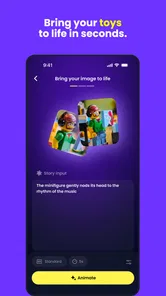
I approached NaukNauk: Bring Fandom to Life as an entertainment app for people who already enjoy figures, toys, and collectibles, but want a more playful way to interact with them. Its central idea is appealing: use AI to help collect, connect, and animate physical items instead of leaving them on a shelf. That makes it feel different from a standard cataloging tool, a social feed, or a simple camera effect.
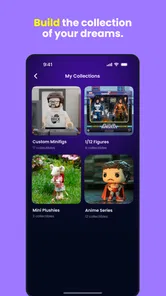
My first impression is that the app is best understood as a bridge between a real-world collection and a digital entertainment experience. You still need something tangible to work with, whether that is a figure, toy, or another collectible, but the app gives that object a more active role. I found the concept especially interesting for collectors who like documenting their items and imagining stories around them, rather than treating each piece only as a purchase or display object.
NaukNauk is made by NaukNauk and sits in the Entertainment category. It is free to install, although purchases inside the app range from $4.99 to $99.99 per item. The audience rating is Teen, so I would not automatically treat it as a children’s toy app just because it involves figures. It runs on Android 6.0 and later, and version 1.3.24 is the version to look for when checking whether the app is up to date.
Where the experience can become confusing
The most likely point of friction is understanding what the app expects from the user before the first enjoyable result appears. A person may open it expecting an instant animation tool, while the actual experience depends on bringing a collectible into the workflow and then deciding what to do with it. That difference matters. If you have not prepared an item or do not know which part of the interface handles collecting, connecting, or animating, the opening session can feel less obvious than the store concept suggests.
I recommend starting with one item rather than trying to organize an entire shelf. Choose a figure or toy with a clear shape, place it somewhere well lit, and keep the background as simple as possible. This is not a promise of a particular recognition result; it is simply a sensible way to reduce visual clutter while learning how NaukNauk responds. A small first test also makes it easier to tell whether a problem comes from the object, the camera view, or the app itself.
Another source of confusion is the word “connect.” It can suggest social interaction, linking objects, or joining parts of a collection. In practice, I would approach that function experimentally instead of assuming it works like a conventional social network or a spreadsheet relationship. Try to understand what the app does with one item before building a larger set of connected collectibles. That habit prevents a common mistake: creating a complicated setup and then not knowing which step caused an unexpected result.
The AI angle also creates a reasonable expectation gap. AI-assisted entertainment can make an object feel more expressive, but it does not remove the need for clear input or patient experimentation. If the first attempt looks ordinary, I would not immediately conclude that the app is broken. Try a cleaner view, a different angle, or a simpler object first. The goal of the first session should be learning the app’s preferred workflow, not producing a perfect scene immediately.
More From Our News Desk

 Gmail
GmailGmail in a Busy Inbox: Who Benefits Most?
From first account to crowded workday, Gmail earns its place through dependable search and flexible sorting—but its best fit depends on how much inbox maintenance you can tolerate.

 Prime Video
Switching to Prime Video: What Changes in Your Viewing Routine
Prime Video can make a compelling second home for streaming, but switching means learning a different catalog, rental layer, and route from browsing to playback.

 Universal TV Remote Control
Universal TV Remote Control Works Best as a Reliable Backup
A phone remote earns its place through quick setup and reliable habits. Here is how to get more from Universal TV Remote Control—and where its limits show.

 Weather - By Xiaomi
Weather by Xiaomi Review: Clear at a Glance, Less Clear Up Close
Xiaomi’s weather app makes everyday forecasts quick to scan, but its calm surface can leave useful details and recovery paths harder to find than they should be.

 X
XX Under Pressure: Can It Recover When Posting Goes Wrong?
A resilience-focused review of X, examining setup, mistaken posts, interruptions, weak connections, and the gaps that matter when recovery needs to be dependable.

 Clash of Clans
Clash of Clans Is Won Between the Battles
Its raids are quick; its community is a long-term project of coordination, teaching, rivalry, and shared responsibility—with all the friction that entails.
Latest News



There is a practical distinction between using NaukNauk as a quick novelty and using it as a collection companion. A quick novelty session may last only long enough to test one figure. A collection companion needs consistency: similar naming habits, repeatable photos, and a clear idea of which items you want to revisit. I found the second approach more rewarding because it gives the app a reason to remain useful after the initial curiosity fades.
What to check before blaming the app
Before troubleshooting anything complicated, I would check the basics. Confirm that the phone uses Android 6.0 or newer, then check whether version 1.3.24 is installed. An older build can make a guide or screen behave differently from what another user describes. It is also worth closing other demanding apps before testing an AI-related action, especially on an older phone. This does not guarantee a particular result, but it removes avoidable background strain.
Lighting is another easy variable to overlook. A glossy toy, a dark figure, or a transparent accessory may be difficult to distinguish from its surroundings. I would test the same item near a window or under an even lamp, avoiding harsh reflections. A plain surface helps too. If the object is partly hidden by packaging, hands, or other collectibles, move those distractions away for the first attempt.
Keep the phone steady while the app is working with the item. A rushed sweep across a shelf gives the system more visual information to interpret at once, while a stable view makes the test easier to repeat. If you are using a particularly small collectible, move closer only as much as necessary and keep its important details visible. The useful lesson here is not that every object must be handled in one exact way, but that repeatable input makes troubleshooting far more reliable.
Storage and network conditions are also worth checking when an action takes longer than expected. AI-assisted functions may need more processing than a basic photo viewer, and a weak connection can make a cloud-dependent step feel stuck even when the phone itself is fine. I would switch to a dependable connection, wait briefly, and retry once rather than tapping repeatedly. Repeated taps can create uncertainty about whether the app is still working or has received several requests.
Because the app is rated Teen, parents should treat it as an entertainment product that deserves a quick look before handing it to a younger user. The rating is not a detailed explanation of every screen, so I would explore the app myself first, especially if a child is interested in AI-generated interactions or in-app purchases. The free entry point is convenient, but purchase controls should be considered before regular use on a shared device.
A calmer way to recover a failed workflow
When an attempt does not work, I prefer a controlled reset instead of changing five things at once. First, return to the simplest item and a clean background. Next, repeat the same action with better light and a steady phone. If that works, add one variable, such as a second collectible or a more detailed object. This process tells you whether the original issue was caused by the item, the scene, or the sequence of actions.
If the app appears frozen, give the current action a moment before closing it. Then leave the screen and reopen the relevant workflow if the interface allows it. If the problem continues, fully close and relaunch the app. A phone restart is a reasonable next step for persistent glitches, but I would not jump straight to reinstalling because that can interrupt a collection workflow and make it harder to identify the original cause.
For a collection that seems incomplete or inconsistent, rebuild from a single known item. Use the same object that produced the clearest result earlier and see whether it still behaves normally. If it does, add the next item individually. This is a useful recovery technique because it creates a reference point. Without one, it is easy to mistake a complicated collection arrangement for an app-wide failure.
I would also avoid judging the app from one failed animation or one unsuccessful connection. The creative value here comes from iteration. Some objects will be more cooperative than others, and some scenes will be easier to interpret than a crowded display. The practical trade-off is that NaukNauk asks for more participation than a passive entertainment app. In return, the physical collection becomes part of the activity.
Purchases deserve the same deliberate approach. Since individual in-app items can cost between $4.99 and $99.99, I would explore the free experience first and decide whether the paid additions solve a real need for my collection. A higher-priced option is not automatically better for a casual user. If you only want to experiment with a single figure, the free starting point may be enough to decide whether the concept suits you. If you plan to build a deeper collection workflow, review each purchase carefully rather than treating every option as necessary.
When the problem is really the phone, the object, or the setting
It is easy to blame NaukNauk when a camera-based or AI-assisted interaction feels unreliable, but the phone can be the limiting factor. Older hardware may take longer to process visual tasks, and a crowded background can make the same collectible harder to handle than it appears to the human eye. If the app works better after closing other apps, improving light, and simplifying the scene, the original problem was probably environmental rather than a permanent fault in NaukNauk.
The collectible itself can be the difficult part. Reflective surfaces, thin accessories, unusual poses, and similar colors between the item and its background all create a less friendly test. I would not use the rarest or most delicate piece in my collection as the first experiment. Start with an ordinary object that is easy to move and replace. Once the workflow makes sense, try the more challenging pieces and accept that results may require more adjustment.
There is also a difference between a technical failure and a creative mismatch. You may complete the process successfully and still dislike the animation or connection it produces. That does not necessarily mean the app malfunctioned. NaukNauk is an entertainment tool, so the output may be more enjoyable for users who like playful interpretation than for collectors seeking precise archival records or professional-grade animation control.
This is where comparison with usual alternatives becomes useful. A spreadsheet or collection database is better for exact ownership records, purchase notes, condition tracking, and structured inventories. A social platform is better for broad conversation and sharing with people who do not own the same objects. A standard camera app is faster when all you want is a clean photograph. NaukNauk makes the most sense when you want the collectible itself to participate in an AI-focused experience.
I would skip it if my main goal were a detailed insurance inventory, a serious valuation log, or highly controlled animation editing. It is also not the right choice if I dislike experimenting with physical objects or want every action to be immediately self-explanatory. On the other hand, fans who enjoy arranging figures, revisiting old toys, and turning a shelf into something interactive may find more personality here than in a conventional catalog.
A realistic everyday use case
Imagine finishing work and having ten minutes before dinner. Instead of opening a general entertainment feed, you choose one figure from a shelf, move it onto a clear table, and use NaukNauk to explore what can be done with it. You test the item alone first, then bring in a second figure if the first result is stable. The session does not need to become a large project. The value is in giving a familiar object a new context without requiring a full collection makeover.
Another useful routine is a weekend collection check. Pick a small group of items, process them one at a time, and keep the setup consistent. This makes it easier to notice which objects are visually difficult and which interactions you actually enjoy. It also stops the app from becoming a one-day novelty. I would treat the process like a creative journal for the collection rather than a formal database, because that matches the app’s entertainment focus more closely.
For families, the app can become a shared activity, but I would keep an adult involved when purchases or account decisions appear. Letting each person choose one figure creates a manageable session and avoids the frustration of explaining a complicated collection all at once. The Teen rating is another reason to decide in advance whether the app fits the household’s age expectations.
For serious collectors, the strongest use case may be presentation rather than record keeping. You can use the physical shelf as the starting point for imaginative interactions, then return to the real objects afterward. That makes NaukNauk complementary to a traditional inventory system instead of a replacement for one. I would keep factual collection notes elsewhere and use this app for the expressive side of ownership.
How the free entry point affects the decision
Free installation lowers the risk of trying the concept, and the app has already attracted over a million installs. Its average rating is 4.4 from around eleven thousand ratings, which suggests that many users find the idea worthwhile, while still leaving room for individual experiences to differ. I would read that as encouragement to test it personally, not as a guarantee that every collectible or phone will behave identically.
The purchase range is the main point where I would slow down. A casual user may be comfortable exploring without spending, while a dedicated fan may be tempted to unlock several additions quickly. I think the sensible order is to learn the basic workflow, test it with items you already own, and only then consider whether a paid item adds something meaningful. That approach protects the app’s playful character from turning into an expensive trial-and-error exercise.
Version 1.3.24 gives the app a concrete starting point for current users, but software experiences can change as updates arrive. If a tutorial or screen differs from what you see, first make sure the installed version is current and then repeat the basic environmental checks. Keeping expectations flexible is particularly important for an app built around AI and physical objects, where small differences in input can affect the experience.
My final view is positive, with a clear qualification: NaukNauk is more interesting when you meet it halfway. It is not simply a replacement for a catalog, a camera, or a social network. Its appeal comes from combining a real collection with playful AI-assisted interaction, and that means setup quality and willingness to experiment matter.
I would recommend it to collectors, toy fans, and curious users who want their figures to do more than sit on a shelf. I would start with one easy object, good lighting, a clean background, and no immediate purchase. If that small test feels enjoyable, the app has a strong chance of becoming a distinctive addition to your entertainment routine. If you need precise records, predictable professional output, or instant results with no setup, a conventional alternative will serve you better.
My practical verdict: try the free experience first, keep the early workflow simple, and judge NaukNauk by whether it makes your own collection feel more engaging. For the right user, that personal connection is the reason to keep it installed.
NaukNauk: Bring Fandom to Life Frequently Asked Questions
Is NaukNauk: Bring Fandom to Life suitable for teenagers?
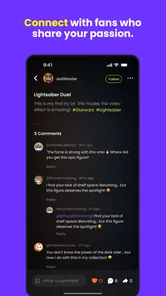
NaukNauk is an entertainment app with a Teen content rating, so it is intended for a teenage audience rather than young children. Because it includes fandom and community activity, the experience can involve content and conversations created by other users. Families may want to review the app together, discuss safe online interaction, and check the platform’s parental controls before a teenager creates an account.
Which devices and operating systems can run NaukNauk?
NaukNauk is available for Android devices running Android 6.0 or later. Before downloading, check your device’s operating-system version and make sure there is enough storage for the app and its updates. The app is free to download, while some optional in-app purchases are available. Availability and compatibility can differ by device and app store, so review the listing on your platform before installing.
What is NaukNauk: Bring Fandom to Life?
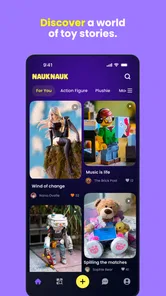
NaukNauk: Bring Fandom to Life is a fandom-focused social and creative app designed for people who enjoy connecting around their favorite entertainment, characters, stories, and communities. It aims to give fans a place to discover content, share their interests, interact with like-minded users, and express their creativity. The app’s store description also presents it as a way to collect, connect, and animate figures, toys, and collectibles with AI. The exact experience may vary depending on the fandoms, features, and community activity available in your region.
What can I do with NaukNauk: Bring Fandom to Life?
After installing NaukNauk, users can generally explore fandom-related content, follow topics or communities, interact with other fans, and participate in conversations or creative activities. Its focus also includes collecting, connecting, and animating figures, toys, and collectibles with AI. Depending on the current version, the app may include tools for posting, commenting, discovering fan creations, or building a personalized feed. It is worth browsing the available categories first to see whether your favorite fandoms are actively represented.
Is NaukNauk: Bring Fandom to Life free to download and use?
NaukNauk is free to download, but some optional in-app purchases cost between $4.99 and $99.99 per item. The app’s core experience and purchase options may differ, so check the price shown for each item before confirming a transaction. Review the billing details and make sure purchases are authorized through your platform account, particularly if the device is shared with a teenager or another family member.
Pros
- Connects fans through shared interests and fandom communities.
- Encourages creative expression with fan-made content and discussions.
- Makes it easy to discover niche fandoms and new communities.
- Offers a dedicated space for meaningful fan-to-fan interaction.
- Useful for following updates and conversations around favorite topics.
Cons
- Community activity may vary widely between different fandoms.
- Some content can feel repetitive when discussions focus on popular trends.
- New users may need time to understand the app’s community structure.
- Fan discussions may occasionally include spoilers or unverified information.
- The experience depends heavily on having an active
- welcoming community.











