MyRecipes
- 71.00
- 3.2
- Installs
- 50.00K
- Price
- Free

Screenshots


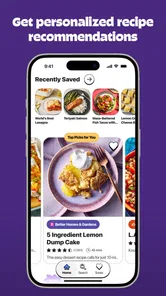
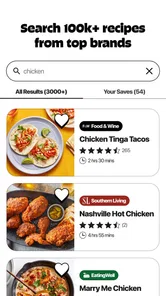
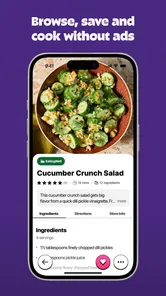

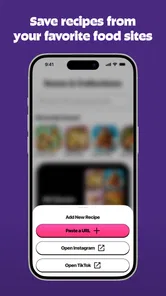

Analysis by Reviewed
I like recipe apps most when they make the next meal easier, not when they simply give me another endless feed to browse. MyRecipes is a cooking app from PEOPLE INC. GROUP, and its appeal is the mix of a large recipe collection with a way to save food ideas encountered on TikTok and Instagram. That combination speaks to a familiar problem: inspiration turns up in several places, while the practical question of what to cook later remains.
The app is free to download, which makes it easy to try before deciding whether it belongs in your routine. Its current version is 1.2.0, and it has a 3.2 average from 110 ratings, alongside 71 written reviews. Those figures suggest a mixed reception rather than a universally smooth experience, so I would approach it as a potentially useful cooking companion—not as a guaranteed upgrade over every recipe site or social platform.
Where the free experience earns its place
I find the free experience most useful when I give it a practical job: keep a few promising social-media recipes close enough to review before I shop. That makes the app easier to judge than browsing its collection without a meal in mind. The next question is whether that convenience adds enough value to justify making it part of a regular cooking routine.
A broad recipe shelf, with a social-media angle
The central promise is access to more than 100,000 trusted recipes, paired with saving recipes from TikTok and Instagram. That gives MyRecipes a more practical role than a standard recipe browser: it can serve as a place to look for a meal and a home for ideas you have already spotted elsewhere. For someone whose cooking inspiration is scattered across saved videos, bookmarks, and screenshots, bringing those ideas into a recipe-focused routine is the part I find most compelling.
A large collection can help when I know the ingredient or type of meal I want but not the exact dish. It is less valuable when I already have a short list of reliable recipes and rarely feel like exploring. Quantity is a starting advantage, not proof that every result will suit your taste, diet, skill level, or available ingredients. I would still judge individual recipes on whether their instructions make sense and whether the ingredients are realistic for my kitchen.
The social-saving element also has a useful second job: it can turn casual browsing into a more deliberate plan. Rather than reopening a video while standing in the supermarket, I can aim to collect promising ideas before shopping and decide which ones are worth making. The practical tip is to save selectively. A small collection of dishes you genuinely intend to cook is easier to act on than a huge archive of attractive clips you may never revisit.
What “free” means for deciding whether to try it
MyRecipes is free to install, while in-app purchases are listed at $6.99 to $39.99 per item. That is the clearest way to think about cost: you can start without paying, but purchases are part of the app’s offering. The listed range alone does not tell me which item is right for a particular cook or what paid access changes, so I would not treat a purchase as necessary simply because it is available.
More From Our News Desk

Weather by Xiaomi Review: Clear at a Glance, Less Clear Up Close

X Under Pressure: Can It Recover When Posting Goes Wrong?

Clash of Clans Is Won Between the Battles

Android Auto Makes the Case for Quieter Car Software

MobiOffice: Transforming Mobile Productivity with Seamless Integration

EA SPORTS FC™ Mobile Soccer: Redefining Mobile Sports Gaming
For a careful first try, I would use the free access to test the parts that matter to me: whether recipe discovery feels manageable, whether the social saving workflow fits how I collect ideas, and whether I can find dishes I would actually cook. If those basics do not earn a place in your week, paying more is unlikely to fix the underlying mismatch. If they do, then it makes sense to examine the specific purchase available in the app and decide whether its stated value suits your needs.
That distinction matters for people comparing it with free recipe websites or the social apps where food videos originate. MyRecipes asks you to consider a separate paid option, while the usual alternatives may already be part of your browsing habits. I would compare the convenience you personally gain against what you already do—not assume that a purchase is automatically a better deal because the app gathers food ideas in one place.
A small workflow that makes the collection more useful
One approach I would use is to separate “interesting” from “ready to cook.” When I see a video that looks good, I can save it, then review saved ideas later with a more practical filter: Do I have time for this? Can I get the ingredients? Does the recipe look clear enough to follow? That second pass is what turns a social bookmark into a dinner decision.
Another useful habit is to choose a recipe before shopping rather than using the app as a last-minute rescue. For example, after work I might remember a pasta video I saved earlier, check whether its ingredients fit what I can pick up, and make a decision before arriving at the store. This reduces the chance of buying ingredients for several appealing dishes that never make it to the pan. The app’s value is not just in finding ideas; it depends on how consistently you turn saved inspiration into a plan.
I would also avoid treating a short video as a complete cooking instruction. Social clips can make a dish look effortless while skipping timings, quantities, or context. When an idea comes from TikTok or Instagram, I would check the recipe details available in the app before relying on it for a meal. That extra step is especially sensible when cooking for guests or trying an unfamiliar technique.
The tradeoffs I would consider before making it a habit
The first tradeoff is breadth versus curation. A very large recipe pool can help me escape a cooking rut, but it can also mean more browsing before I find a dish that fits tonight. If you prefer a small set of tested meals and a simple weekly plan, a dedicated meal-planning tool or your own saved recipes may feel more focused. MyRecipes makes more sense when exploration is part of the fun.
The second is convenience versus dependence on several steps. Saving a social idea sounds simple, but the useful result still depends on being able to revisit it, understand what to cook, and fit it into your plans. If your usual method—keeping a few links in a notes app or saving posts directly in social media—already works, changing habits may not bring enough benefit. The strongest reason to switch is a real organizational gap, not the mere existence of another place to save things.
Its rating is a reminder to keep expectations measured. A 3.2 average across 110 ratings is not a reason by itself to avoid the app, but it does make me less inclined to call it an effortless recommendation for everyone. I would test it against a concrete need and make my own decision after trying the free experience. The app is rated for Everyone, and it requires Android 11 or later; those details matter if you are checking whether it fits your device or household, but they do not tell you whether its recipe workflow will suit you.
There is also a basic difference between collecting food content and cooking successfully. A promising recipe still needs to match your equipment, time, and comfort in the kitchen. I would not choose a dish solely because its video looks appealing. Read through the instructions first, check the ingredient list, and be willing to pass if it calls for more effort than you have that evening.
Who is likely to get the most value
I can see MyRecipes working well for a curious home cook who regularly finds dishes on social media and then forgets where they saw them. It may also suit someone who enjoys browsing for new meal ideas and wants a broad recipe collection to explore alongside that inspiration. In both cases, the free starting point keeps the decision low-commitment while you find out whether the app fits your habits.
It is less compelling for someone who wants a tightly structured meal plan, already has a dependable recipe archive, or dislikes sorting through a broad selection. It may also be the wrong choice if the main thing you need is a simple shopping list or a specific dietary planning system; I would not assume those needs are met just because the app is food-focused. For those tasks, a tool built explicitly around planning or your existing method may be the better match.
MyRecipes is available in version 1.2.0, and its developer is PEOPLE INC. GROUP. I would use those details as practical context when deciding whether to install it, but the more important question is behavioral: do you want one more place to organize recipes, and will you actually return to it when it is time to cook? If the answer is yes, its combination of browsing and social inspiration has a clear purpose.
How it fits into an ordinary cooking week
For me, the most realistic test would be a busy weekday rather than a slow weekend spent browsing. I might have a few minutes during a commute or a break to notice a dish, but little patience to reconstruct its details later. Saving an idea while it is fresh can reduce that memory work; the better test is whether I can turn that saved inspiration into a meal when I have limited time and a real set of ingredients to work with.
I would make the app earn its spot by using it for one planned dinner, not by trying to migrate every recipe I have ever bookmarked. Pick a dish with familiar ingredients, check the instructions before shopping, and see whether the saved idea is still useful when you return to it. If it takes too much effort to identify what to buy or how to cook the dish, that is meaningful evidence about the fit, even if the original video looked appealing.
This also helps answer a practical question: does it replace social media or ordinary recipe sites? I would not expect it to replace either completely. Social platforms are still where a lot of visual inspiration begins, while recipe websites can be more convenient when I want to search for a specific dish and compare instructions directly. MyRecipes has a distinct role if keeping those discoveries together makes your routine simpler; otherwise, using the original platform and a basic personal archive may be less work.
What I would check before relying on a saved recipe
A saved post is not automatically a dependable cooking plan. Before committing, I would confirm that the recipe has enough detail to guide me, that the ingredient list suits the number of people I am cooking for, and that I have a sensible substitute if one item is unavailable. This is particularly useful for social clips, where the visual sequence may leave out preparation steps or make quantities hard to judge.
I would also treat the collection as a source of possibilities, not as a guarantee of dietary suitability. If I am cooking around an allergy, a strict eating plan, or someone’s strong preferences, I would inspect each recipe carefully rather than relying on a broad category or a tempting image. That caution is not a reason to avoid discovery; it is a way to keep a large library useful without letting convenience replace judgment.
Another small but valuable habit is to review saved ideas when you have time, not only at the point of hunger. A quick check earlier in the day gives you room to reject a complicated recipe and choose something more realistic. If you wait until everyone is ready to eat, even a promising collection can become another source of scrolling rather than a shortcut to dinner.
My buy-or-skip verdict
I would try MyRecipes for free if my recipe ideas were spread across social feeds and I wanted a larger collection to explore. Its most distinct value is the bridge between finding food inspiration and keeping it for later, not simply the size of its recipe library. Give it a real test with a dish you might cook this week rather than judging it by how many ideas you can scroll past.
I would skip a paid purchase until I understood exactly what it offers and had confirmed that the free experience solves a problem I actually have. The listed in-app items range from $6.99 to $39.99, so the possible commitment varies considerably; value depends on the specific item and on whether its benefits matter to your routine. I would not spend just to unlock the feeling of being more organized.
My bottom line is measured: this is worth trying when social recipe discovery is already part of how you cook, but it is not automatically the best choice for a person who wants a compact, predictable planning tool. Start free, save only ideas you could realistically make, and see whether that turns into easier meals. If it does, keep it in your rotation; if it becomes another pile of unfinished bookmarks, your existing recipe site or social saves may be enough.
MyRecipes Frequently Asked Questions
What is MyRecipes, and what can I do with it?
MyRecipes is a cooking and meal-planning app designed to help you find dishes to make and keep useful recipe information organized. Depending on the version available in your region, you may be able to browse recipes, view ingredient lists and preparation instructions, save favorites, and plan meals. Check the app listing and screenshots before downloading, since features and content can vary by publisher and platform.
Is MyRecipes free to download and use?
The app may be available to download at no cost, but that does not necessarily mean every feature or piece of content is free. Some versions of recipe apps include advertising, optional subscriptions, or in-app purchases. Review the store listing for the current price and purchase details, and check the app’s settings for subscription terms before starting a trial or confirming a payment.
Can I save recipes and create a meal plan in MyRecipes?
Saving recipes and organizing meals are common features people look for in a recipe app, but what MyRecipes supports depends on the particular app version. Before relying on it for weekly planning, check whether it offers favorites, collections, a calendar, or shopping-list tools. If you switch devices, also look for account or backup options so you know whether saved recipes will carry over.
Does MyRecipes provide nutritional information and dietary filters?
Some recipes may include details such as calories or other nutrition information, while dietary filters may help you find meals suited to particular preferences or restrictions. Availability and accuracy can differ by recipe, so do not assume every dish has complete nutrition data or verified allergen information. If you have a food allergy or medical dietary requirement, confirm ingredients independently before preparing or eating a recipe.
What should I check before downloading MyRecipes on Android or iOS?
Confirm that the app is the intended MyRecipes product by checking its developer name, screenshots, recent reviews, and update history in the official Google Play or Apple App Store. Also review device compatibility, requested permissions, privacy information, and whether the app requires an account or an internet connection. These checks can help you understand what to expect and avoid installing a similarly named app by mistake.
Pros
- Save favorite recipes in one place for quick access.
- Browse recipes by ingredient when planning meals around what you have.
- Step-by-step instructions make recipes easy to follow while cooking.
- Ratings and reviews offer insight from other home cooks.
- Meal-planning tools can help organize what to cook throughout the week.
Cons
- Some recipes may require ingredients that are hard to find locally.
- Sponsored content or promotions may interrupt browsing.
- Recipe results can vary in quality and detail.
- Features and recipe availability may depend on an internet connection.
- Account creation may be required to use some saving or planning features.











