myEquifax
- 985.00
- 4.6
- Installs
- 500.00K
- Price
- Free

Screenshots




Analysis by Reviewed
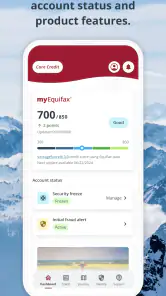
I approached myEquifax as a practical finance app rather than something to open every day for entertainment. Its purpose is clear from the start: help people begin or manage a credit-related routine in one place. After spending time with it, I think its value depends less on how many screens it offers and more on whether you want a focused connection to Equifax Incorporated, the developer behind it. If that matches your situation, the app can make credit tasks feel less scattered. If you want a broad personal-finance dashboard, a budgeting tool, or a service that brings together several financial providers, you may prefer a different type of app.
The app is free, carries an Everyone age rating, and sits in the finance category. It was released on April 25, 2025, and the current version is 1.11.0, with support beginning at Android 8.0. Those details matter because this is a relatively modern option for people using an older Android device, while the age rating makes it approachable for a wide household audience. Its store presence is also substantial, with more than half a million installs and an average rating of 4.6 from roughly ten thousand ratings. I would treat that as a useful sign of adoption, not as a guarantee that every person will have the same experience.
What I looked for before recommending it
When I assess a credit-focused app, I do not begin with the number of buttons or the visual design. I first ask whether it helps me understand what needs attention, whether it reduces the temptation to make rushed decisions, and whether I can fit it into a normal financial routine. A credit app should support careful checking, not create another source of anxiety. That is especially important for someone who is new to credit or has recently been turned down for a financial product.
I also look at the difference between monitoring and action. An app can be useful for keeping an eye on credit information, but that does not automatically make it a budgeting app, a debt payoff planner, or a complete identity-management solution. I found it helpful to keep those categories separate while using myEquifax. The app makes the most sense when I treat it as a credit journey companion, not as a replacement for every financial service on my phone.
Another decision point is trust. Financial apps ask for a higher level of attention than a weather or shopping app because the information involved can affect real decisions. Here, the connection with Equifax Incorporated is central to the experience. That makes the app particularly relevant to someone who wants a direct route to Equifax-related credit information rather than an independent app that collects views from several sources and presents them in a broader dashboard.
My final criterion was friction. I wanted to know whether the app could fit into a short weekly check-in. A good routine might involve opening it after reviewing bills, noting anything unfamiliar, and then closing it without getting pulled into unnecessary activity. That simple workflow is more valuable to me than a crowded interface filled with financial tools I will not use.
How it fits into an ordinary week
Imagine someone preparing to rent a new apartment. They have paid their regular bills, but they are unsure whether their credit profile is ready for an application. Instead of guessing from an old email or relying on a general finance dashboard, they can use myEquifax as a dedicated place to begin reviewing their credit journey. I would open it before submitting applications, use the information as a prompt to check my records, and avoid treating one screen as the sole basis for a major financial decision.
That workflow reveals one of the app's less obvious strengths: it can encourage a pause between concern and action. If something looks unfamiliar, the sensible next step is not immediately applying for another card or closing an account. It is to compare the information with personal records, check dates and balances, and then decide whether further investigation is needed. The app is most useful when it supports that habit of verification.
A second practical use is preparing for a conversation. Someone who is helping a family member understand credit may use the app as a starting point for discussing what to look at, what questions to ask, and which details deserve attention. I would still keep the conversation grounded in the person's complete financial picture, but a focused credit app can make the discussion less abstract than simply saying, “Check your credit.”
For a first-time credit user, I recommend setting a modest routine instead of checking repeatedly. Frequent checking can turn normal changes into a source of stress, especially when the user does not yet understand why credit information may change. A short, deliberate review is better than opening the app whenever a financial worry appears. This is advice about using the product well, not a promise that the app itself will solve every credit problem.
Where the focused approach works best
The clearest advantage is concentration. myEquifax is not trying to be a general-purpose spending tracker in my review. That narrow purpose can be a benefit because it reduces the need to move through unrelated categories before reaching the subject I care about. For a person whose immediate goal is understanding or beginning a credit routine, that focus feels more appropriate than a large budgeting application built around transactions, categories, and savings goals.
I also like the idea of keeping credit review separate from day-to-day spending. Budgeting apps are excellent for showing where money goes, but the habits needed to review credit information are different. Mixing the two can make it harder to tell whether I am checking a bill, planning a purchase, or examining credit-related information. A dedicated app gives each task its own mental space.
The app's free price is another practical advantage for someone who wants to start without adding a subscription to an already crowded monthly budget. That does not mean every related service or financial decision is free, and I would never assume that installing a free app removes all costs elsewhere. It simply lowers the barrier to trying this particular starting point.
The broad Everyone rating may also make it easier for households to consider. A parent helping a young adult learn basic credit habits can introduce the app without choosing a product positioned only for professional investors or experienced borrowers. I would still supervise sensitive financial discussions appropriately, but the presentation is not aimed exclusively at specialists.
There is also a useful psychological benefit to a recognized, single-provider experience. When I am trying to understand a personal credit situation, I prefer knowing which organization is behind the app rather than juggling several unfamiliar services. That simplicity can make it easier to remember where I looked and what I need to follow up on later.
Small habits that make the app more useful
My first tip is to use myEquifax alongside a personal record, not instead of one. Keep a simple note of recent applications, account changes, and questions that need checking. Then, when you review the app, you have a reference point for spotting something that deserves attention. This approach prevents a vague feeling of alarm from becoming the only interpretation of what you see.
My second tip is to review before a planned financial milestone, not only after a problem appears. Renting, applying for a loan, or preparing for a major purchase can all be reasons to organize your records early. Starting ahead of time gives you room to investigate discrepancies or clarify confusing information without the pressure of an immediate deadline.
My third tip is to separate observation from correction. The first pass should answer, “What am I seeing?” The second should answer, “What action, if any, is appropriate?” That two-step method is especially important in credit matters because a surprising entry may require documentation or a formal process rather than a quick tap. The app can be the place where you notice an issue, but noticing is not the same as resolving it.
Finally, I would avoid using any credit app as a reason to apply for products impulsively. If a screen makes you curious about improving your credit, take time to understand the possible consequences of each action. The best outcome from myEquifax is not a burst of activity; it is a clearer, calmer plan.
Where another category may be a better fit
The main limitation is the same quality that makes the app attractive: focus. If your central question is “Where did my money go this month?” you will probably be better served by a budgeting app that connects spending categories, recurring expenses, and savings targets. A credit-centered tool is not the natural choice for tracking groceries, planning cash flow, or comparing household spending over time.
If you manage accounts across several financial institutions and want one combined view, an account-aggregation app may feel more convenient. Such apps are designed around bringing different balances or transactions together. I would choose that category when the daily problem is fragmentation across banks, cards, and savings accounts. I would choose myEquifax when the daily problem is specifically understanding the credit side of my financial life.
There is also a difference between a credit-monitoring starting point and a professional financial consultation. Someone dealing with complicated debt, a disputed account, or a time-sensitive application may need direct guidance from a qualified adviser or the relevant institution. I would not expect a mobile app to interpret every personal circumstance or replace formal assistance.
Users who want extensive customization may also find the focused design less satisfying. People who enjoy building detailed dashboards, assigning every transaction, and adjusting long-term projections may prefer a more comprehensive finance platform. That is not a defect for the intended audience, but it is an important trade-off: myEquifax is easier to understand when the goal is narrow, while broader tools may offer more flexibility for complex planning.
Privacy-minded users should make a deliberate choice before installing any finance app. I would read the app's current permission and privacy information, use a strong device lock, and avoid reviewing sensitive information on a public network or a shared phone. These are sensible precautions for any financial service, and they matter more than convenience when the information is personal.
Switching from another finance app
If you are moving from a general budgeting app, the cost of switching is mostly organizational rather than technical. You may still want the old app for spending history and household planning, while using myEquifax for a more focused credit routine. I would not delete the budgeting tool immediately. First, decide which app owns which task, then keep notes in one place so you do not lose track of follow-ups.
Moving from another credit app requires more caution. Before changing routines, write down the questions you were monitoring and the dates of any actions already taken. This prevents the common mistake of assuming that a new interface automatically carries over your personal context. A clean transition is less about copying every screen and more about preserving your records and knowing what still needs attention.
The free price makes experimenting easier, but I would still avoid installing several similar apps and checking all of them at once. Conflicting layouts can make normal changes look like contradictions. Pick one primary routine, use the others only when there is a clear reason, and keep your interpretation tied to complete records rather than whichever notification feels most urgent.
On supported Android devices, the minimum operating-system requirement is Android 8.0, so people with older phones should check compatibility before planning around it. For everyone else, the current version, 1.11.0, is the version I would look for when deciding whether the app is up to date. Keeping the app current is a sensible part of using a finance product, particularly when the app handles personal information.
My recommendation for different users
I recommend myEquifax to someone who wants a straightforward way to start paying attention to credit and prefers a finance app connected to Equifax Incorporated. It is especially suitable for a first-time user, a person preparing for a major financial step, or anyone who wants credit review kept separate from spending management. The free entry point and accessible age rating make it easy to consider without turning the decision into a major purchase.
I would be more cautious about recommending it to someone who expects one app to manage a complete household budget, combine every bank account, create detailed debt plans, and provide personalized financial advice. That person should look at broader finance categories first. A focused credit app may still have a place in the setup, but it should not be mistaken for the whole setup.
My honest view is that the app earns its place through clarity rather than excess. It gives credit beginners a recognizable starting point and gives experienced users a dedicated place for a specific routine. The trade-off is that the narrower purpose may feel limited when your needs expand beyond credit. That is a fair exchange if you choose it knowingly.
Overall, I see myEquifax as a sensible first step for people who want to begin their credit journey with a focused, free finance app. I would install it with a clear purpose, pair it with careful personal record-keeping, and use it as a prompt for informed decisions rather than as an automatic answer to every financial concern. Choose it for focused credit awareness, not as a replacement for a complete money-management system.
Pros
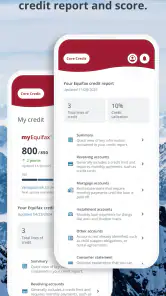
- Free access to your Equifax credit report and score
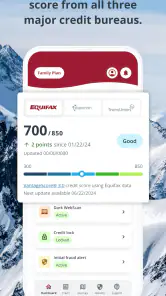
- Credit monitoring alerts can help detect suspicious activity
- Identity protection tools support fraud awareness
- Secure login options help protect sensitive account data
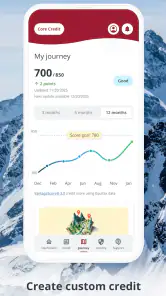
- Useful financial insights are presented in a simple dashboard
Cons
- Some features require a paid Equifax subscription
- Credit score updates may not be available in real time
- App usefulness depends on your country and Equifax coverage
- Users may receive promotional offers for additional services
- Account verification can be lengthy or difficult for some users

- Category
- Finance
- Version
- 1.11.0











