My Cocktail Bar Pro
- 120.00
- 4.6
- Installs
- 10.00K
- Price
- $1.99

Screenshots
Analysis by Reviewed
My most useful habit with My Cocktail Bar Pro is to decide what I need before opening it: a known drink, an idea that fits the ingredients on hand, or a recipe I have already refined. That keeps browsing purposeful and makes the app easier to use when I am already preparing drinks rather than casually exploring. As a paid Food & Drink app from Roman Shu, it costs $1.99; its 4.6 average from over 800 ratings suggests a focused audience of home cocktail makers.
The Ultimate Virtual Bar Experience
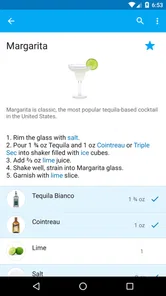
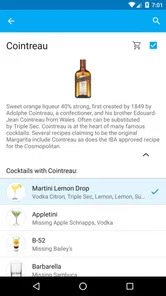
When I first opened My Cocktail Bar Pro, I felt like I had stepped into a virtual speakeasy. The interface is sleek and inviting, promising a treasure trove of cocktail recipes at your fingertips. With a database that seems almost endless, I was thrilled to find both classic concoctions and some avant-garde mixes that I had never even heard of!
A useful baseline for home mixing
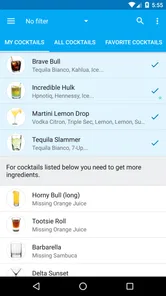
The most reliable way to use a recipe app is to start with a clear goal. If I want a familiar drink, I look it up and follow its directions; if I have a few ingredients left from another evening, I use ingredient search to see what might be possible. That distinction matters: browsing for inspiration is enjoyable, but checking what can be made from what is actually available saves a trip to the shop. The app’s store summary promises practical help with cocktails at home, and that is the setting where its recipe-first approach makes the most sense.
For a realistic weeknight example, imagine having citrus, a spirit, and a mixer on hand but not wanting to improvise blindly. Searching by ingredients can narrow the choices before you start pouring. I would still read the full recipe before committing: a suggested drink may call for a particular garnish or an ingredient you do not have, and a substitute is not always a perfect match. Treat suggestions as a shortlist, not a guarantee that every result can be made exactly as written.
That shortlist approach also helps when shopping. I would check a few promising recipes before buying a bottle that is only useful for one drink, then see whether the same ingredient supports something else I already like. This is a practical way to avoid turning a spontaneous cocktail idea into a cupboard full of single-use purchases. The app can help narrow the choice, but I still make the final call based on what I am willing to buy and use.
Shake Things Up with Customization
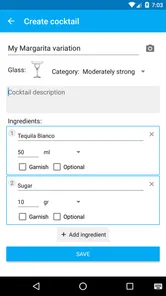
One of the coolest features I discovered was the ability to customize and save your own cocktail recipes. Imagine the pride of crafting a unique drink and then sharing it with your pals, who will undoubtedly shower you with praise. The app even lets you jot down your own notes for each recipe, so you can remember your tweaks and secret ingredients.
Those notes are more useful than they first sound. A small change in sweetness, dilution, or garnish can make a recipe work better for your taste, and recording it turns a lucky experiment into something repeatable. I would use the notes to capture practical details too, such as which brand of mixer I used or whether I preferred a lighter pour. That makes saved recipes a personal working collection rather than just a list of names.
More From Our News Desk

Weather by Xiaomi Review: Clear at a Glance, Less Clear Up Close

X Under Pressure: Can It Recover When Posting Goes Wrong?

Clash of Clans Is Won Between the Battles

Android Auto Makes the Case for Quieter Car Software

MobiOffice: Transforming Mobile Productivity with Seamless Integration

EA SPORTS FC™ Mobile Soccer: Redefining Mobile Sports Gaming
I would make one adjustment at a time when refining a drink. If I change the spirit, sweetness, and citrus together, it becomes hard to tell which change improved the result. A short note about the specific tweak gives the next attempt a useful starting point. For a drink I plan to serve to others, I would also keep a version I know works, rather than replacing it with an untested experiment right before guests arrive.
Learning and Experimenting
If you’re new to the world of mixology, fear not. The app is super user-friendly, offering step-by-step instructions that are easy to follow. It even suggests alternatives for ingredients you might not have on hand, which is a lifesaver when you're in a pinch. And for those who love to experiment, the app’s random cocktail generator is a fun way to discover new favorites!
For beginners, I would use the instructions as a guide and pay attention to the order and proportions instead of treating every recipe as an invitation to pour by eye. The random generator is better for a relaxed tasting night than for a planned menu: it can spark an idea, while a known favorite is the safer choice when guests are waiting. Experienced home bartenders may also prefer to adjust recipes to their own glassware and taste, then save those versions so the next round is consistent.
One useful way to learn from a random suggestion is to treat it as a prompt, not an assignment. I would scan the ingredients first, decide whether the flavor combination sounds appealing, and only then gather what is needed. If I do try it, I would make a single serving before scaling anything up. That small test helps separate an intriguing recipe from one that suits my palate, without wasting a larger batch.
Settings, shortcuts, and party planning
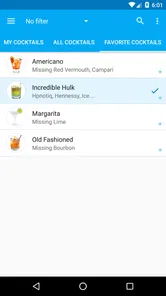
Before relying on any cocktail app for a gathering, I would check how its recipe and ingredient choices fit the drinks I actually make, then build a small favorites list rather than trying to remember everything while hosting. Favorites are a simple shortcut: they reduce browsing when you are juggling ice, glasses, and conversation. The useful habit is to save only drinks you have tested, so the list stays dependable instead of becoming another pile of possibilities.
Party Mode is the feature that changes the workflow most for a group. Scaling a recipe can help with planning a larger batch, but I would check the quantities before mixing and taste a small sample before serving. Scaling does not remove the need to account for ice, glass size, or guests who want a less sweet drink. I would also prepare the non-alcoholic and garnish options separately rather than assuming a scaled recipe covers every preference at the table.
For a low-stress gathering, I would settle on a short menu in advance: one familiar recipe, perhaps one more adventurous choice, and a separate non-alcoholic option prepared to suit the guests. I would use the app to revisit the tested cocktail recipes and scale only what I actually expect to serve. This makes Party Mode a planning aid rather than a substitute for hosting judgment. It is also easier to keep ingredients and glassware organized when every drink on the menu has a clear purpose.
Features That Stir Things Up
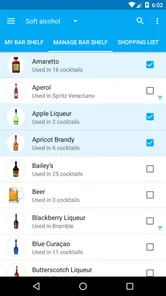
- Ingredient Search: Just input what you have, and the app suggests cocktails you can make. It’s like magic!
- Favorites List: Easily save your go-to drinks for quick access.
- Party Mode: Planning a get-together? The app helps you scale recipes to serve more people, ensuring no one goes thirsty.
Compared with searching the web for one recipe at a time, having ingredient search, saved drinks, personal notes, and party scaling together can make this a more organized home-bar companion. The trade-off is that a dedicated cocktail book may offer a more curated learning path, while a general recipe site can be better when you want broad cooking ideas alongside drinks. This app is most appealing if cocktails are a regular hobby and you want a repeatable way to find and refine them, rather than a one-off answer for a single occasion.
There are practical limits, too. The app cannot supply bottles, fresh citrus, ice, or equipment, and its suggestions cannot tell you whether your ingredients are fresh or your measurements suit your palate. I would skip it if I rarely make cocktails, prefer a bartender to choose and prepare drinks, or want an app centered on non-alcoholic recipes. It is rated Mature 17+, so it is not a suitable choice for younger users; cocktail guidance should be used responsibly by adults.
It is also worth deciding what you expect from a recipe collection. If you want a structured course that explains technique and flavor theory from the ground up, a cocktail book or dedicated learning resource may be a better fit. If you mainly want quick ideas connected to what is already in your kitchen, ingredient search is the more useful starting point here. I would choose between those approaches based on whether I want to study cocktails or simply make a good one tonight.
Who will get the most from it
The app suits curious beginners who want instructions, as well as experienced mixers who enjoy adapting recipes and keeping track of what worked. Its 10K+ installs and 118 reviews sit alongside its average rating, giving potential users a sense of its established but relatively focused audience. It was released on February 18, 2012, and its current version is 2.7.2, with a minimum OS requirement of 6.0. I would check that requirement against an older device before buying, and remember that the $1.99 purchase makes most sense if you expect to use the recipe collection more than occasionally.
One question people often have is whether this can replace a stocked bar or a shopping list. It cannot: it helps you decide what to make, but you still need the ingredients and tools. Another is whether it works for both first-time and practiced home bartenders; the guided recipes and experimentation tools give each group a different entry point, though neither removes the value of learning basic measuring. For a host, the useful question is whether scaling will solve all party planning. It helps with recipe quantities, but you still need to plan serving logistics and account for individual tastes.
A further practical question is whether it is worth paying for if I only mix occasionally. I would say that depends on what “occasionally” means: a person who makes drinks for a few gatherings and likes keeping recipes organized may still value the saved collection, while someone who searches for one familiar recipe once in a while can probably manage with a free web search. The purchase is easier to justify when ingredient search, notes, and repeatable favorites become part of a regular routine.
As much as I love this app, it’s worth noting that while the app provides a wealth of knowledge, it doesn’t actually provide the ingredients. So, you’ll still need to stock up your home bar with the essentials.
The Final Sip
All in all, My Cocktail Bar Pro is a delightful tool for both novice and seasoned cocktail enthusiasts. It’s like having a personal bartender who never judges you for your questionable drink choices. Whether you’re throwing a party or just want to unwind with a well-crafted drink, this app is your go-to companion. So, why not give it a whirl and see what creative concoctions you can come up with?
My recommendation is conditional but straightforward: choose it if you like making drinks at home, want recipes you can adapt, and will use the saved notes and favorites to build a dependable routine. If you only need an occasional recipe, a free web search may be enough; if your priority is comprehensive cocktail education or planning every part of a party, another resource may suit you better. For regular home mixing, though, the combination of discovery and personal recipe keeping gives it a clear purpose beyond simply telling you what goes into a drink.
My strongest recommendation is to use it as a record of decisions, not just a catalogue to scroll through. Keep a few recipes that have earned a place in your routine, note changes you would repeat, and leave room for one new idea when you have time to test it. That habit gives the app a clear role at the counter: it helps turn scattered cocktail inspiration into a small, usable home-bar repertoire.
My Cocktail Bar Pro Frequently Asked Questions
What does My Cocktail Bar Pro cost, and what should I know before downloading it?
My Cocktail Bar Pro is a paid Food & Drink app priced at $1.99. It is intended for adults, with a Mature 17+ content rating, so check that rating before installing it or sharing a device with younger users. The app is designed to help you make cocktails at home, and its short description is simply “My Cocktail Bar.”
What features does My Cocktail Bar Pro offer that other cocktail apps don't?
My Cocktail Bar Pro stands out with its extensive library of over 400 cocktail recipes, detailed ingredient lists, and step-by-step preparation guides. It also offers a unique feature that allows users to input available ingredients at home, providing a list of cocktails that can be made. Additionally, it includes a personalized cocktail recommendation engine based on your taste preferences and previous choices.
Is My Cocktail Bar Pro suitable for beginners or only for experienced cocktail enthusiasts?
My Cocktail Bar Pro is designed for both beginners and seasoned cocktail enthusiasts. The app provides easy-to-follow instructions and video tutorials for beginners. For experienced users, it offers advanced techniques and tips to refine their cocktail-making skills. Whether you're just starting or looking to enhance your expertise, the app caters to all levels.
Does My Cocktail Bar Pro require an internet connection to use all its features?
While My Cocktail Bar Pro offers offline access to its cocktail recipe library, certain features like cocktail recommendations and community sharing require an internet connection. Users can still enjoy most functionalities without being online, making it convenient for use in areas with limited connectivity.
How does the personalized cocktail recommendation engine work in My Cocktail Bar Pro?
The personalized cocktail recommendation engine in My Cocktail Bar Pro analyzes your past cocktail choices and ratings to suggest drinks that match your taste preferences. It uses a sophisticated algorithm that considers ingredients you like, the types of cocktails you've enjoyed, and even the time of day to offer tailored recommendations, enhancing your cocktail experience.
Pros
- Extensive cocktail recipe database.
- User-friendly interface for easy navigation.
- Regular updates with new cocktail ideas.
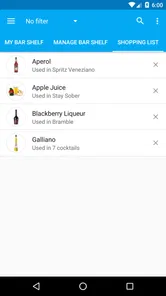
- Customizable shopping list feature.
- Offline access to recipes.
Cons
- Limited non-alcoholic options.
- Advertisements in free version.
- No option to rate recipes.
- Lacks social sharing features.
- Requires internet for updates.











