MS NOW: Watch Live News
- 1.09K
- 4.1
- Installs
- 100.00K
- Price
- Free

Screenshots
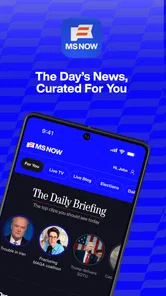

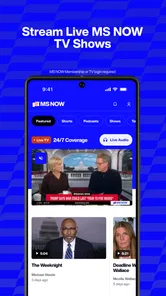

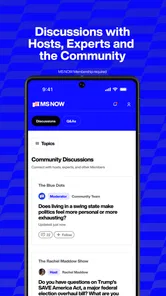

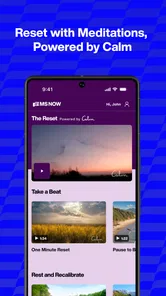
Analysis by Reviewed
I usually judge a news app by what it helps me do in the moment: catch a developing story, understand why it matters, or listen while my attention is elsewhere. MSNBC: Watch Live & Analysis is aimed at people who want a familiar, video-led news voice close at hand, rather than a broad feed built to summarize every outlet. It is a free News & Magazines app from NBC News Digital LLC, and its Teen age rating makes it suitable for older children and adults who follow current affairs.
Choose it for a particular kind of news routine
The main decision is whether you want to watch and listen to coverage from this news team, or compare many publishers in one place. In my view, this app makes more sense as a direct route to MS NOW video and audio than as a complete replacement for every news source you use. Its focus is useful when you already know whose reporting and commentary you want to follow; it is less compelling if your first priority is a neutral-looking, multi-outlet headline roundup.
A practical way to use it is to separate checking the news from keeping it on. I might open the app during a short break to see what is being covered, then return to audio when I am making dinner or doing a routine task. That shift from watching to listening is the useful distinction here: video suits a moment when I can give the story my eyes, while audio can fit around other parts of the day. I would still save screen-free listening for situations where it is safe and appropriate, rather than trying to follow a stream while driving or crossing a busy street.
Stay Updated Anytime, Anywhere
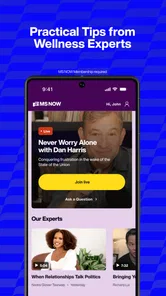
One of the coolest features of the MSNBC: Watch Live & Analysis app is that it lets you watch live news coverage wherever you are. Whether you're commuting, taking a break, or just chilling at home, you can keep up with the latest news on your smartphone. No more missing out on the important stuff because you were away from your TV.
Content That Keeps You Engaged
The app doesn’t just offer live streaming; it’s packed with in-depth analysis and expert opinions. You know those times when you hear a news headline and wish you could get more context? This app has got you covered. It offers detailed breakdowns and insights into the top stories, which is perfect for those of us who like to know all the ins and outs.
Plus, the app is organized in such a user-friendly way that finding your way around is a breeze. With sections dedicated to politics, business, health, and more, you can easily jump to the topics that matter most to you. It’s like having a personal news assistant guiding you through the day’s headlines.
When a focused source is an advantage
For someone who follows a story over several days, hearing the same newsroom’s continuing coverage can make it easier to recognize what has changed and what still needs explanation. I find that especially useful for major political developments or a complicated public issue: a live segment can convey urgency, while a longer explanation may help put a headline in context. That is a different experience from skimming short alerts, which are handy for awareness but rarely leave room for much reasoning.
More From Our News Desk

Weather by Xiaomi Review: Clear at a Glance, Less Clear Up Close

X Under Pressure: Can It Recover When Posting Goes Wrong?

Clash of Clans Is Won Between the Battles

Android Auto Makes the Case for Quieter Car Software

MobiOffice: Transforming Mobile Productivity with Seamless Integration

EA SPORTS FC™ Mobile Soccer: Redefining Mobile Sports Gaming
There is a trade-off, though. A focused source gives you a coherent point of view, not a full cross-section of reporting. If I am making up my mind about a contested issue, I would use this app to hear its coverage and then consult another newsroom or a text-based news aggregator for different framing and additional reporting. That is not a flaw unique to this app; it is simply a sensible way to use any single publisher’s service.
Personalized Experience
Another thing I appreciate about this app is how it tailors content to your interests. By setting up your preferences, you can get notifications about the stories that are most relevant to you. It’s smart, efficient, and saves you the hassle of sifting through headlines that don’t interest you. Just set it up once, and you’re good to go!
For a calmer routine, I would treat notifications as a prompt to check in, not as a complete account of a story. A notification can pull me into a developing headline at an inconvenient moment, so it is worth being selective about what deserves an interruption. If I want to keep up without constantly checking my phone, I can make one deliberate visit during a break and use the audio option later when listening makes more sense. That small change helps keep a news habit useful rather than distracting.
And let’s talk about the design for a sec—it’s sleek and modern, making the whole experience smooth and visually appealing. No clunky interfaces here!
Where other options may fit better
If I want a quick written scan, a newspaper app or an aggregator may be a better first stop: text is easier to skim quietly, and an aggregator can place several publishers side by side. If I want a live voice and commentary from this particular newsroom, this app has the clearer purpose. The choice comes down to whether I am looking for breadth and fast reading or a more direct video-and-audio experience.
There are a few practical trade-offs to keep in mind. Watching video is less discreet than reading a headline, and it asks for more attention than background audio. Streaming also makes a stable connection and a suitable moment important; if I am on a weak connection or need to conserve mobile data, a text-first source may be more convenient. I would check the app’s current options and my device settings before relying on it for a long session, rather than assuming a particular playback or data-saving setup.
A realistic day with the app
Imagine I have a few minutes before work and want to understand why a major story is leading the day. I can use that short window to watch a segment rather than trying to piece together the issue from a run of headlines. Later, while preparing a meal, audio may suit better because I can listen without keeping my eyes on a screen. The useful habit is to choose the format for the moment, not to keep a stream running simply because it is available.
That routine also makes it easier to notice when the app is not the right tool. If I need to confirm a small detail quickly, such as a name or a date, written reporting is usually faster to scan and revisit. If I want several viewpoints before forming an opinion, I would pair this app with another source rather than treating repeated exposure to one newsroom’s coverage as a substitute for comparison. Its strongest role is helping me follow the team’s reporting in a format that fits my available attention.
What the numbers say—and what switching involves
The app has a 4.6 average from around 9,600 ratings, with more than 100,000 installs. Those figures suggest that many people have chosen to try it, but I would still make the decision based on the format and newsroom focus that suit me. It is free to download, so trying it does not require a purchase; the more meaningful cost is attention. If I already have a settled news routine, I would add it for a specific purpose—such as live coverage or listening—instead of expecting it to replace every source overnight.
Switching is easiest when I first decide what I want this app to handle. I might use it for video and audio, while keeping a separate source for quick written updates or contrasting perspectives. That division avoids the false choice between relying on one app for everything and installing nothing new. It also gives me a clear test: after a few days, am I actually using its format at the times I intended, or am I still reaching for my usual headline feed?
Who should keep looking
I would not choose this as my only news destination if I prefer silent, text-first browsing or want a broad mix of publishers gathered in one place. Those readers are better served by a newspaper app or an aggregator that makes scanning and comparing stories the main activity. Likewise, anyone who rarely has a suitable time or connection for streaming may get more practical value from written coverage. The app’s focus is a real advantage only when that focus matches what I want to hear.
It may also be the wrong fit for someone who wants news to stay in the background all day. Audio can be convenient, but continuous listening is not the same as understanding a story, and it can crowd out other things that deserve attention. I prefer to choose a segment or listening period deliberately, then stop when I have enough context. That keeps the app useful without turning every quiet moment into another stream of updates.
Is It Worth It?
At the end of the day, if you’re someone who values being informed and wants a convenient way to access top-tier news coverage, the MSNBC app is definitely worth checking out. It combines the immediacy of live news with thoughtful analysis, all wrapped up in a neat little package on your phone.
So, if you’re ready to take your news consumption to the next level, give it a try. It might just become your go-to source for staying updated. And hey, having the latest headlines just a tap away? That’s something every news lover can appreciate.
My recommendation
I would recommend it to people who already choose this newsroom’s coverage and want the convenience of watching or listening on a phone. I would skip it as my main news app if I mostly want a quick text briefing, a wide mix of publishers, or a habit that does not involve streaming. For everyone else, the best approach is modest: try it as one part of a news routine, compare its coverage with another source when a story matters, and keep only the notifications that genuinely help.
The app was released on March 19, 2024, and has 923 written reviews alongside its rating total. That gives a little context about its place in the news-app landscape, but it does not change my main advice: judge it by whether its video and audio format earns a regular place in your day. I would install it for that clear purpose, keep a separate option for quick written checks, and reassess after I have used it through both a busy news day and a quieter one.
MS NOW: Watch Live News Frequently Asked Questions
Is MSNBC: Watch Live & Analysis available for both Android and iOS?
MSNBC: Watch Live & Analysis is an app for watching MS NOW videos and streaming audio from the team formerly known as MSNBC. If you are considering downloading it, check that you are choosing the version offered for your device in its app store. The app is published by NBC News Digital LLC and is categorized as News & Magazines, making it a news-focused option rather than a general entertainment player.
Who is the app intended for, and what should families know before installing it?
The app is intended for people who want to follow news coverage and commentary through video and audio. Its content rating is Teen, so it may be more appropriate for teenagers and adults than for younger children. Families can consider that rating alongside their own preferences about news programming and commentary before deciding whether to install the app on a shared or child-used device.
What features does the MSNBC: Watch Live & Analysis app offer?
The MSNBC app provides users with live streaming of all MSNBC broadcasts, including breaking news, political commentary, and in-depth analysis. Users can catch up on missed shows with the on-demand feature, customize their experience with personalized news alerts, and enjoy exclusive content not available on cable. The app also offers a user-friendly interface for seamless browsing and streaming.
Is the MSNBC app free to download and use?
The MSNBC: Watch Live & Analysis app is free to download from both the Google Play Store and Apple App Store. However, while the app itself is free, accessing live TV and full episodes requires a cable or satellite subscription. Users can enjoy some free clips and highlights, but for a full experience, a subscription is necessary.
Can I use the MSNBC app without a cable subscription?
While the MSNBC app offers some free content, such as news clips and highlights, a cable or satellite subscription is required to access live TV and full episodes. Users need to log in with their TV provider credentials to enjoy complete access to all features. Without a subscription, users are limited to viewing a selection of clips and short segments.
Pros
- High-quality live streaming.
- In-depth political analysis.
- User-friendly interface.
- Wide range of news topics.
- Access to exclusive content.
Cons
- Requires subscription for full access.
- Occasional streaming lags.
- Limited offline content.
- Ads in free version.
- Mobile notifications can be overwhelming.












