E! News
- 4.22K
- 4.3
- Installs
- 1.00M
- Price
- Free

Screenshots
Analysis by Reviewed
I find that E! News works best when I treat it as a quick way to keep tabs on entertainment stories, rather than as my all-purpose news source. Its focus is celebrity and Hollywood coverage, so it suits the moments when I want to know what people are talking about in pop culture without digging through a broad news feed. The app is free, and Comcast Entertainment Group develops it; its Teen age rating is worth bearing in mind if you are choosing it for a younger reader.
A focused feed changes what you see
The most useful idea here is the celebrity-focused feed. In practice, choosing stars you care about gives your browsing a clearer purpose: instead of opening a general entertainment page and scanning everything, you can look for updates connected to your interests. I would use that selection as a filter, not as a promise that every item will be relevant or that the feed will replace broader coverage. The benefit is less time spent hunting; the trade-off is a narrower view of entertainment.
That distinction matters when a story is moving quickly. A celebrity update may be easy to spot in a dedicated app, but a wider news service is usually the better place to understand how an entertainment story fits into a larger cultural or industry context. I like having a specialist source for the headline and then checking another outlet when I want more background or independent perspectives.
When a specialist feed beats a general news app
The choice between this and a general news app comes down to what I want to find in the moment. A broad feed can put entertainment alongside politics, local stories, and business news, which is useful when I want one place for everything. But if my aim is to catch up on celebrity coverage during a short break, that wider mix can make me scan past unrelated headlines first. A focused feed removes some of that friction, while also giving up the range and context a general publication can offer.
I also wouldn’t treat celebrity coverage as a substitute for reporting on the entertainment business. If I’m curious about an industry change, a contract dispute, or the wider consequences of a public story, I’d use E! News to see what is being discussed and then look for a source that spends more time on the background. That two-step habit is more useful than expecting one app to serve every kind of curiosity.
A practical routine for busy days
For a realistic everyday use, I would check the feed during a short break, open a story that catches my eye, and save the rest of my attention for later rather than scrolling without a purpose. If notifications are enabled, I would keep them to the kinds of breaking updates I genuinely want; otherwise, frequent celebrity alerts can interrupt work or quiet time. This small bit of restraint makes the app feel more like a convenient briefing than a stream demanding constant attention.
Video is another reason to open it, especially when a short interview or red-carpet clip communicates more than a headline can. I would save video viewing for a moment when sound and a stable connection are convenient, and use article browsing when I need a quieter, faster check. That choice helps keep the app useful in shared spaces and on a commute without assuming every situation is right for watching.
More From Our News Desk

Weather by Xiaomi Review: Clear at a Glance, Less Clear Up Close

X Under Pressure: Can It Recover When Posting Goes Wrong?

Clash of Clans Is Won Between the Battles

Android Auto Makes the Case for Quieter Car Software

MobiOffice: Transforming Mobile Productivity with Seamless Integration

EA SPORTS FC™ Mobile Soccer: Redefining Mobile Sports Gaming
Make a quick check more intentional
One small habit I’d recommend is deciding what you want from a session before opening the app: a glance at headlines, a particular celebrity update, or a clip to watch when you have time. That keeps a short visit from turning into aimless scrolling. If a headline seems consequential, I’d read beyond the first impression and compare it with another outlet before repeating it as fact. Entertainment stories can travel quickly, and a specialist feed is most useful when I treat it as a prompt to learn more rather than the final word on every subject.
Stay in the Know with the Latest Headlines
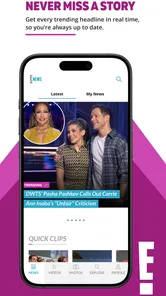
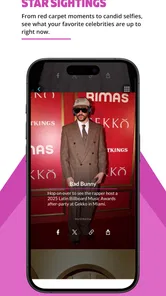
The first thing you notice when you fire up the E! News app is the sleek and user-friendly interface. It’s like they’ve taken the red carpet experience and squished it into your phone. The headlines are right there, front and center, ready to be devoured. From breaking news about the latest celebrity breakups to exclusive interviews with A-listers, the app has it all. I found myself scrolling endlessly, completely immersed in the glitz and glam.
Personalized Celebrity News Feed
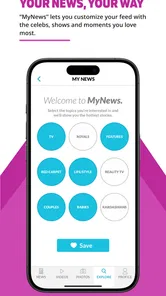
One of the coolest features is the ability to customize your news feed. You can select your favorite celebrities and get updates tailored just for you. It's like having a personal assistant who knows exactly what you want to read. And let me tell you, this feature is a game-changer. No more sifting through irrelevant news—just pure, juicy gossip about the stars you love.
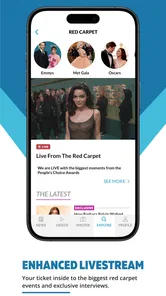
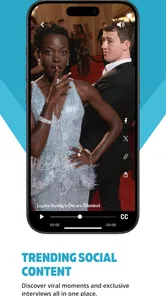
Another neat addition is the video section. Whether it’s red carpet coverage, celebrity interviews, or behind-the-scenes clips, the video content is top-notch. I spent way too much time binging on these, but hey, who can resist a good Hollywood scoop?
How to get more from personalization
Personalization is most helpful when I keep the list of followed celebrities focused. I’d start with the names I genuinely check for, then add more only if the feed feels too narrow. This avoids a common trap with customized feeds: adding so many interests that the page becomes another broad stream to sift through. It also makes it easier to notice when a story is about someone I care about, rather than relying on a long list of familiar names to hold my attention.
The trade-off is that a tailored feed can make the app feel quieter or more repetitive depending on who I follow and what is happening. If I want a wider snapshot of entertainment on a particular day, I would browse beyond the personalized selection rather than assuming it captures every notable story. I see personalization as a useful shortcut, not an editorial guarantee that my chosen list is the whole conversation.
User Experience and Design
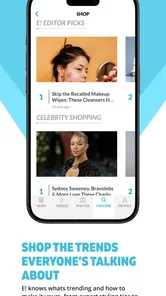
The app's design is as chic as it gets. The developers clearly know their audience, keeping it sleek, stylish, and easy to navigate. The color scheme is pleasing to the eye—lots of whites and blacks with a pop of color here and there. Plus, the app runs smoothly without any annoying glitches or crashes, which is always a bonus.
Now, let’s talk alerts. You can set up notifications for breaking news, and trust me, they come in handy. Whether you’re a casual reader or a hardcore gossip enthusiast, staying updated has never been easier. The alerts are timely, ensuring you never miss a beat in the fast-paced world of entertainment.
Alerts without letting them take over
Notifications are most valuable when they mark stories I truly want to hear about promptly; they are much less useful when every alert becomes another reason to check my phone. I’d begin with a conservative approach and keep only the updates that would genuinely change when I open the app. If I’m using it during work, study, or family time, limiting interruptions matters more than being first to see every celebrity headline.
There is also a practical difference between an alert and a complete account. A notification can tell me that something is happening, but I still need to open the story and decide whether I want more context. For a quick pop-culture check, that is convenient. For a sensitive or complicated story, I would make time to compare coverage elsewhere instead of letting a short alert stand in for the full picture.
Final Thoughts
All in all, the E! News app is a must-have for anyone who lives and breathes celebrity culture. It keeps you in the loop, makes following your favorite stars a breeze, and offers a neat, enjoyable experience. So, if you're looking to add a bit of glam to your daily routine, give this app a whirl. It might just become your go-to source for all things entertainment!
Who will get the most from it?
I’d recommend it to readers who enjoy following particular celebrities and want entertainment headlines in one dedicated place. Its average rating is 4.2 from around 18,000 ratings, and it has more than a million installs, which suggests it has found an audience among people looking for this kind of focused coverage. The current version is 7.2.4, and it requires Android 8.0 or later.
It is less suitable if you want politics, local reporting, business coverage, or a wide mix of perspectives alongside celebrity news. In those cases, a general news app or a publication with more entertainment-industry reporting will serve you better. I would also avoid relying on any single entertainment feed for the full context of a developing story; use it as a starting point and compare accounts when accuracy or background matters.
Small choices that improve the experience
With around 4,300 reviews, the app has plenty of reader feedback behind its 4.2 average, but ratings cannot tell you whether its editorial focus matches your taste. My practical tip is to choose only a few favorite celebrities at first, then broaden the feed if it feels too quiet. That keeps personalization useful instead of turning the page into a long list of names you no longer follow.
If you are deciding whether to install it, ask yourself what you want from a news app: quick celebrity updates and videos, or deeper reporting across many subjects. For the first need, this is a convenient free option; for the second, I’d pair it with a broader source rather than expecting a celebrity-focused app to cover every angle. Its 4.3K reviews offer another perspective from readers, but the best test is whether the headlines and clips are the kind you actually want to check during your day.
A sensible way to decide
If you are mainly looking for a place to follow the celebrities you already care about, the focused feed and video section give you a straightforward reason to try it. If you tend to open a news app for a complete picture of the day, the narrow subject matter will likely feel limiting, and a general news source is the more practical choice. I’d also think about who else uses the phone: the Teen rating is a reminder to make that decision with the intended reader in mind.
For me, the strongest use case is a quick, low-effort entertainment check that can lead into more reading when a story catches my interest. I would keep the alerts selective, treat personalized updates as a starting point, and switch to broader reporting when context matters. That balance lets E! News do what it is good at without asking it to be something it was never meant to replace.
E! News Frequently Asked Questions
Is E! News suitable for readers who want celebrity and pop-culture coverage rather than general news?
E! News is aimed at people interested in celebrity news, pop culture, and entertainment updates. Its focus makes it a more relevant choice for following famous personalities and entertainment stories than for keeping up with every kind of news. If that is the kind of coverage you want in an app, its subject matter is easy to understand before downloading.
What is E! News, and who publishes it?
E! News is an entertainment news app developed by Comcast Entertainment Group. It brings celebrity and pop-culture coverage together in a mobile app, with the aim of giving readers entertainment news when they want it. It is listed in the News & Magazines category, so it is intended for reading and following news rather than serving as a general entertainment or gaming app.
What kinds of entertainment news can I find in E! News?
E! News focuses on celebrity news, pop culture, and entertainment updates. Its short description is simply “E! News,” while the app’s purpose is to bring entertainment coverage to users when they want it. It may suit readers who like keeping up with famous personalities and the broader entertainment world, rather than looking for a general-purpose news app.
What is E! News and what features does it offer?
E! News is a comprehensive entertainment app that provides users with the latest celebrity news, pop culture updates, and exclusive interviews. The app features a user-friendly interface, allowing users to browse through trending stories, watch video clips, and access photo galleries. In addition, it offers a personalized experience by letting users customize their news feed according to their interests.
Is E! News available for both Android and iOS devices?
Yes, E! News is available for download on both Android and iOS platforms. Users can easily find the app on the Google Play Store for Android devices and the Apple App Store for iOS devices. The app is designed to work seamlessly across different devices, ensuring a smooth user experience regardless of the platform you choose. On Android, the listed minimum operating system requirement is version 8.0, so it is worth checking your device’s software before installing.
Pros
- Comprehensive celebrity news coverage.
- User-friendly and intuitive interface.
- Regular updates with latest news.
- High-quality images and videos.
- Customizable news alerts.
Cons
- Occasional app crashes reported.
- Ad-heavy experience for free users.
- Limited customization options.
- Some sections load slowly.
- In-app purchases can be pricey.












