

Money Eco: Budget / Expense
- 11.00
- 4.7
- Installs
- 10.00K
- Price
- Free

Screenshots
Analysis by Reviewed
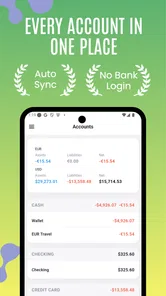
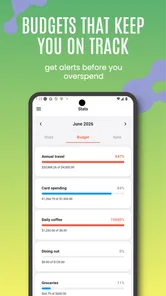
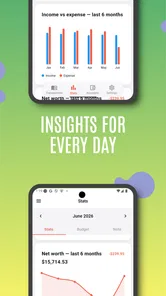
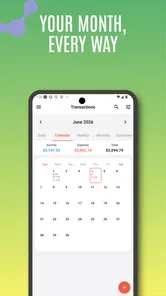
Money Eco: Budget / Expense is the kind of finance app I would open when I want a clearer picture of my spending without turning money management into a second job. It comes from Apponance, Inc. and focuses on budgeting, expense tracking, and visual reports rather than trying to be an all-purpose banking replacement. After using it as a lightweight personal finance companion, I found its main appeal fairly simple: it encourages you to look at where your money goes, then gives that information a visual shape that is easier to understand than a long list of transactions.
That simplicity is useful, but it also means the quality of the experience depends heavily on how consistently you enter and organize information. This is not an app I would recommend as a completely automatic solution for someone who expects every purchase to appear without any effort. I see it more as a hands-on dashboard: you make the records, choose a sensible structure, and use the reports to notice patterns. If that sounds manageable, it can become a practical habit rather than another abandoned budgeting tool.
Getting past the first points of friction
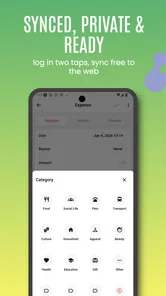
The first place many people can get stuck is not the budget itself, but the decision about how detailed to be. When I start a finance tracker, I am tempted to create categories for every small distinction: groceries, snacks, coffee, takeout, work lunches, and so on. That feels thorough at first, yet it quickly makes recording expenses slower. With Money Eco, I would begin with a compact set of categories that reflects real decisions in my life, such as housing, transport, food, subscriptions, shopping, and savings. The point is to make the report useful, not to recreate every line of a bank statement.
A second source of friction is expecting the first report to be meaningful immediately. A visualization built from only a few entries can give a misleading impression. I would treat the early days as setup rather than judgment. Enter regular expenses, include occasional purchases, and then look for patterns after the app has enough context. This is especially important for bills that do not arrive every week. A budget can look comfortable until an annual payment or irregular household expense appears.
The most important setup choice is consistency, not complexity. If I record a restaurant meal as food one day and entertainment the next, the visual report becomes less helpful even if every entry is technically present. I would decide in advance how I want to classify borderline spending. For example, I might put café visits under food and reserve entertainment for cinema, games, or events. That small rule makes later comparisons more honest.
People also commonly wonder whether this is suitable for a shared household. I would say it can help partners discuss spending if both people agree on the same categories and recording routine, but it is not automatically a shared financial system simply because it tracks personal expenses. For a household, one person should take responsibility for reviewing the entries, while both agree on what the totals are meant to represent. Otherwise, the report may reflect only one person’s side of the budget.
Setup checks that prevent confusing reports
Before relying on a monthly view, I would check the basics carefully. The starting balance, recurring obligations, and category names should all make sense together. If the opening amount is wrong, later totals may look wrong even when individual expenses are entered correctly. I would also avoid mixing planned spending with completed spending unless I have a clear personal rule for doing so. A budget is easier to read when I know whether a figure describes money I intended to use or money that has already left my control.
More From Our News Desk

 Gmail
GmailGmail in a Busy Inbox: Who Benefits Most?
From first account to crowded workday, Gmail earns its place through dependable search and flexible sorting—but its best fit depends on how much inbox maintenance you can tolerate.

 Prime Video
Switching to Prime Video: What Changes in Your Viewing Routine
Prime Video can make a compelling second home for streaming, but switching means learning a different catalog, rental layer, and route from browsing to playback.

 Universal TV Remote Control
Universal TV Remote Control Works Best as a Reliable Backup
A phone remote earns its place through quick setup and reliable habits. Here is how to get more from Universal TV Remote Control—and where its limits show.

 Weather - By Xiaomi
Weather by Xiaomi Review: Clear at a Glance, Less Clear Up Close
Xiaomi’s weather app makes everyday forecasts quick to scan, but its calm surface can leave useful details and recovery paths harder to find than they should be.

 X
XX Under Pressure: Can It Recover When Posting Goes Wrong?
A resilience-focused review of X, examining setup, mistaken posts, interruptions, weak connections, and the gaps that matter when recovery needs to be dependable.

 Clash of Clans
Clash of Clans Is Won Between the Battles
Its raids are quick; its community is a long-term project of coordination, teaching, rivalry, and shared responsibility—with all the friction that entails.
Latest News



Another useful check is to enter a small sample before committing to a full history. I might add a recent grocery purchase, a bill, a transport expense, and an occasional purchase. Then I would inspect how those records appear in the visual report. This gives me a chance to rename or simplify categories while the account is still easy to adjust. It is much less frustrating than discovering later that half a month of entries needs reorganizing.
The app is free to install and is rated for Everyone, which makes it approachable for a wide range of users. Its Android requirement begins with version 7.0, so people using an older device should check compatibility before planning around it. The current release is 7.1.0. I would also remember that optional in-app purchases range from $0.99 to $14.99 per item, so anyone who wants to keep the experience entirely free should review purchase prompts carefully rather than assuming every extra is included.
Money Eco has a 4.7 average from 54 ratings, with 11 written reviews, and it has passed 10K+ installs. Those figures suggest a small but positive user base rather than the scale of a mainstream banking platform. I would interpret that as a reason to judge the app by its workflow and fit, not by popularity alone. Its developer, Apponance, Inc., has positioned it as a focused money-management tool, and that focus is more relevant to me than whether it has a large ecosystem around it.
Recovering when the workflow goes wrong
Budgeting apps become stressful when one mistake seems to spoil the whole month. My first recovery step would be to stop adding new entries and identify the earliest point where the totals stopped matching reality. I would compare the app with a short list of actual purchases rather than trying to audit everything at once. Usually, the problem is a missed expense, a duplicated entry, or a category choice that changed the meaning of the report.
If a number looks suspicious, I would test one variable at a time. First, check whether the transaction was entered twice. Then check its category. After that, review whether the amount belongs to the period being viewed. This slow approach is more reliable than deleting several records and hoping the total improves. It also preserves the useful history that makes the reports valuable in the first place.
A realistic example is a weekend when I pay for a supermarket trip, order food, and buy household supplies in one visit. If I record the full receipt as groceries, my food budget may look inflated; if I split it carelessly, the report may become too detailed to maintain. I would use a practical split only when the difference affects a decision. If the household items are minor, keeping the receipt together may be more useful than spending several minutes dividing it. If the purchase is large or unusual, separating it can make the next review more accurate.
Another recovery tactic is to create a short weekly review rather than waiting until the end of the month. I would look for missing entries, unusually large amounts, and categories that no longer match my habits. This is not about checking every coffee immediately. It is about catching a broken routine before the report becomes difficult to interpret. A short review also makes the app feel less like bookkeeping and more like a feedback tool.
Users may ask whether they can simply rely on the visual report to explain a problem. I would not. A chart can show that one category is unusually large, but it cannot replace checking the underlying entries. Visual summaries are excellent for spotting where to investigate; they are less reliable as a substitute for understanding why the number changed. I would use the report as a map, then return to the individual records for the explanation.
When the app is not the cause
Not every mismatch comes from Money Eco. Sometimes the issue is the way a bank, card, or payment service describes a transaction. A purchase may appear under a merchant name that does not immediately match the shop I remember, or a pending payment may later settle at a different amount. If I copy information into a tracker while it is still changing, the app may appear inaccurate even though the source transaction was not final.
Timing can create similar confusion. A bill paid near the end of a month may be mentally assigned to the next month, while the actual record belongs to the payment date. There is no universally correct choice for personal budgeting, but I need to choose one and apply it consistently. If I use payment date for most expenses, I should not switch to service date only when it produces a more comfortable total.
Device and account habits matter too. If I use more than one phone or frequently reinstall apps, I would be cautious about assuming that every local record will automatically appear everywhere. I would first confirm that I am using the same account and the same version before treating missing information as a software failure. I would also avoid clearing app data during troubleshooting unless I understand what information may be removed. For a finance tracker, a hurried reset is a poor first step.
There is also a human cause that is easy to overlook: cash spending. Card statements create an automatic memory aid, while cash disappears from the account without leaving the same digital trail. If my totals are consistently lower than reality, I would examine cash purchases, shared receipts, and small recurring payments before blaming the visualizations. A simple note or end-of-day entry can make a bigger difference than changing the entire budget structure.
This is where Money Eco differs from many banking apps. A banking app is usually strongest at showing official account activity, while this tool is better suited to organizing personal meaning around expenses. A spreadsheet offers more control and can handle unusual formulas, but it requires more design and maintenance. A notebook is flexible and private in a familiar way, yet it does not provide the same visual overview. Money Eco sits between those options: more guided than a spreadsheet, more analytical than paper, and less automatic than a bank feed.
Who will get the most from its approach
I think the app is a good match for someone who wants to build awareness without learning complicated financial software. A student tracking food and transport, a new worker trying to understand monthly spending, or anyone preparing for a savings goal could use it as a regular check-in. The strongest benefit is not a clever shortcut; it is the way a visual summary can turn vague feelings such as “I spend too much” into a more specific question: which category is taking more than expected, and what can I change?
It can also help during a transition. If I move to a new home, start commuting, or take on a subscription-heavy routine, I would use the app for a defined observation period. Rather than setting a perfect budget immediately, I would record normal spending, review the report, and then set limits based on evidence. This is a more realistic workflow than choosing arbitrary amounts and feeling discouraged when real life does not fit them.
There are trade-offs. Manual entry requires attention, and people who rarely remember purchases may find the reports incomplete. Someone looking for investment tracking, tax preparation, detailed debt modeling, or automatic synchronization with multiple financial institutions should probably choose a more specialized service. I would also skip it if I wanted a finance app to make decisions for me. Its value comes from my participation, so the experience weakens when I treat it as a passive monitor.
For privacy-conscious users, the right approach is to be deliberate about what information they enter and why. I would avoid putting unnecessary personal notes into expense descriptions, especially when a simple label is enough. I would also review any optional purchase carefully and keep the app’s role clear: it is a personal budgeting and expense visualization tool, not a replacement for checking official account records.
My practical verdict after using it
Money Eco: Budget / Expense works best when I use it as a calm weekly reflection rather than an emergency accounting system. I would spend a little time creating sensible categories, enter expenses in a consistent way, and use the visual report to decide what deserves attention. The app’s free entry point makes that experiment easy, while the Everyone rating and broad Android compatibility make it accessible to many everyday users.
Its limitations are directly connected to its strengths. A focused tracker is easier to understand than a sprawling financial suite, but it may not satisfy someone who wants automation, investment tools, or a complete household account system. Manual organization can feel like work, especially during busy weeks. Still, I prefer that honest trade-off to a complicated interface filled with features I would never use.
My recommendation is straightforward: try it if you want a visual way to understand personal spending and are willing to maintain your entries. Start small, test a few categories, and review the first meaningful group of transactions before changing your limits. If you need bank-level automation or advanced financial planning, look elsewhere. For a person who wants a simple, hands-on budget companion from Apponance, Inc., this is a sensible option with enough structure to make everyday money decisions clearer.
Money Eco: Budget / Expense Frequently Asked Questions
How much does Money Eco: Budget / Expense cost, and are there in-app purchases?
Money Eco: Budget / Expense is free to download, with in-app purchases offered for users who want to explore paid options. Before purchasing anything, check the details shown in the app so you understand what each item includes and whether it suits your needs. You can begin by trying its basic money-management and expense-tracking features without paying to download it.
Is Money Eco: Budget / Expense available for my device?
Money Eco: Budget / Expense is a finance app for Android, and its minimum supported Android version is 7.0. Check your device’s software version before downloading to make sure it meets that requirement. The app is developed by Apponance, Inc., and its age rating is Everyone, so it is suitable for a broad audience looking for a personal finance tool.
What is Money Eco: Budget / Expense, and what can I use it for?
Money Eco: Budget / Expense is designed to help you organize your personal finances in one place. You can record income and expenses, group transactions by category, review spending patterns, and monitor how much money remains available. It is useful for everyday budgeting, household expense tracking, and building better financial habits without relying on paper notes or complicated spreadsheets.
Is Money Eco: Budget / Expense suitable for beginners?
Yes, the app is generally suitable for beginners because its main purpose is to make expense tracking more approachable. New users can start by adding a few categories and recording daily purchases, then gradually create a more complete budget. However, the usefulness of the reports depends on entering transactions consistently and choosing clear categories that accurately reflect your spending.
Can I use Money Eco: Budget / Expense to manage a household or shared budget?
Money Eco: Budget / Expense can be helpful for household budgeting when one person is responsible for recording shared income and expenses. You can organize costs such as rent, groceries, transportation, bills, and entertainment to understand where the household budget is going. Before relying on it for shared finances, check whether the current version supports the synchronization or multiple-user features you need.
Pros
- Simple interface makes daily expense tracking quick and approachable.
- Useful budget categories help organize spending clearly.
- Manual entries provide control without requiring bank account access.
- Lightweight app should work smoothly on many Android and iOS devices.
- Helpful for building awareness of recurring spending habits.
Cons
- Manual data entry can become tedious for frequent transactions.
- Advanced financial planning tools may be limited.
- Some features may require an upgrade or include advertising.
- No bank synchronization can make records less automatic.
- Users may need to create their own backup routine to protect data.











