Money App - Cash Advance
- 2.44K
- 4.2
- Installs
- 500.00K
- Price
- Free

Screenshots


Analysis by Reviewed
When an unexpected bill arrives, the hardest part is often not finding a financial app but understanding what it can realistically do for you. Money App - Cash Advance is a free finance app from PRG Ventures that focuses on helping users seek emergency cash through a mobile experience. I found its appeal easy to understand: it puts the first steps in one place instead of making you search through several financial services while you are already under pressure.
My main advice is to approach it as a tool for exploring an emergency-cash option, not as a promise that money will appear instantly or that every request will be accepted. That distinction matters. A cash advance can be useful for a short gap between an essential expense and your next income, but it is still a financial decision that deserves a careful look at the repayment terms and the total cost before you continue.
The app is available at no charge and is rated for Everyone, which makes it approachable for a broad audience. It has reached more than 500,000 installs and holds an average rating of 4.2 from roughly 10,000 ratings, with about 2,400 written reviews. Those figures suggest that many people find the basic experience useful, while also reminding me that an app with this purpose will naturally produce mixed experiences depending on each person’s eligibility and financial situation.
What to expect before asking for emergency cash
The first thing I noticed about this kind of app is that the important outcome is not simply whether the interface opens smoothly. The real question is whether the available option fits your situation. Money App is designed around emergency cash, so it makes the most sense when you have a specific, near-term need rather than a general desire to improve your finances.
A realistic example would be a necessary household payment due before payday. I would open the app with the exact amount in mind, check the request flow, and then compare the expected repayment with my next income. If the repayment would leave too little room for food, transport, rent, or other fixed commitments, I would stop there. The convenience of an application should never replace that simple calculation.
The app’s free download is helpful because you can begin reviewing the process without paying an upfront app fee. However, “free” should not be interpreted as “free money.” Any advance or financial product presented through the service may have its own requirements, costs, timing, and repayment conditions. I would read every screen carefully, especially the final confirmation page, rather than treating the first attractive option as automatically suitable.
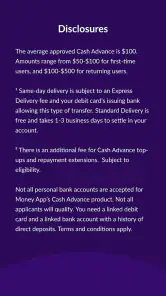
It is also worth separating the app from the financial decision itself. PRG Ventures develops Money App, but the presence of a polished mobile interface does not by itself guarantee approval, a particular advance amount, or a specific delivery time. Those outcomes depend on the details shown during your own application. For a first-time user, this is the most important expectation to set before entering personal information.
Compared with visiting a traditional bank branch, the obvious advantage is convenience. You can begin from your phone and review the available path without arranging an appointment. Compared with a bank overdraft or a credit card, the trade-off is that a cash-advance route may be more focused on short-term access, while a bank product may offer clearer long-term account history or familiar repayment controls. Neither is automatically better; the right choice depends on the cost, timing, and consequences shown to you.
Why the first screen matters more than it seems
In a financial app, the opening flow is not just navigation. It establishes what you are agreeing to review and what information may be needed to continue. I recommend slowing down at the beginning, checking that you are using the intended app from PRG Ventures, and avoiding rushed taps simply because the need feels urgent.
A useful habit is to keep your purpose narrow. If the need is a utility payment, think about that payment rather than browsing for a larger amount than necessary. Borrowing more than the immediate gap can turn a temporary solution into a longer problem. Money App is most sensible when it helps you investigate a defined shortfall, not when it encourages vague or repeated borrowing.
The age rating of Everyone may make the app look broadly accessible, but age suitability is not the same as financial suitability. I would still consider whether I have stable income, a clear repayment date, and enough flexibility for an unexpected deduction or repayment. Someone without those basics may be better served by contacting the bill provider, asking for a payment arrangement, or speaking with a trusted financial counselor before pursuing an advance.
Setting up the app without rushing
After installing Money App, I would begin by reading each prompt from top to bottom and entering information exactly as it appears on any supporting account or document. Small mismatches in names, addresses, or financial details can create friction in financial applications. Even when the app is easy to use, accuracy is more valuable than speed at this stage.
I would also prepare a quiet moment for setup rather than doing it while distracted. Keep the relevant account information nearby, make sure your phone connection is reliable, and avoid switching between several similar financial apps at once. This is a practical tip that is easy to overlook: confusion about which service you are currently using can lead to duplicated applications or an incomplete process.
Before submitting anything, I would look for the screens that explain the amount, repayment expectations, fees, and timing. If the wording is unclear, I would not guess. A financial app should leave you able to explain, in plain language, how much you might receive, what you may have to repay, and when that repayment could happen. If you cannot answer those questions from the information shown, that is a good reason to pause.
Another useful workflow is to write down your pre-application budget first. List the essential bill, your next expected income, and the expenses that must be covered before then. Once the app presents an option, compare it with that written budget instead of relying on the emotional relief of seeing a possible solution. This simple separation between “what I need” and “what is offered” can prevent over-borrowing.
Because Money App is a finance product, I would treat privacy and account security as part of setup, not as an afterthought. Use a secure device, avoid entering sensitive information on public Wi-Fi, and do not share verification codes with anyone who contacts you unexpectedly. These are sensible habits for any financial service, but they matter especially when an urgent cash need makes people more vulnerable to pressure.
What a smooth setup should feel like
A good setup should leave you with a clear understanding of the next action, even if that action is simply continuing to review your options. I would not measure success by reaching a request button quickly. I would measure it by knowing what information I have entered, what I am authorizing, and what decision remains mine to make.
If the app asks you to move to another service or review an offer, read the transition carefully. The name, terms, and responsibilities may change as you proceed. I would take a screenshot or note the key details for my own records where appropriate, while avoiding the storage of sensitive information in an insecure place. The goal is not to create paperwork for its own sake; it is to make later checking easier if the repayment or delivery timing becomes important.
The current version is 2.47.0, and the app supports Android 7.0 or later. That broad compatibility is useful for people using older Android phones, although I would still keep the operating system and the app updated when possible. Updates can improve stability and security, but I would review any new screen or changed wording rather than assuming the process is identical after an update.
Reaching the first meaningful result
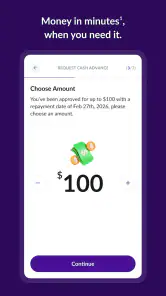
For a first-time user, the first meaningful success is not necessarily receiving cash. It is completing a request or eligibility review with enough understanding to make a responsible decision. I would start with the smallest amount that genuinely addresses the emergency, then inspect the repayment details before accepting anything.
Suppose my car needs an essential repair and I am short until payday. I would enter the application once, verify the requested amount, and compare the possible repayment with the money already committed to rent and groceries. If the app presents a workable option and the terms are clear, I can decide whether to continue. If the repayment would create another shortfall, the successful action is stopping before accepting it and looking for a less expensive solution.
This is where Money App can be more practical than a generic budgeting app. A budgeting tool may help you understand the gap, but it usually does not focus on the immediate cash-advance path. On the other hand, a bank app may show your balance and offer an overdraft or personal-loan route with information tied directly to your account. I would compare the actual total cost and repayment schedule, not just the speed or convenience of the first screen.
One non-obvious advantage of using a dedicated flow is that it can force you to define the emergency. That can be helpful when stress makes every expense feel urgent. Before continuing, name the bill, the amount, and the date it is due. If you cannot identify those three things, I would use the app only to learn what is available and avoid submitting a request until the need is clearer.
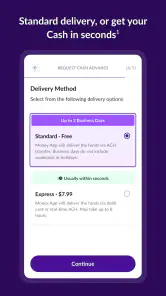
Another practical tip is to check whether the timing solves the original problem. A cash option that arrives after the bill’s deadline may not help, even if the amount looks appropriate. I would compare the expected arrival window with the actual due date and keep a backup plan, such as contacting the provider to request more time. Never assume that “emergency cash” means immediate access in every individual case.
After completing a request, keep track of what you agreed to and set a reminder for the repayment date if you proceed. I would also review my account afterward rather than assuming the process is finished simply because the app shows a confirmation. This habit helps catch misunderstandings early and makes it easier to plan around the repayment.
Where first-time users can become confused
The largest source of confusion is usually the difference between exploring an offer and accepting it. A screen that shows a possible amount is not the same as money already approved or deposited. I would read buttons and labels carefully, especially where the wording changes from checking options to confirming an agreement.
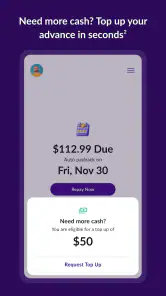
Another common misunderstanding is treating the displayed amount as the full financial impact. The amount you receive and the amount you repay may differ, and timing can matter as much as cost. I would look for every figure connected with repayment and consider whether the deduction could collide with another bill. If the explanation is difficult to follow, that is not a problem to solve by tapping faster.
Users may also expect the app to replace a full financial plan. It does not. Money App is centered on emergency cash, so it is not the right primary tool for tracking long-term spending, building savings goals, comparing investment choices, or managing a household budget in detail. I would pair it with a basic budget or bank statement review if the emergency is part of a recurring pattern.
The app’s rating of 4.2 indicates a generally positive reception, but ratings cannot predict whether a particular user will qualify or find the terms affordable. Written reviews can help reveal how people experience the interface, yet I would not use another person’s result as evidence that my own request will follow the same path. Financial eligibility is personal, and the app’s usefulness depends heavily on the information entered and the option presented.
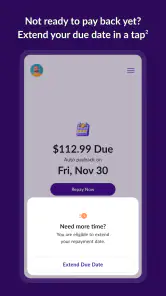
There is also a subtle emotional trap: once you have spent time entering details, you may feel committed to accepting whatever appears. I recommend treating setup time as information-gathering time. You are still allowed to stop. The most responsible outcome may be learning that the option is not suitable and choosing a payment extension, help from family, a community resource, or a lower-cost bank product instead.
When I would choose another option
I would skip Money App for a planned expense that can wait. Saving gradually, using a dedicated budgeting method, or comparing a conventional personal-loan product may be more appropriate when there is no immediate deadline. I would also avoid a cash advance if my income is uncertain or if repaying it would require another advance soon afterward.
A bank app may be better when you already have an established relationship and can see a transparent overdraft or loan offer with familiar controls. A credit union or local nonprofit may be worth considering when the need is larger or when you want personal guidance. For a disputed bill, contacting the company directly can be more effective than borrowing. Money App is best viewed as one possible route, not the default answer to every cash shortage.
I would be especially cautious if the app’s presented terms are hard to understand, if the repayment date conflicts with essential expenses, or if I feel pressured to decide immediately. Convenience is valuable, but clarity is more valuable. No mobile interface can remove the underlying obligation created by borrowing.
My next-step recommendation
For someone installing Money App for the first time, I would follow a simple order: identify the exact emergency, install the app from a trusted source, complete setup carefully, review the available option, and compare repayment with the next several weeks of essential expenses. That sequence keeps the app in its proper role: a way to investigate emergency cash, not a substitute for judgment.
The app is free, available for Android users on version 7.0 or newer, and its broad reach shows that it has become a familiar option for many people. PRG Ventures has continued developing it, with version 2.47.0 currently listed. I appreciate that the entry barrier is low, but I would still judge the experience by the clarity and suitability of the specific offer shown to me rather than by the download count or average rating.
My honest view is that Money App can be worthwhile when the need is genuine, the amount is controlled, the repayment is realistic, and the terms are easy to understand. Its strongest use case is a short, defined gap where you have a credible plan for getting back on track. Its weakest use case is repeated borrowing to cover ordinary living costs, because that can turn a temporary advance into a cycle.
If you decide to try it, begin with curiosity rather than urgency. Read before confirming, compare the result with your bank’s alternatives, and keep a record of the repayment obligation. The best first success is not simply finding emergency cash; it is finding an option you can repay without creating the next emergency. For that reason, I would recommend this app as a convenient starting point for careful comparison, while encouraging anyone with ongoing money problems to seek a broader solution than a single advance.
Pros
- Fast application process with a simple
- user-friendly interface.
- May provide financial help before your next paycheck.
- Clear repayment details are shown before accepting an advance.
- Useful budgeting tools can help monitor spending and cash flow.
- Available on mobile for convenient access wherever you are.
Cons
- Advance limits may be low for larger unexpected expenses.
- Eligibility and fees can vary depending on your financial profile.
- Repayment on payday may leave less money for upcoming bills.
- Not available in every state or for all users.
- Using advances frequently can encourage dependence on borrowed money.

- Category
- Finance
- Version
- 2.47.0











