

MGM+
- 4.43K
- 4.6
- Installs
- 1.00M
- Price
- Free

Screenshots



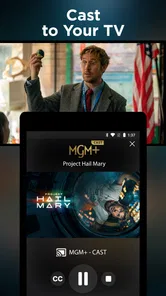
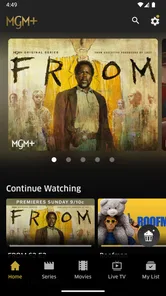
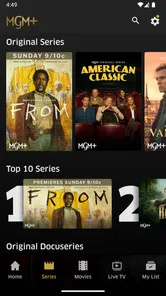
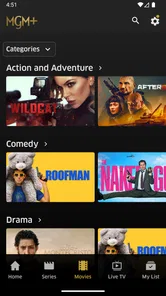
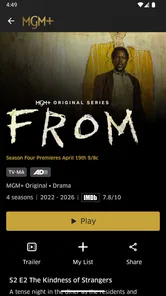
Analysis by Reviewed
I approached MGM+ as an entertainment app rather than simply another place to press play. The important question for me was not only whether it offers a large selection of movies and series, but also how comfortable it feels to use when an account, a subscription, and personal viewing habits are involved. My overall impression is positive, especially for people who want MGM+ content in a focused streaming experience, but I would still recommend checking the subscription screen carefully before committing.
The app is free to install, while access to its broader entertainment offering can involve in-app purchases ranging from $5.99 to $61.99 per item. That difference matters: downloading the app costs nothing, but the practical value depends on the plan or purchase choice presented to you. I would treat the installation as a chance to inspect the catalog and account flow, not as proof that everything inside is included at no cost.
What it feels like to use MGM+
MGM+ is developed by MGMPlus Entertainment LLC and sits firmly in the entertainment category. Its store presence shows a 4.6 average from around 35 thousand ratings, with roughly 4.4 thousand written reviews and over one million installs. Those figures suggest that the app has found a substantial audience, although popularity alone is not a substitute for checking whether its catalog suits your taste.
In everyday use, the appeal is straightforward. I can open a dedicated streaming service, browse movies and series, and decide what fits the moment without treating the app like a general video platform. That focused approach is useful when I already know I want the MGM+ selection. It is less compelling when I am searching for the widest possible mixture of unrelated services, user-created videos, live channels, and free programming.
The service is aimed at a Teen audience, which is worth remembering if several people share a device or if a younger viewer uses the same account. I would not assume that a Teen content label means every title is suitable for every family member. The sensible habit is to review the title information before handing over the phone or tablet, particularly when children are choosing independently.
The app supports devices running Android 7.1 or later. That gives it a reasonably broad technical reach, but compatibility on paper does not guarantee an equally smooth experience on every older phone. On an aging device, storage pressure, battery condition, and network performance can affect streaming more than the operating-system requirement itself. I would install it on the device where I actually plan to watch rather than judging the experience from a newer spare phone.
A practical evening test
My realistic use case is a weeknight when I want one film without spending half an hour comparing several platforms. I would open MGM+, browse by mood, inspect the title details, and start with a short viewing session before deciding whether the service deserves a regular place in my subscription rotation. This trial is more informative than relying on the promotional summary because it reveals whether the navigation feels natural and whether the available choices match my habits.
More From Our News Desk

 Gmail
GmailGmail in a Busy Inbox: Who Benefits Most?
From first account to crowded workday, Gmail earns its place through dependable search and flexible sorting—but its best fit depends on how much inbox maintenance you can tolerate.

 Prime Video
Switching to Prime Video: What Changes in Your Viewing Routine
Prime Video can make a compelling second home for streaming, but switching means learning a different catalog, rental layer, and route from browsing to playback.

 Universal TV Remote Control
Universal TV Remote Control Works Best as a Reliable Backup
A phone remote earns its place through quick setup and reliable habits. Here is how to get more from Universal TV Remote Control—and where its limits show.

 Weather - By Xiaomi
Weather by Xiaomi Review: Clear at a Glance, Less Clear Up Close
Xiaomi’s weather app makes everyday forecasts quick to scan, but its calm surface can leave useful details and recovery paths harder to find than they should be.

 X
XX Under Pressure: Can It Recover When Posting Goes Wrong?
A resilience-focused review of X, examining setup, mistaken posts, interruptions, weak connections, and the gaps that matter when recovery needs to be dependable.

 Clash of Clans
Clash of Clans Is Won Between the Battles
Its raids are quick; its community is a long-term project of coordination, teaching, rivalry, and shared responsibility—with all the friction that entails.
Latest News



One useful workflow is to separate discovery from commitment. First, I would explore the catalog while signed in only as far as necessary, then note which titles I would genuinely watch. After that, I would examine the purchase screen, renewal wording, and account options before selecting anything. This prevents the common mistake of subscribing because a single attractive title appears before the overall value has been considered.
I also find it helpful to make a small personal shortlist rather than browsing endlessly. A streaming app can feel generous when it displays many rows, yet the real question is how often I would choose those titles. A shortlist of several films or series that I would watch soon gives me a better basis for judging the service than the size of the library alone.
Trust starts with the account screen
For a subscription entertainment app, trust is built through visible choices. I want to see clearly what I am buying, how much it costs, and whether the payment creates an ongoing commitment. MGM+ presents itself as a service that can be canceled at any time, but I would still read the exact wording shown during checkout and keep track of where cancellation is managed.
That last point is easy to overlook. If a purchase is handled through an app-store account, cancellation is normally something I would look for in that account’s subscription controls rather than assuming that deleting the application ends billing. I would take a screenshot or save the confirmation after subscribing, not because I expect a problem, but because a clear record makes future account management less stressful.
The range of possible in-app purchase amounts also makes careful reading worthwhile. A lower-priced option may suit someone testing the service, while a higher-priced item could represent a longer access period or another purchase structure. I would never select an option based only on a prominent button. I would expand the details, confirm the billing interval, and check whether the displayed amount is a one-time payment or part of a recurring arrangement.
These are not glamorous features, but they are the controls that determine whether an entertainment app feels respectful. The best experience is not merely fast playback; it is knowing what I agreed to and being able to change that decision without hunting through menus.
Personal data deserves attention during ordinary use
Streaming naturally creates data-sensitive moments. Searching for a title, opening a detail page, starting a series, and continuing it later all connect the service with my viewing activity. I would therefore pay attention to the app’s privacy information and the choices shown during account creation or sign-in. I would not infer that a permission is harmless simply because the app is used for entertainment.
My cautious approach is to provide only the information required to create and manage the account, and to avoid entering extra personal details just to make the profile feel complete. If the app offers optional communications or preference settings, I would treat those as genuine choices rather than steps that must automatically be accepted.
I would also review device permissions when installing or updating the app. The operating system is the right place to see what access has been requested and to adjust permissions that are not necessary for the way I use the service. If a permission prompt appears, I would read its explanation before accepting it. That habit is more reliable than guessing from the app’s category or assuming that every request is essential for video playback.
Another small but important habit is signing out on shared devices. A television in a living room, a family tablet, or a borrowed phone can leave an account open for the next person. Signing out, switching profiles where available, and checking the account screen after use gives me more control over viewing history and purchase access. I would especially avoid leaving payment-enabled streaming accounts unattended on a device that many people use.
Where the app gives me control
User agency in MGM+ is less about changing every aspect of the interface and more about making deliberate decisions around access. I can choose whether the catalog is worth paying for, whether to continue after the current period, and whether the service fits my viewing routine. The stated ability to cancel at any time is reassuring, but I would still treat cancellation as an action to complete and verify, not as an assumption.
I would set a calendar reminder shortly after subscribing, especially if I am trying the service for a particular film or series. That is a practical safeguard for people who rotate between streaming platforms. It keeps the decision in my hands and avoids paying for months that I do not use simply because the original viewing plan was forgotten.
Families should also decide who controls purchases. If several people use the same device, I would keep the account holder’s sign-in details private and avoid passing an unlocked purchase screen to another viewer. The Teen rating makes that conversation more relevant, because content suitability and payment control are separate issues that should not be left to chance.
For users who value a simple, dedicated catalog, MGM+ can be easier to understand than a broad aggregator. I know which service I am opening and can judge its value against the titles I want. On the other hand, an aggregator may be better for someone who wants one search interface across several subscriptions, while a free, ad-supported video service may make more sense for someone who refuses another recurring payment. The right choice depends on whether focused access is worth adding to an existing entertainment setup.
Limitations I would consider before installing
The first limitation is catalog fit. A large selection sounds attractive, but it does not help if the available movies and series do not match my preferences. I would inspect the current catalog before paying, because streaming libraries can change and a service built around a particular brand will not necessarily cover every genre or new release I want.
The second is subscription fatigue. Even a well-designed app can become poor value when it joins several other monthly services. I would compare the titles I expect to watch with the actual purchase amount shown in the app, then decide whether I would use it repeatedly or only for a short period. Someone who watches sporadically may prefer to subscribe briefly and cancel promptly, provided the account screen makes that process clear.
The third is shared-account responsibility. The app may be convenient on a personal device, but shared use introduces questions about viewing choices, purchase access, and sign-out habits. I would not recommend handing the account to casual users without first checking the available controls and deciding who is responsible for billing.
There is also a difference between technical compatibility and comfort. Android 7.1 support is useful for older devices, yet a phone with limited storage or an unstable connection may still deliver a frustrating session. I would keep the app updated through the normal store process, leave enough free storage for the device to operate comfortably, and test it on the network where I usually watch. I would not blame the catalog for a problem caused by an overloaded home connection, but I would include that reality in my decision.
Who should choose it?
I would recommend MGM+ to someone who already recognizes the kind of movies and series it offers and wants a dedicated place to watch them. It is also a reasonable option for a viewer who prefers a focused service over a huge general-purpose platform and is willing to manage a subscription consciously.
I would be more cautious for someone searching for a completely free experience. The app itself is free to download, but the presence of in-app purchases means the meaningful viewing experience may require payment. I would also point heavy multi-platform viewers toward comparing their current subscriptions first, since adding another service can be less useful than upgrading or consolidating an existing choice.
Parents and household managers should approach it with two separate checklists: whether the Teen content rating fits the intended viewer, and whether the account and purchase controls are secure enough for shared use. Those questions are more useful than assuming that a family device automatically creates a family-safe setup.
My cautious verdict
After looking at MGM+ through both the viewing experience and the account experience, I see a solid entertainment app with a clear purpose. Its strong average rating and large installed audience show that many people find value in it, while the free installation makes it easy to inspect before deciding. I like the idea of using it selectively: identify the titles I want, read the purchase terms, watch deliberately, and cancel when the service no longer earns its place.
The smartest way to use MGM+ is to stay in control of the subscription, the account, and the device permissions from the beginning. I would not install it expecting an unlimited replacement for every other streaming option. I would install it when its particular catalog answers a real viewing need, verify the cost shown at checkout, protect the account on shared devices, and set a reminder to reassess the service.
That makes MGM+ a good fit for focused entertainment and a less convincing choice for viewers who want one universal platform or a no-cost catalog. My recommendation is positive but measured: explore it, judge it by the titles you will actually watch, and treat every purchase and privacy choice as something you actively approve rather than something to click through.
MGM+ Frequently Asked Questions
Can I watch MGM+ while traveling or in another country?
MGM+ is a streaming service, and the movies and series available to you can vary by region. If you travel, the catalog may differ from what you see at home, and some titles may not be available where you are. Before relying on a particular show or movie during a trip, check whether it appears in the app in your destination.
What should I know about MGM+ subscriptions and cancellation?
MGM+ offers subscription-based access to its entertainment library, and the service describes its selection as thousands of movies, series, and more, with the option to cancel anytime. Subscription terms can depend on your location and how you signed up. Review the plan details and cancellation instructions associated with your account so you know how to manage access.
Can I use MGM+ through a television or streaming provider?
MGM+ can be accessed through selected television-provider and streaming platforms, as well as its app. Availability and the way you sign in can differ depending on the provider and device. If you already have MGM+ through a television, internet, or streaming service, check that provider’s instructions for connecting your access before purchasing another subscription.
Does MGM+ offer original series as well as movies?
Yes. MGM+ includes movies and series, along with original series, documentaries, and selected classic films from the MGM catalog and other entertainment partners. Its genres include action, drama, thriller, comedy, and science fiction. The selection can change by region, so it is sensible to browse the app’s catalog for the specific kinds of programs you enjoy.
Will MGM+ work on my Android device?
The MGM+ app is available for Android, and it requires Android 7.1 or later. Compatibility can also depend on your device model and country, so meeting the operating-system requirement is an important first check rather than a guarantee for every device. If you plan to watch on another screen, confirm that the platform supports the app as well.
Pros
- Strong selection of MGM and premium studio movies.
- Includes popular original series and exclusive releases.
- Supports downloads for offline viewing on mobile devices.
- Profiles and parental controls help personalize the experience.
- Available on many smart TVs
- streaming devices
- and mobile platforms.
Cons
- Availability and content vary by country or region.
- Some titles may require an additional subscription or add-on.
- Offline downloads can expire or have device restrictions.
- The app may occasionally experience buffering or playback issues.
- A steady internet connection is needed for smooth HD streaming.











