Messages
- 9.89K
- 3.9
- Installs
- 10.00M
- Price
- Free

Screenshots


Analysis by Reviewed
I think Messages makes the most sense when you want a straightforward place for ordinary phone texting, not another social network to manage. Its strongest case is convenience: it is a free communication app built around SMS, so it can suit quick check-ins, practical arrangements, and conversations with people who do not use the same chat service. I would consider it for everyday messages, while keeping expectations grounded about what an SMS app can replace.
Where it fits in a normal day
Imagine you are leaving work and need to tell a family member that you will be late, then send a short address correction to someone meeting you. Those are exactly the kinds of exchanges where a preset messaging app can be useful: open the conversation, write the detail, and get on with your day. I like that this style of communication does not ask everyone to join a separate service before a simple message can happen.
That convenience has a boundary. SMS is not the same thing as a feature-rich internet messenger, and I would not choose an SMS-first app as my only tool for group coordination, long media-heavy conversations, or calls across countries. For those needs, a dedicated chat service may offer a better fit. The useful question is not whether Messages replaces every alternative, but whether it handles the basic conversations you actually have.
Practical habits that make texting easier
A small habit can prevent a surprisingly common mistake: before sending a time, address, or other detail that someone may act on, reread the whole message once. SMS exchanges are often brief, which makes them quick to send but also easy to leave ambiguous. I also find it helpful to keep separate conversations for separate arrangements rather than letting several plans blur into one thread.
When a conversation starts collecting decisions, use a concise recap instead of assuming the other person will scroll back through every message. For example, after settling a meeting, send one final note with the agreed time and place. That is a simple workflow rather than a special feature, but it makes a basic texting app more dependable for errands, appointments, and family logistics.
Making a thread useful later
Text conversations often become informal records: a delivery instruction, a confirmation from a neighbor, or the exact wording of a change to a plan. I treat that convenience carefully. If a detail matters beyond the immediate exchange, I copy it into the calendar, notes, or task list I already use rather than relying on memory or expecting a long thread to be easy to search later. That keeps Messages in its strongest role—quick communication—without turning it into a substitute for tools built to organize commitments.
There is another useful distinction when several people are involved. A text can be perfectly adequate for asking whether someone is home, but it is a poor place to maintain a complicated shared plan if replies arrive at different times. I would send the short prompt by SMS, then move the actual schedule or document to a shared service if the group needs everyone to see the same current version. That small handoff can prevent crossed wires without asking a basic texting app to do work it was not designed for.
More From Our News Desk

Clash of Clans Is Won Between the Battles

Android Auto Makes the Case for Quieter Car Software

MobiOffice: Transforming Mobile Productivity with Seamless Integration

EA SPORTS FC™ Mobile Soccer: Redefining Mobile Sports Gaming

How Microsoft OneDrive Became a Mobile Productivity Giant

How Google Translate Breaks Language Barriers Effortlessly
Who should look elsewhere
If you mainly want encrypted internet messaging, read receipts, elaborate group tools, or reliable sharing of large media, compare dedicated messaging services before settling on an SMS app. Your experience can also depend on whether the people you contact regularly use text messages and whether your device is set up to use this app as its messaging option. I would not assume that every advanced feature found in another service is part of this one.
It is also worth checking that Messages is selected as your preferred SMS app before relying on it for daily conversations. If another messaging app is handling texts, switching between apps can make a simple exchange feel needlessly confusing. For someone who wants one familiar place for ordinary texting, that setup can be worthwhile; someone who wants a unified inbox for every kind of chat may prefer a broader messaging platform.
What switching apps actually involves
If you are considering moving from another texting app, I would first check which app is currently set to handle SMS on your phone and decide whether you want Messages to take that role. A default-app choice matters more than a polished first launch: if incoming texts still open somewhere else, you can end up splitting replies between two places. I would make the change at a quiet moment, send a test message to someone you know, and confirm that incoming replies land where you expect before making it part of an important routine.
I would also be cautious about assuming that changing the app changes the underlying conversation experience. SMS still depends on the normal text-messaging setup and the recipient’s ability to receive texts; choosing a different interface does not turn every exchange into an internet chat. That is why I see the decision as a preference about how to handle ordinary messages, not a shortcut to all the capabilities of a separate messaging network.
Ever since the dawn of smartphones, messaging applications have become a lifeline for staying connected with friends, family, and colleagues. Today, I'm diving into the world of Messages, an app that promises to simplify your communication experience while adding a sprinkle of fun and efficiency. Let me show you around.
First Impressions and Usability
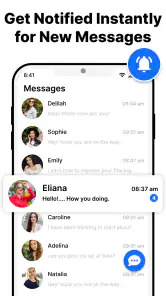
Upon opening the Messages app, you're greeted with a sleek and intuitive interface. It’s like slipping into a pair of comfortable shoes that fit just right. The design is minimalistic, which I appreciate, as it keeps the focus on the conversations rather than flashy graphics or cluttered menus. Trust me, even if you’re not the most tech-savvy person, you’ll find your way around in no time.
Messaging Features That Stand Out
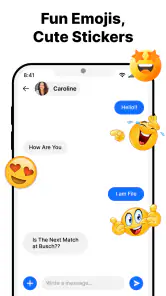
What sets Messages apart from the competition are features that are both practical and delightful. You’ve got your standard text messaging, sure, but there’s so much more. Picture this: you’re in the middle of a chat and suddenly feel the need to share a photo of your cute dog doing something utterly adorable. With the integrated camera and gallery access, sharing photos and videos is a breeze. And if you’re one to add a bit of flair to your messages, the emoji and GIF options are plentiful, ensuring you can always express the exact emotion you want.
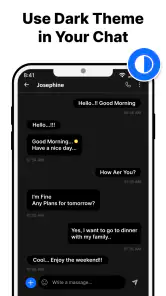
One of my favorite things is the ability to customize chat backgrounds and bubble styles. It might sound minor, but having a personalized chat space makes each conversation feel unique. And let's not forget the smart reply feature that suggests quick responses based on the context of your conversation. It’s like having a little helper right in your pocket!
Privacy is a reason to check the details
I would not choose any texting app solely on the assumption that familiar-looking conversations are automatically private. The protection a message gets can depend on the kind of messaging taking place and the people on the other end, so I would check the app’s current privacy information and avoid sending highly sensitive details by ordinary text. For routine notes, the convenience is useful; for confidential conversations, I would use a service whose protections are clear and appropriate for everyone involved.
This is also a good example of why feature names are not enough to judge a messaging app. A quick reply suggestion can save a few taps, but it does not replace reading the conversation before responding, especially when a short answer might be misunderstood. I use suggestions as a starting point, not an automatic decision. In practical terms, that keeps convenience from becoming carelessness.
Security and Privacy
In today's world, privacy is more important than ever. With Messages, you can rest easy knowing your chats are secure. The app offers end-to-end encryption for your messages, meaning only you and the person you’re chatting with can read them. This level of security is a must-have, and frankly, it's reassuring to know that my conversations are kept private.
For a communication app, the day-to-day trade-off is often less about appearance and more about whether the people you need to reach can receive your messages. SMS is familiar and practical, but it does not automatically give you the same experience across every phone or messaging service. I would use it for quick personal updates and routine coordination, then choose another tool when a conversation depends on richer online features.
Choosing it over the usual alternatives
Compared with a dedicated internet messenger, the main appeal here is the ordinary phone-texting role: you can reach people without asking them to adopt the same chat platform. That is especially handy for one-off practical exchanges with a tradesperson, a school contact, or a relative who prefers basic texting. The trade-off is that platform-specific services are often the more natural choice for ongoing group discussions, frequent media sharing, or conversations that rely on richer online tools.
Compared with the SMS app already installed on a phone, the choice is more personal. If the default app already handles your texts comfortably, there may be little reason to switch just for the sake of switching. Messages becomes more appealing if its presentation and customization suit you better, or if you want to try a different interface for everyday texts. I would judge it by whether it makes common tasks easier on your device, not by expecting it to win every feature comparison.
Integration and Compatibility
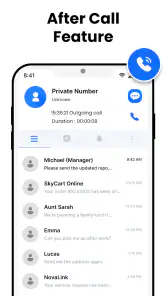
Another aspect where Messages shines is its seamless integration with other apps and platforms. Whether you’re sending a calendar invite, sharing a location, or even making a quick call, it’s all possible without ever leaving the app. This compatibility makes Messages a versatile tool, perfect for both personal and professional use.
To top it off, the app is available on both Android and iOS, so you’re not limited by the type of device you use. Whether you're team Android or a die-hard iOS fan, Messages has got you covered.
A realistic fit for different people
I can see this app working well for someone who sends mostly short, practical texts: checking whether a relative needs groceries, confirming a pickup, or letting a colleague know that a meeting has moved. It is also sensible for people who regularly contact a mix of smartphone users and people who do not want another account-based chat service. In those cases, a familiar SMS exchange can be less awkward than persuading everyone to move platforms for a single message.
I would steer away from it as a primary choice if your daily conversations revolve around large groups, collaborative media, or a consistent online experience across devices. A family organizing a trip through photos, documents, and ongoing group decisions will probably find a dedicated chat service more convenient. Likewise, if privacy requirements are central to your choice, I would compare the relevant protections directly rather than infer them from the app’s name or interface.
Final Thoughts
All in all, Messages is a strong contender in the messaging app arena. Its combination of user-friendly design, rich features, and robust security makes it stand out. Whether you're catching up with old friends, coordinating work projects, or just sharing a laugh, this app has all the bells and whistles you’ll need. Give it a try, and I promise, you won’t be disappointed. After all, staying connected should be effortless and enjoyable.
Messages is developed by Text Messaging, and its average rating is 3.9 from around 181 thousand ratings, with about 9.9 thousand written reviews. More than 10 million installs suggest it has reached a broad audience, though popularity alone does not tell me whether it suits your routine. It is free, rated for Everyone, and version 5.88.29 is listed for devices running Android 7.0 or later.
My recommendation is conditional rather than universal: if your main need is a familiar way to handle everyday SMS, this app is worth considering; if you expect one service to cover every kind of chat, I would compare alternatives first. Its appeal is in keeping basic communication approachable, not in making every conversation format interchangeable. The app was released on February 11, 2021, and for me the deciding factor remains simple: choose it when ordinary texting is the job you want done.
Messages Frequently Asked Questions
Does Messages work on my Android device, and is it available for iOS?
Messages is an Android communication app with a minimum operating-system requirement of Android 7.0. Check your device’s software version before installing to make sure it meets that requirement. If you are choosing an app for an iPhone or another platform, confirm that it is available for your device in the relevant app store before you proceed.
Will Messages replace the messaging app already on my phone?
Messages is described as a preset SMS messaging application, so it may be an option for handling everyday text conversations. Whether it replaces your phone’s current messaging app depends on your device settings and how you choose to use it. Before switching, consider which app you prefer for SMS and check your phone’s settings after installation.
Can I use Messages without an internet connection?
Messages is presented as an SMS messaging app, which makes it relevant for users who primarily want to send ordinary text messages. SMS availability depends on your mobile service and device rather than simply installing an app. For features that send photos, videos, or other content, your connection and carrier arrangements may affect how the message is delivered.
Is Messages free to download, and what should I know before installing it?
Messages is a free communication app for SMS messaging. It is rated for Everyone and is suitable for users looking for a preset messaging application with additional functions. Before installing, check that your device runs Android 7.0 or later, as that is the minimum supported operating system. The app has over 10 million installs and an average rating of 3.9 from around 181,000 ratings.
Who develops Messages, and is it a well-established app?
Messages is developed by Text Messaging and has been available since February 11, 2021. Its large audience and substantial body of user feedback make it a familiar option to consider when choosing a messaging app: it has received around 9,900 reviews. As with any app, individual experiences can differ, so it is sensible to check that its messaging features suit the way you want to communicate.
Pros
- Seamless integration with iOS devices.
- End-to-end encryption for secure chats.
- Supports multimedia messaging.
- User-friendly and intuitive interface.
- Syncs across all Apple devices.
Cons
- Limited functionality on non-Apple devices.
- No customization for chat themes.
- Requires Apple ID for initial setup.
- No backup to third-party clouds.
- Lacks advanced messaging features.
- Category
- Communication
- Version
- 5.88.29