MEATER® Smart Meat Thermometer
- 3.94K
- 4.3
- Installs
- 1.00M
- Price
- Free

Screenshots
Analysis by Reviewed
My first question with a connected cooking tool is whether it makes dinner easier to manage, rather than simply adding another screen to check. The MEATER® Smart Meat Thermometer is built around a wireless probe and a companion app for Android and iOS. In my experience, that focused setup is most useful when a roast or grill session takes long enough that I want to keep track of it while getting on with the rest of the meal.
Where it fits in a real kitchen
This is not a recipe app or an all-purpose kitchen organizer. Apption Labs makes it for monitoring cooking with a thermometer, so its value depends on how often you cook meat that benefits from continuous temperature updates. The app is free, rated for Everyone, and has a 4.0 average from around 41,000 ratings. It has passed one million installs, which gives a sense of its reach, but the more practical question is whether you will use it often enough to appreciate a connected probe.
A realistic use is a Sunday roast: I can start the cook, set the app up, then prepare vegetables and clear the counter without repeatedly opening the oven to check progress. I still need to coordinate the sides and serving time myself, but updates give me a better basis for deciding when to move on to the next task. For a quick meal that needs only a short temperature check, that extra setup may feel unnecessary.
Before the cook: make the routine predictable
I get the most from a thermometer app when I establish a small routine before the food goes on. I check that the probe is ready, open the app, make the relevant selections, and place the probe carefully. Once cooking begins, I treat the estimate as a planning aid rather than a guaranteed finish time. That approach leaves room for the variables of a real oven or grill and helps me avoid promising dinner at an exact minute.
Probe placement is an easy detail to underestimate. A reading is only useful if the probe sits in a representative part of the meat, so I take a moment to position it deliberately rather than rushing just to get cooking. On a large cut, I also think about which portion I care most about serving at the intended doneness. A careful start makes the later updates more meaningful than repeatedly second-guessing the app.
A repeatable cooking routine
My most reliable approach is to prepare the probe and app before the meat goes on, choose the meat and doneness, then treat the estimate as a planning guide rather than a promise. The app tracks internal and surrounding cooking temperatures and sends updates, which means I can use the waiting time to prepare sides or set the table. For a weekend roast, I would start early enough to leave room for the cooking estimate to shift instead of promising guests an exact serving minute.
That habit matters because a thermometer can make doneness easier to monitor, but it cannot coordinate the whole meal for you. I still decide when to season, turn food, and serve it. I find the app most useful when I check it at natural pauses—after starting the cook, when a notification arrives, and when I am deciding whether the rest of dinner is ready—not when I keep reopening it every few minutes.
More From Our News Desk

Weather by Xiaomi Review: Clear at a Glance, Less Clear Up Close

X Under Pressure: Can It Recover When Posting Goes Wrong?

Clash of Clans Is Won Between the Battles

Android Auto Makes the Case for Quieter Car Software

MobiOffice: Transforming Mobile Productivity with Seamless Integration

EA SPORTS FC™ Mobile Soccer: Redefining Mobile Sports Gaming
Getting Started with MEATER
First things first, setting up the MEATER® Smart Meat Thermometer is a breeze. Right out of the box, you’ll find the thermometer itself, which is wireless (yes, no more tangled cords!), and a handy wooden charging dock. The app, available for both Android and iOS, is where the magic happens. Simply download it, sync your device, and you’re ready to go. The app interface is intuitive and user-friendly, even for those who aren’t tech-savvy.
Settings worth checking before you rely on an alert
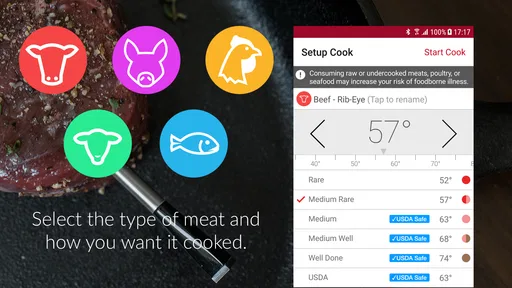
The main choices deserve a second look before a cook starts: the selected meat and target doneness should match what is actually on the grill or in the oven. A mistaken selection can make the guidance less useful, even if the temperature readings themselves are working. I also make sure the phone is somewhere I will notice it; a notification cannot help if the device is tucked away or muted while I am busy with guests.
Bluetooth distance is another practical consideration. The app describes long-range monitoring, but walls, appliances, and the layout between the cooking area and the phone can affect a connection in everyday use. Before I walk away for a while, I check that the app is receiving updates from the probe. If I am hosting, I prefer to keep the phone nearby rather than assume a stated range will work equally well in every house or yard.
Cooking with Confidence
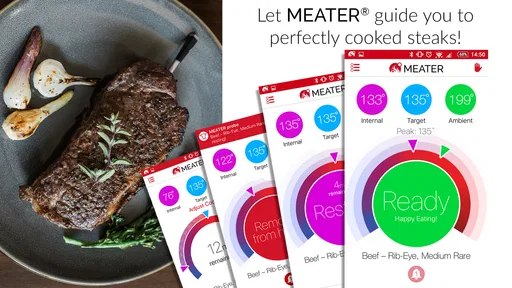
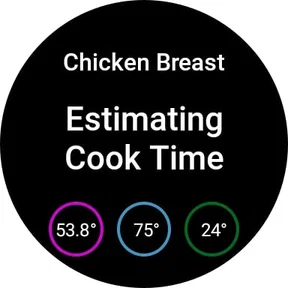
Using MEATER is like having a personal chef by your side. You just insert the thermometer into your meat, select the type of meat and desired doneness on the app, and let MEATER do the rest. The app tracks the internal temperature of your meat and the ambient temperature of your grill or oven. You get real-time updates and an estimated cooking time, so you can kick back and relax while MEATER ensures your steak is cooked to perfection. Talk about cooking with confidence!
The practical advantage over a basic instant-read thermometer is continuity: an instant-read tool gives you a check at one moment, while this setup follows the cook and can alert you when attention is needed. That is helpful for a roast or a long grill session, but less compelling for a quick burger when taking a brief temperature reading is already simple. I would also keep the probe placement consistent; a poorly positioned probe can make any temperature reading less representative of the portion I actually plan to serve.
Faster patterns for busy cooks
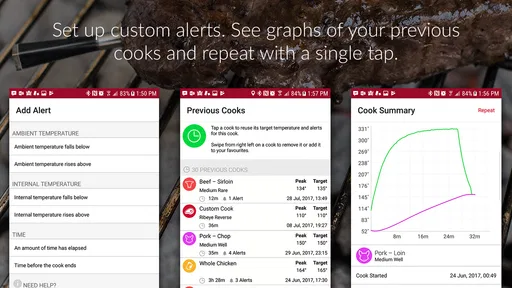
Once I know how a familiar cut behaves in my usual oven or grill, I can use the app as part of a repeatable sequence instead of treating every cook as a new experiment. I start the probe before turning to side dishes, check the estimate when it changes my plan, and use alerts as prompts to return to the food. That is a modest shortcut, but it cuts down on unnecessary checking without asking me to ignore what is happening in the kitchen.
For a gathering, I would use the monitoring to coordinate attention rather than to guarantee a serving time. I can get plates ready or finish a side while the meat cooks, then adjust if the estimate moves. The useful trade-off is that I spend less time hovering, but I still need to be available when a notification calls for action. A connected thermometer helps me manage attention; it does not turn a long cook into a hands-off one.
Features That Sizzle
One of the standout features of MEATER is its long-range Bluetooth capability, allowing you to monitor your cooking from up to 165 feet away. This means you can mingle with guests or catch up on your favorite show without hovering over the grill. Plus, the app’s Guided Cook System takes the guesswork out of cooking, offering step-by-step instructions and notifications when it’s time to flip or remove the meat.
In everyday use, I would check the connection before wandering away, especially if the cooking area is separated from where I am relaxing. A stated range is not a guarantee through every wall, appliance, or outdoor layout. If I am cooking at a gathering, I keep the phone somewhere I can notice an alert, and I still look at the food when a step calls for action rather than assuming the app can manage every part of the cook.
Another cool feature is the Advanced Estimator Algorithm. It’s designed to help you plan your meal and manage your time better by providing a countdown to when your food will be ready. This is especially handy when juggling multiple dishes at once.
I use that countdown as a way to sequence the meal, not as a fixed appointment. If the main dish is running longer than expected, I can delay a side or keep it warm; if it is progressing quickly, I can get the table ready sooner. The useful skill is learning to leave a little flexibility in the plan, since an estimate helps with decisions but does not remove the variables of a real grill or oven.
What continuous monitoring can—and cannot—replace
Compared with the usual instant-read thermometer, this setup is a better fit when I want to follow a longer cook without opening the oven or returning to the grill for repeated checks. An instant-read model remains the simpler choice for small, fast-cooking portions or a cook who prefers to check manually. The app’s strongest case is not that every meal needs more technology; it is that some meals are easier to manage when temperature progress is visible over time.
It also does not replace judgement about the food or the cooking environment. I still need to decide how to arrange the rest of dinner, respond to prompts, and account for a connection that may be less dependable at a distance. If I want a tool that requires no pairing or phone nearby, a conventional thermometer is a more straightforward fit. If monitoring a longer cook is the part I find distracting, the app offers a more useful workflow.
Who benefits most, and what to check
I think this app suits cooks who regularly make roasts, larger cuts, or grilled meat and want to spend less time opening the oven or standing beside the barbecue. It can also help a newer cook build a repeatable routine: make the same choices for a familiar cut, pay attention to the temperature updates, and learn how the timing fits with the rest of dinner. By contrast, someone who mainly cooks small portions quickly, prefers hands-on checking, or does not want to rely on a phone during cooking may be happier with a simple instant-read thermometer.
Before a cook, I would make sure the probe is charged and paired, select the intended doneness carefully, and keep the phone within a sensible range. Those small checks prevent a last-minute scramble and make the app’s guidance easier to use. The app is free, has an Everyone age rating, and has a 4.0 average from around 41,000 ratings; its reach is also reflected in over one million installs. Those figures suggest a well-established tool, though my decision would still come down to whether I cook enough meat to benefit from continuous monitoring.
Advanced limits to keep in mind
Continuous readings can make a cook feel more predictable, but they are not a promise that every cut will finish on schedule. The estimated time is useful for organizing dinner, yet I would leave a buffer before serving and avoid building a rigid plan around the countdown. That matters especially when several dishes need attention at once: the app can inform my timing, but I remain responsible for deciding what to delay, prepare early, or bring to the table first.
The system is also less compelling when the cooking task is brief, when I am already comfortable checking by hand, or when I cannot keep the phone close enough to notice updates. Those are not failures of the app so much as limits of the use case. I would choose it for the cooks where ongoing monitoring solves a real annoyance, not simply because a wireless tool sounds more advanced.
Final Thoughts
In conclusion, the MEATER® Smart Meat Thermometer is a game-changer for anyone who loves to cook meat to perfection. It’s easy to use, packed with smart features, and takes the stress out of grilling. Whether you’re a seasoned grill master or a newbie, MEATER is a worthy addition to your kitchen arsenal. So, fire up the grill, grab your MEATER, and get ready to impress your friends and family with perfectly cooked meals every time. Happy grilling!
My recommendation is more specific: choose it if guided monitoring and better meal timing solve a real problem in your kitchen. Its Bluetooth connection and estimated finish are conveniences, not substitutes for sensible probe placement, attention to alerts, or your own judgement. If you mostly need a quick temperature check, a simpler tool is likely enough; if longer cooks routinely compete with everything else you need to do, this app gives you a practical way to stay informed without hovering over the heat.
MEATER® Smart Meat Thermometer Frequently Asked Questions
Can I use MEATER® with different kinds of cooking setups?
MEATER® is intended to help monitor a cooking session with its connected thermometer, so it can be useful when you want temperature guidance while preparing meat. The app displays readings and cooking progress on your phone rather than replacing the cooking equipment itself. Before downloading, consider whether you want a companion app for checking temperatures and receiving updates as food cooks.
What should I expect when setting up the MEATER® app for the first time?
The app is designed to pair with a MEATER® Smart Meat Thermometer. After installing it, you connect the thermometer to your phone so the app can receive temperature readings and display cooking progress. Once connected, you can follow the on-screen guidance, estimated cooking time, and alerts. The experience is most useful when you have the compatible thermometer ready to use.
Does MEATER® provide alerts during a cooking session?
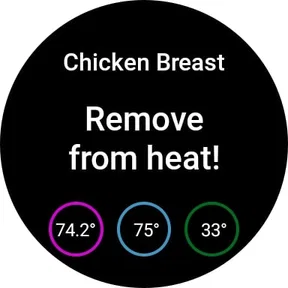
Yes, alerts are part of the app’s cooking guidance. As the connected thermometer sends readings, the app can notify you about progress and when the target temperature is reached. This can make it easier to keep track of cooking without watching the thermometer constantly. The alerts complement the live temperature display and estimated timing, helping you follow the session from your phone.
Is the MEATER® app useful if I already know how to cook meat?
It can still be useful for experienced cooks who want live temperature readings and an estimated cooking time while preparing food. Rather than requiring you to follow every guided suggestion, the app gives you information to help monitor the process and make your own decisions. Its thermometer connection and alerts can add convenience even when you already have a preferred cooking technique.
Does the MEATER® app require the thermometer to be connected to use its cooking guidance?
The app is designed to work with the MEATER® Smart Meat Thermometer, which supplies the temperature readings used for monitoring and cooking guidance. Once paired, the app can show real-time temperatures, estimated cooking time, and alerts as your food cooks. If you are considering downloading the app, keep in mind that the thermometer is central to the experience rather than the app serving as a standalone cooking timer.
Pros
- Wireless design for hassle-free cooking
- User-friendly app interface
- Provides accurate temperature readings
- Compatible with various meat types
- Long battery life
Cons
- Expensive compared to other thermometers
- Limited Bluetooth range
- App occasionally crashes
- Takes time to initially set up
- Requires regular calibration











