Meal Planner & Recipe Keeper
- 962.00
- 4.5
- Installs
- 500.00K
- Price
- Free

Screenshots


Analysis by Reviewed
I judge a meal-planning app by whether it makes the next ordinary dinner easier, not by how many recipes it promises. Meal Planner & Recipe Keeper has a useful idea at its centre: keep recipes, meals, and shopping needs together so planning can lead directly to cooking. That can make a real difference when I’m tired, short on inspiration, or trying to avoid buying ingredients I already have. It is a food and drink app from Stashcook, and its strongest appeal is connecting several small household tasks rather than treating recipes as something to browse and forget.
Where the planning approach earns its place
The most helpful way to use a planner like this is to begin with meals I already know I’ll make, then fill the gaps. For example, I might save a reliable pasta dish and a family favourite first, schedule them for busy evenings, and leave one less-structured night open. That makes the plan a practical guide rather than a strict timetable I’m bound to abandon as soon as plans change.
The recipe library also has value beyond collecting new ideas. When a recipe is saved alongside the meals I plan, it can become part of a repeatable routine: choose it for the week, check what it needs, and shop accordingly. That chain is the app’s most convincing strength. A standalone recipe bookmark may help me remember a dish, but it does not by itself connect that dish to a weekly plan and the ingredients I need to buy.
A practical routine, not a promise of effortless cooking
Meal planning still depends on the effort I put into keeping recipes and household information useful. If I save recipes without organizing my choices or updating what I have at home, the app cannot make those decisions for me. The pantry tracker may help reduce duplicate purchases, but it works best as a habit: check supplies before shopping and adjust the information when ingredients are used. Anyone hoping for a fully automatic account of what is in the kitchen may find that upkeep more tedious than expected.
There is another trade-off in building a personal library. Importing or entering recipes takes time at the beginning, especially if my favourites are scattered across notebooks, family messages, and websites. I would start with the dishes I cook most often instead of trying to digitize everything in one sitting. A smaller, dependable collection is more useful for next week’s dinners than a huge catalogue I have not sorted or tested.
Who is likely to get the most from it
I’d recommend it most to people who cook at home regularly and want one place to connect saved recipes with a week’s meals and a shopping list. It can suit a household where one person usually plans dinner, too, since sharing recipes or meal plans can help others see what is on the menu. The app is less compelling for someone who rarely cooks, prefers spontaneous takeout, or already has a planning routine that works smoothly in a calendar and notes app.
Compared with using a general notes app, this kind of dedicated recipe keeper offers a more food-focused workflow: saved dishes can feed into meal planning and shopping rather than sitting in a long, unstructured list. On the other hand, a basic notes app may be quicker for someone who only saves a recipe now and then and does not need a pantry or weekly schedule. The deciding question is whether I will actually use the connected steps. If not, the simpler tool may be the better choice.
More From Our News Desk

Weather by Xiaomi Review: Clear at a Glance, Less Clear Up Close

X Under Pressure: Can It Recover When Posting Goes Wrong?

Clash of Clans Is Won Between the Battles

Android Auto Makes the Case for Quieter Car Software

MobiOffice: Transforming Mobile Productivity with Seamless Integration

EA SPORTS FC™ Mobile Soccer: Redefining Mobile Sports Gaming
Getting Started with Meal Planner & Recipe Keeper
Diving into the app is as simple as pie. Once you've downloaded it, which you can do for both Android and iOS, you're greeted with a friendly and intuitive interface. Seriously, it feels like the app is giving you a warm hug, saying, "I've got your back." The initial setup process is straightforward, and you’ll be up and running in no time.
The first thing you'll want to do is set up your meal preferences. Whether you’re vegan, vegetarian, or a full-blown carnivore, Meal Planner & Recipe Keeper has you covered. The app allows you to customize your dietary needs, so you’re not wading through a sea of irrelevant recipes.
Your Personal Recipe Library
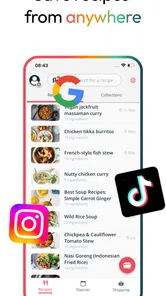
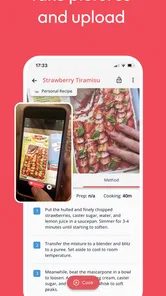
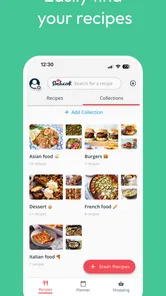
One of the coolest features of this app is its ability to store all your favorite recipes. You can easily import recipes from websites or add your own family secrets. The app organizes them neatly, so you can find that killer lasagna recipe your aunt swears by without tearing your hair out.
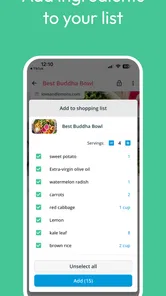
Plus, if you’re like me and have a tendency to forget what ingredients you need, the app has a nifty shopping list feature. It pulls ingredients from your selected recipes and compiles them into a list that you can check off as you shop. No more forgotten basil!
Meal Planning Made Easy
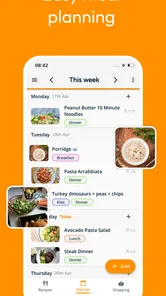
Here’s where the app truly shines. Planning meals for the week can feel daunting, but with Meal Planner & Recipe Keeper, it’s as easy as tapping a few buttons. You can plan your meals by day, week, or even month. The app offers suggestions based on your preferences, so you’re never stuck in a rut eating the same thing over and over.
And for those of us who love a good themed dinner night, the app lets you organize meals around events or holidays. Taco Tuesday? Check. Thanksgiving feast? Double check.
Keeping Track of Your Pantry
Another gem of a feature is the pantry tracker. Ever bought an extra can of tomatoes only to find you already have three in the cupboard? With this app, you can keep tabs on what you have at home, preventing food waste and saving you money. It’s like having a personal assistant who knows your pantry better than you do.
Sharing is Caring
Cooking is often more fun with friends and family, and the app makes it easy to share recipes and meal plans. You can send recipes to your pals or share entire meal plans with a simple tap. It’s perfect for syncing up with roommates or planning a family reunion feast.
What to expect before downloading
The app is free to download, with optional in-app purchases ranging from $3.99 to $139.99 per item. It has a 4.6 average from around 11 thousand ratings, and has been installed over 500 thousand times. It is rated for Everyone, so its audience is broad; the practical question is whether its planning and recipe workflow fits the way you cook.
It first arrived on July 8, 2020, and the current version is 1.2.244, with Android 8.0 as the minimum operating system. Those details are useful if you are checking compatibility before installing. I’d also treat the purchase range as a reason to review any paid options in the app before committing: the basic download costs nothing, but the highest listed purchase is not a small add-on.
A small test week is the best way to decide
Rather than moving every recipe into a new system, I’d try a short, realistic week. Save three meals you already cook, add one new idea, and use the resulting list when you shop. Then notice where the process catches: perhaps a recipe needs an ingredient you forgot to add, or your schedule changes and a planned dinner no longer makes sense. That trial shows whether the app reduces mental load for your household, instead of merely giving you another place to maintain information.
For a busy weekday, a useful routine might be to plan on Sunday, put quick meals on evenings when time is tight, and reserve a more involved recipe for a day with room to cook. Before heading to the store, check the pantry entries against what is actually on the shelf; that small verification step matters because a tracker is only as reliable as its last update. This is a more grounded use of the app than expecting it to prevent waste automatically.
Making the list work in a real kitchen
A useful detail in this kind of workflow is that a shopping list is most effective when I treat it as a starting point, not a finished inventory. Before leaving home, I would scan the list for ingredients that are easy to overlook in the pantry, then group the remaining items mentally by the sections I usually visit. That quick check reduces the chance of buying duplicates and makes the list easier to use in a busy shop. It also gives me a chance to spot a recipe that depends on a specialty ingredient I would rather replace with something already on hand.
When a plan includes several dishes, I’d look for ingredients that can serve more than one meal. If two recipes both call for a familiar staple, buying it once can make the week feel more economical and reduce half-used odds and ends. The app helps bring planned recipes and ingredients into the same routine, but deciding how to reuse ingredients still takes a little judgement. I find that combination useful: let the tool organize the decisions, while keeping flexibility for what is actually available and appealing.
When plans change halfway through the week
Real schedules rarely follow a neat meal calendar. A late workday, an unexpected invitation, or simply not wanting the dinner I chose can throw off the plan. I’d avoid treating each meal slot as a commitment. Instead, I’d use the schedule as a menu of options: move a quicker dish to the busiest night, leave a flexible meal available, and carry an unused recipe into the next planning session. The benefit is not perfect adherence; it is having a few considered choices ready when decision-making feels tiring.
This approach also helps households where different people cook on different days. Sharing a meal plan can make the intended dinner visible, while saved recipes give whoever is cooking a place to find the instructions. Still, sharing information is not the same as agreeing on preferences. I’d settle practical matters such as who shops, who updates pantry contents, and whether everyone is comfortable changing the plan. Without that small agreement, the app can centralize the plan but cannot prevent crossed wires.
How it compares with recipe websites and paper lists
Recipe websites are often better when I want to discover a dish quickly or read a wide range of cooking ideas. A paper list can be faster when I already know what to buy and prefer not to manage another digital collection. The appeal here is the step between those activities: a saved recipe can sit in a planned meal and contribute to shopping preparation. That makes this a better fit for someone who wants to turn inspiration into a repeatable household routine than for someone who mainly browses recipes for occasional cooking.
There is a trade-off in choosing a connected app over familiar, separate tools. Keeping recipes, meals, and shopping together can reduce searching between bookmarks and notes, but it asks me to maintain a more structured system. If I am content with a handwritten menu on the fridge and a quick list on my phone, switching may not save enough effort to justify the setup. I’d judge it by whether the connection changes what I do each week, not by how many functions appear available.
Small habits that make the app more useful
I would add recipes as they become relevant rather than trying to build a perfect archive. After cooking a dish, I can decide whether it deserves a regular place in the rotation and whether the saved version needs a note for next time. That keeps the collection tied to meals I actually enjoy instead of turning it into a warehouse of good intentions. Starting with trusted dishes also makes the first shopping lists easier to check, since I already know which ingredients are essential and which can be substituted.
Another sensible habit is to plan around the week’s shape rather than choosing seven equally ambitious dinners. Put a quick meal beside the busiest day, leave room for leftovers if that suits the household, and save the more involved recipe for a time when cooking will be enjoyable. The app can help lay out those choices, but the useful judgement is yours. That distinction matters: a planner should lower the friction around decisions, not make dinner feel like another schedule to obey.
Final Thoughts
In a world where time is precious and convenience is king, Meal Planner & Recipe Keeper is a game-changer for anyone looking to streamline their meal prep and cooking routine. With its user-friendly interface, customizable options, and comprehensive features, it's like having a sous-chef right in your pocket.
So, if you’re ready to take the stress out of meal planning and find joy in cooking again, give this app a whirl. It's more than just a meal planner; it’s a culinary companion that brings a little more flavor into your life. Bon appétit!
Meal Planner & Recipe Keeper Frequently Asked Questions
Is Meal Planner & Recipe Keeper free to download?
Meal Planner & Recipe Keeper is free to download, so you can try it without paying upfront. The app also offers in-app purchases, with prices ranging from $3.99 to $139.99 per item, so check the purchase details in the app before choosing any paid option. Its content rating is Everyone, making it suitable for a broad audience.
Who makes Meal Planner & Recipe Keeper, and what is it designed to do?
Meal Planner & Recipe Keeper is a Food & Drink app developed by Stashcook. Its focus is practical: save recipes, plan the week, and shop smarter. That makes it relevant for anyone who wants a single place to organize recipes and coordinate meals, whether you are planning ahead for yourself or keeping household meals in order.
What features does Meal Planner & Recipe Keeper offer?
Meal Planner & Recipe Keeper provides a comprehensive suite of features to streamline your meal planning. Users can create weekly meal plans, save and categorize recipes, and generate shopping lists automatically. It also allows for personalized recipe notes and supports multiple dietary preferences, making it a versatile tool for any home cook.
Is Meal Planner & Recipe Keeper suitable for specific dietary needs?
Yes, the app is designed to accommodate various dietary preferences. Users can filter recipes based on dietary needs such as vegetarian, vegan, gluten-free, and more. This flexibility ensures that everyone can find suitable meal options, making it an inclusive choice for diverse dietary requirements.
Can I sync my Meal Planner & Recipe Keeper across devices?
Absolutely. Meal Planner & Recipe Keeper supports cross-device synchronization, allowing you to access your meal plans and recipes on multiple devices. This feature is particularly useful for users who need to update their plans on the go, ensuring seamless access to your data at all times.
Pros
- User-friendly interface for easy navigation.
- Wide variety of recipes to explore.
- Customizable meal plans based on diet.
- Shopping list feature saves time.
- Syncs across multiple devices effortlessly.
Cons
- Limited offline functionality.
- Ads can be intrusive at times.
- Some features require in-app purchases.
- Occasional syncing issues reported.
- Recipe database could be more extensive.











