

Lunory-Sleek & Feature-Focused
- 12.00
- 1.5
- Installs
- 10.00K
- Price
- Free

Screenshots




Analysis by Reviewed
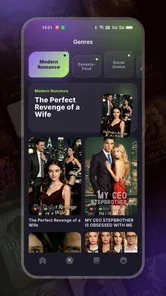
I approached Lunory as something a household might open on a shared phone or tablet: a free entertainment app from VetraShort built around stories, new episodes, and selected recommendations. That framing matters because a shared device changes what “useful” means. One person may want a quick fictional escape after dinner, while another may simply want to browse something new without committing to a long show. Lunory has the right general idea for that kind of casual use, but my experience was also shaped by its very early feel and its uneven reception, so I would not treat it as an automatic replacement for a mature streaming or reading service.
The app is aimed at Everyone, which makes it easier to consider for a general household, but that label should not be mistaken for a complete guide to every story or episode inside the service. In a family setting, I would still preview content before handing the device to a younger child, especially when several people use the same screen. That simple habit is more practical than assuming an age label can settle every question about tone, themes, or suitability.
How Lunory Fits Into Shared Entertainment
When I think about Lunory in a shared home, I see it as a way to trade story suggestions rather than assume everyone wants the same thing. I’d let each person nominate one promising pick, then choose together what to open, keeping the app’s recommendations separate from any expectation of private profiles or household controls. That small routine makes casual browsing more considerate and sets up a useful question: how should a first-time user approach the app on their own?
A practical evening scenario
Imagine a tablet sitting in the living room. After a meal, one person wants to watch or read something brief, another wants to browse upcoming episodes, and nobody wants to negotiate a complicated account switch. Lunory is appealing in that moment because its focus is narrow: discover stories, see what is fresh, and choose from a curated selection. I found that concept more useful for short, informal sessions than for planning a full evening around a large library.
The important distinction is that Lunory works best as a discovery stop rather than as the household’s only entertainment destination. If I already know the exact series, film, audiobook, or book I want, a specialized service usually gives me a clearer route. Lunory makes more sense when I am open to suggestions and want the app to reduce the effort of deciding what to try next.
That creates a genuine shared-device advantage. A parent, partner, roommate, or visiting relative can open the app and browse without needing the rest of the household to agree on one long-running subscription service. The trade-off is that casual discovery can also expose everyone to the same recommendation environment. Without assuming separate profiles or household controls, I would treat the device as a communal window rather than a private, personalized space.
What the browsing concept gets right
The combination of captivating stories, fresh episodes, and curated picks gives Lunory a clear editorial direction. It is not trying to be a general-purpose utility disguised as entertainment. When I use it with a “show me something interesting” mindset, the idea feels natural: start with a selection, follow a story if it catches my attention, and return when a new episode appears.
More From Our News Desk

 Gmail
GmailGmail in a Busy Inbox: Who Benefits Most?
From first account to crowded workday, Gmail earns its place through dependable search and flexible sorting—but its best fit depends on how much inbox maintenance you can tolerate.

 Prime Video
Switching to Prime Video: What Changes in Your Viewing Routine
Prime Video can make a compelling second home for streaming, but switching means learning a different catalog, rental layer, and route from browsing to playback.

 Universal TV Remote Control
Universal TV Remote Control Works Best as a Reliable Backup
A phone remote earns its place through quick setup and reliable habits. Here is how to get more from Universal TV Remote Control—and where its limits show.

 Weather - By Xiaomi
Weather by Xiaomi Review: Clear at a Glance, Less Clear Up Close
Xiaomi’s weather app makes everyday forecasts quick to scan, but its calm surface can leave useful details and recovery paths harder to find than they should be.

 X
XX Under Pressure: Can It Recover When Posting Goes Wrong?
A resilience-focused review of X, examining setup, mistaken posts, interruptions, weak connections, and the gaps that matter when recovery needs to be dependable.

 Clash of Clans
Clash of Clans Is Won Between the Battles
Its raids are quick; its community is a long-term project of coordination, teaching, rivalry, and shared responsibility—with all the friction that entails.
Latest News



That workflow is particularly suitable for people who become tired of endlessly scrolling through enormous catalogs. A huge service may offer more total choice but also creates decision fatigue. Lunory’s smaller, more directed presentation can be preferable when I have only a few minutes and want a prompt rather than a research project.
Still, curated discovery is only as satisfying as the quality and variety of the choices presented. Because the app is from VetraShort and is still on version 1.1.1, I see it as a developing product rather than a finished entertainment ecosystem. The experience can be interesting for exploration, but I would keep another familiar app available for dependable access to established favorites.
Setting boundaries before sharing the device
My first recommendation for a shared phone or tablet is to decide who the device is really for before opening Lunory. If it belongs to an adult but is occasionally passed to a child, I would browse first, choose suitable material, and avoid leaving the app open on an item that could prompt questions or unwanted attention. If several adults use it, I would agree on whether browsing history, saved items, or recommendations are considered personal.
I would also avoid treating one shared session as proof that everyone has the same taste. A teenager may enjoy serialized fiction while an older relative prefers a self-contained story. Since Lunory’s appeal is centered on discovery, the handoff itself becomes part of the experience: the current user should close the item they were exploring and return the device in a neutral state, instead of assuming the next person wants to continue from the same place.
This is a small but useful household rule: use the app in short turns, and say what you are leaving for the next person. “There is a new episode worth trying” is more helpful than silently leaving a crowded screen of recommendations. It also prevents the next user from confusing another person’s interest with a personal suggestion.
Account expectations and personal space
A reader deciding whether Lunory belongs on a shared device will naturally wonder whether each person can keep a separate identity, preserve individual progress, or receive distinct recommendations. I would not build a household plan around those assumptions. Instead, I would test the actual sign-in and browsing experience on the device you intend to share, then decide whether the app is comfortable for communal use.
That approach is especially important when the same tablet is used by adults and children. If the app does not clearly separate people in your particular setup, then a shared session can blur what has been opened and what might be suggested later. The sensible workaround is not to invent a complicated system: use one designated household device for casual browsing, and keep private entertainment on personal devices where separate boundaries matter.
For a couple or group of adult roommates, this may be perfectly manageable. They can treat recommendations as a conversation starter rather than a private feed. For a family that expects strong profile separation, precise viewing boundaries, or carefully isolated histories, I would choose a more established service designed around those expectations.
Coordinating new episodes
Fresh episodes are one of Lunory’s most useful ideas for shared use because they create a simple reason to return. A household can mention a title at breakfast, decide whether to watch or read it together later, and use the app as the place where everyone checks what has changed. That is more engaging than an app that only offers a static collection.
However, I would not assume that seeing a new episode means every person is ready to consume it at the same time. Shared devices often create accidental spoilers: one user opens the latest item, another sees its title, and the surprise is gone. My preferred routine is to announce the series name without describing the episode, then let each person choose when to open it.
Another practical tip is to separate “discovery time” from “group time.” I might browse alone and mention two promising options, rather than handing the device around while everyone waits. This makes Lunory’s curated approach work better in a household because the app supplies ideas, while the people decide together what deserves attention.
There is also a trade-off between convenience and continuity. If the app is being used casually by several people, it may be easy to lose track of where a story was left. I would keep a simple household note with the title and the last episode discussed, particularly if the device is shared by more than two people. It sounds old-fashioned, but it avoids opening the wrong item and spoiling the experience.
Age context and trust
Lunory’s Everyone rating is reassuring as a starting point, especially for a general entertainment app, but I would still use adult judgment. An age category does not tell me whether every individual story matches a particular child’s maturity, sensitivity, or reading level. In practice, previewing the first selection together is a better test than relying on the label alone.
For younger users, I would make the first few sessions collaborative. Sit nearby, ask what they want to explore, and use the app’s selections as a chance to discuss why a story looks interesting. That gives the household a natural trust boundary without claiming that Lunory provides a particular parental feature. If the child wants completely independent browsing, I would first confirm that the app’s actual behavior suits your family’s expectations.
For older children and teenagers, the question is less about constant supervision and more about shared-device privacy. They may not want their interests mixed with a parent’s recommendations, while a parent may not want a communal screen to become a record of every personal choice. If that distinction matters, Lunory is better on a personal device or in a household arrangement with clearly separated use.
The same principle applies to guests. A visitor can browse the app without needing to understand the household’s tastes, but I would avoid leaving personal account details or an unfinished private story visible. A quick sign-out or handoff routine protects trust more effectively than assuming everyone will ignore what appears on screen.
Where Lunory feels less mature
The clearest warning sign is the public response so far: Lunory carries a 1.5 average from around 45 ratings and about 11 written reviews. Those figures do not tell me exactly why each person was dissatisfied, but they do give me a reason to be cautious. I would install it with modest expectations, test the basic browsing flow, and avoid paying for anything until I knew the app fit my routine.
The app has passed 10 thousand installs, which shows that it has reached an initial audience, but that is still a small footprint beside established entertainment platforms. For me, that means the main question is not whether Lunory can be an interesting extra; it is whether its current selection and reliability are strong enough for regular household use. I would judge that after several short sessions rather than after one promising discovery.
Its free entry point helps reduce the risk of trying it. At the same time, in-app purchases range from $4.89 to $299.99 per item, so shared-device users should be careful around any purchase prompt. I would not let a child explore unattended on a device with a stored payment method, and I would explain to every adult user that free installation does not mean every part of the experience is free.
This is one of the most important practical differences between Lunory and a simple free reading app. A household has to treat the app as a commercial entertainment space, even if the initial download costs nothing. Checking the payment confirmation step and keeping purchasing decisions with one adult can prevent an unpleasant surprise.
Comparing it with familiar alternatives
Compared with a major streaming platform, Lunory feels more like a focused discovery layer than an all-purpose library. A large streaming service is usually the better choice when I want recognizable franchises, predictable playback, mature account tools, or a broad collection that serves several age groups. Lunory is more appealing when I want a lighter, story-centered browsing experience and do not mind exploring a less established catalog.
Compared with a dedicated reading app, Lunory’s episode-oriented idea may feel more immediate for serialized storytelling, but a reading specialist is usually preferable for deep library search, personal shelves, typography controls, or long-form reading habits. I would choose Lunory for a quick recommendation-led session, not as my main digital bookshelf.
Compared with social video platforms, Lunory may offer a calmer route into stories because its purpose is clearer and its presentation is less dependent on an endless stream of unrelated clips. The downside is that social platforms often have more obvious sharing and discovery momentum. If my priority is sending a clip to friends or following fast-moving trends, another category will serve me better.
For a household, the deciding factor is not simply content volume. It is whether the app’s boundaries match the way people share devices. A mature family-oriented platform wins when profiles, restrictions, and separate histories are essential. Lunory wins only when the household is comfortable with informal coordination and primarily wants fresh story ideas.
Who should try it, and who should skip it
I would recommend trying Lunory to someone who enjoys discovering unfamiliar stories, likes episodic releases, and wants a free way to sample a developing entertainment app. It is also worth considering for an adult household that shares a tablet casually and can agree on basic rules about browsing, spoilers, and purchases.
I would be more cautious with anyone who needs dependable access to a specific catalog. If you are downloading an app because you already know the exact title you want, Lunory’s discovery-first approach may not be the most efficient route. The same is true for users who expect polished personalization, strong household separation, or a long-established support ecosystem.
Families with young children can test it together, but I would not hand over a shared device on the assumption that an Everyone rating removes the need for supervision. Likewise, anyone uncomfortable with the possibility of in-app spending should either avoid payment-enabled devices or establish a clear rule before installation.
My way of testing it at home
I would begin with one short session on the intended shared device. First, I would check whether the app opens cleanly, browse several recommendations, and note whether the choices feel varied enough for the people who will use it. Then I would open one story or episode with another household member and see whether both of you understand how to return to the main discovery area.
Next, I would close the app and let a different person use it without explanation. This reveals more than a solo test: can they tell what is new, can they avoid another person’s unfinished item, and do they feel comfortable navigating without changing the household’s routine? If the second user becomes confused, Lunory may still be fine for personal use but not ideal as a communal app.
Finally, I would inspect the purchase flow before allowing independent browsing. I would not tap through a payment screen merely to see what happens, and I would keep the device’s purchase permissions under adult control. This three-part test—discovery, handoff, and spending awareness—gives a realistic picture of whether the app belongs in a shared environment.
Device requirements and everyday practicality
Lunory supports Android devices running version 6.0 or later, so compatibility should cover many older phones and tablets. That is helpful for households that keep a spare device in the kitchen or living room instead of buying a new one for entertainment. I would still test the actual device before planning regular group use, because an operating-system minimum alone does not tell me how comfortable browsing will feel on older hardware.
The app’s free price makes experimentation straightforward, particularly when several family members are undecided. I would install it on the device where the household is most likely to use it, rather than scattering it across every personal phone immediately. That keeps the first evaluation organized and makes it easier to decide whether the app is genuinely useful or merely novel.
Because the developer is VetraShort and the current version is 1.1.1, I would also expect the experience to evolve. That can be positive if future refinements improve discovery or shared use, but it means I would not promise relatives that the app will become the household’s permanent entertainment hub. Treating it as an optional addition keeps expectations realistic.
My household verdict
Lunory has a clear place in a shared entertainment routine: it can supply fresh story ideas, give a household something episodic to check, and make a short browsing session feel more purposeful than random scrolling. I like it most when nobody has a fixed title in mind and the goal is simply to find a promising next choice.
My reservations are equally clear. The low average rating, the early-stage feel, the uncertain fit for separate household identities, and the wide range of possible in-app purchase amounts mean I would introduce it carefully. I would not make it the only app on a family tablet, and I would not give unsupervised access to a child merely because the content rating says Everyone.
For me, the right verdict is “try it as a controlled extra.” Install it for free, test the discovery experience with the people who will actually use it, coordinate around unfinished stories, and keep purchases with an adult. If your household values curated exploration more than a huge established catalog, Lunory may earn a place on the shared screen. If you need mature profiles, predictable libraries, or proven reliability, a stronger alternative will probably be the better everyday choice.
Lunory is most convincing as a low-commitment story-discovery app, not yet as a complete household entertainment system. That distinction lets me recommend a careful trial without pretending its current limitations do not matter.
Lunory-Sleek & Feature-Focused Frequently Asked Questions
What is Lunory-Sleek & Feature-Focused?
Lunory-Sleek & Feature-Focused appears to be a modern, streamlined app designed around a clean interface and a focused set of practical features. Its main appeal is simplicity: the layout is easy to understand, navigation feels organized, and the experience avoids unnecessary visual clutter. Before downloading, users should check the store description to confirm the app’s exact purpose and supported functions.
What kind of entertainment does Lunory offer?
Lunory is an entertainment app centered on stories and episodic content. Its description highlights captivating stories, fresh episodes, and curated picks, which gives users a few ways to find something to explore. If you enjoy browsing narrative content and returning for new episodes, that focus may appeal to you. The app is developed by VetraShort.
Is Lunory-Sleek & Feature-Focused easy to use for beginners?
Yes, the app is presented with a beginner-friendly approach. Its sleek design makes the main sections relatively easy to locate, while the focused feature set helps prevent users from feeling overwhelmed. That said, the learning experience may depend on the specific tools included in the current version. New users should spend a few minutes exploring the menus and reviewing any available onboarding or help information.
Is Lunory-Sleek & Feature-Focused free to download?
Lunory is free to download, but in-app purchases are available, with prices ranging from $4.89 to $299.99 per item. The free download does not mean every paid option or feature is included at no cost, so check the purchase details before choosing anything. This is particularly useful if you plan to explore the app regularly and want to understand potential spending beforehand.
What devices are compatible with Lunory-Sleek & Feature-Focused?
Compatibility depends on the operating system and the minimum requirements specified by the developer. Users should check whether Lunory-Sleek & Feature-Focused supports their Android or iOS version before installing it. It is also worth confirming the required storage space, permissions, and whether the app needs an internet connection for its main features, updates, synchronization, or account-related services.
Pros
- Clean
- modern interface that feels polished and easy to navigate.
- Focused feature set avoids unnecessary clutter and distractions.
- Responsive performance makes everyday use feel smooth and reliable.
- Minimal visual style is comfortable for extended sessions.
- Simple layout helps new users understand the app quickly.
Cons
- Limited customization may disappoint users who prefer more control.
- Some advanced tools may feel too basic for experienced users.
- The sleek design can make certain options less noticeable.
- Feature updates may be needed to keep pace with larger competitors.
- Users seeking a highly social or feature-rich experience may find it sparse.











