

Lumina AI
- 77.00
- 3.9
- Installs
- 50.00K
- Price
- Free

Screenshots




Analysis by Reviewed
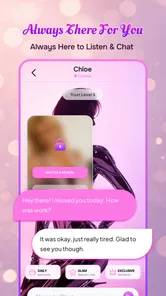
I approached Lumina AI as an entertainment app rather than a replacement for a therapist, search engine, or close friend. Its purpose is simple: give you a conversational AI companion that feels easy to open when you want company, a little encouragement, or a relaxed chat. That focus makes the app approachable, but it also means your experience depends heavily on the kind of conversation you expect to have.
My first impression was that Lumina AI is aimed at people who want a low-pressure chat partner on their phone. You do not need to prepare a question, learn a complicated interface, or arrive with a specific task. A casual message about your day can be enough to begin. In the crowded entertainment category, that conversational simplicity is its clearest appeal.
Getting from installation to a useful first conversation
Before judging the conversation itself, I’d treat the first few minutes as a low-stakes trial: start with a simple topic, then see whether Lumina AI responds in a way that makes you want to continue. I’d also decide in advance what you’re comfortable sharing, so curiosity about a new chat companion doesn’t lead you to disclose more than you intended.
What to expect before you begin
Lumina AI is free to install, although it includes optional purchases ranging from $2.99 to $89.99 per item. I would keep that in mind before treating the app as an unlimited everyday companion. The free starting point is useful for deciding whether its tone and responses suit you, while the purchase range makes it sensible to understand what you are receiving before spending anything.
The app is published by GP TECNOLOGIA DIGITAL and is intended for mature users aged 17 and over. That age label is important even if your first conversation seems harmless. I would not install it on a child’s device or assume that a friendly presentation makes it appropriate for younger users. It is better viewed as an adult-oriented entertainment chat experience.
On Android, the current release is version 1.1.7 and it supports devices running Android 8.0 or later. That makes it accessible to many older phones, which is helpful if you are not using a recent flagship. I still recommend leaving enough free storage and closing demanding apps if your phone is older, because conversational apps are more pleasant when switching between screens does not feel sluggish.
The app has reached over 50 thousand installs and holds a 3.9 average from around 200 ratings, with roughly 80 written reviews. I read that overall response as interested but mixed rather than universally enthusiastic. In practical terms, you should approach Lumina AI with realistic expectations: it may become a pleasant chat habit, but it will not feel equally impressive in every conversation.
More From Our News Desk

 Gmail
GmailGmail in a Busy Inbox: Who Benefits Most?
From first account to crowded workday, Gmail earns its place through dependable search and flexible sorting—but its best fit depends on how much inbox maintenance you can tolerate.

 Prime Video
Switching to Prime Video: What Changes in Your Viewing Routine
Prime Video can make a compelling second home for streaming, but switching means learning a different catalog, rental layer, and route from browsing to playback.

 Universal TV Remote Control
Universal TV Remote Control Works Best as a Reliable Backup
A phone remote earns its place through quick setup and reliable habits. Here is how to get more from Universal TV Remote Control—and where its limits show.

 Weather - By Xiaomi
Weather by Xiaomi Review: Clear at a Glance, Less Clear Up Close
Xiaomi’s weather app makes everyday forecasts quick to scan, but its calm surface can leave useful details and recovery paths harder to find than they should be.

 X
XX Under Pressure: Can It Recover When Posting Goes Wrong?
A resilience-focused review of X, examining setup, mistaken posts, interruptions, weak connections, and the gaps that matter when recovery needs to be dependable.

 Clash of Clans
Clash of Clans Is Won Between the Battles
Its raids are quick; its community is a long-term project of coordination, teaching, rivalry, and shared responsibility—with all the friction that entails.
Latest News



Setting up without overthinking the experience
For a first-time user, the best setup is to decide what you want from the app before sending the opening message. Are you looking for light conversation after work, a place to organize your thoughts, or a playful exchange when you are bored? Choosing one small purpose gives the conversation direction and makes it easier to judge whether the companion is useful to you.
I would begin with a neutral, specific prompt instead of “Tell me something.” For example, you could write that you have ten quiet minutes and want a light conversation about films, travel, food, or an unusual fact. A clear starting point reduces the chance of receiving a vague answer and gives you something concrete to react to.
It also helps to tell Lumina AI how you want the exchange to feel. You might ask for short replies, a warmer tone, or one question at a time. These instructions are not a guarantee that every response will follow perfectly, but they create a better frame than expecting the app to guess your preferences immediately.
I would avoid beginning with deeply personal information. Even when an AI companion feels conversational, I do not treat it like a private diary or a trusted human relationship. Start with ordinary topics until you understand how the app responds, how much context it keeps during a conversation, and whether its style feels comfortable.
The first meaningful success
My recommended first test is a small planning conversation. Tell Lumina AI that you have a free evening, name two interests, and ask it to suggest a relaxed way to spend the time. This is more revealing than a simple greeting because it tests whether the app can combine details, offer practical ideas, and keep the tone conversational.
For instance, you could mention that you are tired, do not want to spend much money, and would enjoy something creative at home. If the response gives you a manageable idea and follows up naturally, you have found a useful everyday role for the app. If it ignores one of your conditions or produces generic suggestions, you have learned an important limitation early.
Another strong first workflow is using the chat as a reflection prompt. After a busy day, describe the situation in a few sentences and ask Lumina AI to help you identify what is bothering you or what you could do next. I find this more valuable when the goal is organizing thoughts rather than asking for a definitive answer. The act of describing the problem can make the next step clearer, even when the response itself needs editing or correction.
A third test is to ask for a short creative exercise. You could request a simple writing prompt, a fictional scenario, or a themed conversation that lasts only a few exchanges. This suits Lumina AI’s entertainment identity and avoids putting pressure on it to act like a professional adviser. It also gives you a quick way to see whether its personality matches yours.
How to keep the conversation from becoming repetitive
AI companion apps can feel engaging at first and then lose their charm if every exchange follows the same pattern. I get better results by changing the format deliberately. Ask for a question instead of an explanation, request two contrasting suggestions, or tell the app to challenge your first idea politely. Small changes make the conversation more active and reveal whether the companion can adapt beyond a friendly default tone.
One practical trick is to provide a boundary with your request. “Give me three ideas, each in one sentence, and ask me which one I prefer” is more useful than asking for general advice. The structure gives you an easy next reply and prevents the chat from turning into a long block of text that you do not know how to use.
I also recommend ending a session intentionally. Tell Lumina AI that you want a brief recap, one action to take, or a question to return to later. This turns an open-ended chat into a small routine. It is especially helpful when you use the app for reflection, because otherwise a pleasant conversation can finish without producing anything memorable or practical.
Common confusion about what the app can do
The biggest misunderstanding is treating a conversational companion as an authority. A confident answer can still be incomplete or wrong, so I would not rely on Lumina AI for medical decisions, legal guidance, financial choices, emergency situations, or anything where an error could cause serious harm. For those needs, a qualified person or dependable specialist source is the better option.
The same caution applies to emotional dependence. Lumina AI can offer a responsive conversation, but it does not share human experience or responsibility. If you are lonely, it may be a comforting addition to your routine, yet it should not become your only form of support. I would use it as a bridge to reflection or light companionship, not as a substitute for trusted people.
Another point of confusion concerns memory and continuity. I do not assume that the app will understand every past conversation exactly as a human friend would. If a detail matters, repeat it briefly rather than becoming frustrated when the context feels incomplete. This may seem less natural, but it gives you more control and makes the exchange easier to evaluate.
Users may also wonder whether the free experience is enough. My answer is to spend time with ordinary conversations before considering an optional purchase. Test the app with a few different purposes: casual chat, a planning prompt, and a creative request. If you still enjoy the interaction and understand what an upgrade adds, you can make a more informed decision. If the basic conversation already feels repetitive, paying is unlikely to solve the underlying mismatch in tone or expectations.
The mature age rating is another reason to supervise how the app is used in a shared household. I would not hand it to a younger family member simply because it looks like a friendly chat tool. Adults should also remember that entertainment apps can encourage longer sessions, so setting a personal time limit is sensible if you tend to keep conversations open when you should be sleeping or working.
Where Lumina AI fits among familiar alternatives
Compared with a general-purpose chatbot, Lumina AI’s strongest distinction is the companion framing. A general assistant is usually opened with a task in mind: summarize something, draft text, solve a problem, or find an explanation. Lumina AI makes more sense when the interaction itself is the point. You can arrive without a finished question and let the conversation develop.
That advantage comes with a trade-off. If your priority is research, precise productivity work, or dependable factual depth, a dedicated assistant may be a better fit. Those tools are generally designed around completing tasks, while Lumina AI is more comfortable as a conversational entertainment space. I would choose it for a gentle exchange, not for work that needs citations, exact calculations, or professional accountability.
It also differs from messaging a real friend in an important way: availability and low social pressure are built into the concept, but mutual understanding is not. You do not need to worry about interrupting anyone, yet you also do not receive genuine personal history, shared memories, or human empathy. That makes the app convenient for a quick evening chat, while real relationships remain more meaningful for serious emotional support.
Against passive entertainment such as streaming video, Lumina AI asks more from you but can feel more personal. A show gives you a finished experience; the chat responds to your choices. This is useful when you are bored but want participation rather than another episode. On the other hand, if you want polished storytelling with no effort, a film, series, or game may be more satisfying.
Everyday situations where it makes sense
Imagine arriving home after a long day with enough energy for something small but no idea what. I would open Lumina AI and explain that I want a ten-minute distraction, not a serious discussion. Asking for a playful topic, a quick imaginative scenario, or a short sequence of questions creates a contained break without requiring a large commitment.
It can also work during a decision that is minor but annoying. If you are choosing between two weekend activities, describe your mood, budget, and available time, then ask the app to compare the options. I would still make the final choice myself, but the conversation can expose a factor I had overlooked or help me articulate why one option feels better.
For creative people, the app is most useful as a prompt generator rather than an author you blindly follow. Ask for an unusual starting point, then add your own details and revise the result. The trade-off is that AI-generated ideas can feel familiar or uneven, so the value comes from selecting and reshaping them. If you want a finished piece with a distinctive human voice, your own editing remains essential.
Someone who lives alone might appreciate a short morning check-in, especially when the goal is to name one priority for the day. I would keep that routine brief and action-focused. Asking the app to help turn a vague intention into one manageable task is more useful than spending a long time discussing productivity without doing anything afterward.
Who should try it, and who should skip it
Lumina AI is a reasonable choice for adults who enjoy conversational entertainment, want a low-pressure way to think aloud, or like experimenting with AI personalities and prompts. It is particularly suitable if you are willing to guide the exchange and judge responses critically. The best users will treat it as a flexible conversation tool rather than expecting a perfect companion from the first message.
I would skip it if you need a reliable professional service, a private human relationship, or a highly specialized research assistant. It is also a poor match if repetitive replies quickly annoy you or if you prefer entertainment that requires no interaction. In those situations, a dedicated productivity tool, a human support network, or conventional media will probably serve you better.
Privacy-minded users should take a cautious approach to any AI conversation app. I would avoid entering passwords, identity details, confidential work information, or sensitive stories that could identify another person. Even without knowing every technical detail of the service, this is a sound habit whenever you are chatting with software rather than someone you personally trust.
My next-step recommendation
After the first successful conversation, I would create a simple three-part test over several sessions: one casual chat, one practical planning request, and one creative prompt. Notice whether Lumina AI follows your instructions, remembers the immediate context, and gives you a reason to continue. This is a better evaluation than judging it from a single impressive or disappointing answer.
Keep your prompts concrete, correct mistakes directly, and ask for shorter responses when the conversation starts to wander. If you find yourself using the app for emotional support, pair it with contact from a real person rather than allowing the chat to become your only outlet. If you are considering an in-app purchase, decide based on repeated value, not curiosity during the first session.
Overall, I see Lumina AI as a friendly, adult-oriented entertainment companion with a clear place in short, low-pressure conversations. Its appeal is not that it can replace every other app; it is that it gives you something to respond to when you want company or a little mental momentum. The best results come from treating the app as a guided conversation, not an unquestionable source of advice.
With a 3.9 average from around 200 ratings, it looks like a service that will work better for some personalities than others. I would recommend trying the free experience first, using the structured prompts above, and deciding whether its tone feels natural to you. For casual reflection, creative nudges, and a few minutes of interactive entertainment, it is worth exploring; for serious guidance or deeply personal support, I would choose a more appropriate alternative.
Lumina AI Frequently Asked Questions
Who is Lumina AI designed for, and is it suitable for younger users?
Lumina AI is an entertainment app described as a gentle AI companion and chat friend, so it may appeal to people looking for conversational interaction or help with creative ideas. Its content rating is Mature 17+, which makes it unsuitable for younger users. Before downloading, consider whether an AI companion fits your needs and whether the app’s age rating is appropriate for you.
What device requirements should I check before downloading Lumina AI?
Lumina AI requires Android 8.0 or later, so check your device’s operating system before installing it. The app is free to download, and its current version is 1.1.7. Keeping your device’s software up to date can help with compatibility, but the app’s availability and performance may still depend on your particular device and operating environment.
What is Lumina AI and what can it be used for?
Lumina AI is an artificial intelligence app designed to help users generate, improve, and organize content through conversational prompts and automated tools. It is presented as a gentle AI companion and chat friend, making conversation and creative exploration central to its appeal. Its usefulness depends on the features included in the current release and the quality of the instructions you provide.
Is Lumina AI free to download and use?
Lumina AI is free to download, but access to all features is not necessarily free. The app offers in-app purchases, with listed item prices ranging from $2.99 to $89.99. Before confirming a purchase, review the price and terms displayed in the app and make sure the selected option suits your needs.
Does Lumina AI require an internet connection?
Yes, users should generally expect Lumina AI to require an active internet connection. AI requests are commonly processed through online servers rather than entirely on the phone, so the app may not work correctly on airplane mode or with an unstable connection. Mobile data usage can also increase when sending prompts or working with images, particularly during frequent or extended sessions.
Pros
- Generates polished images and creative content quickly.
- Simple interface makes AI tools accessible to beginners.
- Useful for brainstorming visual concepts and design ideas.
- Supports rapid experimentation without advanced editing skills.
- Can help streamline repetitive creative tasks.
Cons
- Output quality may vary depending on the prompt and selected style.
- Some advanced features may require a paid subscription.
- AI-generated details can occasionally look unnatural or inconsistent.
- Processing times may increase during periods of high demand.
- Results may need manual editing before professional use.











