Lowes Foods
- 295.00
- 4.4
- Installs
- 100.00K
- Price
- Free

Screenshots
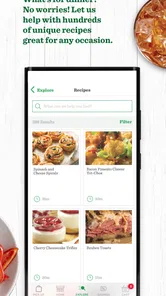
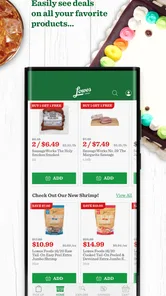
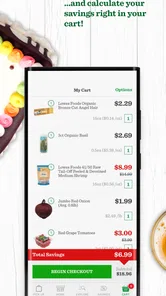
Analysis by Reviewed
Shopping for groceries is one of those tasks where a small delay can become surprisingly annoying. I tested Lowes Foods as a dedicated Food & Drink app, and my overall impression is that it is most useful when you already shop at Lowes Foods and want a quicker way to organize a store visit. It puts the retailer’s mobile experience in one place rather than asking me to switch between a browser, notes app, and paper list.
The app is free, aimed at everyone, and published by Lowes Foods, LLC. It has reached more than one hundred thousand installs, with an average rating of 4.4 from roughly one thousand ratings. Those figures suggest that it has found a practical audience, although they do not replace the more important question: does it make my particular shopping routine easier?
How Lowes Foods feels during an ordinary shopping trip
My first expectation was not that this would be a complete replacement for every grocery-shopping tool, but that it should reduce friction around a Lowes Foods visit. That is the right way to judge it. A retailer app does not need to entertain me or offer a huge collection of extras; it needs to open without fuss, help me prepare, and remain usable when I am standing in a busy aisle with one hand occupied.
In that role, Lowes Foods has a clear advantage over using a general browser search. The experience is focused on one retailer, so I am not starting from a broad web page full of unrelated results. The app’s purpose is immediately understandable, which helps when I am checking something quickly before leaving home or while deciding whether to make an extra stop.
The current version is 1.1.43, and the app was released on October 5, 2022. I would not treat the version number as a promise of speed by itself, but it does show that this is an established mobile product rather than a brand-new experiment. The practical question is whether the app continues to feel responsive as I move between preparation and in-store use.
Speed matters more before the visit than during it
The most valuable speed improvement is not necessarily a dramatic launch animation or an instant transition. It is the time saved before I leave. If I can prepare my shopping intentions in the retailer’s own environment instead of searching across several pages, the whole trip feels more controlled. That is especially helpful when I am buying a small number of items and do not want to build a complicated workflow.
For a larger shop, I would still avoid waiting until I am already in the parking lot to do all the preparation. A grocery app is more comfortable when I have a few quiet minutes at home, a stable connection, and both hands free. That habit also reduces the chance of rushing through screens while trying to remember what else I need.
More From Our News Desk

Weather by Xiaomi Review: Clear at a Glance, Less Clear Up Close

X Under Pressure: Can It Recover When Posting Goes Wrong?

Clash of Clans Is Won Between the Battles

Android Auto Makes the Case for Quieter Car Software

MobiOffice: Transforming Mobile Productivity with Seamless Integration

EA SPORTS FC™ Mobile Soccer: Redefining Mobile Sports Gaming
Once inside the store, perceived speed depends on more than the app itself. Phone signal, network congestion, and the amount of information being loaded can affect any retailer application. I therefore see Lowes Foods as a tool to prepare with, not something I would rely on as my only memory aid in a completely rushed trip.
Where heavier use can expose friction
The app is easiest to appreciate during a short, focused task: checking the retailer’s information, preparing for a visit, or confirming something related to a planned shop. Heavy use is different. A long grocery trip can involve repeated screen checks, interruptions, a nearly full phone, and frequent switching between the app and other tools. That is where a simple retail companion has to prove its stability.
My advice is to keep the workflow deliberate. Before leaving, review the items or information you expect to need and make sure the app has had time to load properly. This is a small but useful trade-off: the app can streamline preparation, but it should not become a second source of stress because I am trying to assemble everything at the last second.
Another realistic scenario is a family shop. One person may be comparing options while another is collecting items, and the phone may be passed back and forth. In that situation, a focused retailer app is more convenient than repeatedly opening a general website, but it still benefits from a clear plan. I would use it as the shared reference point and keep unusual requests or personal reminders somewhere else.
That distinction is one of the less obvious strengths of the app. It works best when it acts as the retailer-specific layer of my routine, while a notes app remains the place for details that are personal, temporary, or unrelated to Lowes Foods. Trying to make one app handle both jobs can create unnecessary clutter.
Reliability is about recovery as much as uptime
For a shopping app, reliability is not only the ability to open once. I also care about what happens after an interruption. A phone call, a screen lock, a weak connection, or an accidental swipe can break the rhythm of a store visit. The safest approach is to prepare important information before entering the busiest part of the trip and avoid assuming that every screen will be available instantly.
I also recommend reopening the app before leaving home if the visit depends on it. That simple check gives me a chance to notice a sign-in issue, a slow connection, or an update requirement before I am standing beside a shopping cart. It is a practical recovery habit rather than a criticism unique to this app; retailer tools are often most frustrating when used for the first time at the exact moment they are needed.
Lowes Foods feels more dependable when I use it in short sessions instead of leaving it open throughout an entire outing. I prefer to complete preparation, close it, and return when necessary. That reduces the impact of a long idle period and makes it easier to tell whether a problem comes from the app or from the phone’s connection.
The rating of 4.4 indicates that many users find the experience satisfactory, while the presence of around three hundred written reviews shows that people have taken time to comment on it. I read that as encouraging but not definitive. Retail apps can behave differently across devices and network conditions, so my confidence is strongest for ordinary, planned use rather than demanding, uninterrupted use all day.
Device demands and who should think twice
The minimum operating-system requirement is Android 6.0, which gives the app a broad compatibility range for Android users. That is useful for people who keep an older phone and do not want a grocery tool that immediately forces a hardware upgrade. At the same time, compatibility is not the same as identical performance. An older device may open the app, yet still feel slower when memory is limited or several other apps are running.
On a newer phone, I would expect a smoother experience when moving between the app and other shopping tools. On an older or heavily loaded phone, I would keep the workflow lighter: close unused apps, charge the device, and prepare the most important information in advance. These steps matter more than chasing a perfect in-store experience on hardware that is already struggling with everyday tasks.
Resource-conscious users should also consider how often they truly need a retailer app. If I only visit Lowes Foods occasionally, a browser may be enough for a quick check, and installing a dedicated app may not justify the extra space or notifications on my phone. The free price removes the financial barrier, but it does not remove the need to decide whether another app belongs in my routine.
Conversely, regular shoppers have a stronger reason to keep it installed. The value accumulates through repetition: preparing in the same place, returning to a familiar layout, and reducing the number of steps before a visit. That is where a dedicated app can beat a general grocery list, even if the general tool is more flexible.
What it does better than the usual alternatives
A paper list is dependable, fast to glance at, and immune to battery problems. It is also easy to lose, difficult to update, and disconnected from the retailer’s digital experience. Lowes Foods is the better choice when I want retailer-specific information close at hand, especially before a planned trip. Paper remains better for someone who wants zero screen time or shops in places where phone use is inconvenient.
A generic notes app gives me more freedom. I can add household tasks, reminders, quantities, and items from several stores in one place. That makes it a better central organizer for a mixed shopping day. The Lowes Foods app is more specialized, so its advantage comes from focus rather than flexibility. I would use the notes app for the master list and this app for the Lowes Foods portion when my trip includes multiple retailers.
A mobile browser is the closest alternative. It avoids another installation and can be convenient for a one-off visit. However, the dedicated app is more natural for repeated use because I can return to it directly instead of searching for the retailer’s page each time. The trade-off is that the browser keeps my phone simpler, while the app gives the retailer a more permanent place in my routine.
This comparison also explains who should skip it. If I rarely shop at Lowes Foods, prefer handwritten lists, or want one app that manages every store, I would not install it just because it is free. If I shop there regularly and dislike jumping between a browser and unrelated tools, the focused approach makes more sense.
Practical habits that make the app more useful
My first tip is to separate planning from navigation. I would prepare the shop at home, when the phone is charged and distractions are low, then use the app briefly in the store rather than attempting to build the entire plan between aisles. This improves perceived speed because I am not asking the app to perform its most important work under pressure.
My second tip is to keep a backup for information that would genuinely disrupt the trip if it disappeared. A short note or remembered essentials list is enough. This is not because Lowes Foods is unusable; it is because every phone-based shopping workflow has a recovery point, and a backup prevents one interruption from turning into a wasted journey.
My third tip is to treat the app as a repeatable routine rather than a one-time download. The benefit becomes clearer when I use the same preparation pattern before each visit: check what I need, review the retailer-specific information, and close the app once I am done. That approach avoids the common mistake of installing a retail app but never giving it a consistent job.
A fourth useful trade-off concerns shared shopping. If several people contribute to one trip, a general list may remain the best place for family notes, substitutions, and non-grocery errands. Lowes Foods is more effective as the store-specific companion. Keeping those roles separate makes the workflow easier to understand and reduces duplicated entries.
My performance verdict for regular shoppers
After using it as a focused grocery companion, I see Lowes Foods as a practical rather than ambitious app. Its strongest quality is concentration: it gives Lowes Foods customers a direct mobile starting point instead of making them assemble their visit from scattered tools. The free cost and broad Android compatibility make it easy to try, and the overall rating suggests that the basic experience works well for many people.
Its limitations are equally clear. It is not the best universal shopping organizer, and it cannot replace good preparation, a charged phone, or a backup for essential information. Heavy multitasking and last-second use are less appealing than a calm session at home followed by short checks in the store. Users with older devices may also need to keep their workflow simple to maintain a responsive feel.
I would recommend it to frequent Lowes Foods shoppers who want a retailer-specific tool and are comfortable using their phone as part of the grocery routine. I would skip it if my shopping is spread across several stores, if I strongly prefer paper, or if a browser already handles my occasional visits without inconvenience.
In the end, the best reason to install Lowes Foods is repeated convenience, not novelty. It earns its place when it shortens the path from deciding what to buy to being ready for a Lowes Foods trip. For that audience, it is a sensible free app from Lowes Foods, LLC, and a useful addition to a well-organized shopping routine. For everyone else, keeping a simpler alternative may be the more efficient choice.
Lowes Foods Frequently Asked Questions
Who publishes the Lowes Foods app, and what kind of app is it?
Lowes Foods is a Food & Drink app published by Lowes Foods, LLC. It is intended for people who want to bring parts of the Lowes Foods shopping experience onto their phone, including browsing products, viewing savings, and managing grocery plans. The app is free to download and is suitable for Everyone. Its current version is 1.1.43, and it requires Android 6.0 or later.
What is the Lowes Foods app used for?
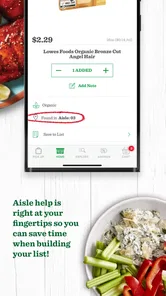
The Lowes Foods app is designed to make grocery shopping easier, whether you are planning a trip or ordering from home. After signing in, you can browse products, search for specific items, view weekly savings, manage your Fresh Rewards account, create shopping lists, and check available pickup or delivery options. Features and availability can vary by store and location.
Can I order groceries for pickup or delivery through the Lowes Foods app?
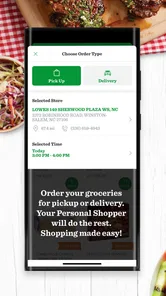
In supported areas, the app allows you to shop for groceries and choose between curbside pickup and delivery. You select an eligible store, add products to your cart, choose an available time slot, and complete checkout. Delivery zones, fees, minimum order requirements, substitutions, and time-slot availability may differ, so confirm the details for your selected location before placing an order.
How do Lowes Foods rewards and digital coupons work?
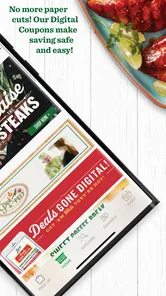
The app connects with the Lowes Foods Fresh Rewards program, allowing members to view eligible savings and apply digital coupons while shopping. You generally need to sign in or link your rewards account so discounts can be associated with your purchase. Some offers have product, quantity, expiration, or store restrictions, and not every promotion is available to every customer.
Does the Lowes Foods app show accurate product prices and availability?
The app provides store-specific product information, pricing, promotions, and availability, but these details can change quickly. Inventory may be different when you arrive at the store or when an employee prepares a pickup order. Prices can also vary by location, and weighted items may receive an adjusted final charge. Always review substitutions, totals, and fees before confirming an order.
Pros
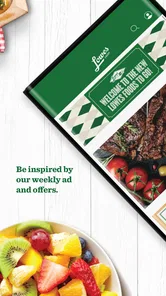
- Easy access to weekly deals and digital coupons.
- Store locator helps find nearby Lowe’s Foods locations.
- Shopping lists make it easier to organize grocery trips.
- Rewards features can provide savings on eligible purchases.
- Fresh-food departments offer convenient grocery variety.
Cons
- Some deals may require a loyalty account or digital coupon clipping.
- App performance can vary depending on device and internet connection.
- Product availability may differ between stores and online listings.
- Online ordering fees or minimums may apply in some areas.
- Not all locations may support the same pickup or delivery options.











