Long John Silver's
- 1.44K
- 4.7
- Installs
- 100.00K
- Price
- Free

Screenshots


Analysis by Reviewed
I approach a restaurant app differently from a menu on a website: I want to know whether I can find what I need quickly, place an order without guesswork, and use it comfortably in the situation I’m actually in. Long John Silver’s is a free Food & Drink app from Long John Silver’s, built around ordering and rewards. Its focus is practical rather than broad: it makes the most sense when I already have this restaurant in mind and want a simpler route from choosing a meal to collecting it.
A good fit for a planned meal
I’d treat this as a restaurant-specific tool, not as my starting point for deciding where to eat. That distinction matters: if I already know Long John Silver’s is the choice, the app can bring menu decisions, ordering, and rewards into one place. If I’m still comparing cuisines, locations, or delivery choices, a general restaurant search or ordering service is likely a better first stop.
For a household order, I’d ask everyone what they want before opening the checkout flow. Then I’d add meals one by one and pause at each customization. This keeps a group order manageable and makes it less likely that a side or preference gets attached to the wrong meal. The app is most useful when it supports a decision I have nearly made, rather than when I’m trying to settle every detail while other people wait.
The Quest for Convenience
Readability and navigation
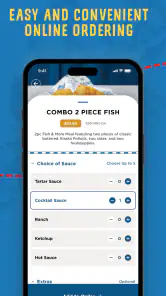
First things first, the interface. As soon as I opened the app, I was greeted with a neat and user-friendly layout. It’s like they knew I wanted to spend less time navigating and more time munching. With just a few taps, you can explore the menu, place an order, and even customize your meal. It’s smooth sailing here, folks!
That direct ordering flow is useful when I know roughly what I want, but the real test is whether it helps me decide when I don’t. I’d use the menu to narrow down a meal before going through checkout, rather than treating the app as a place to browse every possible seafood option. If I’m choosing for a group, I’d settle the main choices first and then enter them one at a time; that makes it easier to catch a customization or side choice before committing.
One practical question is whether I need to create an order immediately just to look around. I’d begin by exploring the menu and offers, then move toward checkout only once I’ve decided what fits the occasion. Keeping those steps separate makes it easier to compare a planned meal with an offer without accidentally letting a promotion dictate the whole order.
Deals That Make You Feel Like a Pirate
One of the standout features of the Long John Silver’s app is the treasure trove of deals it offers. Seriously, who doesn’t love a good bargain? The app keeps you updated with the latest promotions, ensuring you never miss out on a chance to save some doubloons. I found myself checking it more often than my social media feeds, just to see what new offers were available.
More From Our News Desk

Clash of Clans Is Won Between the Battles

Android Auto Makes the Case for Quieter Car Software

MobiOffice: Transforming Mobile Productivity with Seamless Integration

EA SPORTS FC™ Mobile Soccer: Redefining Mobile Sports Gaming

How Microsoft OneDrive Became a Mobile Productivity Giant

How Google Translate Breaks Language Barriers Effortlessly
I’d check any offer before building an order around it, then compare the final basket with what I would have chosen anyway. That small habit helps avoid the familiar trap of adding food just because a promotion looks tempting. Rewards and deals are most useful for people who already visit Long John Silver’s; if I only eat there occasionally, I wouldn’t make the app a daily stop simply to hunt for savings.
For regular visits, I’d make checking the offers part of the meal-planning routine rather than an extra task at checkout. A quick look before deciding what to order can help me see whether a deal suits the meal I already want. The trade-off is that an offer is only valuable if it matches my appetite and plans; a discount that nudges me into a larger or less suitable order is not a saving I’d count as a win.
Order Ahead and Avoid the Plank
Ordering ahead is a breeze with this app. No more waiting in line or risking your shipmates gobbling up all the good stuff before you get there. Simply place your order, choose your pickup time, and voilà! Your meal is ready when you are. It’s like having a personal chef who knows exactly when you’ll be hungry.
In an ordinary workday scenario, I’d place a pickup order before leaving the office, then check the order details once more while I still have time to correct a mistake. It can be a better fit than joining a counter queue during a short lunch break, but it doesn’t remove the need to allow time for the trip and collection. For delivery or a last-minute meal decision, I’d compare the options available to me rather than assume an advance pickup workflow suits every plan.
That workflow is particularly useful when I can order somewhere with a moment to focus, then travel to the restaurant without having to make menu choices on arrival. I would not place the order while driving, walking through a crowded area, or trying to keep track of children and bags. A few calm minutes to review the basket can prevent the kind of small mistake that turns a convenient pickup into a frustrating one.
Customization for the Captain
What I really appreciate is the level of customization available. Whether you want extra tartar sauce or prefer your fish grilled instead of fried, it’s all possible. They’ve made sure that even the pickiest of eaters can get their fill without any fuss. It’s the kind of flexibility that makes you feel like the captain of your own culinary ship.
Customization is especially helpful when ordering for people with different preferences: I can think through each meal separately instead of relying on a single standard order. Still, I’d read each choice carefully and avoid treating a preference setting as a guarantee about ingredients or food preparation. Anyone managing a serious allergy or strict dietary requirement should confirm the relevant details directly with the restaurant before ordering.
For a mixed group, I’d use the separate meal choices to keep preferences attached to the right person, then review the full order before submitting. That extra pass is worthwhile when several meals look similar or when one person has asked for a specific adjustment. The app can make those choices easier to express, but the person placing the order still needs to check that the final selections reflect what everyone asked for.
Motor and sensory considerations
A phone order can be easier than speaking over a busy counter for someone who prefers to make choices at their own pace. It can also help me keep a group order organized because I can review the selections on screen before placing it. On the other hand, tapping through a menu is not automatically easier for everyone: small touch targets, screen glare, or a noisy and distracting setting can make a phone-based task frustrating. I’d choose a quieter moment and a stable surface rather than trying to build a complicated order while walking or juggling bags.
People who find phone screens tiring may prefer to decide what they want before opening the app, rather than browsing for a long time. If the screen is difficult to read in bright light, stepping indoors or finding shade can make the task more comfortable. These are simple situational adjustments, not a substitute for a usable interface, and they will not solve every motor or sensory barrier.
There is also a useful difference between placing an order alone and coordinating it with others. Ordering privately can give me time to make choices without counter noise or pressure, but a group may need to agree on the menu before one person begins tapping. I’d collect those choices first and let one person enter them at a steady pace. That approach reduces back-and-forth and avoids making the phone itself the focus of a busy conversation.
Situational access and trade-offs
The app is at its best when the restaurant and pickup plan are already part of my day. For someone who often chooses Long John Silver’s, having ordering and rewards together can be more convenient than checking a general restaurant directory and then switching to another ordering route. If I’m comparing many restaurants, deciding based on delivery availability, or ordering from somewhere else, a broader food-ordering service or the restaurant’s usual in-person option may be more useful. This is a focused tool, not a replacement for every way of finding dinner.
It has a 4.7 average from around 17,000 ratings, and more than 100,000 installs. The app is rated for Everyone, was released on May 7, 2024, and version 2.8.0 supports devices running Android 7.1 or later. Those details make it easy to judge basic fit, but the practical question for me is whether I’ll use its restaurant-specific ordering often enough to keep it handy.
For someone who does not want to install an app for an occasional meal, ordering at the counter can be the simpler choice. A general ordering service may also suit someone whose priority is comparing several restaurants in a single place. I’d choose this app when the restaurant is already decided and its own ordering and rewards are relevant; I’d switch approaches when the main task is discovery, comparing alternatives, or handling a plan that does not revolve around pickup.
One question worth considering before relying on advance ordering is how much time the whole outing actually takes. Ordering ahead can reduce menu and queue time, but it cannot shorten the journey to the restaurant or remove the need to collect the food. I’d use it to make the ordering part more organized, not as a reason to leave with no margin during a tight break.
Who will get the most from it
I’d recommend it most to regular customers, families who want to sort individual meal choices before arriving, and anyone whose lunch break is too short for browsing at the counter. Before setting off, I’d review the order summary and confirm the intended pickup plan; that simple check is more valuable than rushing through checkout. The app’s 1.4K reviews also give prospective users a substantial set of experiences to consult, while remembering that one person’s smooth order may not match every visit.
It is less compelling for someone who rarely visits the chain, prefers to make every decision face to face, or needs to compare a wide range of restaurants before choosing dinner. I would also be cautious about using any digital customization as the only step in managing a serious dietary need. In those cases, confirming details directly with the restaurant or choosing another ordering method may be the more comfortable route.
If I were helping a friend decide, I’d ask two things: do they already choose Long John Silver’s often, and do they value preparing an order before they arrive? If both answers are yes, the app’s narrow focus is a strength. If either answer is no, the convenience may not outweigh the extra app and screen interaction. That is a more useful test than downloading it simply because a restaurant offers rewards.
Inclusive verdict
Long John Silver’s works best as a convenient companion to a familiar restaurant, not as a universal dining guide. Its clear, task-focused purpose can reduce friction for people who like to decide privately and order ahead, while phone interaction and the need to check details can remain barriers in some contexts. At age 7.1 minimum OS and version 2.8.0, it is a reasonable option for compatible Android devices; I’d skip it if I rarely eat at the chain or need a broader way to compare restaurants. For the right routine, it can make ordering feel more considered and less rushed.
My overall recommendation is conditional but positive: I’d keep it in mind for repeat visits, planned pickups, and group meals where separate choices need a careful review. I would not expect it to solve every access need or replace a wider restaurant finder. The best experience comes from using it when the restaurant is already the right choice, giving myself time to check the order, and choosing another route whenever the screen, timing, or dietary questions make that more sensible.
Long John Silver's Frequently Asked Questions
How much storage space should I have available before downloading the app?
The app is free to download, and you can check the available storage on your phone before installing it. Keeping some room free can also help your device run smoothly when you browse the menu or place an order. Once installed, the app is intended for Long John Silver’s customers who want to handle ordering and rewards from a mobile device.
Does the Long John Silver’s app support older operating systems?
The app requires operating-system version 7.1 or later. If you are using an older phone or tablet, check its software version before downloading so you know whether it meets that requirement. A compatible device lets you use the app for its main purpose: ordering from Long John Silver’s and accessing rewards while on the go.
Which devices can run the Long John Silver’s app?
The Long John Silver’s app is available for Android and iOS, so you can use it on a compatible phone or tablet. Its minimum operating-system requirement is 7.1, making it worth checking your device settings before downloading. The app is designed for customers who want to browse the menu, order, and access rewards from their mobile device.
Is the Long John Silver’s app suitable for all ages?
The app has an Everyone content rating, so it is generally suitable for a broad audience. Parents can still review its features with younger users, particularly when account details, ordering, or payment are involved. The app focuses on Long John Silver’s food, ordering, and rewards, making it most useful for customers who want to interact with the restaurant through their phone.
What is Long John Silver's app?
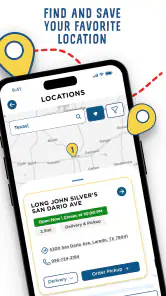
Long John Silver's app is a convenient mobile application that allows users to browse the full menu, find the nearest restaurant locations, and place orders directly from their devices. The app offers exclusive deals and rewards for regular users, enhancing the overall customer experience. Available for both Android and iOS, it aims to streamline your dining experience with Long John Silver's.
Pros
- Intuitive user interface
- Fast order processing
- Customizable menu options
- Accurate location services
- Frequent promotions
Cons
- Limited payment options
- Occasional app crashes
- High data usage
- Inconsistent customer support
- No offline mode
- Category
- Food & Drink
- Version
- 2.8.0











