Locally Grown: Local Farms
- 223.00
- 4.9
- Installs
- 10.00K
- Price
- Free

Screenshots

Analysis by Reviewed
Buying from nearby farms sounds simple until the practical details get in the way: finding what is available, choosing a pickup or delivery option, and making sure an order fits your week. Locally Grown: Local Farms is a free Food & Drink app built around that specific task. It connects the shopping side of local agriculture with a mobile ordering experience, so I can look for farm-sourced food without treating the process like a general supermarket trip.
After spending time with it, I see the app as most useful for people who already want to buy locally and need a more convenient way to organize those purchases. It is not a replacement for every grocery app, and it does not remove the realities of farm availability or collection schedules. Its value is more focused: it gives local-food shopping a single place to begin, whether I plan to collect an order or have it brought to me.
What the app is really like to use
The first thing I noticed is that the experience depends heavily on location and timing. A conventional supermarket app usually starts with a broad catalog designed around steady stock. A local-farm marketplace works differently. The available food can reflect what participating farms have ready, where they serve, and how orders are fulfilled. That makes the app feel more personal, but also less predictable than a standard grocery delivery service.
That difference matters before I even add anything to an order. If I open the app expecting the same selection every day, I may feel disappointed. If I treat it as a way to check what local producers currently make available, the design makes more sense. My most useful habit was to browse with a flexible meal plan rather than a rigid shopping list. Instead of deciding that I must find one exact ingredient, I look at what is offered and then shape meals around it.
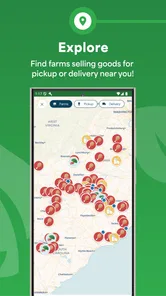
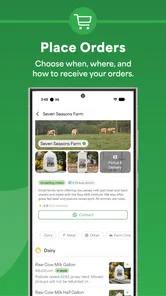
The store presents Locally Grown: Local Farms as an app for buying food from local farms for pickup or delivery. In practical terms, that gives it two distinct use cases. Pickup can suit someone who already travels near a participating location, while delivery is more attractive when convenience matters more than making an extra stop. The better choice depends on the available option for the order and on how much control I need over my schedule.
I also appreciate that the app is free to install and carries an Everyone age rating. That makes it approachable for households where more than one person may help with food shopping. The developer is JohnAnge Kernodle, and the current release is version 1.1.0, running on Android 7.0 or later. Those details are useful when an older phone is involved, because compatibility should be checked before assuming an installation problem is caused by the service itself.
Where people commonly get stuck
The most likely point of friction is not the idea of local shopping but the handoff between browsing and fulfillment. With farm orders, the words “pickup” and “delivery” are not interchangeable conveniences. They can involve different timing expectations and different planning needs. I recommend deciding which one fits the week before spending much time building an order. That small decision prevents the common mistake of choosing food first and discovering later that the collection or delivery arrangement is inconvenient.
More From Our News Desk

Weather by Xiaomi Review: Clear at a Glance, Less Clear Up Close

X Under Pressure: Can It Recover When Posting Goes Wrong?

Clash of Clans Is Won Between the Battles

Android Auto Makes the Case for Quieter Car Software

MobiOffice: Transforming Mobile Productivity with Seamless Integration

EA SPORTS FC™ Mobile Soccer: Redefining Mobile Sports Gaming
Another sticking point is expecting a local marketplace to behave like a large retailer. A supermarket app encourages substitution: if one brand is unavailable, another is usually close enough. Local farm shopping can be less forgiving. The appeal is the connection to nearby producers, but that also means the exact item, quantity, or timing may not match a mass-market catalog. I get better results when I consider categories and meal ideas rather than treating every item as a guaranteed permanent listing.
There is also a mental adjustment around ordering frequency. A large grocery app supports spontaneous top-up shopping, while local purchasing may reward planning ahead. If I only open the app when dinner is already urgent, it may not be the best tool for that particular moment. For a weekly household routine, however, checking it before the main shop can make the experience feel much less rushed.
The key trade-off is convenience versus flexibility. The app can make local buying easier, but it cannot make farm supply as uniform as supermarket inventory. That is not a flaw unique to the software; it is part of the category. Understanding it early prevents an unfair comparison and helps me decide whether the app fits my habits.
Setup checks that save time
Before judging the app, I would start with the basics. I make sure the phone is using Android 7.0 or newer, then install the free app from the relevant store. If installation fails, the operating-system requirement is the first sensible check. On an older device, available storage, a stable connection, and a current app-store session are also worth checking before assuming there is a problem with Locally Grown: Local Farms itself.
Once installed, I keep the first session simple. I use a reliable connection, avoid jumping between several apps during the initial browse, and give the catalog time to load. Those are ordinary steps, but they matter more when the experience depends on location-sensitive or changing local listings. If the screen looks incomplete, I first retry the page calmly rather than repeatedly tapping controls and creating confusion about whether an action went through.
I also recommend preparing the practical information needed for fulfillment before placing an order. For pickup, that means knowing when I can realistically collect it. For delivery, it means being certain that the chosen destination and timing suit the household. The app’s purpose is to help arrange the purchase; it cannot compensate for a delivery window that clashes with work or a pickup point that is difficult to reach.
A useful setup check is to begin with a small, uncomplicated order. I prefer testing the full path with food I already know I can use, rather than starting with a large purchase for a special occasion. This gives me a clearer sense of how browsing, selection, and fulfillment fit together. It also limits waste if the first attempt reveals that local ordering does not match my routine.
For families, I would agree on who is responsible for checking the order status and who will collect or receive it. That sounds minor, but local food purchases are often more schedule-sensitive than casual online shopping. A shared plan reduces the chance that one person assumes another person handled the final step.
Recovering when a workflow breaks
When something goes wrong, I separate the problem into stages: opening the app, finding the local selection, building the order, and completing pickup or delivery. This is more useful than treating the entire app as broken. If the app opens but content does not appear, I check the connection and retry. If browsing works but the order process stalls, I avoid starting several duplicate attempts and instead return to the last clear step.
If a screen appears not to respond, I close and reopen the app once, then check whether the previous action actually completed before trying again. Repeated taps can be especially unhelpful around orders because they make it harder to know whether I have created a duplicate request. A short pause, followed by a careful review of the current screen, is safer than rushing through the process.
For a failed or interrupted session, I would write down what I was trying to do: browse, select an item, choose fulfillment, or finish the order. That simple note helps identify whether the issue is repeatable. If the same step fails after a clean restart and a stable connection, I would report the exact step rather than sending a vague complaint. Clear descriptions are more useful to the developer than saying only that “the app does not work.”
It is also sensible to keep expectations realistic after an interruption. I would not assume that a partially completed order is confirmed merely because items were visible in the basket. I look for a clear indication that the final action succeeded and keep my own note of the intended pickup or delivery plan. This is a general shopping precaution, but it is particularly important when food availability and timing are central to the purchase.
Another practical recovery method is to simplify the next attempt. If a complex basket becomes confusing, I start again with fewer items and one fulfillment method. Once that path works, I can decide whether adding more products is worthwhile. This approach does not guarantee a fix, but it distinguishes a problem with one particular selection from a broader issue with the ordering flow.
When the app is not the cause
Local-food shopping has outside factors that no app can control. A farm may have limited stock, a delivery route may not suit every day, or a pickup plan may require more coordination than a supermarket collection. If the selection changes between visits, that may reflect the nature of local supply rather than a technical failure. I find the app easier to evaluate when I judge it on how clearly it helps me act on available choices, not on whether it creates unlimited availability.
Connectivity can also create misleading symptoms. A weak signal may make a catalog look empty, delay a screen change, or interrupt an order step. Before reinstalling, I would try a stronger connection and reopen the app. If other apps are also slow, the phone or network is the more likely place to investigate.
Device age is another factor. The stated minimum is Android 7.0, but an older phone can still feel less comfortable if it has limited storage or struggles with newer app-store processes. That does not automatically mean the app is defective. Clearing unnecessary storage, restarting the phone, and checking that the operating system meets the requirement are sensible first steps.
Scheduling problems should likewise be treated as planning issues first. If I cannot be present for a delivery or reach a pickup location, changing the order method or choosing a different shopping routine may be more effective than repeatedly retrying the app. This is where a conventional grocery service can be the better option: it may offer a broader network and more standardized fulfillment for people who need maximum predictability.
That comparison is important. Locally Grown: Local Farms is a better match for someone who values nearby producers and is willing to work with changing availability. A mainstream grocery app is usually better for exact-brand shopping, urgent replacements, and highly repeatable baskets. Neither approach is universally superior. I would use the local app when the origin of the food and the connection to farms matter, then keep a regular grocery option for emergency gaps.
Who will get the most from it
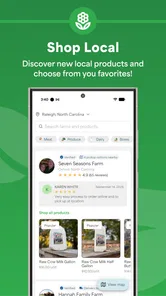
The strongest audience is a household that wants to make local purchasing part of its normal routine. Someone who cooks seasonally, enjoys adjusting meals around available ingredients, or prefers pickup from a nearby source can get genuine value from the focused purpose. It can also suit a person who wants to explore local food without visiting several separate farm pages or making multiple phone calls.
A realistic example is a Saturday shopper planning meals for the coming week. I would open the app before writing the final list, look at what is currently available, and build two or three flexible meals around those choices. I would then select pickup if I already have an errand nearby, or delivery if avoiding another trip is more important. The benefit is not just placing an order; it is changing the order-planning process so the available local food shapes the menu.
The app is less suitable for someone who needs a precise inventory every time. If dinner depends on one exact product, if substitutions must be automatic, or if a household cannot adapt to pickup and delivery timing, a conventional grocery platform may cause less stress. I would also skip relying on it as my only emergency food source until I had learned how well its local options fit my area and schedule.
Its rating of 4.8 from around 2,400 ratings suggests that many users respond positively to the concept and execution, while the app has passed the ten-thousand-install mark. I treat those figures as encouraging signs rather than proof that every location will offer the same experience. A local marketplace can be excellent for one user and limited for another simply because the surrounding supply and fulfillment options differ.
My practical verdict
I like Locally Grown: Local Farms because it focuses on a clear problem instead of trying to become an all-purpose shopping platform. The free price removes an obvious barrier to trying it, and the pickup-or-delivery model gives the idea practical flexibility. The strongest experience comes from treating it as a planning tool for local food, not as a guaranteed substitute for a large supermarket catalog.
My advice is to begin with a modest order, choose the fulfillment method before filling the basket, and keep meal plans flexible. Check the Android requirement if the phone is older, use a dependable connection during setup, and separate technical problems from normal changes in local supply. Those habits address most of the friction I would expect from this kind of service.
For me, the app is worth trying if buying from nearby farms is already a priority and I can accommodate some variation. I would recommend it to a friend who enjoys seasonal choices and wants a simpler route to pickup or delivery. I would not recommend depending on it alone for rigid, last-minute grocery lists. With that distinction in mind, Locally Grown: Local Farms feels like a useful, focused addition to a food-shopping routine rather than a universal replacement for every alternative.
Locally Grown: Local Farms Frequently Asked Questions
Who is Locally Grown: Local Farms intended for?
Locally Grown: Local Farms may suit people who want to discover food from nearby farms and support local producers, as well as anyone looking for farm shops or farmers’ markets. Its content rating is Everyone, so the app is intended for a broad audience. Whether it is useful for you will depend on the local listings and the kinds of food providers available around your area.
Is Locally Grown: Local Farms free, and what device does it work on?
The app is free to download and is listed for devices running Android 7.0 or later. Its focus is helping people find food from local farms for pickup or delivery, so it may be worth trying if you want to explore those options in your area. As with any app, check that your device meets the operating-system requirement before downloading.
What is Locally Grown: Local Farms?
Locally Grown: Local Farms is an app designed to help users discover nearby farms, farmers’ markets, farm shops, and locally produced food. It can make it easier to find fresh products in your area while supporting independent growers and local businesses. Available listings and information may vary depending on your location and the participation of local producers.
How does Locally Grown: Local Farms help me find local food?
The app generally uses your location or a selected area to show nearby farms and local food providers. You can browse available listings, review business details, and identify places that may offer produce, meat, dairy, eggs, flowers, or other farm products. Before visiting, it is advisable to check opening hours, availability, seasonal offerings, and any purchasing instructions provided by the farm.
Does Locally Grown: Local Farms sell products directly through the app?
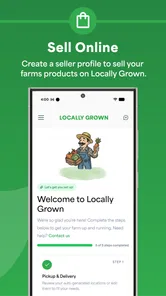
Locally Grown: Local Farms primarily functions as a discovery and information tool, so the exact purchasing options depend on each listed farm or producer. Some businesses may offer direct sales, online ordering, deliveries, subscriptions, or pickup services, while others may only provide an address and contact details. Always confirm payment methods, order requirements, and collection arrangements with the individual provider.
Pros
- Helps discover nearby farms
- markets
- and locally produced food.
- Supports small farmers and encourages more sustainable shopping habits.
- Useful for finding seasonal products and fresh ingredients in your area.
- Location-based listings can make local food searches faster and easier.
- Can inspire users to try new farms
- producers
- and community markets.
Cons
- Coverage may be limited in rural areas or smaller towns.
- Business hours and product availability may change without notice.
- Some listings may lack detailed pricing or inventory information.
- Requires location access for the most relevant local recommendations.
- The app’s usefulness depends on how actively local farms update their listings.











