Toast - Local Restaurants
- 5.42K
- 4.8
- Installs
- 1.00M
- Price
- Free

Screenshots
Analysis by Reviewed
I judge a restaurant app partly by what it asks me to do before it becomes useful. With Local by Toast, the practical question is whether nearby restaurants you actually want to use are available through it. Toast, Inc. makes this free Food & Drink app, and its focus is ordering from local restaurants rather than replacing every dining or delivery service. It has a 4.7 average from around 26,000 ratings and over a million installs, which suggests it has found an audience, but those figures matter less than whether its restaurant selection suits your routine.
Trust starts with what you can see
I would treat it as a convenient route to participating restaurants, not as a universal directory. Before relying on it for dinner, I’d search for a place I already know and inspect the menu and checkout flow. That quick test tells you more than downloading an app based on a broad promise: if your regular spots are missing, the convenience will be limited no matter how tidy the interface feels.
For trust, I’m careful not to confuse a smooth ordering experience with proof of how information is handled. I check the permission prompts on my own device, read each one before allowing access, and look for choices presented during account setup and checkout. I don’t grant a permission just because an app requests it; if a prompt appears that seems unrelated to what I’m doing, I pause and decide whether I can continue without it.
How I’d test the fit before depending on it
I’d start with a small, low-stakes check rather than planning an important meal around an unfamiliar ordering route. Search for a restaurant you know, compare the listed menu with what you expect, and continue far enough to understand what information the app asks for before placing an order. You can then decide whether the choices feel comfortable without committing to a purchase. This is a useful way to separate “the app is available” from “the app is practical for me.”
Restaurant coverage is the key trade-off. A local listing can be valuable when it brings a familiar place into a straightforward digital workflow, but no single app can be assumed to include every nearby restaurant. If a place you rely on does not appear, its own ordering channel or a phone call may be more useful than repeatedly searching. I’d also avoid making a group plan depend on the app until I’ve checked that everyone’s preferred restaurant and meal options are represented.
A Fresh Take on Dining
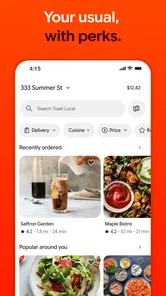
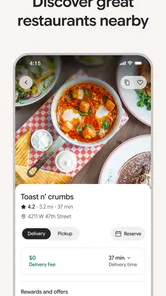
When I first opened Local by Toast, I was immediately impressed by its sleek and modern interface. It's super intuitive, which means even if you're not tech-savvy, you'll find your way around with ease. The app aims to bring local restaurants closer to you, offering everything from browsing menus to making reservations with just a few taps.
Exploring the Features
One of the features I found incredibly handy is the real-time menu updates. Have you ever been excited about a dish only to find out it's unavailable when you get to the restaurant? Yeah, me too. But with this app, restaurants can update their menus on the fly, ensuring you know exactly what's cooking before you even leave the house.
More From Our News Desk

Weather by Xiaomi Review: Clear at a Glance, Less Clear Up Close

X Under Pressure: Can It Recover When Posting Goes Wrong?

Clash of Clans Is Won Between the Battles

Android Auto Makes the Case for Quieter Car Software

MobiOffice: Transforming Mobile Productivity with Seamless Integration

EA SPORTS FC™ Mobile Soccer: Redefining Mobile Sports Gaming
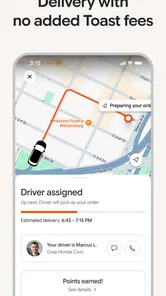
Another standout feature is the order tracking system. Once you've placed an order, you can track its progress from the kitchen to your doorstep. It's like having your own little culinary GPS, which is pretty neat if you ask me. Plus, the app offers a seamless payment system, so there's no more fumbling around for cash or cards.
These conveniences are most useful when I have a specific meal in mind and want to avoid calling ahead just to ask whether it is available. I’d still check the final order details before paying: menu changes can make it worth confirming customizations, portions, or pickup timing rather than assuming an item’s description answers every question. For a busy evening, placing an order before leaving work can make pickup easier to plan, but only if the restaurant’s timing works with my route.
Compared with calling a restaurant, ordering in person, or using a broad delivery marketplace, the appeal here is a direct, app-based path to local dining options. The trade-off is coverage: a marketplace may show more places in some areas, while a restaurant’s own channel may be the better choice when I want to ask a detailed question or handle a special request. I’d use Local when it lists the restaurant and the order is straightforward, rather than assume it is the best channel for every meal.
Small checks that prevent ordering surprises
When I’m ordering for more than one person, I’d treat the cart as a final checklist, not just a payment step. Confirm each item, quantity, and selected customization, then make sure the order is for the right restaurant and collection or delivery plan. A saved choice or a quick tap can make repeat ordering convenient, but it can also make it easy to overlook an option that has changed. Reading the summary once before submitting is a simple habit with real value.
Timing deserves the same attention. An order placed while I’m still at work may be convenient only if the preparation window and my journey line up; ordering too early can leave me waiting, while ordering too late can defeat the point of planning ahead. I’d use the app to arrange the order around a realistic departure time, and contact the restaurant directly if a delay or unusual timing would materially affect the plan.
For a meal with allergies or other important dietary requirements, I would not treat a menu description or saved preference as a guarantee. If the information shown does not answer a safety-critical question, the restaurant is the better source to ask before ordering. That is not a weakness unique to this app; it is a sensible boundary between an ordering interface and a direct conversation with the people preparing the food.
Reservation Made Easy
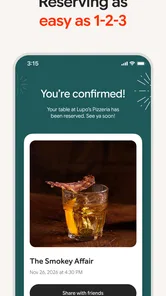
If dining out is more your style, Local by Toast has got you covered. Making reservations through the app is a breeze. You can see available time slots, book a table, and even receive confirmation without having to make a single phone call. It's perfect for those last-minute plans or when you just don't feel like talking to anyone – we've all been there!
A useful habit is to check the party size and selected time carefully before confirming, especially when plans are changing on the move. For a last-minute dinner, seeing a bookable slot can save a call, but I would keep the restaurant’s contact details handy if the group needs to change its arrival time or ask about a particular seating need. The app can simplify the booking step without replacing a direct conversation for unusual arrangements.
That distinction matters for plans involving more than a standard table booking. If someone in the group needs extra help, has a specific seating request, or may arrive well after the others, I’d call the restaurant to explain rather than assume a reservation form can capture the nuance. For an ordinary meal where the party size and time are settled, booking in the app is a practical shortcut; for a complicated plan, speaking to staff is the safer route.
Personalized Experience
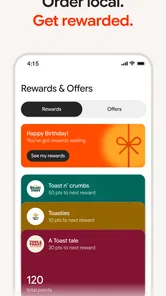
What really sets this app apart, though, is its personalization features. The more you use the app, the better it gets at understanding your preferences. Whether it's recommending new spots based on your taste or remembering your favorite orders, it's like having a personal dining assistant in your pocket. Local by Toast truly elevates your dining experience.
Personalization can save a few decisions on a familiar lunch order, but I prefer to review saved choices before submitting: a previous favorite may no longer fit today’s appetite or dietary needs. If you’re sharing a phone or ordering for someone else, take a moment to check the restaurant, items, and any selected options rather than relying on recommendations to make the choice for you. That small pause is especially sensible when food preferences matter.
I also see a practical limit to recommendations: they are most useful when I’m open to choosing among places already available to me. If I have a particular restaurant in mind, searching for it is more direct than browsing suggestions. And if I’m trying to discover a new place outside the app’s participating options, a general map or local directory may offer a broader starting point. I’d use the personalization as a convenience, not as a complete guide to dining nearby.
Who will get the most from it
I can see this fitting people who already have local restaurants they return to and want a simpler way to browse, order, or arrange a table. Imagine finishing a late shift and wanting to collect dinner on the way home: checking the menu first and placing the order in advance can reduce uncertainty, provided the restaurant is available in the app and its pickup timing suits you. It is less compelling if you mainly cook at home, prefer speaking directly with staff, or need a restaurant that the app does not list.
It may also suit someone who orders the same lunch from a familiar place and would rather check the menu and organize the purchase before stepping away from work. In that situation, having a known restaurant and a predictable order reduces the need to browse broadly. By contrast, a traveler who wants an exhaustive view of nearby dining, or a person who needs to discuss several special requests, may be better served by a map, a wider marketplace, or direct contact with the restaurant.
Before making it part of your routine, I’d also look through the account and checkout choices for options that matter to you, and review the device’s app-permission settings if you change your mind later. Those are sensible steps for any ordering service, not a reason to assume a particular data practice. The app is rated for Everyone, runs on Android 8.0 or later, and its current version is 2.26.0-production, so compatibility is worth checking on an older phone before planning around it.
Account choices and moments to pause
Ordering and paying are moments when I slow down, because that is where a small mistake can become an inconvenient one. I review the restaurant, order contents, and total shown in the checkout flow before confirming, and I pay attention to any account or consent choices presented on screen. If a setting is unclear, I would rather pause and read it than tap through just to save a few seconds. The point is not to assume there is a problem, but to make an informed choice at the point it matters.
If you are uncomfortable creating or using an account, take time to see what the app actually lets you do before deciding whether it fits. I would not assume an account is optional or mandatory without checking the flow myself. Likewise, I’d use the device’s settings to review permissions after installation and adjust them if needed, while remembering that a permission choice can affect convenience. This gives you a concrete way to retain control without making unsupported assumptions about how the service handles information.
A shared device calls for extra care. Before placing an order for another person, check which account is active and which payment or contact details are selected in the flow. I would avoid leaving a checkout half-finished on a phone someone else uses, and I’d review any confirmation before handing the device back. These are small practical safeguards, particularly in a household where people take turns ordering meals.
A measured recommendation
Overall, if you're looking for a way to enhance your dining experiences, whether at home or out and about, this app is definitely worth checking out. It's user-friendly, efficient, and makes the whole process of ordering and reserving as smooth as butter. So, next time you're feeling peckish or planning a night out, give Local by Toast a whirl and see for yourself just how much it changes the game.
My recommendation is conditional rather than blanket: try it if the restaurants you use are represented and you value handling routine orders in one place. Keep a restaurant’s direct channel or another ordering option for requests that need a conversation, and don’t treat convenience as a substitute for checking your order and account choices. Released on March 9, 2020, this free app has a substantial audience, with around 4,300 written reviews alongside its ratings. I’d start with one familiar restaurant and a simple order; that gives you a fair sense of whether it earns a place in your regular routine.
For me, the best way to judge it is not to ask whether it replaces every restaurant app, but whether it makes a few real meals easier without asking me to give up useful checks. Try one ordinary order, confirm the details, and see whether the restaurants you care about are there. If they are, this can be a handy addition to your dining routine; if they are not, choosing another route is a sensible decision rather than a failure to use the app properly.
Toast - Local Restaurants Frequently Asked Questions
Can I use Local by Toast to order ahead at restaurants?
Yes. Local by Toast is designed for ordering ahead at your favorite restaurants, which can make it useful when you want to place an order before arriving. It is a Food & Drink app from Toast, Inc. If you are looking for a restaurant-ordering app rather than tools for running a business, its stated purpose is the clearest guide to what it offers.
Who is Local by Toast intended for?
Local by Toast is intended for people who want to order ahead at their favorite restaurants. Its focus is on restaurant ordering, so it may suit diners seeking a convenient way to place orders. The app is rated for Everyone, making it suitable for a broad audience. It is not described as a business-management app, so users looking for tools to manage a restaurant should consider that distinction.
Is Local by Toast free to download, and what should I expect before installing it?
Local by Toast is free to download and is a Food & Drink app from Toast, Inc. Its central purpose is ordering ahead at favorite restaurants, so it is aimed at people looking for a convenient way to place restaurant orders. The app is rated for Everyone, making it suitable for a broad audience. It has a 4.7 average from around 26,000 ratings.
What is Local by Toast and what does it do?
Local by Toast is a versatile app designed to streamline the management of your local business. It offers features for handling orders, payments, and customer relationships, all from a single platform. This app aims to enhance the efficiency of your business operations, making it easier to track sales, inventory, and customer preferences.
Is Local by Toast suitable for all types of businesses?
Local by Toast is primarily tailored for small to medium-sized local businesses, such as restaurants, cafes, and retail stores. Its features are optimized to meet the needs of these sectors, offering tools for order management, payment processing, and customer engagement. However, larger businesses might find some limitations due to its focus on smaller operations.
Pros
- User-friendly interface
- Seamless integration with POS
- Customizable menu options
- Comprehensive reporting tools
- Efficient order management
Cons
- Limited offline functionality
- Requires stable internet
- Subscription cost
- Complex initial setup
- Limited third-party integrations











