

Living Worlds – Mark Ferrari
- 154.00
- 4.7
- Installs
- 5.00K
- Price
- $1.99

Screenshots



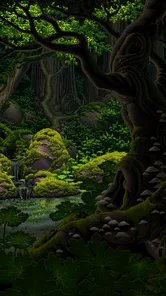
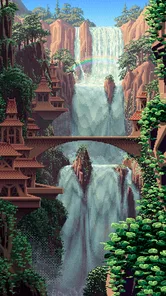
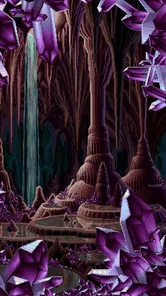


Analysis by Reviewed
I came to Living Worlds – Mark Ferrari expecting a small pixel-art showcase, but the appeal is more about watching a scene change than simply looking at a finished image. It sits in the entertainment space, and I’d describe it as a quiet visual experience rather than a game with goals to chase. If you enjoy pausing over carefully made artwork, its slow, atmospheric approach is the main reason to give it a try.
What the pace feels like in practice
This is not the kind of app I’d open for a burst of fast action or a steady stream of new challenges. Its pleasure comes from staying with a scene long enough to notice its shifting details. That makes the pace feel deliberately unhurried: useful when I want a calm screen to return to, less satisfying when I’m looking for active play or a clear sense of progression. I’d treat it as a digital art visit, not as a substitute for a conventional game.
Small details reward a little patience
The most enjoyable way I’ve found to approach this kind of dynamic pixel art is to resist tapping through too quickly. Let a scene sit while you look at its edges and background; the movement can be easy to miss if you only glance at the screen. That also makes the experience work well in short breaks: I can stop after taking in one view rather than feeling obliged to complete a level or keep a streak going. The trade-off is that anyone who wants frequent interaction may find the slower rhythm too passive.
For a realistic everyday use, I’d open it during a quiet coffee break or while waiting somewhere, lower the pressure to “do” anything, and spend a few minutes observing the artwork. It suits a person who likes illustrated worlds and wants a screen-based pause. If I needed directions, messaging, or an absorbing game to fill a long commute, I’d choose something more functional or active instead. Compared with the usual entertainment apps that emphasize clips, feeds, or constant new prompts, this one asks for attention to a single visual moment rather than rapid browsing.
Step Into a World of Living Art
The app showcases the incredible work of Mark Ferrari, a renowned artist known for his vibrant and dynamic pixel art. What’s truly remarkable about it is how it brings these static images to life. You might think pixel art is a thing of the past, but this app shows just how dynamic and engaging it can be.
Interactive and Engaging
The interactive nature of the app is its biggest draw. As you explore each scene, you’ll notice subtle animations and changes that make the environment feel alive. It’s almost like being part of a digital diorama. You can spend hours just admiring how the scenes change from day to night, or how the weather affects the surroundings. It’s a testament to how art and technology can blend to create something truly captivating.
A Nostalgic Yet Fresh Experience
For those of us who grew up with classic video games, this app is a nostalgic trip down memory lane. Yet, it’s not just about nostalgia. The app introduces fresh elements that keep you hooked. The attention to detail is astonishing, and it’s clear that a lot of love and effort has gone into crafting each scene.
More From Our News Desk

 Gmail
Gmail in a Busy Inbox: Who Benefits Most?
From first account to crowded workday, Gmail earns its place through dependable search and flexible sorting—but its best fit depends on how much inbox maintenance you can tolerate.

 Prime Video
Switching to Prime Video: What Changes in Your Viewing Routine
Prime Video can make a compelling second home for streaming, but switching means learning a different catalog, rental layer, and route from browsing to playback.

 Universal TV Remote Control
 Works Best as a Reliable Backup
A phone remote earns its place through quick setup and reliable habits. Here is how to get more from Universal TV Remote Control—and where its limits show.

 Weather - By Xiaomi
Weather by Xiaomi Review: Clear at a Glance, Less Clear Up Close
Xiaomi’s weather app makes everyday forecasts quick to scan, but its calm surface can leave useful details and recovery paths harder to find than they should be.

 X
X Under Pressure: Can It Recover When Posting Goes Wrong?
A resilience-focused review of X, examining setup, mistaken posts, interruptions, weak connections, and the gaps that matter when recovery needs to be dependable.

 Clash of Clans
 Is Won Between the Battles
Its raids are quick; its community is a long-term project of coordination, teaching, rivalry, and shared responsibility—with all the friction that entails.
Latest News



One moment you’re standing in a tranquil forest, the next you’re in a bustling cityscape, all within the same art style. The transitions are seamless, and it feels like the worlds are telling a story of their own.
How to make the most of a visit
I wouldn’t rush from scene to scene. A useful little habit is to choose one focal point, such as a lit window or a patch of foliage, and keep watching it while taking in the rest of the composition. It gives the changes time to register and turns a brief look into a more deliberate viewing experience. This isn’t a hidden control or a challenge; it’s simply a better way to appreciate art whose movement can be subtle.
As an app from Pixfabrik, it has a 4.7 average from around 557 ratings, with over 5K installs. Those figures suggest a well-liked niche experience, though they don’t tell me whether its particular pace will suit you. It costs $1.99, so I’d think of the purchase as paying for a focused art experience rather than a large library of activities. The Everyone age rating makes it approachable for a broad audience, and version 2.12.74 runs on Android 5.0 or later.
What to expect from longer sessions
Because the appeal is visual, I’d judge performance by whether the artwork remains pleasant to watch, not by how quickly it can move through menus. I can’t promise identical smoothness on every device, especially across a wide range of hardware. For a longer viewing session, keeping other demanding apps closed is a sensible way to avoid competing for device resources; it’s a general precaution, not a special requirement of this app. If it stutters or closes, reopening it is the straightforward first recovery step, though I wouldn’t assume that any particular scene or viewing state will be restored. If dependable motion, detailed settings, or hands-on play is essential to you, a different app may be a better fit.
Who will enjoy this quiet format
I’d recommend it most to people who already enjoy pixel art, digital illustration, or simply looking closely at a carefully composed scene. It can also suit someone who wants a low-pressure way to share an image with a friend or family member: you can point out a small detail, wait for the scene to shift, and let the artwork prompt the conversation. Its calm pace is a strength in that setting because nobody has to keep up with a timer or learn a complicated control scheme.
On the other hand, I wouldn’t choose it for a child who expects a game to respond to every tap, or for someone who wants a long, structured activity with objectives and a sense of achievement. The Everyone age rating signals broad suitability, but it doesn’t change the basic nature of the experience: it is primarily for looking and noticing. If you’re deciding whether to pay for it, ask yourself whether a small collection of animated pixel-art scenes sounds enjoyable on its own. If you need ongoing content, challenges, or a strong reason to return every day, a more conventional game will probably feel like better value.
How it compares with other ways to unwind
Many entertainment apps compete for attention with short videos, endless feeds, or frequent notifications. This one feels closer to opening an art book and lingering on a page, except the image has movement. That makes it a useful alternative when scrolling leaves me more distracted than relaxed. It is less versatile than a streaming service, of course, and it cannot replace a game designed around player choices. Its particular value is the quiet middle ground: more engaging than a static wallpaper, but far less demanding than a game or a feed.
There is a small practical trade-off in that distinction. A moving scene rewards sustained viewing, so I get more from it when I can leave the phone in my hand for a few uninterrupted minutes. If I’m in a noisy queue and checking the time every few seconds, the changes may pass unnoticed and the experience can feel slight. For that situation, a podcast or a short game would make more sense. I’d save this for a pause when I can actually look at the screen rather than treating it as background entertainment.
Purchase expectations and device fit
The one-time price is easier to judge if I compare it with a small digital art purchase rather than with a free feed that refreshes endlessly. I’d be comfortable paying for it if I knew I wanted this specific kind of visual calm, but I wouldn’t buy it expecting a broad entertainment library. Its 4.7 average from around 557 ratings is encouraging, and more than 5K installs show that it has found an audience, yet neither figure guarantees that its deliberately gentle presentation will be right for every taste.
On Android, the stated minimum is version 5.0, which gives the app a broad software starting point. That alone cannot tell me how smoothly it will perform on a particular device; age, available resources, and what else is running can all matter. I’d try it on the phone or tablet where I expect to view the artwork, then pay attention to whether the scenes remain comfortable to watch. If the device is older or already struggles with visual apps, I’d keep expectations modest rather than assume that an older operating-system threshold guarantees a uniformly smooth experience.
When a scene does not behave as expected
Because this is a viewing experience rather than a tool for storing work, my first response to a stall or an unexpected close would be simple: reopen the app and see whether the scene behaves normally. I wouldn’t rely on an interrupted moment being preserved, so I’d avoid starting a viewing session when I need the screen to stay available for something important. That’s a modest limitation, but it matters if you’re hoping to use the app as a dependable display for a long stretch.
I also wouldn’t interpret a pause in movement as a reason to tap repeatedly. Since the appeal lies in subtle changes, rapid tapping can interrupt the relaxed rhythm without making the artwork more rewarding. I’d give the scene a moment, check that the device itself is responsive, and restart only if it seems genuinely stuck. This is a practical way to keep a small technical hiccup from turning into a frustrating interaction.
Why You Should Download It
If you’re an art enthusiast or someone who appreciates the beauty of detailed pixel art, downloading this app is a no-brainer. It’s not just about looking at pretty pictures; it’s about immersing yourself in a world that feels tangible and real. Plus, it’s a great way to unwind and let your mind wander through these living worlds.
In conclusion, Living Worlds – Mark Ferrari is a unique addition to any art lover’s app collection. It’s a reminder of how art and technology can come together to create something that’s both nostalgic and new. So, whether you’re looking to relive the charm of old-school pixel art or discover something fresh and exciting, this app has got you covered. Trust me, it’s worth every pixel.
Living Worlds – Mark Ferrari Frequently Asked Questions
What devices and operating systems can run Living Worlds – Mark Ferrari?
Living Worlds – Mark Ferrari is an entertainment app from Pixfabrik for exploring Mark Ferrari’s classic dynamic pixel art. It supports Android devices running version 5.0 or later, so it’s worth checking your device’s software before downloading. The app is priced at $1.99, making it a paid download rather than a free installation.
What is Living Worlds – Mark Ferrari?
Living Worlds – Mark Ferrari is an innovative application that showcases the mesmerizing pixel art of renowned artist Mark Ferrari. Users can explore dynamic scenes filled with vibrant colors and intricate details, bringing static art to life. The app offers a unique blend of nostalgia and modern technology, allowing users to experience art in an interactive and immersive way. Its store summary describes the experience as classic dynamic pixel art from Mark Ferrari.
How does the app work?
The app operates by displaying a collection of animated pixel art scenes created by Mark Ferrari. These scenes use a unique technique that cycles colors and patterns to create the illusion of movement and time passing. Users can interact with the scenes by tapping or swiping, which may reveal hidden details or trigger additional animations, making the experience more engaging.
Is Living Worlds – Mark Ferrari available for both Android and iOS?
Yes, Living Worlds – Mark Ferrari is available for download on both Android and iOS platforms. Users can access the app through the Google Play Store for Android devices and the Apple App Store for iOS devices. This ensures that a wide range of users can enjoy the captivating art and interactive features regardless of their preferred device.
Does the app require an internet connection to function?
No, Living Worlds – Mark Ferrari does not require an internet connection to function. Once the app is downloaded and installed on your device, you can enjoy the animated scenes and interactive features offline. This makes it convenient for users who want to access the art without worrying about data usage or connectivity issues.
Pros
- Stunning pixel art animation.
- Immersive soundscapes.
- Interactive scenes to explore.
- Unique retro aesthetic.
- No in-app purchases.
Cons
- Limited interaction options.
- No storyline progression.
- Requires stable internet.
- Only visual experience.
- Not suitable for quick play.











