

Lilt - Offline Music Player
- 89.00
- 4.8
- Installs
- 100.00K
- Price
- Free

Screenshots

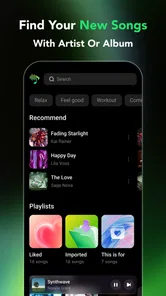
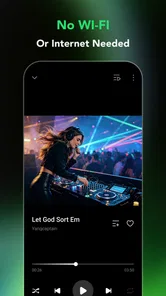
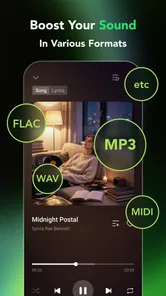
Analysis by Reviewed
I approached Lilt as the kind of app you open when you want to play audio already stored on your device without dealing with a crowded streaming service. Its appeal is easy to understand: it focuses on local listening, keeps the idea simple, and avoids turning a basic playback session into a search through recommendations, accounts, and online catalogs. In my experience, that narrow purpose is both its strongest quality and the main thing to consider before installing it.
Developed by nashmi jo, this free entertainment app is aimed at people who want a straightforward way to listen to their own audio. It has an Everyone age rating, works from Android 8.0 onward, and has reached over one hundred thousand installs. The current release is version 1.0.9, while its average score sits at 4.8 from around two thousand ratings. Those figures suggest that its uncomplicated approach is connecting with a sizeable group of listeners, although a high score does not remove the need to check whether your personal listening habits match its purpose.
Getting past the first points of friction
The first place I would expect a new user to hesitate is not playback itself, but the transition from installing the app to seeing useful audio inside it. A local player depends on files being available on the device and visible to the app. That sounds obvious, yet it is the source of many “nothing is showing” moments with this kind of tool. If your music lives only inside a streaming service, in a cloud account, or behind an app-specific download system, a local player is not automatically going to treat it as part of its library.
My practical advice is to begin with one or two audio files that you know are stored locally. This creates a simple test. If those files appear and play, the app is probably doing what it should, and the issue is more likely the location or format of the rest of your collection. If even a clearly saved local file does not appear, I would close and reopen the app, check Android’s app access prompts, and confirm that the file can be opened from the device’s own file manager. That sequence separates a library problem from a playback problem without wasting time rebuilding everything.
It is also worth remembering that “downloaded” can mean several different things on Android. A file saved for offline use inside another audio service may remain protected inside that service rather than becoming a normal file that Lilt can browse. The same applies to audio attached to an app’s private storage. In that situation, repeatedly refreshing the player will not help. The useful question is whether the track exists as an ordinary audio file that the phone can expose to another application.
People moving from a streaming app may also look for familiar conveniences and assume they are missing because setup is incomplete. A local player starts from your files rather than from a remote catalog, so the experience naturally feels quieter. There may be less to configure, but there is also less automatic discovery. I see that as a deliberate trade-off rather than a flaw: you gain control over what is played, while giving up the instant library and recommendation engine that come with online alternatives.
Checks I would make before blaming playback
When a track fails to appear, I would work through the basics in a fixed order. First, confirm that the file is actually on the phone and not merely visible in a cloud file list. Next, try opening it outside Lilt, because a damaged or incomplete file can look like an app issue. Then check whether the file is stored in a location Android allows the app to read. Finally, restart the app after moving or adding files, since a library view may not update at the exact moment a file changes location.
More From Our News Desk

 Gmail
GmailGmail in a Busy Inbox: Who Benefits Most?
From first account to crowded workday, Gmail earns its place through dependable search and flexible sorting—but its best fit depends on how much inbox maintenance you can tolerate.

 Prime Video
Switching to Prime Video: What Changes in Your Viewing Routine
Prime Video can make a compelling second home for streaming, but switching means learning a different catalog, rental layer, and route from browsing to playback.

 Universal TV Remote Control
Universal TV Remote Control Works Best as a Reliable Backup
A phone remote earns its place through quick setup and reliable habits. Here is how to get more from Universal TV Remote Control—and where its limits show.

 Weather - By Xiaomi
Weather by Xiaomi Review: Clear at a Glance, Less Clear Up Close
Xiaomi’s weather app makes everyday forecasts quick to scan, but its calm surface can leave useful details and recovery paths harder to find than they should be.

 X
XX Under Pressure: Can It Recover When Posting Goes Wrong?
A resilience-focused review of X, examining setup, mistaken posts, interruptions, weak connections, and the gaps that matter when recovery needs to be dependable.

 Clash of Clans
Clash of Clans Is Won Between the Battles
Its raids are quick; its community is a long-term project of coordination, teaching, rivalry, and shared responsibility—with all the friction that entails.
Latest News



This approach is especially useful after transferring a collection from a computer. A cable transfer can finish while individual files are still being indexed by the phone, and a folder can contain items that are not audio at all. Testing a small group first is more reliable than copying an entire library and trying to diagnose dozens of missing tracks at once. I prefer this method because it gives a clear baseline and avoids confusing a large transfer with the app’s own behavior.
Another sensible check is storage space. Local playback does not remove the need for free space, particularly if you are importing or moving a large collection. When the phone is nearly full, file transfers can stop partway through or produce incomplete copies. The player may then appear inconsistent even though the underlying problem happened before playback began. Freeing space and testing a fresh, known-good file can reveal that quickly.
The app’s simple design is most valuable once these foundations are in place. Instead of asking you to create an account or wait for a service to rebuild an online library, it gives you a direct route to audio that is already present. That makes it a sensible companion for personal recordings, downloaded public-domain material, music transferred from a computer, or other audio you intentionally keep on the phone. It is less suitable for someone whose collection exists almost entirely in a subscription platform.
A dependable routine for everyday listening
My preferred workflow would be to organize files before expecting the player to do all the sorting. Clear folder names and consistent file names make a local collection easier to understand in any basic player. For example, separating spoken recordings from albums means you are not mixing short voice notes with longer listening sessions. This is not a glamorous tip, but it reduces the amount of searching you have to do every time you open the app.
A realistic everyday example would be a commute where I want to listen to a few recordings without using mobile data. I would prepare the files at home, verify that they open while the phone is offline, and then use Lilt as the playback point during the journey. That offline test matters because it confirms that the files are genuinely local rather than dependent on a background connection. It also prevents the frustrating discovery that a supposed offline collection was only available through another service’s own app.
For language learners, students, and people who keep personal audio notes, the local approach can be more useful than a general music service. You can keep a focused group of files together and avoid recommendations competing with the material you actually intend to hear. The same is true for someone who wants a low-distraction listening tool. The app’s value is not in replacing every audio product; it is in staying out of the way when your files are already chosen.
There is a small but important trade-off in that workflow. You are responsible for the collection’s organization and backups. If you remove a file from the phone, the player cannot preserve it by magic. If you replace a file with a different version, your local library changes with it. I would keep an additional copy of anything important on a computer or another safe location, especially for recordings that cannot easily be recreated.
Recovering when a session goes wrong
When playback stops unexpectedly, I would avoid making several changes at once. Start by trying another local file. If the second file works, the original may be incomplete, unsupported, or otherwise problematic. If neither works, close and reopen the app, then test again. This simple comparison tells you more than immediately reinstalling, deleting the library, or moving every folder.
If the problem began after moving files, restore one test file to a straightforward local folder and try it there. A complicated folder structure can make it harder to tell whether the file is present, readable, and being recognized. Once the test succeeds, add the rest of the collection in smaller groups. That creates a recovery path instead of leaving you with a full library and no clue which change caused the trouble.
I would also check the phone itself when audio pauses, skips, or disappears. A temporary system slowdown, a nearly full device, or another app competing for audio focus can create symptoms that look like a player failure. Restarting the phone is not an exciting solution, but it is a reasonable diagnostic step when several audio apps behave strangely. If only one particular file fails while everything else plays normally, I would investigate the file before changing the player.
Keeping the app current is another sensible part of recovery. Lilt is currently at version 1.0.9, so updates may matter when Android changes how local files are handled. I would install an available update before attempting more disruptive fixes. At the same time, I would not assume that an update can repair a file that was never copied correctly or make streaming-service downloads behave like ordinary local audio.
When the player is not the real cause
Some frustrations come from expectations rather than defects. If you want a huge searchable catalog, synchronized listening across devices, editorial playlists, or recommendations based on your taste, a streaming service is the better match. Lilt’s local focus means it begins with what you own or have saved as accessible files. That can feel limited next to a service built around online discovery, but it also avoids dependence on a remote catalog for the audio you deliberately keep on your phone.
It is also not the first choice for people who never manage files themselves. A listener who expects every album to appear automatically may find the local model inconvenient. In that case, the usual subscription alternative offers a smoother start because its library management happens inside the service. I would recommend Lilt instead to someone who values direct control and is comfortable spending a little time keeping folders tidy.
Audio interruptions can have causes outside the app as well. Wireless headphones may disconnect, another application may take control of the phone’s audio output, or the phone may apply its own background restrictions. A useful test is to play a local file through the phone’s built-in speaker and then try the headphones again. If the speaker works but the wireless connection does not, the evidence points toward the accessory or connection rather than the player.
The same principle applies to volume. A quiet track may simply have been recorded at a low level, while a loud track may have been mastered differently. Comparing several files helps distinguish a file-specific issue from a general output problem. I would avoid judging the whole app from one recording, especially when other local players produce the same result with that file.
Who will appreciate the simple approach
I think Lilt is a good fit for Android users who have a defined local collection and want a clean route to it. It can suit someone transferring audio from a computer, keeping personal recordings on a phone, listening to saved material during travel, or reducing dependence on constant online access. Its Everyone rating also makes the basic product accessible to a broad audience, although the practical experience still depends on how comfortable each person is with managing files.
The strongest benefit is focus. The app does not need to be a complete media ecosystem to be useful. When I already know what I want to hear, a local player can be more convenient than opening a large service and navigating through unrelated content. That directness is particularly welcome for short listening sessions, where searching for the right recording can take longer than the recording itself.
The limitation is equally clear: the app cannot solve an unorganized collection or replace the convenience of online discovery. If your priority is finding new music, following artists, or keeping a library synchronized through a service, another category of app will serve you better. I would also think twice if you rarely download or transfer audio files, because the local model offers little advantage when there is no local material to play.
My practical verdict
After looking at the way this type of player fits into real phone use, I see Lilt as a focused tool rather than an all-purpose music replacement. Its free price removes a major barrier to trying it, and its straightforward local-audio purpose is easy to understand. The strong 4.8 average and more than one hundred thousand installs show that many users appreciate that direction, but the right decision still comes down to where your audio lives.
My recommendation is to install it if you want a simple offline listening routine and are willing to verify your files during setup. Start with a small test folder, play those files while disconnected, and only then bring over the rest of your collection. That workflow catches most avoidable confusion early and gives you a practical way to tell whether a later problem belongs to the file, the phone, the headphones, or the app.
Lilt is at its best when simplicity is the feature you are looking for. I would choose it for personal, local audio and quiet playback sessions, not for streaming discovery or automatic library management. If that distinction matches your needs, nashmi jo’s app offers a refreshingly direct option. If it does not, a conventional streaming platform will probably feel more natural from the first launch.
Lilt - Offline Music Player Frequently Asked Questions
Who is Lilt - Offline Music Player developed by, and where can I get it?
Lilt is an entertainment app developed by nashmi jo. It is available for Android, and its minimum operating-system requirement is Android 8.0. Before downloading, check that your device meets the requirement and use the official app store for your platform. The app is free, so you can try it as a local music player without paying to install it.
What is Lilt - Offline Music Player?
Lilt - Offline Music Player is designed for listening to music stored directly on your device, without depending on a continuous internet connection. After adding compatible audio files to your phone, you can browse your collection, organize tracks, and play music locally. It is aimed at users who prefer a simple listening experience without streaming subscriptions, advertisements, or mobile data usage.
Can I use Lilt without an internet connection?
Yes. The main purpose of Lilt is offline playback, so you can listen to music that has already been downloaded or transferred to your device. This makes it useful during flights, commutes, travel, or in areas with weak reception. However, the app does not automatically provide access to online music catalogs; you generally need to obtain and store your own supported audio files first.
Does Lilt include music for streaming or downloading?
Lilt should not be treated as a music streaming service. It functions primarily as a local audio player and does not replace platforms that offer licensed online catalogs, radio stations, or subscription-based downloads. Before installing it, make sure you understand that you are responsible for adding music to your device legally, whether through personal transfers, purchased downloads, or other authorized sources.
What audio files and features does Lilt support?
Support can depend on the version of Lilt and the operating system, but the app is intended to handle common locally stored music formats and provide essential playback controls. Depending on your device, you may be able to browse songs by folders or library information, create playlists, repeat tracks, shuffle playback, and continue listening in the background. Checking the current store description is recommended for exact format compatibility.
Pros
- Plays downloaded music without an internet connection.
- Supports background playback while using other apps.
- Simple interface makes browsing local tracks straightforward.
- Keeps listening private without requiring an online music account.
- Useful for saving mobile data during travel or commuting.
Cons
- Requires music files to already be stored on your device.
- No built-in music streaming catalog or discovery features.
- Storage use can grow quickly with large offline libraries.
- Limited appeal if you mainly listen through streaming services.
- Album artwork and track details may depend on file metadata.











