

Latin Chords (LaCuerda PRO)
- 484.00
- 4.6
- Installs
- 100.00K
- Price
- $2.99

Screenshots
Analysis by Reviewed
I like keeping a shared music app on hand for those evenings when one person has a guitar and everyone else is calling out songs. That is the kind of setting where Latin Chords (LaCuerda PRO) makes sense: it gives a group a practical starting point for finding Latin songs and trying them together, rather than leaving the guitarist to search from scratch while everyone waits.
A useful tool for a shared music session
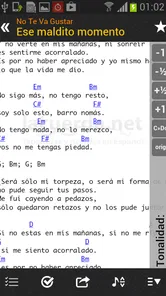
For a casual household jam, I would use it as a song reference, not as a replacement for listening closely or working out a part by ear. Someone can suggest a tune, the player can look it up, and the group can decide whether the chords suit the guitar and the voices in the room. Transposing is especially useful here: if the original key feels uncomfortable for the singer, shifting the chords can make a familiar song more inviting to play together.
There is a small but worthwhile workflow tip: build a short setlist before friends arrive instead of relying on a live search for every request. That helps keep the session moving, and it gives the guitarist a chance to check the chord changes ahead of time. I would still treat any chart as a guide; listening to the recording remains important when rhythm, strumming feel, or a particular arrangement matters.
One device, different players
On a shared phone or tablet, the main boundary is simply whose saved material and browsing activity are on that device. I would keep a setlist focused on the songs the group actually plans to play, rather than assuming each person has a separate profile or private library. That makes handoffs easier and avoids confusion when one player changes the key or opens a different song.
It also suits people who take turns playing: one person can search while another tunes or practices, then pass the device over when the next song is ready. If several musicians need to work independently, each using their own preferred arrangements, a shared screen may become awkward. In that case, separate devices or a conventional songbook can be a better fit than trying to coordinate everything on one phone.
Age, trust, and expectations
The app is rated for Everyone, and its focus is musical reference material, so I would be comfortable introducing it in a family music session. Still, an age rating is not a substitute for an adult deciding what is suitable for a particular child or how a shared device should be used. I would set the device up in the usual way for the household and supervise younger players as needed, rather than assuming the app provides family controls.
LaCuerda is the developer, and the app has a 4.6 average from around 4,300 ratings, with more than 100,000 installs. It costs $2.99. For someone who regularly plays Latin songs, that is a straightforward paid choice to weigh against searching the web song by song; for a person who only occasionally wants one chord chart, a free browser search may be enough.
More From Our News Desk

 Gmail
GmailGmail in a Busy Inbox: Who Benefits Most?
From first account to crowded workday, Gmail earns its place through dependable search and flexible sorting—but its best fit depends on how much inbox maintenance you can tolerate.

 Prime Video
Switching to Prime Video: What Changes in Your Viewing Routine
Prime Video can make a compelling second home for streaming, but switching means learning a different catalog, rental layer, and route from browsing to playback.

 Universal TV Remote Control
Universal TV Remote Control Works Best as a Reliable Backup
A phone remote earns its place through quick setup and reliable habits. Here is how to get more from Universal TV Remote Control—and where its limits show.

 Weather - By Xiaomi
Weather by Xiaomi Review: Clear at a Glance, Less Clear Up Close
Xiaomi’s weather app makes everyday forecasts quick to scan, but its calm surface can leave useful details and recovery paths harder to find than they should be.

 X
XX Under Pressure: Can It Recover When Posting Goes Wrong?
A resilience-focused review of X, examining setup, mistaken posts, interruptions, weak connections, and the gaps that matter when recovery needs to be dependable.

 Clash of Clans
Clash of Clans Is Won Between the Battles
Its raids are quick; its community is a long-term project of coordination, teaching, rivalry, and shared responsibility—with all the friction that entails.
Latest News



Unlocking the World of Latin Music
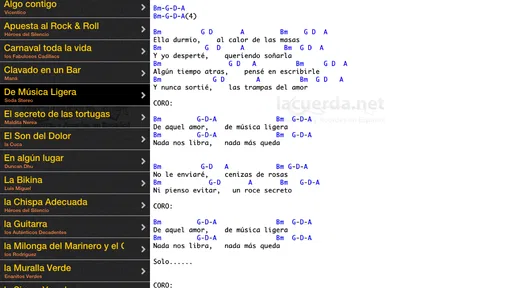
From the moment I downloaded Latin Chords (LaCuerda PRO), I was hooked. The app greets you with a vast library of Latin music, offering a comprehensive collection of chords for a wide range of songs. Whether you're into salsa, bachata, or reggaeton, this app has got you covered. It's like having a personal music tutor right in your pocket!
User-Friendly Interface
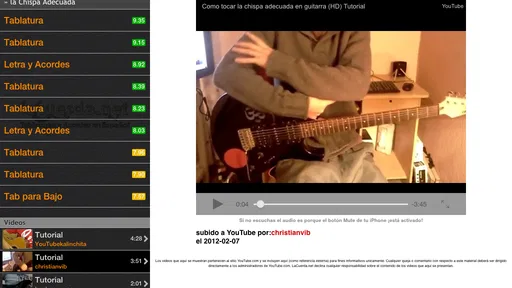
As someone who isn't exactly tech-savvy, I truly appreciated the app's user-friendly interface. Navigating through the vast database is a breeze, thanks to its intuitive design. You can easily search for songs by artist or title, and the app even provides suggestions based on your preferences. It's clear that the developers prioritized ease of use, making it accessible for everyone, from beginners to experienced musicians.
Features That Stand Out
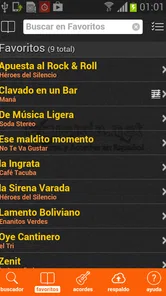
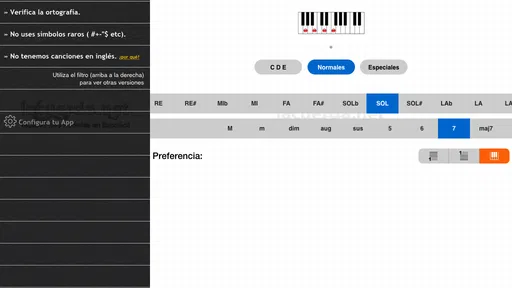
One of the features that really stood out to me was the ability to transpose chords with just a tap. This is a game-changer for anyone who wants to play along but might need to adjust the key to suit their vocal range. Additionally, the app offers the option to create and save your own setlists, which is perfect for gigs or jam sessions with friends.
The offline mode is another feature worth mentioning. You can download your favorite songs and access them without an internet connection, making it ideal for those impromptu beach jams or road trips where Wi-Fi might be spotty.
Why I Love It
What truly makes Latin Chords (LaCuerda PRO) stand out is its dedication to quality. The chords are accurate and easy to follow, and the app consistently updates its library to include the latest hits. It's a dynamic tool that evolves with the music scene, ensuring you always have fresh content at your fingertips.
Moreover, the app fosters a sense of community among its users. You can share your own chord arrangements and collaborate with fellow musicians, making it a hub for creativity and growth.
In conclusion, if you're passionate about Latin music and looking for a reliable resource to enhance your playing experience, Latin Chords (LaCuerda PRO) is a must-have. It's not just an app; it's a gateway to the vibrant world of Latin music, offering endless possibilities for musicians of all levels. So go ahead, download it, and let the rhythm take over!
Where it fits—and where it does not
In entertainment apps, many alternatives focus on streaming songs or teaching general guitar technique. This one is more specific: its value is in getting from a Latin song title to a playable chord reference. I would choose it when I already know what I want to sing and need a practical chart; I would choose a streaming service to discover unfamiliar music, or a structured lesson app when my main goal is learning technique rather than finding repertoire.
That distinction matters for beginners. A chord chart can help you follow a song, but it does not automatically teach timing, strumming patterns, finger placement, or how to handle a change that feels difficult. I would use the charts alongside a recording and slow down to practice tricky transitions. More experienced players may find the archive handy for building a repertoire, while players who need notation, detailed lessons, or a particular arrangement should check that the material suits their approach.
Getting more from the archive
When searching, I would try both the song title and the artist’s name if the first attempt does not bring up the version I expect. Latin songs often circulate in multiple arrangements, and the familiar title alone may not tell you which one will match your group’s recording. Before saving a chart to a setlist, I would check the opening chords and the key, then test the progression against the track. That quick check can prevent a false start when the group is ready to play.
Offline access is particularly useful when you know in advance where you will be playing, such as a road trip stop or a place with unreliable reception. I would save the songs before leaving rather than count on searching once disconnected. The trade-off is that offline preparation takes a little forethought: if someone calls out an unexpected song, you may need a connection to find it. That makes the app strongest for planned practice and prepared get-togethers, though it can still be useful as a reference at home.
A practical household verdict
LaCuerda’s app suits a household with a guitar player who often accompanies singers, especially when the group enjoys Latin repertoire and wants a shared shortlist of songs. The paid price is easiest to justify if you expect to return to the archive, use transposition, and prepare setlists; occasional players may be happier with a free search for a one-off chart. I would not pick it as a complete music-learning course or as a discovery service, but as a focused companion for finding and organizing songs, it has a clear role.
My overall advice is to think about how your household actually plays. If one person usually leads and others sing, a shared device and a prepared setlist can make the app part of an easy routine. If everyone wants separate preferences, or if you need detailed instruction rather than chord references, another tool will serve you better. For the right kind of informal music-making, it is a useful way to turn “what should we play?” into a song the group can try.
A routine that makes a shared device easier
A practical way to use it at home is to let one person act as the session’s navigator while the guitarist focuses on playing. Before anyone starts calling out requests, I would agree on a short list, check each chart, and leave the device open to the next song. That small division of roles reduces the stop-start feeling that can happen when a player has to put down the guitar after every verse to search again.
For a family with different musical tastes, I would also keep the shortlist deliberately mixed rather than trying to make one person’s choices represent everyone. The point is not to build a perfect catalogue of the household’s music; it is to make the next few songs easy to find. A short, shared queue is less confusing than a long list nobody has checked, particularly when people are taking turns and the screen is being passed around.
What to check before choosing a chart
A result with the right title is only the first step. I would compare the chart’s starting section with the version the group knows, because a recording may have a different arrangement or structure from the one someone remembers. Then I would test the chord sequence at a comfortable pace before the group joins in. This is a useful habit even for experienced players: it separates a chart that is broadly helpful from one that fits the exact performance everyone has in mind.
Transposition can solve a key problem, but it cannot make every chord shape equally comfortable on the guitar. If a shift produces a progression that is awkward for the player, I would try another practical key rather than insisting on the singer’s first choice. In a casual setting, the best key is usually the compromise that lets the singer sound relaxed and the guitarist keep the rhythm steady. That is a more useful way to treat the feature than viewing it as a one-tap fix for every arrangement.
Choosing between the app and other references
Compared with searching for individual charts in a browser, a dedicated archive can make repeat use feel more organized: I can approach a song as part of a repertoire rather than as a one-off search result. The trade-off is that a focused chord resource is not a substitute for every kind of music reference. If I need a full transcription, detailed notation, or a lesson that explains how to play a passage, I would look for a tool built around that task instead.
It also helps to separate finding songs from learning them. A streaming app is better when the group needs to hear options before choosing what to play; a guitar-learning app is better when someone wants guided practice and technique. This app makes the most sense in the middle of those activities: the song is already chosen, and the player wants a chord-based route into it. Knowing that boundary keeps expectations realistic and makes the purchase easier to judge.
Who will get the most from it
I would recommend it most to a guitarist who regularly accompanies singers, already has a few favourite Latin artists or songs, and likes preparing material in advance. It can also suit a confident beginner who knows basic chords and wants a reference while building a first shared repertoire. The setlist approach is especially handy when the same songs come up at family gatherings, because checking them ahead of time makes it easier to spend the actual get-together playing instead of troubleshooting.
I would hesitate if someone expects the app to teach guitar from the beginning, guarantee that every chart matches a specific recording, or keep separate private collections for different household members. Those are different needs. Someone who only wants one chart once in a while may find a web search adequate, while a player who relies on notation or exact arrangements should use a resource that clearly supports that style of work. The right choice depends less on musical ambition than on what the player needs at the moment they pick up the instrument.
A considered choice for the household
The app was released on December 11, 2010, and its long-running focus is a Spanish-language archive of guitar chords. For me, that makes it a specialised reference rather than a general entertainment destination. Its 483 written reviews sit alongside the broader rating total, but the more important question for a household is whether the repertoire and chord format match the songs people actually play. A strong rating cannot replace that personal fit check.
My household recommendation is simple: choose it if a shared guitar session is a regular pleasure and you want a prepared route from song request to chord chart. Use a setlist, verify the arrangement against the recording, and treat transposition as a flexible aid rather than a guarantee that every song will suit every player. If your home needs separate music accounts, detailed teaching, or precise notation, pick a tool designed for those needs. For an informal group that wants to sing familiar Latin songs together, this is a focused and practical companion.
Latin Chords (LaCuerda PRO) Frequently Asked Questions
Is Latin Chords (LaCuerda PRO) a good fit if I mainly want to play songs in Spanish?
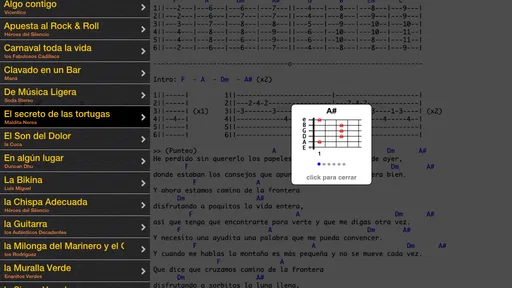
Its focus is especially relevant if you want a Spanish-language guitar tab archive: Latin Chords gives direct access to LaCuerda.net, described as a comprehensive archive of guitar tabs in Spanish. That makes it a natural option for players looking for Latin songs and Spanish lyrics. The app is listed in the Entertainment category, so it is centered on accessing music content rather than serving as a general-purpose instrument-learning course.
What does Latin Chords (LaCuerda PRO) cost, and what should I expect before downloading?
Latin Chords (LaCuerda PRO) is a paid app listed at $2.99, so it is worth checking that price in your device’s app store before downloading. It is marked for Everyone, and the app has an average rating of 4.6 from around 4.3 thousand ratings. Those details offer a quick sense of its audience and reception, while the Spanish guitar-tab archive is its main appeal.
What is Latin Chords (LaCuerda PRO) and what does it offer?
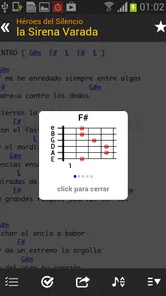
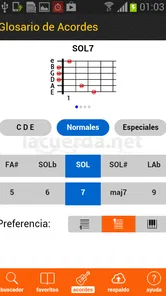
Latin Chords (LaCuerda PRO) is a comprehensive music application designed for musicians and music enthusiasts interested in Latin music. It offers a vast library of chords and lyrics for a wide range of Latin songs. Users can access thousands of songs, with features like chord diagrams, transposition, and offline access, making it a valuable tool for both beginners and experienced musicians.
Is Latin Chords (LaCuerda PRO) available for both Android and iOS devices?
Yes, Latin Chords (LaCuerda PRO) is available for download on both Android and iOS platforms. Users can find the app on Google Play Store for Android devices and the Apple App Store for iOS devices. This cross-platform availability ensures that users can access their favorite Latin song chords and lyrics on a wide variety of smartphones and tablets.
Does Latin Chords (LaCuerda PRO) require an internet connection to function?
While Latin Chords (LaCuerda PRO) requires an internet connection for initial download and to access new content, it offers an offline mode. Users can save their favorite songs and chords for offline use, allowing them to practice and play music without needing a constant internet connection. This feature is particularly useful for musicians on the go.
Pros
- Extensive library of Latin music chords.
- User-friendly interface with easy navigation.
- Offline access to saved songs and chords.
- Regular updates with new songs and features.
- Supports transposing chords for different keys.
Cons
- Limited to Latin music genres only.
- Requires a subscription for full access.
- Occasional bugs in the offline mode.
- No integration with music streaming apps.
- Interface customization options are limited.











