Krispy Kreme
- 7.11K
- 3.2
- Installs
- 1.00M
- Price
- Free

Screenshots

Analysis by Reviewed
I find the Krispy Kreme app most useful when I treat it as a practical way to plan a doughnut stop, rather than as something I need to browse every day. It brings ordering, loyalty, and the Hot Light into one place, which can save a little guesswork when I’m deciding where to go or what to pick up. The experience is focused on Krispy Kreme, so it makes sense for regular customers; if I’m comparing menus across several cafés, a general food-ordering app is usually the better starting point.
A routine that works from craving to pickup
My simplest workflow is to check which nearby shop is convenient, look over the menu, and decide what I want before I arrive. That is especially helpful when I’m picking up for other people: choosing a mix in advance is easier than trying to remember everyone’s preference at the counter. I’d still review the cart before placing an order, because a quick check is the best way to catch an unwanted item or an order that no longer suits the group.
For a realistic weekday example, imagine I’m bringing a treat to a meeting. I can use the app to plan the order before leaving, then check the store details and timing so the stop fits into my route. That turns a spontaneous detour into a more deliberate errand. The useful habit is to make the choice when I have a moment, not while I’m already rushing out the door.
Settings and checks that prevent surprises
I’d start by checking the selected store each time I order, particularly if I’m away from my usual neighborhood. A nearby location is not necessarily the right one for the route I’m taking, and choosing the wrong shop can undo the convenience of ordering ahead. I also prefer to review any offer’s terms in the app before counting on it; a deal is only useful if it applies to the items and location I’ve selected.
Notifications can be useful if I want to hear about new flavors or events, but they are not essential to placing an order. I’d keep them on only if those updates genuinely help me decide when to visit; otherwise, checking the app when I’m already planning a stop is a quieter routine. The Hot Light is another reason to open it at the right moment: it can help make a visit feel more timely, but I wouldn’t build a tight schedule around a treat run without checking what the app currently shows.
Making the app fit real life
I look at making the app fit real life as a matter of choosing the right moment to use it, not adding another routine to every day. A quick check before a planned stop can help me decide whether ordering ahead suits the trip, while an unhurried counter visit may be simpler when I’m already there. That practical distinction also helps set expectations for how much the app can streamline a visit.
Repeatable habits beat constant browsing
The loyalty side is more valuable when I remember to use it consistently. Before paying, I’d make a quick habit of checking that the purchase is connected to my account and that I understand how the current rewards work. This small pause is more dependable than assuming every visit will take care of itself. If I’m buying for a group, I’d also separate the question of what everyone wants from the question of which offer is worthwhile; chasing a promotion can make a simple order more complicated than it needs to be.
More From Our News Desk

Weather by Xiaomi Review: Clear at a Glance, Less Clear Up Close

X Under Pressure: Can It Recover When Posting Goes Wrong?

Clash of Clans Is Won Between the Battles

Android Auto Makes the Case for Quieter Car Software

MobiOffice: Transforming Mobile Productivity with Seamless Integration

EA SPORTS FC™ Mobile Soccer: Redefining Mobile Sports Gaming
There’s a trade-off here: the app can bring ordering and loyalty together, but it is still tied to one doughnut brand. A general delivery or restaurant app may be more convenient when I want to compare many places, coordinate a larger meal, or order from whichever shop is closest to my destination. I’d choose Krispy Kreme’s app when I already know that’s what I want and value its brand-specific ordering and rewards, rather than expecting it to replace every food app on my phone.
What to expect from the experience
Krispy Kreme is a free Food & Drink app from developer Krispy Kreme. It is rated for Everyone, has been available since December 15, 2011, and its current version is 2025.10.20, with Android 7.0 as the minimum operating-system requirement. Its average rating is 3.2 from around 16,000 ratings, and it has more than 1 million installs. I take that rating as a reminder that a focused app can still be a mixed experience for different users, not as a guarantee that every ordering trip will go smoothly.
The main limitation is its narrow purpose: if I rarely buy Krispy Kreme, the rewards and brand-specific updates may not justify making it part of my routine. Even for a fan, checking the selected shop and the final order matters; convenience does not remove the need to confirm details. I would also avoid treating notifications as a substitute for checking the app when I actually plan to visit. Those habits make the app more useful without relying on features or outcomes I can’t count on.
Who gets the most from it
For someone who visits regularly, the combination of mobile ordering, loyalty, and Hot Light information gives the app a clear purpose. I’d recommend it to a friend who already has a usual order, likes checking for relevant offers, or often picks up doughnuts for family or coworkers. Someone who wants the broadest choice of restaurants, rarely visits the chain, or prefers deciding everything at the counter can comfortably skip it and use their usual approach instead.
My verdict is that Krispy Kreme is at its best as a small convenience tool, not a reason to make extra trips. I’d open it when I have a specific stop in mind, confirm the location and cart, and use the loyalty and Hot Light features when they fit that visit. With those expectations, it can make a familiar doughnut run easier; without a regular interest in the brand, its focused feature set is unlikely to change how I order food.
Choosing a pickup rhythm that suits the day
One small but useful distinction is whether I’m placing an order because the visit is already happening or letting the app create the visit. I find the first approach more sensible. If I’m passing a shop on the way home, ordering ahead can help me arrive with a clear plan; if I’d need to make a special journey, the time saved at the counter may not outweigh the detour. That keeps the convenience in proportion to the actual errand.
For a family pickup, I’d settle the quantity and preferences with everyone before opening the cart, then use the app to carry out that decision. This avoids turning the menu into a long group discussion while I’m trying to place the order. It also makes the final review more meaningful: I can check the cart against a short list rather than trying to remember a string of requests made on the way out the door.
Where the dedicated app earns its place
Compared with ordering in person, mobile ordering is most valuable when I want to decide privately and avoid making choices in a hurry. Compared with a delivery marketplace, the dedicated app is the more natural option when Krispy Kreme is already the destination and I want its loyalty tools alongside the order. A marketplace has the advantage when I’m still choosing among several food options or need to organize a broader meal. Neither approach wins in every situation; the useful question is whether I have chosen the shop already.
I’d also distinguish the app’s Hot Light information from a promise that a visit will be perfectly timed. It can inform my decision to stop, but I still treat shop selection, route, and the details shown at the time as the practical checks. For a casual treat run, a little flexibility is part of the appeal. If I have a firm appointment or a group waiting on a precise arrival, I would avoid relying on a doughnut stop as though every part of the trip were under the app’s control.
Small habits that make repeat visits easier
For regular customers, I’d make the sequence almost automatic: select the intended shop, build the order, inspect the cart, check any applicable offer, and make sure the loyalty account is in play before completing the purchase. This is not a shortcut hidden in the interface; it is a repeatable checklist that reduces ordinary mistakes. It is especially useful when ordering for someone else, because an incorrect location or overlooked item is more frustrating when the order is meant to be shared.
I would keep the process flexible rather than assuming the same order or promotion will always be available. The menu and offers are reasons to check the app when I’m planning a visit, not reasons to decide that a particular item or deal is guaranteed. If the details do not suit the occasion, I can change the cart or order another way. That modest expectation is more useful than treating a loyalty app as a promise of constant savings.
When I would choose another approach
If I’m already inside a shop and have a simple order, asking at the counter may be quicker than opening an app, navigating the menu, and reviewing a cart. If I’m exploring what to eat, a general food app offers a wider comparison. And if I only visit occasionally, I may not benefit enough from account-based loyalty to make a separate ordering routine worthwhile. These are not flaws so much as reminders that the app is designed for a specific kind of customer and moment.
For someone who does want to use it, I’d recommend starting with one low-pressure visit rather than making the app part of a time-sensitive plan immediately. Check the location and order details, learn how the loyalty portion appears in the flow, and see whether the pickup routine fits your habits. Once that feels dependable, using it for a larger group order becomes less of a guess. If it adds friction instead of removing it, there is no reason to force the digital route.
Krispy Kreme app is your golden ticket to the world of delightful doughnuts and more. Whether you're a doughnut enthusiast or just craving a sweet treat, this app promises to be your best companion. Here's my take on the Krispy Kreme app after diving into its sugary realm.
Getting Started: A Sweet Journey Begins
From the moment I downloaded the Krispy Kreme app, I was greeted with a user-friendly interface that made navigation a breeze. You know that feeling when you walk into a Krispy Kreme store and the aroma of fresh doughnuts hits you? Well, the app kind of gives you the digital version of that experience. It's warm, inviting, and oh-so-tasty.
The Features That Make It a Treat
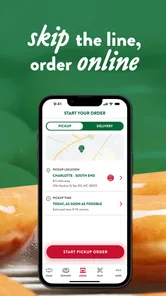
One of the standout features of the app is the ability to locate the nearest Krispy Kreme store. No more wandering around with a doughnut craving and no place to satisfy it. The app uses your location to pinpoint the nearest store and even provides directions. It's like having a doughnut GPS!
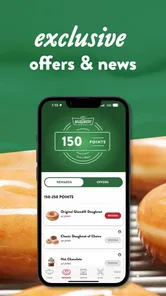
Ordering through the app is as smooth as their signature glaze. You can customize your order, choose from the vast array of doughnuts, and even add a coffee to your cart. Plus, they offer exclusive deals and offers that you won't find anywhere else. Trust me, these deals are worth every bite.
Rewards That Sweeten the Deal
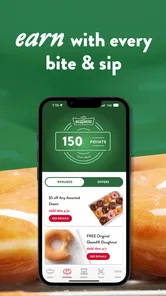
Who doesn't love a good reward? The Krispy Kreme app doesn't just stop at doughnuts; it rewards you for your loyalty. Every purchase gets you points that you can redeem for free treats. It's like they are saying, "Thank you for loving us as much as we love you." And honestly, who can resist free doughnuts?
Smooth and Efficient Performance
The app is as smooth as their cream-filled doughnuts. It runs without a hitch, loads quickly, and all features work as advertised. I didn't encounter any lag, which is crucial when you're trying to snag a limited-time offer before it disappears.
Notifications are another handy feature. The app keeps you in the loop about new flavors, special events, and more. It's like having a friend who always knows where the best doughnut parties are happening.
Final Thoughts: A Must-Have for Doughnut Lovers
In conclusion, the Krispy Kreme app is a delightful addition to any doughnut lover's phone. It's easy to use, packed with features, and full of opportunities to get more of what you love. Whether you're a long-time fan or new to the doughnut scene, this app is bound to make your life a little sweeter. So, if you haven't already, give it a download and dive into a world of sugary bliss. Your taste buds will thank you!
Krispy Kreme Frequently Asked Questions
What information should I have ready before placing an order in the Krispy Kreme app?
Before ordering, choose the Krispy Kreme location you plan to use and review the menu and options shown for that store. The app supports mobile ordering, with pickup or delivery available as part of its features. Items and choices may vary by location, so check your selections in the app before confirming. This can help you make sure the order suits your plans.
Can I use the app to place an order for pickup or delivery?
Yes. The Krispy Kreme app includes mobile ordering for pickup or delivery, making it possible to arrange an order through your phone rather than choosing everything in person. The available choices depend on the options shown for the selected store. Check the location and order details carefully before proceeding, especially if you are planning around a particular collection or delivery arrangement.
Is the Krispy Kreme app free, and what devices can run it?
The Krispy Kreme app is free to download and is intended for everyone. It is available for Android and iOS, so you can use it on a compatible phone or tablet. Before installing, check that your device meets the minimum operating-system requirement: Android 7.0 or later. The app is a practical choice if you want mobile ordering, loyalty features, or Hot Light information in one place.
Can I use the Krispy Kreme app to check whether a nearby store is open or has fresh doughnuts?
The app includes a store locator and availability information, which can help you find a nearby Krispy Kreme and check on doughnuts before making a trip. Its Hot Light feature is also part of the mobile experience and can help you keep an eye out for hot doughnuts. Store details and product availability can vary by location, so check the options shown for the store you plan to visit.
What features does the Krispy Kreme app offer?
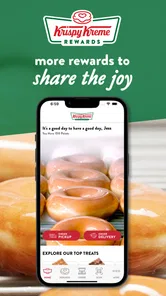
The Krispy Kreme app offers a range of features designed to enhance the customer experience. These include locating the nearest store, checking the availability of your favorite doughnuts, accessing exclusive offers and promotions, and ordering for pickup or delivery. The app also allows users to join the Krispy Kreme Rewards program, enabling them to earn points with every purchase that can be redeemed for free treats.
Pros
- Delicious variety of donuts available.
- User-friendly app interface.
- Convenient order customization.
- Loyalty rewards for frequent users.
- Easy store locator feature.
Cons
- Limited payment options available.
- Occasional app crashes reported.
- No nutritional information provided.
- Limited delivery area coverage.
- Some features require a fast internet.











