KFC US - Ordering App
- 8.73K
- 3.2
- Installs
- 5.00M
- Price
- Free

Screenshots
Analysis by Reviewed
When I’m ordering from KFC, a clear screen and an uncomplicated route from choosing food to placing an order matter as much as the menu itself. The KFC US - Ordering App is a free Food & Drink app from KFC US, and its main appeal is letting me make a meal choice on my phone instead of handling everything at the counter. That can be useful when I want time to look through the options, though the experience is not equally convenient in every situation.
Who benefits most from ordering on a phone
I see the app as most useful for someone who already knows they want KFC and would rather make a choice before reaching the counter. A regular customer can take time to consider a meal, revisit familiar choices, and check what offers are available without having to make a quick decision in a busy setting. It is less useful if the main goal is to find the best meal among several restaurant chains, since a KFC-only app cannot provide that wider comparison.
That distinction also helps set expectations about convenience. Ordering from a phone can reduce the need to explain a familiar order aloud, but it does not remove the need to make decisions or check the details. I would think of it as a different path to ordering at KFC, rather than a complete replacement for staff or a general-purpose dining guide.
Reading the menu and finding your way
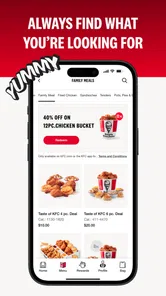
First things first, downloading the app is a breeze. Whether you’re on Android or iOS, just head over to the app store, and in a few taps, you’re ready to roll. Once installed, the interface greets you with a warm, red hue reminiscent of the KFC branding we all know and love. It's simple, it's clean, and most importantly, it's user-friendly.
The app is intended for US KFC customers, so it makes most sense if you already have a nearby restaurant in mind or regularly choose from KFC’s menu. If you are comparing several nearby places, a general food-ordering service may be easier because it brings different restaurants together. Here, the narrower focus can be an advantage: I can concentrate on a KFC meal rather than sort through unrelated menus.
Making a choice at your own pace
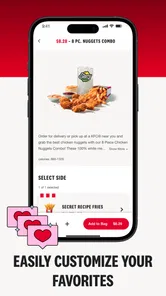
Now, we’ve all had those moments where we’re stuck in traffic or just too lazy to head out. This app is a lifesaver in those moments. With its seamless ordering system, you can customize your meal down to the last detail. Want extra gravy? No problem. Prefer spicy over original? Just a tap away. And let’s not forget the option to save your favorite orders. Reordering your usual has never been this easy!
Saved orders are particularly handy when I am choosing lunch between tasks: I can start with a familiar meal rather than rebuild the same choices each time. I would still review the order before submitting it, especially if I am buying for someone else. A saved favorite is a shortcut, not a reason to skip checking that the selection suits the occasion.
More From Our News Desk

Weather by Xiaomi Review: Clear at a Glance, Less Clear Up Close

X Under Pressure: Can It Recover When Posting Goes Wrong?

Clash of Clans Is Won Between the Battles

Android Auto Makes the Case for Quieter Car Software

MobiOffice: Transforming Mobile Productivity with Seamless Integration

EA SPORTS FC™ Mobile Soccer: Redefining Mobile Sports Gaming
Deals, timing, and everyday use
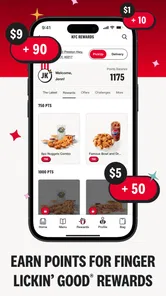
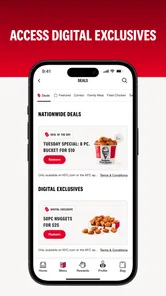
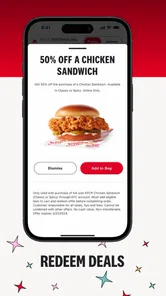
Another cool feature is the exclusive deals section. Who doesn’t love a good bargain? The app frequently updates with special offers that are just too good to pass up. So, not only are you satisfying your cravings, but you’re also being kind to your wallet.
For a practical routine, I would browse offers before settling on a meal rather than choosing first and assuming a deal applies. That small change makes it easier to compare the available promotion with what I actually want. If I am planning food for a group, I would also decide on everyone’s preferences before opening the order flow; this reduces back-and-forth on a small screen and makes customization less rushed.
Planning for a group and avoiding rushed choices
For a family meal or an office lunch, I would use the app as a place to organize the KFC choices, not as a substitute for asking what each person wants. A useful approach is to collect preferences first, including any requested changes, then enter the order when there is enough time to review it. That is especially helpful when several people are sharing food: a quick visual check can catch a missed customization before the order is submitted.
I would also separate browsing from the final decision. Looking through choices while distracted can make a phone order feel more complicated than walking up to a counter, particularly when people are waiting on an answer. If the group cannot agree, ordering in person may be simpler because questions can be handled in conversation rather than passed around one screen.
Motor, sensory, and situational access
A phone order can be more comfortable than speaking over a busy counter, and choosing at my own pace may help when a noisy setting makes conversation tiring. The app’s straightforward presentation also keeps the basic task approachable. Still, ordering on a touchscreen calls for accurate taps and attention to the screen, so someone who finds small controls difficult may prefer help from a companion or ordering in person.
In a realistic rush-hour scenario, I would make the choices while stopped somewhere safe, then review the order before confirming it. Trying to browse while driving is not a sensible use of any ordering app. If I am already at a restaurant and need quick assistance, speaking with staff may be more dependable than troubleshooting a slow screen or location result on the spot.
Using it in different settings
The best time to use a phone order is when I can give the screen my attention: at home before leaving, during a break, or while waiting somewhere safe. That gives me room to read the choices and review the restaurant selection without holding up a line. In a loud room, the quieter phone interaction can also be appealing, although it still depends on being able to see and operate the display comfortably.
There are situations where the app is not the more accessible route. Bright sunlight can make a screen harder to read, and a person who has difficulty with touch controls may find a spoken order easier. If time is extremely limited, opening the app, checking the details, and resolving a location issue can take longer than asking staff directly. I would choose the method that makes the task easiest in that moment, rather than treating app use as the goal.
Where the convenience has limits
Of course, no app is perfect, and the KFC US - Ordering App is no exception. While the app generally runs smoothly, there are occasional hiccups. Sometimes it might lag, especially during peak hours. I also noticed that the GPS location can be a bit finicky at times, which can be a hassle when trying to find the nearest KFC outlet.
That location friction matters most when I am unfamiliar with an area. I would check the restaurant choice carefully instead of relying on an automatic location result, and allow time to correct it before placing an order. For someone who rarely visits KFC, or who wants to compare menus across restaurants, the app is less compelling than a broader food-ordering option or a direct visit.
It is also worth keeping expectations grounded: a phone interface cannot remove every barrier. Screen glare, limited time, difficulty with touch input, or needing another person to help choose can all make a counter conversation more practical. I would treat the app as an alternative route to ordering, not as a guarantee that every step will be effortless for every user.
Questions worth considering before relying on it
One practical question is whether it makes sense to install the app for an occasional visit. I would say yes only if the convenience of checking KFC choices or offers on a phone matters to you; for a rare visit, a direct order may be less effort than learning another ordering flow. The app is free, so the decision is more about whether you want a dedicated KFC tool than about an upfront purchase.
Another question is whether it replaces checking the restaurant and the order yourself. I would not rely on it to make those decisions automatically. The location issue makes it sensible to verify the restaurant, and saved choices deserve a final review before submission. Those two checks are small, but they are particularly useful when ordering for someone else or when you are away from a familiar area.
People also often wonder whether a restaurant app is better than a general delivery service. For KFC specifically, I prefer the focused app when I already know what I want from the chain and want to browse its own offers. A multi-restaurant service is the better starting point when the restaurant itself is still undecided. Neither route is automatically easier: the right choice depends on whether a focused menu or broader comparison matters more.
Who it suits, and what to expect
The app is rated for Everyone and works on Android 8.0 or later; its current version is 2025.11.0. It has an average rating of 3.3 from around 26,000 ratings, with over five million installs. Those figures suggest a widely used option with a mixed reception, so I would install it for the convenience of ordering from KFC rather than expect a flawless experience. Its strongest fit is a regular customer who values saved choices and wants to check offers; someone seeking restaurant variety or who dislikes phone-based ordering may be better served elsewhere.
KFC US - Ordering App first appeared on February 12, 2021, and its continued updates are welcome, though an update alone cannot prevent every lag or location snag. My practical advice is to browse when you have a moment, confirm the restaurant and order details, and keep a non-app fallback if the screen becomes a bottleneck. That makes the app more useful without depending on it in circumstances where speed or hands-free access matters most.
An inclusive way to think about convenience
For me, the app’s inclusive value is situational rather than universal. It can give a customer more time to choose and avoid speaking in a crowded space, which matters if quick verbal exchanges are uncomfortable. But the same digital route asks the customer to read, navigate, and tap through the process. If any of those steps are difficult, the counter or help from another person may be the more workable option.
I would recommend trying it in a low-pressure setting before counting on it for a time-sensitive meal. That lets you see whether the layout and ordering steps suit your own habits, and it gives you a chance to learn where to check your choices. The app’s broad reach and Everyone rating do not mean every person will find its controls equally comfortable; personal needs and the situation matter more than a label.
Final Thoughts
All in all, the KFC US - Ordering App is a must-have for any KFC enthusiast. It brings convenience to your dining experience and offers a plethora of options to satisfy your chicken cravings. Whether you’re a regular customer or just someone who indulges occasionally, this app is worth keeping on your phone. With its user-friendly design, customizable options, and enticing deals, it makes enjoying your favorite chicken meal a whole lot easier.
So, next time you’re in the mood for some delicious fried chicken, why not give the app a whirl? Happy munching!
KFC US - Ordering App Frequently Asked Questions
Is the KFC US - Ordering App suitable for someone who only wants to browse the menu?
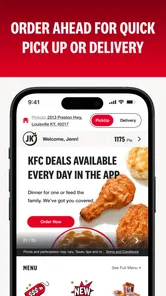
The app is centered on ordering from KFC US, so it may be most useful if you expect to place an order rather than simply browse food options from different restaurants. Its ordering tools include meal customization, restaurant selection, and choices for pickup or delivery. If you mainly want to explore KFC meals, you can still use the app to view the options involved in building an order.
Who publishes the KFC US - Ordering App, and what kind of app is it?
The KFC US - Ordering App is published by KFC US and belongs to the Food & Drink category. Its store summary describes it as the KFC-US Mobile App, and the short description identifies it as KFC US. The app is designed around ordering from the brand, with tools for choosing meals and a restaurant rather than serving as a general-purpose food discovery service.
Is the KFC US - Ordering App free, and what devices can run it?
The KFC US - Ordering App is free to download and is intended for iOS and Android users. On Android, it requires version 8.0 or later, so it is worth checking your device’s software before installing. The app is listed for everyone, and its focus is ordering from KFC US rather than browsing a general food directory.
What features does the KFC US - Ordering App offer?
The KFC US - Ordering App provides users with a seamless way to order their favorite KFC meals directly from their smartphone. It includes features like customizable meal options, exclusive offers, and deals, a restaurant locator, and a quick reorder function for past orders. Additionally, the app supports secure payment methods and offers the convenience of choosing between pickup or delivery services, making it a must-have for KFC lovers.
How can I find nearby KFC locations using the app?
The KFC US - Ordering App includes a built-in restaurant locator feature that allows users to find nearby KFC outlets quickly and easily. By enabling location services on your device, the app displays a list of nearby KFC restaurants along with their addresses and distance from your current location. This feature also provides directions, ensuring you can easily navigate to your chosen KFC branch for order pickup or dine-in.
Pros
- Easy-to-navigate interface.
- Quick order customization.
- Real-time order tracking.
- Integrated payment options.
- Exclusive app-only deals.
Cons
- Limited menu customization.
- Occasional app crashes.
- Requires constant updates.
- Limited customer support.
- High data usage.











