

Kelley Blue Book: We Know Cars
- 168.00
- 4.6
- Installs
- 100.00K
- Price
- Free

Screenshots

Analysis by Reviewed
When I start comparing cars, I want a quick sense of what a model might be worth before I get drawn into a sales pitch or a long list of listings. Kelley Blue Book: We Know Cars is aimed at that early research stage: it brings valuation, vehicle information and automotive reading together in one place. I’d treat it as a useful reference while making a decision, not as a substitute for checking a specific car in person.
Start with a benchmark, then check the details
The app is free, and Cox Automotive, Inc is the developer. Its 4.8 average from around 500 ratings and more than 100,000 installs suggest that plenty of people use it, though popularity alone cannot tell me whether a particular valuation fits my situation. I’d use the estimate to prepare questions and set a starting point, then compare it with the car’s condition, history and the offers I can actually get.
That distinction matters because a value estimate is a benchmark, not a promise of what a buyer will pay. Two cars of the same model can differ in ways a quick comparison cannot settle. Before negotiating, I’d make sure I’m comparing the same year and version, and keep condition and local availability in mind. A low or high number is a reason to investigate, not automatic proof that a deal is good or bad.
Make research manageable
One helpful way to use a car-research app is to decide what question you are trying to answer before opening it. Are you checking whether a seller’s asking price seems plausible, comparing two model years, or trying to narrow a long list of possible cars? Keeping one goal in mind helps me avoid wandering through interesting but irrelevant information.
For a buyer, I’d start with a short list of candidates and note the details that matter most: the model year, trim, mileage, and condition as described by the seller. The app can provide a useful reference point, but it cannot make two cars comparable if the details entered are incomplete or different. When information is uncertain, I’d keep that uncertainty visible in my notes instead of treating a neat estimate as a precise answer.
For an owner thinking about selling, the same discipline helps in a different way. I’d check the vehicle’s details carefully, use the estimate to form an initial expectation, and then see how that expectation sits beside comparable local asking prices. Those asking prices are not confirmed sale prices, so neither source should be treated as the whole market. The useful outcome is a more informed starting point for deciding what to investigate next.
Research, valuation and everyday performance
So, what's the deal with this app? Well, Kelley Blue Book: We Know Cars is essentially your go-to source for all things car-related. Whether you're in the market for a new ride or trying to get rid of your old one, this app has got you covered. It’s packed with features that help you check the value of cars, compare prices, and even get reviews and ratings on different models.
More From Our News Desk

 Gmail
GmailGmail in a Busy Inbox: Who Benefits Most?
From first account to crowded workday, Gmail earns its place through dependable search and flexible sorting—but its best fit depends on how much inbox maintenance you can tolerate.

 Prime Video
Switching to Prime Video: What Changes in Your Viewing Routine
Prime Video can make a compelling second home for streaming, but switching means learning a different catalog, rental layer, and route from browsing to playback.

 Universal TV Remote Control
Universal TV Remote Control Works Best as a Reliable Backup
A phone remote earns its place through quick setup and reliable habits. Here is how to get more from Universal TV Remote Control—and where its limits show.

 Weather - By Xiaomi
Weather by Xiaomi Review: Clear at a Glance, Less Clear Up Close
Xiaomi’s weather app makes everyday forecasts quick to scan, but its calm surface can leave useful details and recovery paths harder to find than they should be.

 X
XX Under Pressure: Can It Recover When Posting Goes Wrong?
A resilience-focused review of X, examining setup, mistaken posts, interruptions, weak connections, and the gaps that matter when recovery needs to be dependable.

 Clash of Clans
Clash of Clans Is Won Between the Battles
Its raids are quick; its community is a long-term project of coordination, teaching, rivalry, and shared responsibility—with all the friction that entails.
Latest News



Easy Navigation and Comprehensive Data
One of the first things I noticed was how user-friendly the interface is. Seriously, even if you're not particularly tech-savvy, you'll find your way around pretty easily. The app is organized in such a way that you can quickly access the information you need without any hassle. Plus, the amount of data available is nothing short of impressive. It covers everything from car specifications to expert and user reviews. You can even find out about the latest car trends and news.
For a more useful comparison, I’d write down the exact model year and trim of each car I’m considering before browsing. That small step helps keep research focused: a review of one version may not answer a question about another, and broad model names can hide meaningful differences. I’d also use the app to build a shortlist first, rather than trying to read everything about every vehicle. That makes its breadth more helpful and less distracting.
Price Checking Made Simple
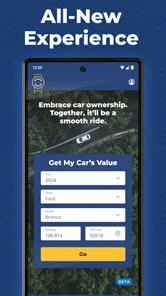
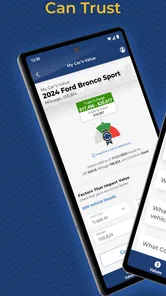
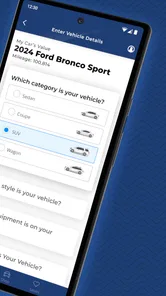
Now, let's talk about one of the app’s standout features: the price checker. If you're buying a car, you definitely want to know if you're getting a good deal, right? The app lets you input the car's details and voila—it gives you the market value based on current data. This is super handy if you're negotiating a price or just trying to get a sense of what you should be paying.
A practical use is to check a car before visiting a seller, then revisit the estimate after confirming the details and inspecting the vehicle. If I were selling, I’d use the value as a starting reference before deciding what price to ask, not assume it guarantees a quick sale. For a buyer, pairing the estimate with local listings and a vehicle inspection is more dependable than relying on any single source. Classified ads show asking prices; a valuation tool offers a different perspective, so I’d compare both rather than expect them to match exactly.
Stay Ahead with Car News
Another cool feature is the news section. If you're a car enthusiast or just like to stay informed, this part of the app is for you. It provides the latest updates in the automotive industry, from new model releases to changes in car laws. It’s like having a car magazine in your pocket!
The news is most useful to me when it helps frame a decision, such as learning what has changed between model years or keeping up with an automotive topic I’m already researching. If I only need directions, fuel information or a place to browse nearby cars, a dedicated navigation, vehicle-shopping or local listings app is a better fit. This one is strongest when the question is about value and research rather than completing every step of a purchase.
Putting it to work during a real search
Imagine I’m considering a used car listed by a private seller, while also looking at a similar model at a dealership. I’d record the year and trim for both, check their estimates separately, and use the results to identify questions rather than declare a winner. If one asking price sits far outside the range I expected, I’d look for an explanation in the vehicle’s condition, equipment or history before deciding it is a bargain or overpriced.
That workflow is useful because it separates three different things that are easy to blur together: an estimated value, an advertised asking price, and the condition of the actual vehicle. The app can help with the first and provide research context for the second; a careful inspection and records help with the third. If the seller cannot answer basic questions or the car’s condition does not match its description, I would pause rather than let a reassuring estimate push me toward the purchase.
For someone selling, I’d use the same comparison in reverse. I would check the details, look at local listings for context, and think about whether I want to price for a quicker sale or leave room for negotiation. A valuation does not decide that strategy for me. It gives me a reference to discuss alongside the car’s condition and the alternatives available to buyers.
Speed, stability and everyday use
I’d expect the most satisfying sessions to be focused ones: look up a vehicle, compare a few candidates, and read only the background that affects the choice. Research can naturally take longer when I’m moving between models, specifications, reviews and news, so I wouldn’t judge responsiveness by the length of a deep-dive session. The app’s current version is 2.3.4; I’d keep it updated through the relevant app store so I’m using the version available for my device.
For example, if I spot a used car after work, I can use the app to get a preliminary sense of its value before arranging a viewing. At the seller’s lot, I’d confirm the exact details and compare the asking price with that reference, then make the physical condition and history part of the decision. If reception is poor or I need to preserve battery, I’d do the research beforehand rather than count on a long browsing session in the moment. That’s a sensible habit for any research app, especially when the purchase itself is a bigger commitment than the quick lookup.
For heavy use, I’d break the work into stages instead of trying to settle everything while standing beside a car. I can shortlist models and read background material at home, then use a viewing to verify details and note questions. That keeps the on-the-spot task simple and reduces the chance of making a rushed decision because I am switching between research and conversation. If I need to recover my train of thought later, keeping a separate note of the exact cars and questions is more dependable than assuming I will remember which version I checked.
As for device demands, I would not choose this app based on an expectation of advanced tools or constant background activity; its value is in looking up and reading vehicle information. On an older or less capable phone, I’d keep a session focused and close unrelated tasks if the device feels sluggish. That is ordinary practical troubleshooting, not a special performance claim. The key compatibility point is straightforward: it supports Android 9 and later, so someone using an older Android release should check their device before planning to rely on it.
When another tool is the better fit
The usual alternatives answer different questions. A classifieds app is better when I need to see what sellers are asking nearby, while a dealer’s site can show that dealer’s current advertised stock. A mechanic or inspection service is the right choice for assessing a particular car’s mechanical condition. Kelley Blue Book is more useful as a valuation and research reference that can sit beside those sources, not replace them.
I would also skip it if my only goal were to navigate to a seller, find a repair shop, or arrange financing. Those are separate tasks, and a focused app or direct service is likely to be more practical. Likewise, someone who already has a firm offer and only wants to complete a transaction may get little from browsing model reviews or automotive reading. Its strength is helping me become better prepared before those next steps.
Who will get the most from it
I think it suits first-time buyers who want an accessible starting point, owners planning to sell, and curious drivers who enjoy learning about models beyond their own. It can also help someone narrow a shortlist before speaking with a dealer, because entering a conversation with questions is better than relying on a sales pitch alone. The content rating is Everyone, and the app supports devices running Android 9 or later.
It is less suited to someone who already knows exactly what they want and only needs live local inventory, a mechanic’s inspection, or a firm purchase offer. Those tasks call for other tools or direct professional advice. I also wouldn’t use a general estimate to settle a disagreement about a vehicle’s condition: photos, records and an independent inspection address questions that a market reference cannot answer by itself.
The app is free, which makes it easy to try as one part of a buying or selling routine, but I would still judge its usefulness by whether its research answers my actual question. It has a 4.8 average rating, yet no overall score can tell me whether the estimate for a specific vehicle matches the local market or whether its research suits my needs. The practical test is to compare its guidance with the car, the seller’s details and other sources before I commit.
My performance verdict
In conclusion, if cars are a big part of your life—or even if they're not—Kelley Blue Book: We Know Cars is an app worth having. It’s like having a personal car consultant at your fingertips. Whether you're buying, selling, or just curious, this app makes the whole process a lot less daunting and much more enjoyable.
My recommendation comes with a boundary: use it to prepare, not to make the decision for you. It is most worthwhile when I have a specific vehicle or comparison in mind and can verify the details elsewhere. For broad research, its mix of valuations, model information, reviews and news gives me several useful starting points; for a final judgment about one car, the inspection, records and real offers still carry more weight. With that expectation, it earns a place in my research routine without pretending to be the whole buying process.
Kelley Blue Book: We Know Cars Frequently Asked Questions
Who develops Kelley Blue Book: We Know Cars, and is it suitable for all ages?
Kelley Blue Book: We Know Cars is developed by Cox Automotive, Inc and is categorized as an Auto & Vehicles app. Its Everyone content rating makes it suitable for a broad audience, including people who are beginning to research cars as well as experienced drivers. The app focuses on car values, research, and related automotive information.
Is Kelley Blue Book: We Know Cars available for both Android and iOS?
Kelley Blue Book: We Know Cars is available as a mobile app, and the listed minimum operating-system requirement is version 9. Before downloading, check that your device meets the requirement and that the app is offered for your device through its app store. The app’s core purpose is to provide car values, research, and more, so it may be useful whether you are browsing casually or preparing for a vehicle decision.
What is Kelley Blue Book and what does it offer?
Kelley Blue Book is a comprehensive automotive resource that provides users with vehicle valuation and pricing information, helping consumers make informed decisions when buying or selling cars. The app offers tools to assess car values, compare models, explore expert reviews, and access detailed market insights, making it an essential tool for car enthusiasts and buyers.
How accurate are the car valuations provided by Kelley Blue Book?
Kelley Blue Book is renowned for its accuracy in vehicle valuations, using a combination of data analysis, market trends, and dealer transactions to provide up-to-date and reliable pricing information. While it's a trusted resource, users should consider it as one part of their research, as local market conditions may also influence actual car prices.
Is the Kelley Blue Book app free to use?
Yes, the Kelley Blue Book app is free to download and use. It provides access to a wealth of information, including car valuations, expert reviews, and comparison tools. However, certain premium features or services may require in-app purchases, so users should review any costs associated with these additional options.
Pros
- Comprehensive car valuation tool
- User-friendly interface
- Regularly updated market data
- Trusted by industry experts
- Wide range of automotive reviews
Cons
- Limited to US market
- Requires internet connection
- Contains ads
- Some features behind paywall
- Occasional app crashes












