

CentralDispatch Carrier Hub
- 52.00
- 3.8
- Installs
- 10.00K
- Price
- Free

Screenshots
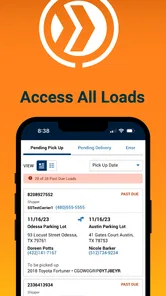
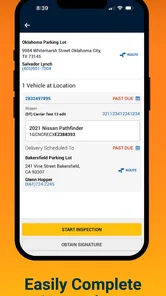
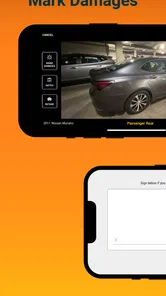
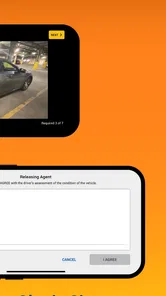
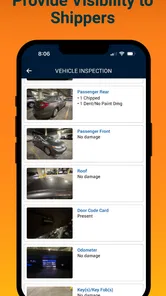
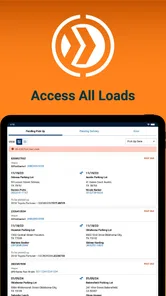
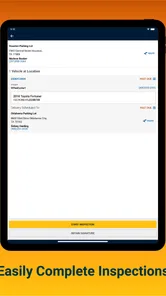

Analysis by Reviewed
I approached CentralDispatch Carrier Hub as a practical work tool rather than a typical consumer app. It belongs to the Auto & Vehicles category and is designed around Central Dispatch inspection work, so its value depends less on entertainment or visual polish and more on whether it helps a carrier check the right information at the right moment. For someone involved in vehicle transport, that focused purpose is immediately more relevant than a general driving or navigation app.
My first impression is that this is a specialist companion for people who already operate within the Central Dispatch workflow. It is free to use, carries an Everyone age rating, and comes from Cox Automotive, Inc. That combination makes it easy to consider, but it does not automatically make it useful for every driver. If you are simply looking for directions, fuel prices, maintenance reminders, or a way to track your personal car, this is not the tool I would recommend.
How the current version fits a carrier’s daily work
The current release is version 51.0.0, and the app supports Android 8.0 or later. Those details matter because a carrier may be using a dedicated work phone that is not running the newest operating system. The relatively broad system requirement makes the app more approachable for older devices, although the real experience will still depend on the phone’s condition, network connection, camera, and the way the carrier’s organization uses Central Dispatch.
I see the app’s central role as an inspection checkpoint. Instead of treating a vehicle pickup or delivery as a loose exchange of messages, a carrier can use a purpose-built mobile tool to support the inspection process while standing beside the vehicle. That is a much narrower job than the one handled by a full transport-management platform, but the narrow focus can be an advantage when speed and consistency matter.
A realistic example is a carrier arriving at a pickup location during a busy route. The driver has limited time to examine the vehicle, record its condition, and move on without creating confusion later. A dedicated inspection app can keep that task separate from personal notes, text messages, or a generic camera roll. The practical benefit is not simply having another app installed; it is having a work-specific place for inspection activity.
I would still treat it as one part of a larger process. It is not a replacement for careful visual judgment, safe loading procedures, clear communication with the customer, or whatever paperwork the carrier and dispatch operation require. An app can help organize evidence, but it cannot decide whether a mark is significant or whether a vehicle is safe to move. That responsibility remains with the person performing the inspection.
What the release and version tell existing users
The app was released on October 16, 2023, which places it in a relatively modern stage of its product life rather than making it a long-established legacy utility. The current version suggests that the product has continued through multiple iterations since its initial arrival. I would read that as a sign of ongoing maintenance, not as proof that every workflow is complete or that every user will notice a major change.
More From Our News Desk

 Gmail
GmailGmail in a Busy Inbox: Who Benefits Most?
From first account to crowded workday, Gmail earns its place through dependable search and flexible sorting—but its best fit depends on how much inbox maintenance you can tolerate.

 Prime Video
Switching to Prime Video: What Changes in Your Viewing Routine
Prime Video can make a compelling second home for streaming, but switching means learning a different catalog, rental layer, and route from browsing to playback.

 Universal TV Remote Control
Universal TV Remote Control Works Best as a Reliable Backup
A phone remote earns its place through quick setup and reliable habits. Here is how to get more from Universal TV Remote Control—and where its limits show.

 Weather - By Xiaomi
Weather by Xiaomi Review: Clear at a Glance, Less Clear Up Close
Xiaomi’s weather app makes everyday forecasts quick to scan, but its calm surface can leave useful details and recovery paths harder to find than they should be.

 X
XX Under Pressure: Can It Recover When Posting Goes Wrong?
A resilience-focused review of X, examining setup, mistaken posts, interruptions, weak connections, and the gaps that matter when recovery needs to be dependable.

 Clash of Clans
Clash of Clans Is Won Between the Battles
Its raids are quick; its community is a long-term project of coordination, teaching, rivalry, and shared responsibility—with all the friction that entails.
Latest News



For an existing carrier, the most important question is whether the latest release fits the way inspections are already being completed. A version update can be valuable even when the visible interface looks familiar, especially if it improves reliability or smooths a repeated step. At the same time, I would not update immediately before a critical transport job without allowing time to open the app, sign in if required, and test the inspection flow on the actual work phone.
This is one of the less obvious trade-offs with a specialized business app: a newer version may be better for the overall service while still requiring a small adjustment from people who perform the same task hundreds of times. I recommend checking the app before leaving for a route, rather than discovering a changed screen at the pickup location. That simple habit reduces pressure and gives the carrier a chance to identify device or connectivity problems early.
The public reception is mixed but not alarming. The app holds an average rating of 3.8 from around 147 ratings, with 52 written reviews. I would interpret that as evidence that the experience is useful for some users but not universally smooth. It is not a reason to dismiss the product, yet it is a good reminder to judge it against your actual inspection routine instead of assuming that a specialist label guarantees a perfect fit.
Where it helps compared with ordinary alternatives
The usual alternative is a combination of a phone camera, handwritten notes, text messages, and perhaps a generic form. That setup is flexible, but flexibility often creates inconsistency. One driver may photograph every angle, another may record only visible damage, and a third may keep details in a private note that is difficult for anyone else to locate. A dedicated Central Dispatch inspection tool has a clearer operational purpose.
The strongest advantage is context. A generic camera stores images, but it does not inherently tell the carrier which inspection task those images belong to. A notes app can capture observations, but it is easy to forget the vehicle identifier, location, or timing. A work-specific inspection flow can encourage the carrier to complete the examination as part of the transport job rather than treating documentation as an afterthought.
There is also a useful separation between personal and professional activity. When a driver uses the same phone for family messages, navigation, photos, and vehicle work, important inspection material can become difficult to find. Keeping the inspection task in its own app can make later review more practical and reduce the chance of mixing one vehicle’s evidence with another’s.
However, a generic alternative may be better for a very small operation that does only occasional vehicle moves and has no need to work inside the Central Dispatch ecosystem. Installing a specialist tool adds another workflow to learn. If your actual requirement is just taking a few reference photos for yourself, a camera and a simple checklist may be faster. The dedicated app makes more sense when inspections are a recurring professional responsibility.
Small workflow choices that make a real difference
My first recommendation is to prepare the phone before reaching the vehicle. Keep the device charged, make sure the operating system meets the Android 8.0 requirement, and open the app before the inspection begins. This is not glamorous advice, but it matters in a parking lot where sunlight, weather, traffic, and customer availability can all make a delayed start expensive.
Second, use a consistent physical routine even if the app guides the digital part. Walk around the vehicle in the same direction every time, pause at the same major areas, and compare what you see with the information you are entering. The app can support consistency, but a repeatable inspection habit is what helps prevent skipped panels or rushed observations.
Third, treat the final review as a separate step. It is tempting to finish the last entry and immediately leave, especially when the next pickup is waiting. I would take a moment to check that the inspection record belongs to the correct vehicle and that the documentation reflects what was actually visible. This is a particularly valuable habit when several vehicles are handled in one day.
A fourth insight is to avoid using the app as a substitute for communication. If a condition needs clarification, the carrier should resolve that through the appropriate dispatch or customer channel rather than assuming that an inspection entry alone will explain every disagreement. The app can strengthen the record, but people still need to interpret and discuss unusual situations.
Finally, I would not rely on a single device without a basic contingency plan. A phone battery problem, weak signal, or damaged handset can interrupt any mobile inspection workflow. The right backup depends on the carrier’s operating procedure, but having a way to note essential details temporarily is sensible. That is not a criticism unique to this product; it is the unavoidable trade-off of moving a work process onto a phone.
Who should use it and who should skip it
This app is best suited to carriers and transport professionals who already need to complete Central Dispatch-related inspections. It is especially relevant when several people need a more consistent process, when inspection records must stay connected to transport activity, or when a driver wants to avoid keeping work evidence scattered across unrelated phone apps.
I would also consider it for a carrier who is moving away from paper-based inspection habits. The transition may take some practice, but a mobile workflow can be more convenient when the vehicle is directly in front of you. It keeps the work close to the source of the information instead of requiring the driver to remember details and enter them later.
On the other hand, casual car owners should skip it. The app is not aimed at routine personal vehicle care, buying advice, route planning, or general automotive research. A private driver who downloads it expecting a broad vehicle utility will probably find the focused purpose confusing rather than helpful.
I would also hesitate to recommend it as the only system for a large transport company that needs extensive dispatch management, accounting, scheduling, customer messaging, or fleet analytics. A carrier inspection tool can serve one important stage of the operation without covering every administrative need. In that situation, it should be evaluated as a focused component, not as a complete business platform.
Remaining friction in the everyday experience
The main limitation is specialization. The more closely an app is tied to a particular professional workflow, the less useful it becomes outside that workflow. That is a fair trade, but it means the app’s success depends on whether your company, customers, and dispatch process actually expect this kind of inspection activity.
Another point of friction is the physical environment. Vehicle inspections happen outdoors, in driveways, lots, dealerships, and roadside locations. Bright light can make a screen harder to read, gloves can make tapping awkward, and a hurried handoff can encourage incomplete entries. These are practical conditions that no interface can completely remove. I would prefer a tool that keeps each action clear and quick, but the carrier still needs a calm inspection method.
The rating around 3.8 also suggests that users should keep expectations realistic. The app may be useful without feeling polished in every situation. Before depending on it for a busy route, I would test the complete process: open the app, reach the relevant inspection area, capture the required information, review it, and determine what happens after submission. That trial is more informative than relying on the store score alone.
There is also a difference between an app being free and a workflow being cost-free. The download does not require a purchase, but professional use still involves staff time, device upkeep, training, connectivity, and the consequences of incomplete documentation. For an independent carrier, those indirect costs are worth considering before replacing a familiar paper or camera-based routine.
What I would watch as the product continues
For future development, I would watch how the app handles the moments that create the most pressure: starting an inspection quickly, recovering from an interrupted session, reviewing entries before leaving, and working when connectivity is unreliable. Those areas determine whether a specialized inspection tool feels dependable in real transport conditions.
I would also pay attention to how clearly updates communicate changes to existing users. Since the current release is version 51.0.0, established carriers may already have a muscle-memory workflow. Clear explanations of changed screens or steps would help teams adopt improvements without confusion. A small interface change can have a large effect when a driver repeats it throughout the day.
Another meaningful direction would be better support for consistency across carriers and dispatch staff. The value of an inspection record increases when everyone understands what should be checked and how unusual conditions should be documented. The app itself cannot create a complete company policy, but its continued evolution should make the intended process easier to follow.
The install base is over 10 thousand, which indicates that the tool has reached a real professional audience while remaining fairly specialized. That scale makes me view it as a focused working product rather than a mass-market automotive app. Its future usefulness will depend on whether continued releases make the inspection task more reliable without adding unnecessary complexity.
My final view is positive but practical. I would recommend CentralDispatch Carrier Hub to a carrier who needs a dedicated inspection tool within the Central Dispatch environment and is willing to test it as part of the real pickup and delivery routine. I would not recommend it to someone seeking a general car app, nor would I present it as a complete replacement for every transport-management system.
The best reason to choose it is workflow focus: it puts inspection work closer to the vehicle and gives professional carriers a more purposeful alternative to scattered photos and notes. The best reason to be cautious is equally clear: a focused tool only pays off when it matches the organization’s process. For the right user, the free app is worth trying on a work device, with a short practice inspection before relying on it during a demanding route.
CentralDispatch Carrier Hub Frequently Asked Questions
Who develops CentralDispatch Carrier Hub, and what is it designed to do?
CentralDispatch Carrier Hub is an Auto & Vehicles app from Cox Automotive, Inc. Its store summary describes it as a Central Dispatch inspection tool, and the app is intended for use within Central Dispatch carrier workflows. It is free to download and is rated for Everyone. Before installing, consider whether you already use Central Dispatch for carrier work, since the app is aimed at that professional context rather than general vehicle browsing.
What is CentralDispatch Carrier Hub used for?
CentralDispatch Carrier Hub is designed for professional vehicle transporters and carriers who need to manage dispatch-related activities from a mobile device. Depending on the account and permissions provided by the company, it may help users review available vehicle transport jobs, monitor assigned loads, access pickup and delivery information, and stay connected with dispatch operations while working on the road.
Do I need a Central Dispatch account to use the app?
Yes, access generally depends on having valid credentials connected to a Central Dispatch or carrier account. This is not an app intended for casual browsing or personal vehicle shipping without registration. Your employer or carrier business may need to activate your profile and assign the appropriate permissions before you can view loads, update shipment information, or use the available carrier-management features.
What information can carriers manage through CentralDispatch Carrier Hub?
The information available can vary according to your account type, role, and the current version of the app. In general, carrier users may be able to review load details, check vehicle and route information, follow pickup or delivery requirements, and communicate status updates to dispatch. Before relying on the app, confirm which actions your account supports and whether some tasks still require the Central Dispatch website.
Does CentralDispatch Carrier Hub require an internet connection?
An active internet connection is normally required for signing in, retrieving current load information, sending updates, and synchronizing changes with the Central Dispatch system. Mobile data can be useful when you are away from Wi-Fi, but connection quality may affect how quickly information loads. Because transport details can change, users should refresh the app whenever possible and avoid assuming that an old screen reflects the latest dispatch status.
Pros
- Centralizes loads
- messages
- and dispatch details in one mobile workspace.
- Push notifications help carriers react quickly to new load opportunities.
- Useful status updates improve visibility for dispatchers and customers.
- Reduces reliance on phone calls and scattered text message threads.
- Designed for on-the-go use during pickups and deliveries.
Cons
- Some features may depend on an active Central Dispatch account.
- Load availability can vary by location
- vehicle type
- and current demand.
- Frequent notifications may become distracting during long routes.
- The interface may feel limited compared with full desktop dispatch software.
- Performance and usability can depend on mobile signal strength.












