Jimmy John's Sandwiches
- 62.98K
- 4.8
- Installs
- 5.00M
- Price
- Free

Screenshots
Analysis by Reviewed
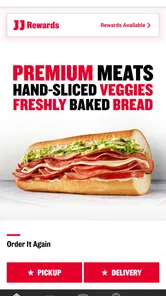
When I want a sandwich from Jimmy John’s, I’d rather choose it on my own time than rush through a phone order. The Jimmy John's Sandwiches app is built around that simple use: browsing the restaurant’s menu, arranging delivery or pickup, and keeping track of rewards. It makes the most sense when Jimmy John’s is already what you have in mind, rather than when you’re still deciding among several restaurants.
When an app beats a phone call
I find a dedicated ordering app most useful when I already know roughly what I want and would rather check the menu at my own pace than explain a custom order over the phone. It can also help when I’m ordering for a few people: I can think through each sandwich and review the cart before placing the order, instead of trying to keep everyone’s choices in my head.
A realistic lunch run might start with one person choosing pickup while colleagues settle on their sandwiches. Saving a familiar order can make a later repeat quicker, but it is still worth checking the cart before checkout; a saved favorite is convenient, not a substitute for confirming that it suits today’s appetite. For a larger group, I’d compare the final order carefully with everyone’s requests rather than assume the app will resolve disagreements or prevent a mistaken selection.
What to expect from the pace
The app’s main speed advantage is the ordering flow: browsing, choosing, and sending a request can be easier than starting from scratch each time. That does not mean every order will arrive at the same speed. Delivery and pickup depend on the actual order and local circumstances, so I would not plan a tight schedule around an assumption that an app can guarantee a fast handoff. If I’m already near a shop and in a hurry, pickup may be a more practical choice than waiting for delivery.
For people deciding whether it is worth installing, Jimmy John's Sandwiches is a free Food & Drink app from Jimmy John's Sandwiches. It has a 4.8 average from around 270,000 ratings, and has been installed over 5 million times. Those figures suggest it is widely used, but what matters to me is whether the menu and ordering tools fit the way you actually buy lunch.
Getting Started: Download and Setup
First things first, downloading the app was a breeze. Available on both Android and iOS, the installation process took just a few minutes. Once installed, the app welcomed me with a clean, intuitive interface. Setting up my account was straightforward, requiring only basic details. I loved how the app offered a quick tutorial on its features right at the start, ensuring I knew my way around without any hiccups.
Browsing the Scrumptious Menu
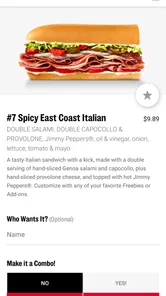
Now, let’s talk about the heart of the app – the menu. The options are presented in a visually appealing manner, making my decision both exciting and challenging. From the classic Turkey Tom to the indulgent Italian Night Club, each sandwich is detailed with ingredients and nutritional info. I appreciated the feature that allows customization of sandwiches, catering to every taste bud.
More From Our News Desk

Weather by Xiaomi Review: Clear at a Glance, Less Clear Up Close

X Under Pressure: Can It Recover When Posting Goes Wrong?

Clash of Clans Is Won Between the Battles

Android Auto Makes the Case for Quieter Car Software

MobiOffice: Transforming Mobile Productivity with Seamless Integration

EA SPORTS FC™ Mobile Soccer: Redefining Mobile Sports Gaming
Customization is especially helpful when I’m ordering for someone else or trying to keep a familiar sandwich close to my usual preference. I’d still take a moment to review each item before adding it to the cart: small choices are easy to overlook when ordering quickly, and a menu that invites changes also asks you to pay attention. If I’m unfamiliar with a sandwich, checking its listed ingredients is a better starting point than relying on its name alone.
Ordering Made Easy
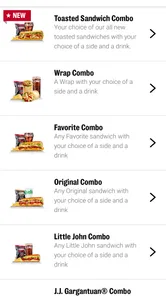
Ordering through the Jimmy John's Sandwiches app was seamless. The process is as simple as selecting your desired sandwich, customizing it if needed, adding it to the cart, and checking out. Payment options are varied, including credit/debit cards and even Google Pay and Apple Pay. There’s also a nifty feature for saving your favorite orders for quick reordering. Trust me, once you find your perfect sandwich, you’ll want it again and again!
That saved-order option is most useful for a regular lunch routine, but I wouldn’t let convenience rush me through the last check. Before submitting, I’d confirm the items and any changes, particularly when a saved choice is being used as the base for a new order. Compared with ordering through a general food-delivery service, a restaurant’s own app can feel more direct when I already want that restaurant; a broader service may be more useful when I’m choosing between several places instead.
Delivery and In-Store Pickup
Whether you’re at home or on the go, the app has you covered. I found the delivery service to be incredibly fast, living up to Jimmy John’s reputation for being "Freaky Fast." There are also options for in-store pickup, which is great if you’re out and about and need a quick sandwich fix. The app updates you with real-time notifications, so you’re never left wondering where your order is.
I’d treat delivery and pickup as different kinds of convenience, rather than assuming one is always better. Delivery makes sense when I can’t leave home or work, while pickup can suit a short break when I’m already nearby. If the timing is important, I’d choose the option that best matches my location and plans, and leave enough flexibility for the handoff; a notification can keep me informed, but it does not remove the need to be ready to receive the order.
User Experience and Features
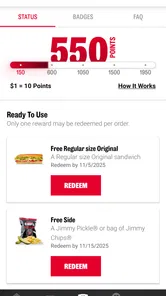
The app isn't just about ordering sandwiches; it's about enhancing the overall user experience. The rewards program is a fantastic addition, offering points for every purchase that can be redeemed for free items. Who doesn’t love free food? There’s also a store locator feature, ensuring you can find the nearest Jimmy John's when those sandwich cravings hit.
The rewards element gives regular customers another reason to place orders through the app, while the store locator is handy when I’m somewhere unfamiliar and want to check for a nearby location. I’d use the app most if Jimmy John’s is already my choice, not as a way to compare every restaurant around me. Someone who wants a wide selection across different cuisines may be better served by a general delivery app; someone who wants a Jimmy John’s sandwich and a repeatable ordering routine has a clearer reason to keep this one.
Reliability when plans change
Ordering on a phone is convenient, but I still treat the final confirmation as an important step, especially when a lunch plan involves other people. Before placing an order, I’d check that the selected location and handoff choice fit where I’ll actually be. That small pause is useful when plans shift from eating at the office to picking up on the way home: an easy ordering flow cannot make an outdated choice the right one.
The app’s rewards tracking can also be a reason to use it consistently, but I wouldn’t make a purchase just to chase a reward. For an occasional customer, the simpler choice may be to order only when a Jimmy John’s meal already suits the day. For someone who returns regularly, keeping orders and rewards in the same restaurant-focused experience may be worthwhile. I’d check the current reward details in the app rather than assume every purchase or offer works the same way.
Stability, device fit, and who should skip it
For everyday use, the most useful test is whether the app lets me complete a simple order without unnecessary detours. I would keep the process manageable by deciding on delivery or pickup first, then browsing and checking out, instead of exploring the whole menu when I’m already short on time. If I’m ordering for a group, I’d review the cart once more before submitting so that a rushed tap does not turn into a wrong lunch.
The current version is 7.1.2, and the app supports devices running Android 9 or later. Its content rating is Everyone. If your device cannot run that Android version, or you prefer not to use a restaurant-specific app, a different ordering method may suit you better. The app is free to download, but I’d still judge its value by how often I order from Jimmy John’s rather than by the download cost alone.
I wouldn’t read the popularity of an ordering app as a promise that every session or handoff will be flawless. If something interrupts an order, my practical approach would be to reopen the app and check the cart or order status before trying again, so I don’t accidentally submit the same request twice. That’s sensible caution with any mobile order, and particularly useful when I’ve already tapped through checkout once.
As for device demands, the Android minimum gives a straightforward compatibility check, but it doesn’t tell me how much storage or battery the app uses in day-to-day use. I’d avoid keeping it installed on a device that is already short on space if I only order from Jimmy John’s once in a while. On a phone that meets the requirement, I’d expect the main workload to be ordinary browsing and ordering rather than something that needs constant attention or heavy processing.
Who will get the most from it
I’d recommend it to people who already enjoy Jimmy John’s, order the same sandwich more than once, or want to choose between delivery and pickup without repeating their preferences each time. It is also useful when a small group needs to settle on specific sandwiches and one person is coordinating the order. The strongest reason to keep it installed is repeated convenience, not simply having another food app on the phone.
On the other hand, I’d skip it if I rarely eat at Jimmy John’s, mainly want to compare restaurants, or prefer to decide what to eat only after seeing a broad range of local options. A restaurant’s own app naturally focuses on its own menu. That focus is an advantage when I know what I’m craving, but a limitation when I’m undecided and want alternatives in one place.
There’s also a useful middle ground for people who don’t want another app taking up space: use the restaurant’s usual ordering route when you’re trying it once, then consider installing this one if you find yourself returning. A dedicated app earns its place when repeat ordering, customization, pickup planning, or rewards make a regular routine easier. If none of those matter to you, the broader choice of a general delivery service—or simply deciding in person—may be more useful.
My performance verdict
For the task it is designed around, the app’s appeal is practical rather than technical: it gives Jimmy John’s customers a way to browse and arrange an order without making the process the main event of lunch. I’d use it when I have a clear sandwich choice, want to organize a pickup, or need to coordinate a modest group order. I’d be more cautious when timing is tight, when a delivery handoff depends on precise plans, or when I’m still comparing restaurants.
Overall, I see it as a focused convenience, not a replacement for every way of ordering food. The smoothest experience comes from knowing what you want, confirming the details, and choosing the handoff that works for your day. If that describes how you buy lunch, the app has a clear purpose; if you want broad discovery or use Jimmy John’s only rarely, it may not earn a permanent spot on your phone.
In conclusion, the Jimmy John's Sandwiches app is a must-have for sandwich lovers. It combines ease of use with a range of features that make ordering your favorite sandwiches a delightful experience. Whether you’re a regular or a newbie to Jimmy John's, this app will surely satisfy your sandwich desires efficiently and deliciously.
Jimmy John's Sandwiches Frequently Asked Questions
Can I check whether delivery or pickup is available for my order?
The app is built around arranging orders for delivery or pickup, so it can help you choose the option that suits your plans. Availability can depend on the order and location you select, so check the choices shown while placing your order. If you are planning ahead, reviewing the available options in the app can help you decide how to get your meal.
Does the Jimmy John's Sandwiches app include a rewards program?
Yes. The app highlights rewards as one of its conveniences, making it useful for customers who order regularly and want to keep track of their rewards activity. You can explore the rewards section in the app to see what is available to you. Alongside ordering sandwiches and boxed lunches for pickup or delivery, rewards are part of the app’s main appeal.
What devices and software do I need to use the Jimmy John's Sandwiches app?
The app is available for Android and iOS devices. For Android, it requires version 9 or later, so it is a good idea to check your device’s software before downloading. If your phone meets that requirement, you can use the app to browse and arrange orders. Checking compatibility first can save time if you are deciding whether to install it.
Do I need an account to place an order in the Jimmy John's Sandwiches app?
The app is designed to make ordering and reordering convenient, with features such as saved favorite orders and rewards. Before downloading, consider whether you want to use those personalized options or simply browse the menu. An account can be useful for keeping your preferences and activity together, while the app’s main appeal is making it easier to arrange sandwiches for pickup or delivery.
What features does the Jimmy John's Sandwiches app offer for users?
The Jimmy John's Sandwiches app offers a variety of features designed for convenience and ease of use. Users can easily browse the menu, customize their sandwiches, and place orders for delivery or pickup. The app also includes a location finder to help users find the nearest store, track their orders in real-time, and save favorite orders for quick reordering. Additionally, the app offers special promotions and rewards for frequent users, enhancing the overall customer experience.
Pros
- Quick and efficient delivery service.
- Easy-to-use and intuitive interface.
- Variety of sandwich options available.
- Customizable orders to fit preferences.
- Offers nutritional information for items.
Cons
- Limited vegetarian/vegan options.
- No loyalty rewards program available.
- Delivery area coverage can be limited.
- App glitches reported by some users.
- Inconsistent delivery times reported.











