Jim: sell & get paid instantly
- 470.00
- 4.3
- Installs
- 100.00K
- Price
- Free

Screenshots
Analysis by Reviewed
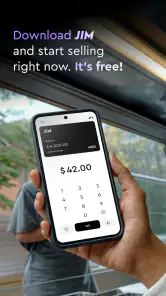
I tested Jim: sell & get paid instantly as a finance app built around one clear idea: using a phone as a card reader. That focus makes it more interesting than a general wallet or banking app, because the phone becomes the point where a sale can happen. For a small seller, freelancer, market trader, or anyone who occasionally accepts card payments, that can remove a surprisingly awkward step from everyday work.
My first impression is that Jim is easiest to understand when viewed as a compact payment tool rather than a complete business-management system. It is free to download, aimed at Everyone, and developed by CloudWalk. The app has reached over one hundred thousand installs, with an average rating of 4.3 from around two thousand ratings. Those figures suggest that the concept is already attracting practical users, but I would still judge it by the way it fits your selling routine rather than by popularity alone.
Turning a phone into the checkout
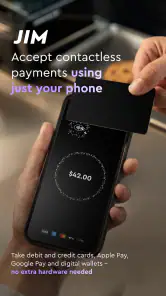
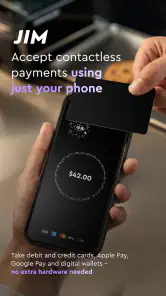
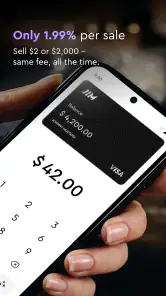
The verified capability at the heart of Jim is phone-based card acceptance. Instead of carrying a separate card terminal, the seller can use a compatible phone as the place where the customer’s payment is handled. That matters most when you do not have a fixed counter, when you move between customers, or when buying dedicated equipment feels excessive for the amount of business you do.
I like this approach because it changes the physical setup of a sale. A traditional terminal is another object to charge, store, protect, and remember. A phone is already something most sellers keep close. Combining the two can make a payment moment feel less like a special procedure and more like a normal part of the conversation with a customer.
There is also a useful psychological benefit. When a seller has to say, “I only take cash,” the sale can become uncertain. A phone-based reader gives the seller another way to finish the transaction. That does not guarantee every payment will work, but it can make card acceptance possible in places where carrying a terminal would be inconvenient.
Jim is particularly relevant to people who sell outside a permanent shop. Think of a designer taking payment after delivering a small order, a food seller working at a temporary stand, or a local service provider collecting payment after an appointment. In each case, portability is not a decorative feature; it directly affects whether the seller can accept the customer’s preferred method at that moment.
What the phone-first approach changes
With a conventional card machine, the device itself usually defines the payment workflow. With Jim, the phone becomes part of that workflow, so the seller needs to treat it as business equipment during a transaction. Battery level, screen visibility, a stable connection, and keeping the device available all become more important than they would be if the payment hardware were separate.
More From Our News Desk

Weather by Xiaomi Review: Clear at a Glance, Less Clear Up Close

X Under Pressure: Can It Recover When Posting Goes Wrong?

Clash of Clans Is Won Between the Battles

Android Auto Makes the Case for Quieter Car Software

MobiOffice: Transforming Mobile Productivity with Seamless Integration

EA SPORTS FC™ Mobile Soccer: Redefining Mobile Sports Gaming
That is the main trade-off I noticed in the concept. You gain simplicity by removing an extra terminal, but you also place more responsibility on the phone. If you use the same device for calls, navigation, messages, and payments, a busy day can expose practical friction that is easy to overlook when reading a short store description.
For occasional sellers, that exchange may be worthwhile. For a busy counter handling a constant stream of customers, a dedicated terminal can still feel more dependable because it is designed only for payments. Jim makes the strongest case when flexibility and low equipment overhead matter more than having a specialized checkout station.
How I would use it during a real sale
I would prepare the phone before opening the app in front of a customer. That means checking the battery, making sure the device is not cluttered with background tasks, and keeping the screen easy to read. These are small habits, but they reduce the chance that a payment becomes a pause while the seller searches for a charger or waits for the phone to respond.
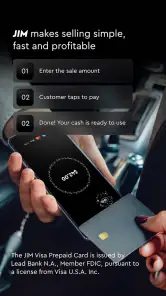
The basic rhythm is straightforward: open the app, enter or confirm the amount, present the phone as the payment point, and wait for the transaction to finish. The important detail is not the number of taps; it is keeping the interaction clear for the customer. I would say the amount aloud before accepting the payment and show the confirmation screen afterward. That creates a simple shared check without making the customer guess whether the transaction succeeded.
A useful workflow is to separate selling from bookkeeping. Jim’s core appeal is accepting payment, but I would not assume that the payment screen alone replaces a sales log. After each transaction, I would record the item or service separately if I needed detailed inventory, tax, or customer-history information. This is one of the less obvious limitations of a focused payment app: completing a payment and managing a business are related tasks, but they are not the same task.
For a small seller, I would keep a short end-of-day routine. I would compare the payments shown in the app with my own order notes, mark any cash sales separately, and check that every customer received a clear confirmation. This is especially helpful when several sales happen quickly and the phone is being passed between conversations rather than used at a formal checkout desk.
A practical example away from a shop
Imagine I sell handmade items at a temporary community event. I have a small display, limited table space, and no desire to bring a full payment setup for a single day. A customer chooses an item, I confirm the amount, and I use my phone to accept the card payment. The key benefit is not that the transaction becomes magically faster; it is that I can complete it without sending the customer to find cash or carrying another device.
In that situation, I would keep the phone in one hand and the product or receipt process in the other, making sure the customer can see the amount before paying. If the event is crowded, I would also create a simple queue habit: finish one confirmation before starting the next sale. That prevents the common problem of mixing up which customer has paid when several people are waiting.
Jim is also a reasonable fit for a freelancer who normally invoices but occasionally needs payment at the end of an in-person job. The phone-based format makes sense when the work happens at the customer’s location and carrying a terminal would be unnecessary. It gives the seller a way to handle an immediate payment without changing the entire business model.
At the same time, I would not present it as a replacement for every payment arrangement. A customer who prefers bank transfer, cash, or an invoice may still want another option. The best use is as an additional route, particularly for sellers who lose convenience when card acceptance is unavailable.
Small habits that make the experience better
My first practical tip is to treat the phone like a checkout device during the payment, even though it is also a personal phone. I would avoid beginning a sale while navigating, taking a call, or switching between several apps. A clean, uninterrupted interaction is easier for both sides and lowers the chance of entering the wrong amount.
The second tip is to build a confirmation habit that does not depend on memory. After a payment, I would wait for the app’s completion state and show it to the customer rather than relying on a sound, vibration, or a quick glance. This is useful when the environment is noisy or when the seller is processing several orders in succession.
Third, I would plan for the phone’s physical position. A screen lying flat on a busy table can be difficult for a customer to see, while holding it too close can make the payment feel rushed. A stable, visible position makes the transaction more transparent. This is a small design choice, but it has a real effect on trust.
Fourth, I would keep a backup payment conversation ready. If the phone is low on power or the connection is unreliable, the seller should be able to explain the alternative without improvising in front of a waiting customer. Jim can reduce equipment needs, but it does not remove the need for a fallback plan.
Finally, I would use the app for the kind of sale it handles best and avoid forcing it into a larger role. If I needed complex stock control, employee permissions, detailed invoices, or a full register, I would look for a dedicated business system and consider Jim as one payment component rather than the entire operation.
Where the convenience has limits
The biggest limitation is dependence on the phone itself. A separate terminal can remain dedicated to payments while the seller’s personal device is used for everything else. With Jim, the seller has to protect the phone’s availability and keep it ready at the exact moment a customer wants to pay.
That can matter during long selling sessions. A phone used continuously for transactions may also be receiving messages, handling calls, or running other demanding tasks. Even when the app is simple to operate, the surrounding device environment can introduce interruptions. I would be comfortable with that for occasional or moderate use, but I would think carefully before relying on it as the only checkout method in a high-volume setting.
There is also a learning curve for customers. Some people immediately understand a phone-based card reader, while others may hesitate because they are used to a conventional terminal. The seller may need to explain where to present the card or how to recognize the successful payment. That explanation is not a serious flaw, but it means the experience depends partly on how confidently the seller guides the transaction.
Another trade-off is specialization. Jim’s central job is accepting payment, not replacing every tool a business might need. Someone who expects built-in inventory management, product catalogs, staff controls, customer records, or detailed reporting may find the phone-reader approach too narrow. A broader point-of-sale system would be better for a shop with multiple employees and a more complicated sales process.
I would also avoid choosing it solely because it is free. The absence of a download price makes trying the app easier, but the real decision should include the complete payment arrangement and how it fits your operation. A free app can still be the wrong choice if your customers need a different payment method or if your business requires capabilities beyond accepting a card.
The app’s current version is 1.4.19, and it requires Android 7.0 or newer. That makes the operating-system requirement relatively approachable for many Android users, although I would still check the phone I plan to use before building a selling routine around it. The most important practical question is not only whether the app installs, but whether that particular phone is comfortable to use as a visible, reliable payment device.
Who benefits most from Jim
I think Jim is strongest for independent sellers who value mobility. A person who works from different locations, accepts occasional in-person payments, or does not want to buy a separate terminal can gain a lot from having the payment point inside a familiar device. The same is true for a small operation testing card acceptance without immediately investing in a larger checkout setup.
It is also useful for sellers whose customer flow changes from day to day. A mobile service provider may not know in advance where a payment will happen. A phone-based reader gives that person a more adaptable option than a fixed counter. The benefit is practical: fewer objects to carry and less dependence on a particular selling location.
I would be more cautious if you run a busy retail counter, need several people to accept payments, or depend on detailed business reporting. In those cases, a dedicated point-of-sale platform may offer a smoother overall process even if it requires more setup. Jim can still be useful as a portable backup, but I would not automatically make it the center of a complex operation.
It may also be a poor fit for someone who rarely accepts card payments and already has a simple, reliable alternative. If your customers normally pay through invoices or cash and you do not need mobile card acceptance, adding another workflow may create more administration than value.
CloudWalk has kept the product’s identity focused: the phone is not merely displaying account information; it is being used at the moment money changes hands. That narrow purpose is the reason to try it, and also the reason not to expect it to behave like a full accounting or retail-management suite.
After using the concept in realistic selling situations, my view is positive but conditional. Jim is most convincing when portability matters more than a traditional terminal. It can make an occasional sale easier to complete, especially for independent workers and temporary sellers, while keeping the equipment burden low.
I would recommend starting with a small number of test transactions before depending on it for an important event. That lets you learn the payment flow, decide where the phone should sit, establish your confirmation routine, and see whether the app fits naturally beside your existing records. If that trial feels comfortable, the free price and phone-first design make Jim an appealing addition to a small seller’s toolkit.
My final recommendation is simple: choose it when your main problem is accepting cards away from a fixed checkout. Choose a broader point-of-sale solution when your main problem is managing a busy business. For the first situation, Jim: sell & get paid instantly offers a focused and practical answer, provided you are willing to treat your phone as part of the payment equipment rather than just another personal device.
Jim: sell & get paid instantly Frequently Asked Questions
Is Jim: sell & get paid instantly free to download?
Jim is free to download, so you can install it without paying an upfront app price. Keep in mind that a free download does not automatically mean every transaction or optional service is free; any applicable charges depend on the transaction and the terms shown in the app. Review those details before listing an item or accepting a payment.
What is Jim: sell & get paid instantly?
Jim: sell & get paid instantly is a marketplace app designed to make selling items more convenient. Users can create listings, communicate with potential buyers, and arrange transactions through their mobile device. The app focuses on simplifying the selling process, helping you present products clearly and receive payment quickly, depending on the available payment methods and transaction conditions in your region.
How does selling an item through Jim work?
To sell an item, you generally create a listing by adding photos, a title, description, price, and other relevant details. Once the listing is published, interested buyers can contact you or proceed according to the app’s selling flow. Before accepting an offer, check the buyer information, confirm the final price, and carefully review any delivery, pickup, or payment instructions shown in the app.
Do sellers really get paid instantly on Jim?
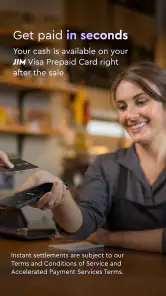
The phrase “get paid instantly” describes the app’s goal of speeding up transactions, but the exact timing can depend on several factors. Payment availability may vary according to the selected payment method, buyer confirmation, identity checks, bank processing times, refunds, and local regulations. Always review the payment status inside the app and do not hand over an item until the transaction is confirmed.
Is Jim safe to use when selling or buying items?
Jim may include features intended to support safer marketplace transactions, but users should still take normal precautions. Keep conversations and payments within the official app whenever possible, avoid sharing unnecessary personal information, and be cautious of requests involving external links, gift cards, overpayment, or urgent transfers. For in-person exchanges, choose a public location and verify payment before completing the handover.
Pros
- Instant payment options help sellers access earnings quickly.
- Simple listing tools make it easy to upload and manage items.
- Built-in messaging supports direct communication with buyers.
- Useful for selling locally without complicated marketplace setup.
- Mobile notifications help users respond promptly to offers and sales.
Cons
- Availability and features may vary depending on your location.
- Transaction fees can reduce the final amount sellers receive.
- Buyer interest may be limited compared with larger marketplaces.
- Users may need to handle shipping
- meetups
- or delivery themselves.
- Account verification could be required before selling or receiving payments.
- Category
- Finance
- Version
- 1.4.19












