Jersey Mike's
- 52.86K
- 4.8
- Installs
- 5.00M
- Price
- Free

Screenshots

Analysis by Reviewed
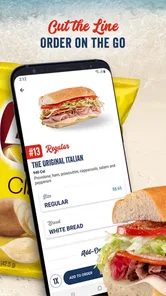
I like apps that solve a specific annoyance without making lunch feel like a project, and Jersey Mike’s is built around one useful idea: place your sandwich order before you reach the shop. The app comes from Jersey Mike’s Subs, is free, and sits in the food-and-drink category. In my view, that makes it most valuable on a busy day when I already know what I want and would rather spend my break eating than waiting to order.
Ordering ahead is the point
The main benefit is practical, not complicated. Instead of deciding at the counter while people queue behind you, you can put together an order on your phone and arrange to collect it at a Jersey Mike’s. That shift is especially helpful when you have a short lunch break, are picking up food for someone else, or want to get the order details right before you arrive.
It does not make every visit effortless: you still need to choose a participating nearby shop, make your selections, and collect the food yourself. But for a familiar lunch routine, moving the decision out of the queue can make the whole stop feel calmer. I would treat it as a convenience for planning pickup, rather than as a general restaurant-discovery app.
A better workflow for regular orders
If you tend to order the same sub, using the app can also give you a moment to check the details before submitting. I find that useful for avoiding the rushed “wait, did I ask for that?” feeling at the register. For a group pickup, it helps to settle everyone’s choices first and review the combined order before heading out; that is a small step, but it can prevent a last-minute scramble when several people want different things.
One practical trade-off is that order-ahead convenience depends on the location being a sensible stop for your route and the pickup timing working for your day. If you are already walking past a shop and have no time pressure, ordering in person may be just as easy. Likewise, someone who wants a broad choice of restaurants in one place will probably prefer a delivery or restaurant-aggregator app. Jersey Mike’s is narrower by design: it serves people who have chosen this sandwich shop, not people still comparing cuisines.
Who will get the most from it?
I’d recommend it to regular customers, commuters, and anyone coordinating a quick sandwich pickup for coworkers or family. It is less compelling if you visit only occasionally, like to browse menus across many restaurants, or need food brought to your door rather than collected. The app is rated 4.8 from around 137,000 ratings, with over 5 million installs, which suggests plenty of customers use it; that does not guarantee every pickup will suit your schedule, so I’d still leave a little breathing room when lunch is time-sensitive.
Jersey Mike’s has been available since April 6, 2016, and version 2.42.1 supports Android 8.0 and newer. Its Everyone age rating makes it broadly suitable for customers of different ages, though anyone placing an order should still check the choices carefully before paying. The strongest reason to install it is simple: if Jersey Mike’s is already part of your routine, ordering ahead can make that routine easier. If it is not, the app alone is unlikely to change where you want to eat.
More From Our News Desk

Weather by Xiaomi Review: Clear at a Glance, Less Clear Up Close

X Under Pressure: Can It Recover When Posting Goes Wrong?

Clash of Clans Is Won Between the Battles

Android Auto Makes the Case for Quieter Car Software

MobiOffice: Transforming Mobile Productivity with Seamless Integration

EA SPORTS FC™ Mobile Soccer: Redefining Mobile Sports Gaming
Why planning the order can make a difference
The useful change is not simply moving a few taps from the counter to a screen. It gives me a chance to make the choices when I am not holding up a line or trying to talk over a busy lunch rush. That matters most when I am ordering for more than one person, since each person can settle on a sandwich before I submit anything. I would still take a final look at the order rather than assume that a familiar routine makes mistakes impossible.
For a typical weekday, I might decide on lunch during a quiet moment, select the shop that makes sense for my route, and place the order before leaving. When I arrive, the goal is to collect rather than begin the whole decision-making process from scratch. That can make a short break feel less rushed, although it does not remove the travel or pickup part of the errand. If plans change, I would not assume an order can be adjusted after submission; I would make sure the choices and location are right first.
Small habits that make pickup smoother
My most useful tip is to treat the final review as part of ordering, not as an optional extra. Check the selected shop, the items, and any custom choices before placing the order. With a group, collect everyone’s decisions first instead of passing the phone around while people are still debating. That simple sequence reduces the chance of submitting an incomplete order and keeps the app’s main advantage—less counter-side deliberation—from getting lost in a different kind of scramble.
I would also choose a location based on where I will actually be, rather than selecting the nearest one without thinking about the route. The closest shop may not be the easiest stop if I am heading somewhere else, and pickup only helps when the collection point fits the trip. This is a modest but important distinction: the app can organize an order, but I still have to plan the real-world handoff around my day.
When another ordering option makes more sense
Compared with a restaurant aggregator, this is a focused tool rather than a place to compare a long list of cuisines. That focus suits someone who has already decided on Jersey Mike’s; it is less useful when the question is whether to get a sandwich, a salad, or something from another restaurant. Ordering at the counter remains a reasonable alternative for an unplanned visit, especially when there is no queue or I want to decide after seeing the menu.
Delivery apps serve a different need. If I cannot leave work or want food brought to my door, pickup planning does not solve that problem. I would choose this app when I am willing and able to collect the order, and use another route when delivery or restaurant comparison matters more. In other words, its convenience is real but specific: it helps with the ordering part of a Jersey Mike’s pickup, not every part of getting lunch.
What to expect from the experience
The app is free, and its age rating is Everyone. It was released on April 6, 2016, and its current version is 2.42.1, with Android 8.0 as the minimum operating system. Those details make it straightforward to judge basic compatibility, but the practical question is whether the pickup workflow fits your habits. If you use an older device, checking its Android version before relying on the app is a sensible first step.
There is also a difference between a high overall rating and a guarantee about a particular visit. The app has a 4.8 average from around 137,000 ratings and more than 50,000 reviews, while installs exceed 5 million. Those figures show broad use, but a smooth result still depends on choosing carefully and allowing enough time to collect. I would view the app’s reputation as reassuring context, not a reason to cut a time-sensitive lunch plan too close.
Customers may wonder whether it is worthwhile if they do not order often. I think that depends less on frequency than on the kind of visit: an occasional customer with a predictable stop can still benefit from deciding ahead, while a regular who enjoys browsing in person may not feel much difference. If the meal is for a group, the value rises because the order can be reviewed before everyone reaches the counter. If I am simply passing a shop with time to spare, I would not open the app just for the sake of it.
A focused recommendation
Hey there, sandwich lovers! If you’re always on the hunt for the next best thing in subs, then you might have already heard of Jersey Mike's. Yep, this isn’t just your regular sandwich chain; it's a flavor-packed extravaganza that brings the East Coast vibe right to your fingertips. Whether you're a newbie or a seasoned fan, the app is here to make your sub-experience even more epic. Let’s dive into what makes this app a must-have for any sub enthusiast.
What's Cooking in the App?
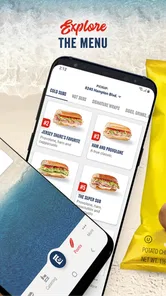
First things first, let's talk about the user interface. The app is clean, simple, and super user-friendly. From the moment you open it, you’re greeted with a straightforward layout that makes ordering your favorite sub as easy as pie. No more fumbling around trying to find your go-to sandwich; everything is right where it should be.
Order Like a Pro
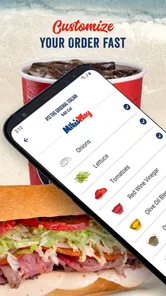
One of the coolest features of the app is the ability to customize your order. Whether you’re in the mood for a classic Italian or want to mix things up with a Chicken Philly, the app allows you to tweak your sub to your heart's content. Want extra pickles or double meat? Just a tap away! It’s like having your own personal sandwich artist in your pocket.
And hey, if you're someone who can’t decide what to eat, the app’s got you covered with its featured items section. Here, you can find some of the most popular subs that other users are raving about. It’s a great way to discover new favorites!
Rewards and More
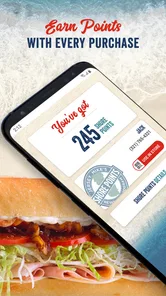
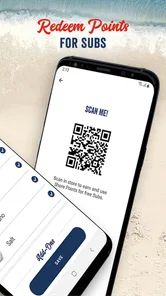
Now, let's talk perks. Who doesn’t love a good reward system? With the app, you earn Shore Points with every purchase. Rack up enough points, and you can snag a free sub. It’s a win-win situation: you get to enjoy delicious subs and earn rewards at the same time.
Plus, the app keeps you in the loop about the latest promotions and deals. So, if there’s a special offer on your favorite sandwich, you’ll be the first to know. No more missing out on those sweet deals!
Location, Location, Location
Another handy feature is the store locator. If you’re out and about and craving a sub, just pull up the app, and it will direct you to the nearest Jersey Mike's location. It’s super convenient, especially if you’re in a new city and the sub cravings hit hard.
And let’s not forget about the order tracking feature. Once you’ve placed your order, you can track it in real-time, so you know exactly when your tasty sub will be ready for pickup. No more waiting around wondering if your order got lost in sub-limbo!
In conclusion, the Jersey Mike's app is a game-changer for anyone who loves a good sub. With its user-friendly interface, customizable options, and rewarding perks, it’s a no-brainer for sandwich aficionados. Whether you’re ordering lunch on the go or planning a family sub feast, this app has got you covered. So, what are you waiting for? Dive into the delicious world of Jersey Mike's and let the sub adventures begin!
My final take on using it
For me, the strongest case for keeping the app is a repeatable pickup routine: I know what I want, I know which shop fits my route, and I want to spend less of my break sorting out the order. It is especially handy when I am coordinating several sandwiches, because reviewing the choices before setting out is more comfortable than trying to remember everyone’s preferences at the counter.
I would skip it if I mainly want delivery, compare restaurants before choosing lunch, or enjoy making an unhurried decision in person. Those are not flaws so much as limits of a single-chain pickup app. If a Jersey Mike’s sandwich is already your plan, the ordering tools, customization, rewards, offers, location help, and pickup tracking give you practical reasons to use it. Just check the details before submitting and leave enough time for the trip. That’s the kind of convenience I would recommend to a friend: useful when it matches the day, without pretending to replace every way of ordering lunch.
Jersey Mike's Frequently Asked Questions
What is Jersey Mike’s, and what can I use the app for?
Jersey Mike’s is a food-ordering app from Jersey Mike’s Subs. Its main purpose is to let you order food ahead from your phone and avoid waiting at your favorite Jersey Mike’s. It is most useful if you already have a meal in mind and want to arrange your order before heading to a location. The app is free to download.
Can I use the app to find a nearby Jersey Mike’s before ordering?
The app includes a feature for finding nearby Jersey Mike’s locations, which can help you choose where to place an order. This is handy when you are away from your usual restaurant or want to plan an order around a particular location. You can also use the app to browse and customize choices, then complete your order through its checkout flow.
Is the Jersey Mike's app free to download, and what devices can run it?
The Jersey Mike's app is free to download and is available for Android and iOS devices. It requires Android 8.0 or later, so it is worth checking your device’s software before installing. The app is intended for everyone and focuses on convenient food ordering, making it a practical option if you want to browse and arrange a Jersey Mike’s order from your phone.
Can I order ahead with the Jersey Mike's app?
Yes. Ordering ahead is a central convenience of the app: you can place a food order from your phone and avoid waiting at your favorite Jersey Mike’s. It is useful when you already know what you want and would rather arrange the order before arriving. You can browse and customize your choices in the app, then use its checkout flow to complete the order.
What features does the Jersey Mike's app offer for users?
The Jersey Mike's app provides a seamless experience for ordering your favorite subs on the go. Users can customize their orders, find nearby locations, earn and redeem Shore Points for rewards, and access exclusive promotions. The app also allows for convenient payment options, including credit cards and gift cards, ensuring a quick and hassle-free checkout process.
Pros
- User-friendly interface
- Wide variety of subs
- Loyalty rewards program
- Fast delivery service
- Online customization options
Cons
- Limited delivery areas
- No gluten-free options
- Occasional app crashes
- High delivery fees
- Limited vegetarian choices











