Jason's Deli
- 1.14K
- 4.8
- Installs
- 500.00K
- Price
- Free

Screenshots


Analysis by Reviewed
I’d treat the Jason’s Deli app as a practical ordering tool, not a reason on its own to choose a meal. Its main appeal is simple: I can browse deli food and arrange delivery or takeout without joining a line. Whether that convenience is worthwhile depends on whether a Jason’s Deli location serves the area and whether its menu suits the occasion.
What the free price does—and doesn’t—tell you
The app is free to download, so trying it does not require paying for the app itself. Jason’s Deli, the restaurant developer, has built it for people who want to place an order rather than just look up deli options. That makes the cost question easy at the download stage, but it does not mean the meal or delivery is free: I’d check the order details before submitting and judge the total against the convenience I’m getting.
That distinction matters when comparing it with ordering in person. If I’m already near a deli, walking in may be just as convenient and avoids making an app part of the process. When I’m at work, at home, or coordinating lunch for several people, placing the order ahead can be more useful. I see the app’s value as time and reduced hassle, not a discount promise.
Ease of Use: Navigating the App
The first thing you’ll notice about the Jason's Deli app is its user-friendly interface. Right off the bat, I was impressed with how intuitive everything felt. The main menu is straightforward, making it a breeze to find what you're looking for. Whether you want to explore their menu or dive straight into ordering, each option is just a tap away.
One feature that stood out to me was the app's seamless navigation. It’s clear that a lot of thought went into making sure users can easily scroll through the extensive menu options. Trust me, you’ll be grateful for this when you’re hangry and need to order, like, yesterday!
Menu Variety: A Deli Lover's Dream
Now, onto the main event – the menu. Wow, where do I start? The range of choices is impressive. From classic sandwiches to fresh salads and mouth-watering sides, Jason's Deli has something for everyone. The app neatly categorizes everything, so browsing through options is as easy as pie.
I particularly loved the detailed descriptions and images for each item. It’s almost as if you can taste the food just by looking at it. This aspect is crucial, especially when you're ordering something new and want to know exactly what you're getting into.
More From Our News Desk

Weather by Xiaomi Review: Clear at a Glance, Less Clear Up Close

X Under Pressure: Can It Recover When Posting Goes Wrong?

Clash of Clans Is Won Between the Battles

Android Auto Makes the Case for Quieter Car Software

MobiOffice: Transforming Mobile Productivity with Seamless Integration

EA SPORTS FC™ Mobile Soccer: Redefining Mobile Sports Gaming
Making the menu work for your plans
For a quick solo lunch, I’d use the menu descriptions to settle on a familiar sandwich without spending time comparing every option. For a group order, browsing the categories first helps me think through the mix: sandwiches for people who want something filling, salads for anyone after a lighter choice, and sides to round things out. I’d still ask the group about preferences before placing the order; a wide menu gives people options, but it doesn’t make guessing their tastes any easier.
A useful habit is to review the whole order before checkout, especially when ordering for others. I’d check that each person’s choice is represented and that I haven’t mistaken a side for a main item. The descriptions and pictures are helpful when I’m unfamiliar with a dish, but they’re best treated as a browsing aid rather than a substitute for checking the item details carefully.
Ordering and Delivery: Sleek and Swift
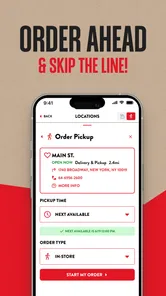
Ordering through the app is a breeze. I placed my order in under five minutes, and the best part? You can track your delivery in real-time. No more guessing games about when your food will arrive. The app sends you notifications every step of the way, from when your order is accepted to when it’s en route to your location.
And let's talk about delivery times. I was genuinely surprised at how quickly my food arrived. It's clear that Jason's Deli prioritizes getting your order to you as fresh and fast as possible. Plus, if you prefer picking up your order, the app has a handy feature that lets you schedule a pickup time. Convenience at its finest!
Choosing delivery, pickup, or the usual alternatives
The most useful choice depends on where I’ll be when the food is ready. If I’m staying put, delivery saves a trip; if I’ll pass near the deli anyway, scheduled pickup may fit my day better. I’d avoid placing a pickup order too early if my plans are uncertain, since a scheduled time only helps when I can actually collect it then. For an immediate meal, I’d also compare the app with simply ordering at the counter: the app is more attractive when I want to decide in advance, while walking in keeps things straightforward when I’m already there.
Compared with a general food-ordering service, a restaurant’s own app is a more focused way to browse Jason’s Deli specifically. That focus is useful when I already know what I want from its menu; it is less helpful if I’m deciding between several nearby restaurants or want to compare their menus in one place. I’d use this app to make a Jason’s Deli order, not as a broad restaurant-discovery tool.
Small decisions that make ordering smoother
For a workday lunch, I’d place the order before the busiest part of my schedule and choose pickup only if I can leave at the planned time. For delivery, I’d keep my phone nearby so I can see the order updates and respond if needed. These are ordinary steps, but they reduce the uncertainty that can make ordering food inconvenient in the first place.
The trade-off is that convenience still depends on the delivery or pickup option fitting my location and plans. Tracking can help me follow an order, but it doesn’t remove the need to allow time for the meal to arrive. If I’m in a rush with no flexibility, or I need to compare many restaurants before choosing, the app may not be the best first stop.
Who gets the most value from it?
I’d recommend trying it if Jason’s Deli is already a place you enjoy, especially when you want to arrange lunch from a desk, plan a pickup around errands, or bring several people’s choices together. It is also a sensible option for someone who likes to read menu descriptions before deciding rather than make a quick choice at the counter. With a 4.7 average from around 4,300 ratings, it has found an audience, though ratings alone can’t tell me whether it suits my own ordering habits.
Someone who rarely eats deli food, prefers choosing among lots of nearby restaurants, or would rather order face-to-face may get little from installing it. The app is free and rated for everyone; it launched on April 30, 2017, and its current version is 4.9.1, with Android 6.0 as the minimum OS. It has passed 500,000 installs, but those figures are context, not a reason to download it if the restaurant’s menu is not for you.
Final Thoughts: More Than Just a Deli
In conclusion, if you’re someone who loves deli food and values convenience, this app is a must-have. The Jason's Deli app combines the charm of a traditional deli with modern technology, bringing delicious meals right to your doorstep. Whether you're a sandwich enthusiast or just looking for an easy way to grab lunch, this app delivers on all fronts.
So next time you're in the mood for a tasty meal without the hassle, give Jason's Deli a try. You might just find yourself wondering how you ever lived without it!
A practical lunch plan, from browse to handoff
Imagine I have a short break between meetings and want lunch without spending that break deciding where to go. I can browse the deli menu earlier, compare a sandwich with a salad, and settle on a choice before I’m hungry and rushed. That small change is where a focused restaurant app can make a real difference: it moves the decision out of the narrow window when I need to eat.
If I’m ordering for coworkers, I’d collect everyone’s choices first, then use the categories to build the order. I’d keep a simple note of who chose what, check the basket against it, and confirm the pickup or delivery plan with the group before submitting. This is especially useful when several people are sharing a deadline: fewer last-minute messages and fewer assumptions about who wanted which item.
Make the app work around uncertainty
Plans change, so I wouldn’t treat a scheduled pickup as a promise that the food will fit any future schedule. Before choosing it, I’d check whether I can realistically get to the restaurant at that time. If a meeting might run late, delivery may be the calmer choice if it is available for my location; if I’m already passing the deli, pickup avoids waiting for a driver. The best option is not automatically the fastest-sounding one, but the one with the fewest extra steps in my actual day.
There’s also a useful distinction between browsing and committing. I can explore the menu before deciding, but I’d pause at checkout to verify the location, the items, and the handoff choice. That final check matters more for group orders than solo ones, because a small selection mistake can affect someone else’s lunch. I wouldn’t rush through the last screen simply because the earlier browsing felt easy.
Where a restaurant app beats a general food app
When I already want Jason’s Deli, its own ordering app has an obvious advantage over a broad delivery app: the experience is centered on that restaurant rather than a list of competing places. I can spend my attention on its menu and the way I want to receive the order. A general service is more useful when I’m undecided, comparing cuisines, or trying to see several restaurants at once. These tools answer different questions, so I’d choose based on whether the restaurant decision is already made.
Ordering at the counter remains a reasonable alternative, too. It works well when I’m nearby, want to ask a question in person, or don’t need to plan ahead. The app is more compelling when I value browsing at my own pace or want to arrange a meal before reaching the deli. For a spontaneous stop with no line, adding a phone-based step may not improve anything.
Questions worth settling before checkout
One practical question is whether the app can serve my current location. Since delivery and pickup depend on where I am and which restaurant I can use, I’d start by checking the available location and order options rather than building a full order around an assumption. If the right location or handoff method is not available, a nearby alternative or an in-person visit may be more sensible.
Another question is whether the food suits everyone I’m ordering for. Menu descriptions and images help me understand choices, but I’d ask about preferences directly when dietary needs or strong dislikes matter. I would not rely on a picture alone to answer ingredient or preparation questions; when something is important, checking with the restaurant is the safer approach.
I’d also think about whether I need delivery tracking or simply need a convenient way to place a pickup order. Tracking can reduce the guesswork after an order is underway, but it does not replace planning a realistic arrival time or being ready to receive the food. If I can’t keep an eye on updates, or my schedule is too unpredictable, ordering closer to the moment may be a better fit.
Cost, usefulness, and the sensible verdict
The app’s no-cost download lowers the barrier to trying it, but I’d judge value by the meal and ordering experience rather than the download. I would compare the total shown at checkout with the convenience of delivery or pickup, and with the effort of ordering another way. Since the app is a tool for placing a restaurant order, not a meal plan or a way to compare every local option, its value is strongest when I already want this deli.
My recommendation is straightforward: install it if you regularly choose Jason’s Deli and expect to order ahead, especially for a work lunch, a planned pickup, or a small group order. Skip it if you mainly want to discover restaurants, prefer ordering face-to-face, or rarely eat from this menu. For me, it earns its place as a focused shortcut—not as a must-have for every diner.
Jason's Deli Frequently Asked Questions
Is Jason's Deli app free to download, and which devices can use it?
Jason's Deli is a free Food & Drink app from the Jason's Deli developer. It is intended for everyone and supports devices running Android 6.0 or later. Before downloading, check that your phone or tablet meets that minimum requirement and has enough available storage. Once installed, the app is designed to help you order Jason's Deli food for delivery or take-out.
Can I use the app to find a Jason's Deli location near me?
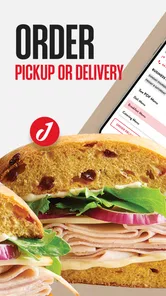
Yes, the app can help you find Jason's Deli locations, which is useful if you want to place an order for take-out or choose a nearby deli. Browsing for a location before ordering can help you start with the place that suits your plans. The app also supports ordering for delivery, so you can choose the option that works best for the occasion.
What is Jason's Deli app and what are its main features?
Jason's Deli app is a convenient mobile application designed for food lovers who enjoy the delicious offerings of Jason's Deli. The app allows users to easily browse the menu, place orders for delivery or pickup, and find the nearest Jason's Deli locations. Additionally, it offers nutritional information, special promotions, and loyalty rewards, making it a comprehensive tool for regular patrons of the deli.
How do I place an order using the Jason's Deli app?
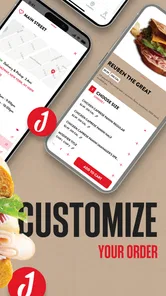
Placing an order on the Jason's Deli app is straightforward. Once you open the app, you can browse the menu, select your desired items, and customize them to your preference. After adding items to your cart, proceed to checkout where you can choose delivery or pickup options. Finally, complete the payment process using the app's secure payment gateway. Your order confirmation and estimated time of arrival will be provided.
Is there a loyalty program available on Jason's Deli app?
Yes, Jason's Deli app features a loyalty program that rewards frequent customers. Users can earn points with every purchase, which can later be redeemed for discounts or free items. The app keeps track of your points automatically, making it easy to monitor your progress and enjoy the rewards. Special promotions and exclusive offers are also available to loyalty program members.
Pros
- User-friendly interface makes ordering easy.
- Wide variety of menu options available.
- Option for contactless delivery.
- Healthy and organic food choices.
- Loyalty program rewards regular customers.
Cons
- Limited delivery areas restrict service.
- App occasionally crashes during peak hours.
- No option to customize meal portions.
- Limited payment methods accepted.
- Inconsistent delivery times reported.











