

iWant
- 2.10K
- 2.6
- Installs
- 10.00M
- Price
- Free

Screenshots
Analysis by Reviewed
I approached iWant as an entertainment app for Filipino viewers who want a convenient place to follow local shows and other video content. Developed by ABS-CBN, it carries the simple promise of being a home for Filipino feelings, but the real question is whether it feels comfortable in everyday use: does it start quickly, remain dependable during longer viewing sessions, and fit the limits of an older phone? My overall impression is mixed. The app has a clear cultural purpose and a large audience, yet its modest average rating suggests that the experience is not equally smooth for everyone.
It is free to install, which makes trying it fairly easy, although optional purchases range from $0.49 to $234.99 per item. That range is worth keeping in mind before treating the app as a completely cost-free viewing solution. I would recommend approaching it as a focused Filipino entertainment service rather than as a universal replacement for every streaming platform on your phone.
How iWant feels in real viewing situations
I find iWant most useful when I treat it as a planned viewing stop rather than something I keep open all day. In this section, I’ll look at how the app fits into ordinary moments—choosing a program before a commute, watching during a break, and deciding when a bigger screen or steadier connection makes more sense. That practical rhythm also helps clarify what to check before relying on it for a longer session.
Speed expectations before you settle in
When I open an entertainment app, I want to move from the home screen to something worth watching without unnecessary hesitation. With iWant, the perceived speed will depend heavily on the phone, the connection, and the amount of content the app has to load, so I would avoid expecting the same instant response from every device. The app supports Android devices starting with version 7.0, a broad compatibility range that includes phones far older than today’s premium models.
That compatibility is useful, but it also creates a trade-off. A recent phone with plenty of free storage and a strong connection is more likely to feel responsive than an older handset running several demanding apps at once. If your phone already struggles with video services, iWant may not feel dramatically lighter simply because it is free. I would close unused apps, keep the operating system reasonably current, and leave enough storage available for normal app updates before judging its speed.
The current Android release is 26.08.10-1, so users who installed the app long ago should check that they are not relying on an outdated build. Updating is especially sensible when an entertainment app behaves oddly after a system update. A fresh version can improve compatibility, but it can also change the way menus or playback behave, so I would give myself a few minutes to explore the interface again rather than assuming something has disappeared.
One practical habit makes a noticeable difference: choose what you want to watch before you are already in a weak-signal situation. Browsing while commuting, moving between Wi-Fi networks, or relying on unstable mobile data can make any video service appear slower. iWant is best approached with a little preparation. I would open it while connected to reliable Wi-Fi, browse the available choices, and begin playback before settling into a longer session.
More From Our News Desk

 Gmail
GmailGmail in a Busy Inbox: Who Benefits Most?
From first account to crowded workday, Gmail earns its place through dependable search and flexible sorting—but its best fit depends on how much inbox maintenance you can tolerate.

 Prime Video
Switching to Prime Video: What Changes in Your Viewing Routine
Prime Video can make a compelling second home for streaming, but switching means learning a different catalog, rental layer, and route from browsing to playback.

 Universal TV Remote Control
Universal TV Remote Control Works Best as a Reliable Backup
A phone remote earns its place through quick setup and reliable habits. Here is how to get more from Universal TV Remote Control—and where its limits show.

 Weather - By Xiaomi
Weather by Xiaomi Review: Clear at a Glance, Less Clear Up Close
Xiaomi’s weather app makes everyday forecasts quick to scan, but its calm surface can leave useful details and recovery paths harder to find than they should be.

 X
XX Under Pressure: Can It Recover When Posting Goes Wrong?
A resilience-focused review of X, examining setup, mistaken posts, interruptions, weak connections, and the gaps that matter when recovery needs to be dependable.

 Clash of Clans
Clash of Clans Is Won Between the Battles
Its raids are quick; its community is a long-term project of coordination, teaching, rivalry, and shared responsibility—with all the friction that entails.
Latest News



What happens during heavier use
The most demanding moment is not opening the app; it is maintaining video playback while the phone is handling network changes, background activity, and heat. A short viewing session may feel perfectly manageable, while a longer one can expose the limits of an older device. If the handset becomes warm, battery drain and slower response may become more noticeable, particularly when brightness is high or other apps are active.
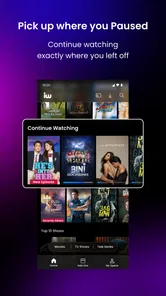
For a realistic daily scenario, imagine watching an episode during a lunch break, then returning to it at home later. I would first use a stable connection for the initial session, close iWant rather than leaving it suspended for hours, and reopen it when I am ready to continue. That workflow is less convenient than expecting every app to preserve its exact state indefinitely, but it reduces the chance of returning to a stale screen or a connection that has changed.
I would also avoid judging the service during the busiest possible moment in a crowded place. A packed train, shared household network, or weak mobile signal can create buffering that is not caused solely by the app. The fair test is to try the same content on a dependable connection and then compare it with a less reliable one. If playback remains troublesome in both situations, the problem is more likely to be the app, the device, or the particular release you are using.
Long viewing sessions also reveal an important trade-off between convenience and resources. A dedicated television or newer tablet may be more comfortable for several episodes because of its larger screen and stronger battery capacity. iWant makes more sense when the phone is the screen you already have with you: during a quiet break, while visiting family abroad, or when you want Filipino programming without carrying another device.
My useful tip here is to treat the app as a viewing destination, not as something to keep constantly running in the background. Launch it when you intend to watch, finish your session, and close it if the phone starts feeling warm or the interface becomes sluggish. This will not fix a service-side problem, but it can prevent background clutter from making the experience harder to assess.
Reliability and recovering from interruptions
Reliability matters more to me than a flashy opening screen. A video app earns trust when I can return to it after a call, a brief loss of signal, or an accidental trip to another application. In practice, recovery is likely to be more dependable when the interruption is short and the connection returns quickly. A longer network change may require restarting playback or reopening the title, which is frustrating when you are watching in small pieces throughout the day.
I would not use iWant as my only plan for an important viewing event unless I had already tested it on the exact device and connection. That is not a criticism unique to this service; live or on-demand video can be sensitive to network conditions. Still, the app’s average rating of 2.6 from around 77 thousand ratings tells me that potential users should keep expectations realistic. The audience is substantial, but popularity does not automatically mean a friction-free experience on every phone.
When something goes wrong, I would work through recovery in a simple order. First, check whether other apps can use the same connection. Then close and reopen iWant, retry the content, and restart the phone if the whole device feels slow. If the problem happens only on one network, changing connections is a more useful test than repeatedly reinstalling. If it follows the app across networks and after a restart, I would consider waiting for an update or contacting the developer rather than wasting time repeating the same steps.
Reinstalling should be a later step, not the first one. It can clear local problems, but it may also remove convenient app state and force you to set things up again. I would reserve it for persistent crashes, failed launches, or behavior that survives normal restarts. This recovery approach is especially helpful for people using older Android phones, where limited memory can make a temporary slowdown look like a permanent failure.
Another non-obvious point is that reliability is partly about expectations around access. If your entertainment routine depends on a particular program being available precisely when you want it, check the app’s current selection before building your whole evening around it. iWant’s identity is strongly tied to Filipino content, which is its main reason to exist, but that focus also means it may not satisfy someone looking for the broadest international catalog or a single service covering every genre.
Older phones, Android support, and resource pressure
Android 7.0 support makes iWant accessible to people who have kept an older phone instead of upgrading. That is a genuine advantage, especially for viewers who mainly want local entertainment and do not need the newest hardware. At the same time, operating-system compatibility does not guarantee identical performance across all supported devices. Two phones can run the same Android version while differing greatly in memory, processor speed, display quality, and battery condition.
If you are using a budget phone, I would pay attention to three signs during the first few sessions: whether menus respond after returning from playback, whether the device becomes unusually warm, and whether switching away from the app causes it to reload. Those observations tell you more about practical suitability than the installation itself. A phone that opens the app successfully but constantly reloads during normal use may not be the right place for long viewing sessions.
Storage is another quiet constraint. Video apps need room for updates and ordinary system activity even when you are not deliberately saving content. If your phone is nearly full, clear unnecessary files or remove apps you no longer use before blaming iWant for slow behavior. I would not sacrifice essential photos or messages just to make one entertainment app fit; the better solution may be watching on another device with more breathing room.
Battery condition also changes the experience. On a well-used phone, streaming can make the battery percentage fall quickly enough to discourage mobile viewing. I prefer using Wi-Fi at home and lowering brightness slightly when the screen is comfortable to read. For travel, I would carry a power bank rather than assume the app itself will be gentle on a weak battery. These are simple adjustments, but they determine whether the service feels practical outside the living room.
People who are sensitive to data usage should be equally deliberate. I would avoid starting a long session over mobile data until I understood how quickly my plan is consumed, particularly if the app is being used repeatedly throughout the week. A stable Wi-Fi connection is the safer default. This is also where iWant differs from a traditional television channel: the convenience of choosing content on a phone comes with responsibility for the connection and device carrying that stream.
Who will appreciate it most?
I see the strongest fit for Filipino viewers who want entertainment connected to their language, culture, and familiar local programming. It can also suit someone living away from the Philippines who wants a more direct connection to Filipino media than a general international streaming catalog provides. The app’s Teen content rating makes it more appropriate for older children and adults than for unsupervised young viewers, so parents should still decide whether particular programs suit the household.
It is also a reasonable option for a casual viewer who does not want to commit money just to explore the service. Since the app itself is free, the barrier to trying it is low. However, I would pay attention to any purchase prompt and make sure the person using the phone understands that optional items can cost from $0.49 to $234.99. That is a wide range, and the presence of in-app purchases means “free to install” should not be confused with “every part of the experience is free.”
I would skip it if your priority is a huge cross-border catalog, highly predictable performance on an older phone, or a viewing setup designed around advanced television features. A broader streaming alternative may be better for someone who watches many international productions and wants one familiar interface for everything. A cable or broadcast option may be preferable for a viewer who dislikes app troubleshooting altogether. iWant’s value is its Filipino focus, not its ability to replace every other form of entertainment.
I would also hesitate to recommend it as the main app for a family sharing one aging handset. Video playback, phone calls, messaging, and limited storage can compete with one another. In that situation, a newer shared tablet or television-based service may offer a calmer experience. The right choice depends less on the word “free” and more on whether the device and viewing habits match what the app asks of them.
How it compares with familiar entertainment alternatives
Compared with a general streaming service, iWant feels more specialized. That specialization can be a strength because you are not searching through an enormous global catalog when your goal is Filipino entertainment. It can also be a limitation if your household wants documentaries, foreign films, children’s programming, and local shows from one place. I would choose iWant alongside a broader service rather than expecting it to cover every viewing need.
Compared with ordinary television, the phone-based format gives you more control over when you watch and where you watch. The compromise is that playback depends on the phone, the app, and the network. Television is often simpler for a relaxed evening, while iWant is more useful when your schedule is fragmented. I particularly like the idea of using it for short windows of time, provided I start with a dependable connection and do not treat interruptions as impossible.
Compared with video platforms built around user uploads, iWant has a clearer Filipino entertainment identity. A general video platform may offer more random discovery and a wider variety of short clips, but it can take longer to find content that feels culturally relevant. I would use the broader platform for open-ended browsing and iWant when I already know the kind of Filipino viewing experience I want.
That distinction leads to my most important practical advice: decide whether you are choosing by culture or by catalog size. If cultural relevance is the deciding factor, iWant deserves a trial. If sheer breadth, device polish, or highly consistent performance is more important, compare it with the services you already trust before making it your default.
My performance verdict after weighing the trade-offs
iWant is an appealingly focused entertainment app, but I would describe it as a conditional recommendation rather than an automatic one. ABS-CBN gives it a clear identity, and more than ten million installs show that it has reached a large audience. Those figures make it easy to understand why people seek it out, yet the average rating of 2.6 is a useful warning that the experience may vary considerably from one device and connection to another.
For me, the best use case is straightforward: install it on a compatible Android phone, update it to the current release, test it over reliable Wi-Fi, and use it for Filipino viewing in manageable sessions. Keep the phone cool, leave storage available, and do not depend on a weak mobile signal for an important program. Those habits will not transform the app, but they give it the fairest chance to perform well.
My final judgment is that iWant is worth trying for Filipino entertainment, but not worth ignoring its practical limits. It is free to start, supports Android devices from version 7.0 onward, and offers a cultural focus that general alternatives cannot always match. I would recommend it to viewers who value that focus and are comfortable doing a little troubleshooting. I would steer demanding streamers, families sharing older hardware, and viewers seeking one all-purpose catalog toward a different primary option.
In short, I would keep iWant as a targeted part of my entertainment setup rather than make it the only one. When the content focus matches what I want, that specialization is its strongest quality. When reliability, breadth, or effortless performance matters more, another service may be the better everyday choice.
iWant Frequently Asked Questions
What should I check before installing iWant on my phone or tablet?
iWant is an entertainment app from ABS-CBN, and its current version is 26.08.10-1. Check that your device runs Android 7.0 or later before downloading. The app is free to install, but some viewing options may involve in-app purchases. It is also worth considering whether Filipino-focused entertainment is what you are looking for before adding another streaming app to your device.
Does iWant focus on Filipino entertainment?
Yes. iWant’s store tagline is “Home of Filipino Feels,” and the app is centered on Filipino entertainment. That focus may appeal to viewers looking for programs and stories connected with Filipino culture. The experience is most relevant if that is the kind of content you want to explore; viewers seeking a broad, international catalog may want to browse the available titles and decide whether they suit their interests.
Is iWant free to download, and can charges occur after installation?
iWant is free to download, but some of its entertainment may require paid access. In-app purchases range from $0.49 to $234.99 per item, so review the purchase details shown in the app before confirming a transaction. A free download does not mean every movie, series, or other offering is free to watch, and subscription terms should be checked before you sign up.
Is iWant suitable for younger viewers?
iWant has a Teen content rating, so it is intended for teen audiences and older viewers. Its entertainment catalog includes a range of Filipino programs, films, and series, and individual titles may suit different ages and preferences. Parents and guardians should consider the rating and review the available content with younger viewers before allowing them to use the app.
What is iWant and what can I watch on it?
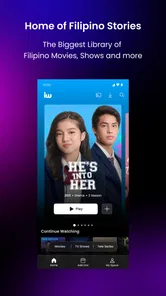
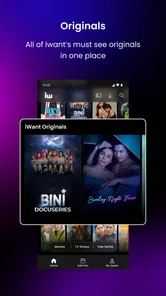
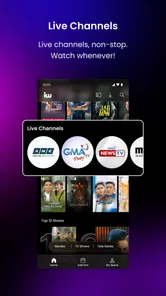
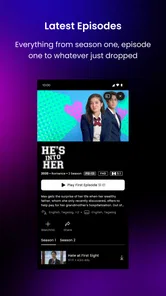
iWant is a streaming and entertainment app focused on Filipino content, including movies, television series, live channels, news, entertainment programs, and selected original productions. The exact catalog can change depending on licensing agreements, your location, and the current programming schedule. Before subscribing, it is worth browsing the available titles in your region to confirm that the shows, films, or live broadcasts you want are included.
Pros
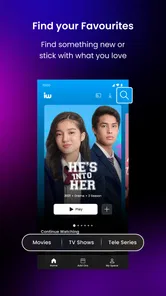
- Simple interface makes browsing and searching content straightforward.
- Supports convenient access to entertainment from compatible mobile devices.
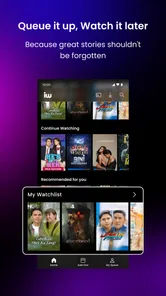
- Content can be enjoyed on demand instead of following a fixed schedule.
- Useful option for users already subscribed to participating iWant services.
- Regular updates may add new shows
- movies
- and platform improvements.
Cons
- Availability of titles can vary depending on your location and subscription plan.
- Some content may require an additional payment beyond the basic subscription.
- Video quality depends heavily on your internet connection and device.
- The app may use considerable mobile data when streaming over cellular networks.
- Older devices may experience slower loading or limited playback compatibility.











