

IPTV Player: All Channel Live
- 7.00
- 3.3
- Installs
- 100.00K
- Price
- Free

Screenshots

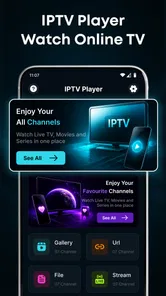
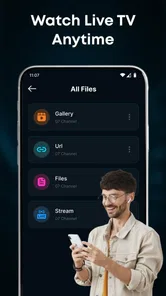
Analysis by Reviewed
I judge an IPTV app less by how many channels it claims to offer than by how calmly it handles the channels I actually want to watch. IPTV Player: All Channel Live is a free entertainment app from Silveroot Softwares built around a simple idea: you bring your own IPTV content, then use the app to browse and watch it. That distinction matters. It is a player, not a ready-made TV package, so the experience depends first on having a playlist or other supported content to add.
In my view, this makes it most appealing to people who already know where their IPTV content comes from and want a mobile place to organize a viewing session. If you expect to install an app and immediately get a complete collection of channels, this is probably the wrong starting point. If you have a legitimate source and prefer one straightforward player over a larger streaming service, it is worth considering.
Start with the content you bring
I’d start by treating the content you bring as the foundation of the whole experience, rather than expecting the player to supply a channel lineup. Choosing a trusted source and testing a few channels you genuinely use gives you a clearer first impression than browsing at random. That small trial also makes it easier to decide what deserves a place in your regular viewing routine.
A practical first session
The sensible way to approach the app is to prepare your IPTV source before settling down to watch. Add your own content, let the channel list become available, and then browse for something specific rather than treating the app like a television service with a fixed catalogue. That small change in expectation can save frustration: the app’s usefulness follows the quality and organization of the content you supply.
For a first test, I would add a source I already trust and try a few channels with different purposes: one I would watch for a few minutes, one I might leave on in the background, and one I expect to return to regularly. This gives a more useful impression than opening a single channel and deciding the whole app is either perfect or broken. A player can feel smooth with one stream and less comfortable with another because playback also depends on the source and connection.
The app is aimed at watching live TV, including HD streams, but “HD” is not a promise that every channel will look equally sharp or start equally quickly. Your source, network conditions, and device all matter. I would test over the connection you normally use, especially if you expect to watch on mobile data or in a room where Wi-Fi is less reliable.
One everyday scenario where this setup makes sense is keeping a small group of familiar channels handy for a lunch break. Rather than searching through a broad video-on-demand catalogue, you can open the player, browse your supplied channels, and choose a live stream. That is convenient when your viewing is spontaneous and short. It is less compelling if what you really want is a carefully curated library of films, series, and catch-up episodes.
More From Our News Desk

 Gmail
GmailGmail in a Busy Inbox: Who Benefits Most?
From first account to crowded workday, Gmail earns its place through dependable search and flexible sorting—but its best fit depends on how much inbox maintenance you can tolerate.

 Prime Video
Switching to Prime Video: What Changes in Your Viewing Routine
Prime Video can make a compelling second home for streaming, but switching means learning a different catalog, rental layer, and route from browsing to playback.

 Universal TV Remote Control
Universal TV Remote Control Works Best as a Reliable Backup
A phone remote earns its place through quick setup and reliable habits. Here is how to get more from Universal TV Remote Control—and where its limits show.

 Weather - By Xiaomi
Weather by Xiaomi Review: Clear at a Glance, Less Clear Up Close
Xiaomi’s weather app makes everyday forecasts quick to scan, but its calm surface can leave useful details and recovery paths harder to find than they should be.

 X
XX Under Pressure: Can It Recover When Posting Goes Wrong?
A resilience-focused review of X, examining setup, mistaken posts, interruptions, weak connections, and the gaps that matter when recovery needs to be dependable.

 Clash of Clans
Clash of Clans Is Won Between the Battles
Its raids are quick; its community is a long-term project of coordination, teaching, rivalry, and shared responsibility—with all the friction that entails.
Latest News



Organize before browsing becomes a chore
With any user-supplied channel list, organization is part of the viewing experience. If your source contains many channels, browsing can become the slowest step even when playback itself is fine. My practical advice is to start with a source that is as tidy as possible, instead of assuming the player will automatically turn a messy list into a personal guide.
Experienced users tend to benefit from deciding what they actually watch before building a routine around the app. If you only return to a handful of channels, learn where they sit in the list and keep the source focused where you have control over it. If you browse widely, take a moment to understand how the available channel presentation works before relying on it for a time-sensitive programme. A few minutes of setup can matter more than repeatedly scrolling once you are ready to watch.
I would also treat the channel list as a working tool rather than a one-time chore. When a source changes or a channel stops behaving as expected, check the source and your connection before blaming the player. That simple troubleshooting order helps separate a playback issue from a content issue: try another channel, then another network if available, and only then decide whether the app itself is the likely problem.
Settings and habits that make a difference
Before a longer viewing session, I would check the app’s available settings and make sure the device is suited to the stream you plan to watch. I would not assume that a video-quality label alone determines the experience. A higher-resolution stream may be less comfortable on a weak connection, while a stable stream at a lower resolution can be the better choice for casual viewing. When playback is uneven, testing another channel is often a more useful first move than changing several settings at once.
A good repeatable habit is to test your usual viewing setup at the time and place you will use it. A stream that behaves well on home Wi-Fi may not be a dependable choice during a commute. If you are planning to watch something important, open the channel early enough to confirm it plays rather than discovering a source or connection problem at the moment you want to tune in.
It is also worth keeping your expectations realistic about what a player can control. The app can provide a place to browse and play content, but it cannot make an unreliable IPTV source reliable. When a channel buffers or fails, I would compare it with a second channel from the same source. If several channels struggle, check the connection and source before repeating the same attempt. If only one channel is affected, the issue may be specific to that stream.
That approach is more efficient than tapping around at random, and it makes the app easier to judge fairly. It also keeps a useful distinction clear: the player’s interface is one part of the chain, while the supplied content and network are others. For live TV, where there is no convenient pause-and-download workflow implied by the basic player concept, that distinction has real value.
Faster viewing without expecting magic
The best shortcut here is a personal routine, not an assumed hidden feature. Keep the source you use most often ready, know which channels matter to you, and open the app with a particular choice in mind. That turns “browse everything” into “go to the channel I normally watch,” which is especially helpful when you have only a few minutes.
If you switch between different kinds of viewing, make the choice before you start scrolling. For example, decide whether you want news, background entertainment, or a specific live event, then browse with that purpose. This is a small habit, but it reduces the temptation to blame the app for a list that is simply longer than your attention span.
Another useful pattern is to keep a fallback channel or a second source available if your own setup supports it. I would not build a plan around a single stream until I have tested it under ordinary conditions. For a casual evening, a failed channel may be a minor annoyance; for a programme you do not want to miss, having an alternative is sensible. This is a trade-off of bringing your own content: you gain choice, but you also take responsibility for having a dependable option.
Compared with mainstream subscription television apps, this is a more hands-on arrangement. Those services generally bundle their own catalogues and guide the viewer through a managed selection. IPTV Player: All Channel Live instead centers the content you add. Compared with a basic video player, its live-channel purpose is more specific, but it does not remove the need to source and maintain what you watch. It suits someone who values control more than a ready-to-go catalogue.
Where the approach reaches its limits
The main limitation is also the app’s defining condition: you need your own IPTV content. Newcomers may find that step less convenient than opening a conventional streaming service, and the app is not a substitute for finding a legitimate source. If you want a simple, all-in-one subscription with a familiar programme catalogue, a licensed TV or streaming provider is likely to be the easier option.
There is also a learning curve in knowing what to troubleshoot. When a channel does not play, the cause may be the source, the network, the individual stream, or the player. That uncertainty can be irritating if you expect every channel to behave like a polished on-demand title. I recommend testing a few channels early and keeping notes mentally about which ones are dependable, rather than assuming one successful playback proves the whole list is ready.
Its rating sits at 3.5 from around 144 ratings, with 7 written reviews, and the app has passed 100K installs. I read those figures as a sign that people have found it and tried it, not as a substitute for checking whether its bring-your-own-content model fits your needs. It is free, carries an Everyone age rating, and is currently at version 1.1. It supports devices running Android 7.0 or later, so checking your device’s software before installing is a straightforward first step.
Silveroot Softwares has kept the pitch focused on the job of playing user-supplied IPTV content. That focus is useful if you do not want an app to decide what you should watch. At the same time, the focused role means it should not be mistaken for a channel provider, a source-finding service, or a replacement for a full streaming library. The more independent your IPTV setup already is, the more naturally this app may fit into it.
Who I would recommend it to
I would recommend IPTV Player: All Channel Live to someone who already has a legitimate IPTV source, wants to browse live channels on an Android device, and is comfortable checking their own setup when playback varies. It is particularly suitable for viewers with a repeatable routine: a few familiar channels, a reliable network, and a clear idea of what they want to watch.
I would skip it if you are looking for free access to a ready-made channel lineup, do not want to manage a content source, or mainly watch films and series on demand. In those cases, a licensed service with its own catalogue will be easier and more predictable. I would also avoid relying on it for an important live programme until you have tested your chosen stream in the place and conditions where you plan to watch.
My overall take is that this is a practical tool for a particular kind of viewer, not a universal television app. Its strongest point is the direct, user-controlled approach to live-channel playback; its weakest point is that the same approach leaves setup and reliability partly in your hands. If that trade-off sounds fair, start with a small, trusted source, test a few channels, and build a simple viewing routine. If you want the app to supply the entertainment as well as play it, choose a different kind of service.
A sensible way to decide
Before making it part of your regular viewing, I would use a short trial session to answer a practical question: does the source you already have work comfortably in this player on the device you plan to use? Try the channels you genuinely care about, not a random selection, and include one that you might watch away from your strongest Wi-Fi. This reveals more than simply confirming that the app opens, while keeping the test small enough that setup does not become a project.
That trial also helps clarify which responsibility belongs where. If one stream fails while others work, you have a reason to investigate that particular channel or its source. If the whole session is unreliable, I would first reconsider the network or the source rather than assume a new player will solve it. For viewers who enjoy managing their own setup, this distinction is part of the appeal; for anyone who wants support and consistency handled by a single provider, it is a meaningful drawback.
There is no reason to maintain a sprawling list just because it is available. A lean set of channels that you can find quickly may be more useful on a phone than a long catalogue that turns every viewing session into a search. I would keep the app for the channels that earn a place in your routine and use a conventional streaming service for on-demand shows or a polished programme guide. That division of labour is often more satisfying than expecting one app to cover every kind of television.
IPTV Player: All Channel Live Frequently Asked Questions
What is IPTV Player: All Channel Live, and what does it do?
IPTV Player: All Channel Live is a media player intended for watching television streams through IPTV playlists. It may let you add a playlist or compatible stream source and browse the channels supplied by that source. The app itself should not be assumed to include live channels, films, or subscriptions; available content depends on the playlist and provider you use.
Does IPTV Player: All Channel Live provide free live TV channels?
Installing the player does not necessarily give you access to free channels. IPTV players generally display streams from playlists provided by users or third-party services, and those sources can be free, paid, or unavailable. Check the app’s current listing and instructions to learn which playlist formats it supports, and make sure any service you use has permission to distribute its content.
How do I add channels to IPTV Player: All Channel Live?
To watch content, you may need to provide a compatible playlist link or import a playlist file, depending on the app’s supported setup options. Obtain those details from a legitimate IPTV provider, then follow the app’s on-screen instructions. Playlist formats and menu labels can vary between versions, so consult the app’s help information if an import fails or channels do not appear.
Is IPTV Player: All Channel Live safe and legal to use?
The player’s safety and legality are separate from the content sources used with it. Download the app from an official app store where available, review its permissions and privacy information, and avoid unfamiliar playlist links or requests for sensitive account details. Use only streams you are authorized to access; laws and distribution rights vary by country, so check local rules and provider terms.
Is IPTV Player: All Channel Live compatible with my device, and does it require internet access?
Compatibility depends on the app’s current version and the operating system requirements shown on its store page, so check those details before downloading. Streaming live television normally requires an active internet connection, and video quality depends on your connection, device, and stream source. Mobile data use can be substantial; using Wi-Fi and checking your data allowance may help avoid unexpected charges.
Pros
- Simple interface makes it easy to browse and play IPTV streams.
- Supports common playlist formats such as M3U.
- Playback can be viewed in full-screen landscape mode.
- Useful for organizing frequently watched channels.
- Lightweight design is suitable for everyday viewing.
Cons
- Does not provide TV channels or subscriptions; users need their own source.
- Stream quality and reliability depend on the playlist provider.
- Some playlists may contain broken or unavailable channel links.
- Compatibility with certain codecs or stream formats may vary.
- Viewing live streams can consume substantial mobile data.











