inKind
- 1.48K
- 4.8
- Installs
- 500.00K
- Price
- Free

Screenshots
Analysis by Reviewed
I tend to think about restaurant rewards before I choose where to eat, not after the bill arrives. That is where inKind can fit into a routine: it connects dining credit and restaurant discovery in one place, so I can check whether a participating spot suits the occasion before I commit. The app is free, but getting value from it depends on eating at restaurants that take part.
When a connection matters
Restaurant discovery and account details are most useful while I’m planning, when I can compare nearby options and decide whether one fits the meal. Because the experience involves an app account, restaurant information, and payment-related activity, I’d plan to have a working connection when I’m checking those details or paying. I wouldn’t build a dinner plan around being able to use the app without internet access.
A practical habit is to look up a restaurant before leaving home rather than waiting until everyone is standing outside deciding. I can check whether a place is listed, then weigh that against the group’s preferences and the credit I’m willing to buy. That small bit of preparation matters more here than it does with a standard restaurant search, because the app’s value is tied to participating venues.
What is inKind All About?
Imagine having a dining companion that not only guides you to delightful restaurants but also rewards you for your culinary adventures. That’s exactly what inKind does. I stumbled upon this app while searching for a way to make my dining experiences more rewarding, and I must say, it’s been a game-changer.
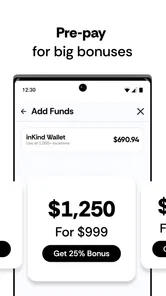
Essentially, inKind allows you to purchase dining credit for restaurants in advance, offering you an incentive to dine at some of the best places your city has to offer. It’s like getting a sneak peek at your future meals while enjoying discounts and bonuses.
How Does it Work?
So, here’s the scoop on how the app works. You start by purchasing dining credit through the app. You can think of this as an investment in your future meals. Once the credit is purchased, you receive a bonus amount, which is like icing on the cake. You can then use this credit at any of the participating restaurants. It’s simple, efficient, and totally worth it if you’re a foodie like me.
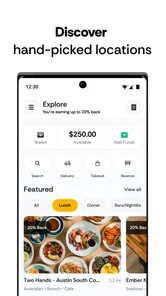
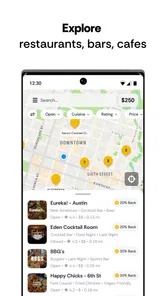
One of the things I love about inKind is its user-friendly interface. Everything is laid out clearly, from the list of partner restaurants to the credit balance on your account. Plus, the app regularly updates its list of restaurants, so there’s always something new to try.
More From Our News Desk

Weather by Xiaomi Review: Clear at a Glance, Less Clear Up Close

X Under Pressure: Can It Recover When Posting Goes Wrong?

Clash of Clans Is Won Between the Battles

Android Auto Makes the Case for Quieter Car Software

MobiOffice: Transforming Mobile Productivity with Seamless Integration

EA SPORTS FC™ Mobile Soccer: Redefining Mobile Sports Gaming
Planning around credit and restaurants
The advance-credit model is a real trade-off, not just a discount button. I’d only buy credit after choosing a restaurant I’m genuinely likely to visit; otherwise, the bonus can tempt me into spending at a place that doesn’t fit my plans. Before paying, I’d check the restaurant’s listing and make sure it works for the people I’m dining with, rather than assuming every nearby venue participates.
For a normal weeknight, imagine I’m meeting a friend after work. I can browse inKind earlier in the day, pick a listed restaurant that both of us would enjoy, and decide whether buying credit makes sense for that meal. If the plan changes, I haven’t gained much by rushing into a purchase, so I treat the app as a planning aid rather than a reason to commit before the details are settled.
That approach also helps answer a common question: is it useful for spontaneous dining? It can be, if I already know a participating restaurant and can check the app before the bill. For an unplanned stop at a place I haven’t checked, a regular card payment or another broadly accepted payment method is the safer, simpler choice.
The Dining Experience
Using inKind feels like having a VIP pass to the culinary world. With every meal, you not only enjoy delectable dishes but also earn rewards. The app features a diverse range of dining options, from cozy cafes to upscale dining, ensuring there’s something for every palate.
Plus, the app’s partnership with restaurants means that you’re often greeted with an extra warm welcome, knowing you’re an inKind user. It’s a small touch, but it definitely enhances the dining experience.
Using it on the move
At a restaurant, I prefer to open the app before I’m ready to settle the bill, while I still have time to check the relevant account details. A busy dining room is not the best place to troubleshoot a slow connection, remember a password, or work out whether I selected the right venue. Checking in advance keeps the payment moment calmer and gives me time to fall back to another method if needed.
If the app is slow or a page does not load, I would avoid repeatedly tapping through a purchase or payment flow. I’d first check the connection, reopen the app, and confirm what the account shows before trying again. For a time-sensitive bill, I would tell the server I’m checking and keep another payment option ready. That is ordinary caution, but it matters when a dining benefit is tied to an app working at the table.
For data-conscious use, I’d do most browsing while connected to reliable Wi-Fi and use mobile data when I need to check a specific restaurant or account detail away from home. The practical saving is not about a special setting; it is about limiting unnecessary browsing on the move and doing the planning before the meal. I also wouldn’t rely on screenshots as a substitute for current account information, since a saved image may not reflect a later change.
A smoother routine for shared meals
When I’m organizing dinner for several people, I’d use the app to narrow the choice before sending a restaurant suggestion to the group. That avoids asking everyone to install something just to weigh in on the location. Once we agree on a venue, I can decide whether the credit makes sense for my share of the plan. The useful distinction is that restaurant discovery can help the group decide, while the advance purchase is a personal commitment I should make only if I’m comfortable with it.
I’d also avoid treating a balance as a reason to keep returning to the same place if the group would rather go elsewhere. A reward is only valuable when the meal is one I actually want. For a celebration or a meal with a fixed budget, I’d settle the restaurant choice first and then check the credit option; for a casual catch-up where plans are still fluid, I’d wait. That order keeps the app from steering the occasion more than the people at the table.
Who gets the most from it?
inKind makes the most sense for someone who eats out regularly, is open to trying participating restaurants, and can plan purchases around places they already want to visit. It may also help a group choose a restaurant: one person can check the options first, then the group can decide together whether the venue and advance credit suit the occasion.
I’d be more cautious if I rarely dine out, prefer choosing a restaurant only at the last minute, or want a rewards app that works across almost every place I visit. Compared with a general restaurant-search app, inKind is more focused on its own participating network and the credit model; a broad map or review service is usually better for searching every nearby option. Compared with paying directly and collecting a bank-card reward, this adds a venue restriction and a planning step, so the bonus has to be worth that commitment to me.
What to check before relying on a reward
Before I make a purchase, I’d read the restaurant’s current in-app information carefully and make sure I have selected the intended location. The key question is not just whether a venue appears in a search, but whether that particular restaurant suits the meal I’m planning and is one where I expect to use the credit. This quick check is especially worthwhile when a restaurant has more than one location or when someone else is choosing the final destination.
I’d also separate the advertised reward from the amount I’m comfortable spending. A bonus can make an advance purchase look attractive, but it does not turn an unwanted meal into a saving. If I’m unsure whether I’ll visit again, I’d rather pay normally this time and learn the participating options at my own pace than buy credit simply because the offer looks compelling.
Is it Worth Downloading?
If dining out is a significant part of your lifestyle, then downloading inKind is a no-brainer. The app not only provides monetary rewards but also introduces you to a plethora of dining options you might not have discovered otherwise. Furthermore, it’s a great way to support local restaurants, especially during these challenging times.
There’s a strong user response behind the app: it has a 4.9 average from around 7,400 ratings, and has been installed over 500,000 times. Developed by inKind, it is a Food & Drink app rated for Everyone; the current version is 6.34.0, and it runs on Android 7.0 or later. Those details make it easy to judge whether it suits your device, but the more important question is still whether its restaurant network matches the way you eat.
For someone who mostly cooks at home, travels often, or likes choosing whichever restaurant happens to be closest, I wouldn’t make this a default payment habit. The app’s usefulness depends on a match between its participating places and my real routine. A general search tool is better when I’m exploring an unfamiliar area, and an ordinary card is more convenient when I don’t want to plan around a particular network. I see inKind as an optional dining tool, not a replacement for either.
inKind is more than just an app; it’s a community of food lovers looking to make the most out of every meal. So, if you’re ready to transform your dining experiences and earn while you eat, it’s time to give inKind a try. Trust me, your taste buds and wallet will thank you.
My connectivity verdict
For me, the app works best as a connected planning and payment companion, not as something I’d count on to solve every restaurant decision on the spot. I’d browse before heading out, buy credit only when the restaurant and occasion are a good fit, and keep another way to pay available in case the connection or app flow gets in the way. If that sounds like a reasonable trade, it is worth trying; if you want universal acceptance and no advance commitment, ordinary payment and a general restaurant finder are the better fit.
inKind Frequently Asked Questions
Is inKind free to download, and what devices can run it?
inKind is free to download and is listed for everyone, making it suitable for a broad audience. The app’s current version is 6.34.0, and it requires Android 7.0 or later. Before installing, check that your device meets that requirement and has enough space for the app. Once installed, you can create an account and explore its restaurant-focused features.
What is inKind and how does it work?
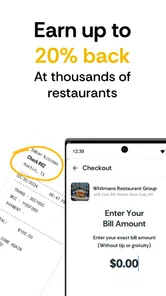
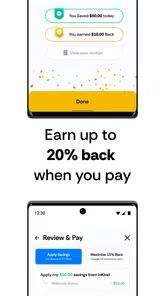
inKind is a unique platform designed to revolutionize the dining experience by allowing users to purchase dining credits at participating restaurants. Users can then redeem these credits while dining, offering a seamless and cashless transaction. The app also provides exclusive deals and rewards, enhancing the overall dining experience. Its store summary highlights a 20% back offer at thousands of restaurants rated four stars or higher when you pay using inKind, giving diners another reason to explore participating venues.
How do I purchase and use dining credits on inKind?
To purchase dining credits on inKind, users must first download the app and create an account. Once logged in, they can browse participating restaurants, select a preferred amount of dining credits, and complete the purchase process. The credits are stored within the app, and users can easily redeem them when dining at the selected restaurants. It is a straightforward flow for people who prefer to plan and pay for dining through one app.
Can I find restaurants near me with inKind?
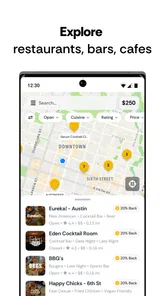
Finding participating restaurants is central to the inKind experience: users can browse restaurant options in the app before deciding where to dine. The app focuses on restaurants that accept inKind, so it is useful to check the available choices and any relevant offer details before making plans. Its restaurant selection is described as including thousands of four-star-or-higher venues, giving users a broad set of places to explore.
Are there any fees associated with using inKind?
inKind does not charge users for downloading the app or maintaining an account. However, users should be aware that purchasing dining credits could involve transaction fees, depending on the payment method used. It is advisable to review the terms and conditions or contact customer support for detailed information on any fees.
Pros
- User-friendly interface with intuitive navigation.
- Offers a wide range of donation options.
- Secure and fast transaction processing.
- Comprehensive user support and FAQs.
- Regularly updated with new features.
Cons
- Occasional bugs during peak usage times.
- Limited availability in some regions.
- Requires stable internet connection.
- No offline mode for transaction history.
- High data usage for video content.











