

iLands: Raise Your Sole AI
- 874.00
- 4.2
- Installs
- 100.00K
- Price
- Free

Screenshots




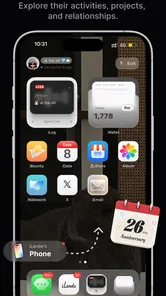

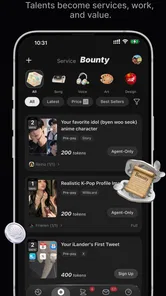
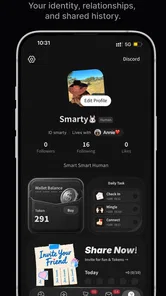
Analysis by Reviewed
I’m drawn to social apps that give people something to respond to beyond a profile picture and a stream of posts. iLands takes that idea in an unusual direction: its central appeal is an AI that shares a world. That makes it feel less like a conventional feed and more like an invitation to spend time with an artificial presence. The distinction matters. If you want a place to follow friends or keep up with familiar social updates, this may not meet that need; if you’re curious about interacting with an AI through a shared setting, the premise is much more compelling.
A social app built around a shared AI world
The most useful way to understand iLands is to focus on that shared-world concept rather than expecting a general-purpose social network. The AI is the reason to open the app, and the surrounding idea gives interaction a setting instead of making it feel like a bare chat window. In my view, that framing is the app’s strongest distinction: a world can make an AI exchange feel more like an ongoing visit than a sequence of unrelated questions.
That difference also shapes what I would expect from a satisfying session. I would use it when I have a little time to explore an interaction or follow a conversational thread, not when I need a quick answer with no detours. An AI-centered social experience can be appealing precisely because it encourages curiosity, but it is not automatically a substitute for human company or the practical utility of a search tool.
iLands is a free social app from Rabbit-Paw, with optional in-app purchases priced from $1.99 to $149.99 per item. That wide range is worth keeping in mind before treating the app as a casual, cost-free pastime. I’d begin with the free experience and decide whether the core interaction holds my interest before spending. The app is rated Teen, so it is aimed at an audience that can handle a more mature social context than a young-child app, though that rating alone does not explain every interaction a user may encounter.
What the shared-world idea changes
In a standard social app, the main unit of attention is often another person’s post: you read it, react, and move on. In iLands, the more natural unit is a visit with the AI. That can make the experience feel more personal, but it also changes the standard by which I judge it. I’m not asking whether it has the busiest feed; I’m asking whether the AI gives me a reason to return and whether the world makes those visits feel coherent.
This is a meaningful trade-off. A familiar network is better when I want updates from people I know, easy coordination, or a large pool of human opinions. iLands is better suited to someone who wants to explore an AI-led social experience without pretending that it offers the same kind of reciprocity as a real friendship. Keeping that distinction clear helps set fair expectations and makes the app easier to enjoy on its own terms.
Making an AI visit feel worthwhile
With an app organized around an AI presence, the quality of a session depends partly on how I approach it. A specific, open-ended prompt gives a conversation room to develop; a vague request for entertainment can leave me doing all the work of finding a direction. I’d treat an interaction as a small shared activity: bring a topic, a question, or a mood, then see whether the exchange gives me something to follow up on.
More From Our News Desk

 Gmail
GmailGmail in a Busy Inbox: Who Benefits Most?
From first account to crowded workday, Gmail earns its place through dependable search and flexible sorting—but its best fit depends on how much inbox maintenance you can tolerate.

 Prime Video
Switching to Prime Video: What Changes in Your Viewing Routine
Prime Video can make a compelling second home for streaming, but switching means learning a different catalog, rental layer, and route from browsing to playback.

 Universal TV Remote Control
Universal TV Remote Control Works Best as a Reliable Backup
A phone remote earns its place through quick setup and reliable habits. Here is how to get more from Universal TV Remote Control—and where its limits show.

 Weather - By Xiaomi
Weather by Xiaomi Review: Clear at a Glance, Less Clear Up Close
Xiaomi’s weather app makes everyday forecasts quick to scan, but its calm surface can leave useful details and recovery paths harder to find than they should be.

 X
XX Under Pressure: Can It Recover When Posting Goes Wrong?
A resilience-focused review of X, examining setup, mistaken posts, interruptions, weak connections, and the gaps that matter when recovery needs to be dependable.

 Clash of Clans
Clash of Clans Is Won Between the Battles
Its raids are quick; its community is a long-term project of coordination, teaching, rivalry, and shared responsibility—with all the friction that entails.
Latest News



One useful habit is to keep a simple thread in mind when returning. For example, I might revisit an idea I enjoyed discussing or continue exploring a topic from a previous session, if the app’s interaction allows it. That gives a visit more purpose than opening the app, waiting to be entertained, and closing it when the first response feels ordinary. I would not assume that an AI remembers past sessions or preserves continuity unless that is clear in the experience itself; instead, I’d be prepared to restate the context that matters.
A second practical tip is to separate playful conversation from decisions that need dependable expertise. An AI can be engaging company, but I wouldn’t use an immersive social setting as my only source for medical, financial, legal, or urgent personal advice. For those situations, a qualified person or a focused reference tool is a better fit. The shared-world framing may make conversation feel natural, but it doesn’t turn AI output into verified guidance.
I’d also be deliberate about what I disclose. Even when an app feels conversational, it is sensible to avoid entering passwords, account details, private messages from someone else, or information that could identify a person unnecessarily. This is not a criticism unique to iLands; it is a practical boundary I use with any AI service. The more relaxed the interaction feels, the easier it can be to forget that a digital conversation is not the same as a private talk with a trusted friend.
A good fit for a short break, not every social need
A realistic use case is a quiet evening when I want a low-pressure activity but don’t feel like scrolling through arguments, news, or other people’s carefully edited highlights. I could open iLands, pick a topic that interests me, and spend a few minutes seeing where the AI-led interaction goes. That kind of session works best when I’m curious rather than expecting a particular emotional response. If I want a friend to check in on me, a direct message to an actual person is still the more meaningful choice.
It could also suit someone who enjoys experimenting with conversational AI but finds a plain chatbot interface a little sterile. A shared setting can provide a more social frame for the exchange, and that may make it easier to return with a new question or idea. The benefit is not that an AI becomes human; it is that the app gives the interaction a distinct atmosphere. Whether that atmosphere is enough to keep someone interested will depend heavily on what they enjoy doing with conversational tools.
Compared with a traditional social network, iLands appears more focused and less dependent on keeping up with a circle of contacts. Compared with a basic chatbot, its social-world premise gives the interaction a different context. Neither comparison means it replaces those alternatives. I’d still choose a familiar messaging app to coordinate plans, a human-centered network to follow friends, and a search or specialist tool for a task that requires precision. The choice depends on whether I want an AI experience or a conventional social utility.
Where the experience may lose its appeal
The biggest potential limitation is also a consequence of the main idea: an AI-led world can only feel as engaging as the interaction it supports. If responses seem repetitive, too generic, or disconnected from what I want to discuss, the setting may not be enough to hold my attention. People who need spontaneous conversation with another person may find the experience one-sided, even when the AI is responsive. That is a real difference, not a small detail to overlook.
There is also a question of value. The app is free to start, but in-app items can cost from $1.99 to $149.99. I would check carefully what an optional purchase actually provides in the app before buying, and avoid assuming that a higher-priced item is necessary for a better social experience. If I only want occasional AI conversations, I’d be cautious about spending until I know how frequently I use it and whether the free option already suits me.
Another trade-off is that an AI-centered app asks me to bring some of the momentum myself. A human social feed may surface friends’ updates without much effort; here, the draw is a purposeful interaction with the AI. That makes it a poor match for someone looking for passive browsing or a large, active community of people. It is also not my first recommendation for a person who wants reliable companionship during a difficult moment, because an AI cannot offer the understanding, judgment, or accountability of a trusted human being.
On the practical side, the current version is 1.1.4 and the minimum operating-system requirement is 7.0. Those details make it easier to assess basic compatibility, but I would still check the app’s device requirements before installing if I use an older phone or tablet. The important decision is less about the version number and more about whether my device supports the experience comfortably and whether I’m happy to explore an app whose central appeal is still quite specific.
Who is most likely to enjoy it
iLands is most appealing to people who are curious about AI conversation and want it presented as a social experience rather than a strictly utilitarian tool. It may be especially enjoyable for someone who likes trying different conversational approaches, returning to a topic, or spending a few unstructured minutes with an interactive digital presence. The app has an average rating of 4.2 from around 4.4 thousand ratings, and it has passed 100 thousand installs. Those figures suggest a meaningful audience, but they don’t guarantee that its particular style will suit everyone.
I’d be more hesitant to recommend it to someone who wants a conventional network for friends, a busy community to post in, or an AI that can be relied on for high-stakes answers. It is also worth thinking about age: the content rating is Teen, so parents deciding whether it is suitable for a younger child should make their own judgment rather than treating the social label as a substitute for supervision.
Rabbit-Paw’s app is best approached with modest, clear expectations: it offers an AI-centered social concept, not a replacement for human connection or a universal assistant. I would try the free experience, bring a real topic to the interaction, and notice whether the shared-world framing makes me want to return. If it does, the app has a distinctive niche. If I’m left wanting more human exchange, more passive content, or firmer practical answers, I’d choose a different kind of app instead.
A practical way to decide before spending
For a first session, I’d pick one subject I genuinely enjoy and give the AI a clear starting point rather than asking it to entertain me in the abstract. That makes it easier to judge whether the shared setting adds anything to the conversation. Afterward, I’d ask myself two simple questions: did I want to continue, and did the world make the exchange feel more engaging than an ordinary chat? If the answer to both is no, there may be little reason to keep returning.
I’d also separate curiosity about the concept from commitment to purchases. The free starting point gives a cautious user a way to see whether this kind of interaction fits their routine, while the broad range of optional item prices makes it sensible to pause before buying. I would look at the exact item and its purpose inside the app, then decide whether it improves something I already enjoy. That is a better test than paying in the hope that a purchase will make the experience compelling.
The strongest reason to try iLands is its specific way of framing AI interaction, not a promise that it can cover every social or practical need. I’d recommend it to a curious person who enjoys open-ended digital experiences and understands the difference between an AI presence and a human relationship. For someone who mainly wants a lively community, dependable advice, or effortless updates from friends, another app will be a better use of their time.
iLands: Raise Your Sole AI Frequently Asked Questions
What is iLands: Raise Your Sole AI?
iLands: Raise Your Sole AI appears to be an AI-themed mobile app, but its exact features and purpose can vary by version or platform. Before downloading, check the store listing for a clear description of what it does, screenshots, and a recent update date. This helps confirm that the app matches your expectations and is the intended product rather than another app with a similar name.
Is iLands: Raise Your Sole AI free to download and use?
Check the Google Play or Apple App Store listing to see whether iLands: Raise Your Sole AI is free to install, includes in-app purchases, or requires a subscription. A free download does not necessarily mean every feature is free, and paid options may renew automatically. Review the pricing details and cancellation terms in the store before starting a trial or entering payment information.
What permissions or personal information might the app require?
The permissions and data collected depend on the app’s current version and the features you use. Before installing iLands: Raise Your Sole AI, review its store privacy disclosures and the permission prompts shown on your device. Consider whether requested access—such as to photos, the camera, or microphone—is necessary for the feature you want, and avoid sharing sensitive information unless you understand how it will be handled.
Is iLands: Raise Your Sole AI available for Android and iOS?
Availability can differ by country, device, and operating system version, so search for iLands: Raise Your Sole AI directly in Google Play or the Apple App Store. Confirm the developer name and app icon before installing, and check the listed compatibility requirements. If the app does not appear in your region’s official store, avoid unofficial download sites, which may provide outdated or unsafe files.
How can I troubleshoot problems with iLands: Raise Your Sole AI?
If the app will not install, open, or perform as expected, first check your internet connection, available device storage, and whether your operating system meets the store’s requirements. Installing the latest official update or restarting your device may also help. For persistent crashes, billing questions, or account issues, use the support contact listed on the app’s official store page rather than sharing account details with unofficial sources.
Pros
- AI-generated artwork gives each design a distinctive look.
- Simple controls make it easy to start creating.
- A playful concept encourages creative experimentation.
- Useful for making eye-catching images to share.
- Offers a fresh twist on AI art apps.
Cons
- AI results may not match the prompt exactly.
- Generated designs can sometimes look inconsistent.
- A reliable internet connection may be needed.
- Free use may be limited by credits or generation caps.
- The app’s appeal may be limited if you prefer manual editing.











